1. Product Overview
The HTC HS01 Wireless Neckband Earphones are designed for comfort and performance, featuring Bluetooth 5.0 connectivity, active noise cancellation (ANC), and IPX5 water resistance. This manual provides instructions for setting up, operating, and maintaining your earphones.

Figure 1: HTC HS01 Earphones in use, showcasing key features.
2. Setup and Initial Use
2.1 Charging the Earphones
Before first use, fully charge your HTC HS01 earphones. A full charge takes approximately 1 hour and 50 minutes and provides up to 16 hours of battery life.
- Locate the USB-C charging port on the control module.
- Connect the provided USB-C cable to the charging port and plug the other end into a compatible USB power source.
- The LED indicator will show charging status and turn off when fully charged.
2.2 Pairing with a Device
The HTC HS01 earphones use Bluetooth 5.0 for stable and efficient connection.
- Ensure the earphones are powered off.
- Press and hold the Power button until the LED indicator flashes blue and red, indicating pairing mode.
- On your device (smartphone, tablet, etc.), enable Bluetooth and search for available devices.
- Select "HTC HS01" from the list of devices.
- Once connected, the LED indicator will flash blue slowly.

Figure 2: Bluetooth 5.0 technology for stable transmission.
2.3 Fitting the Earphones
For optimal sound quality and comfort, choose the correct earplug size. The earphones come with multiple earplug sizes (Small, Medium, Large).
- Gently insert the earbuds into your ears.
- Adjust the neckband for a secure and comfortable fit around your neck.
- If the fit is loose or uncomfortable, try a different size of earplug.

Figure 3: Proper earphone fit and available ear tip sizes.
3. Operating Instructions
3.1 Control Functions
The control module on the neckband allows you to manage various functions:
- Power On/Off: Press and hold the Power button.
- Volume Up: Press the '+' button.
- Volume Down: Press the '-' button.
- Play/Pause: Press the Power button once during music playback.
- Next Track: Press and hold the '+' button.
- Previous Track: Press and hold the '-' button.
- Answer/End Call: Press the Power button once during an incoming call or active call.
- Reject Call: Press and hold the Power button during an incoming call.
- Activate ANC (Active Noise Cancellation): Press the 'ANC' button.
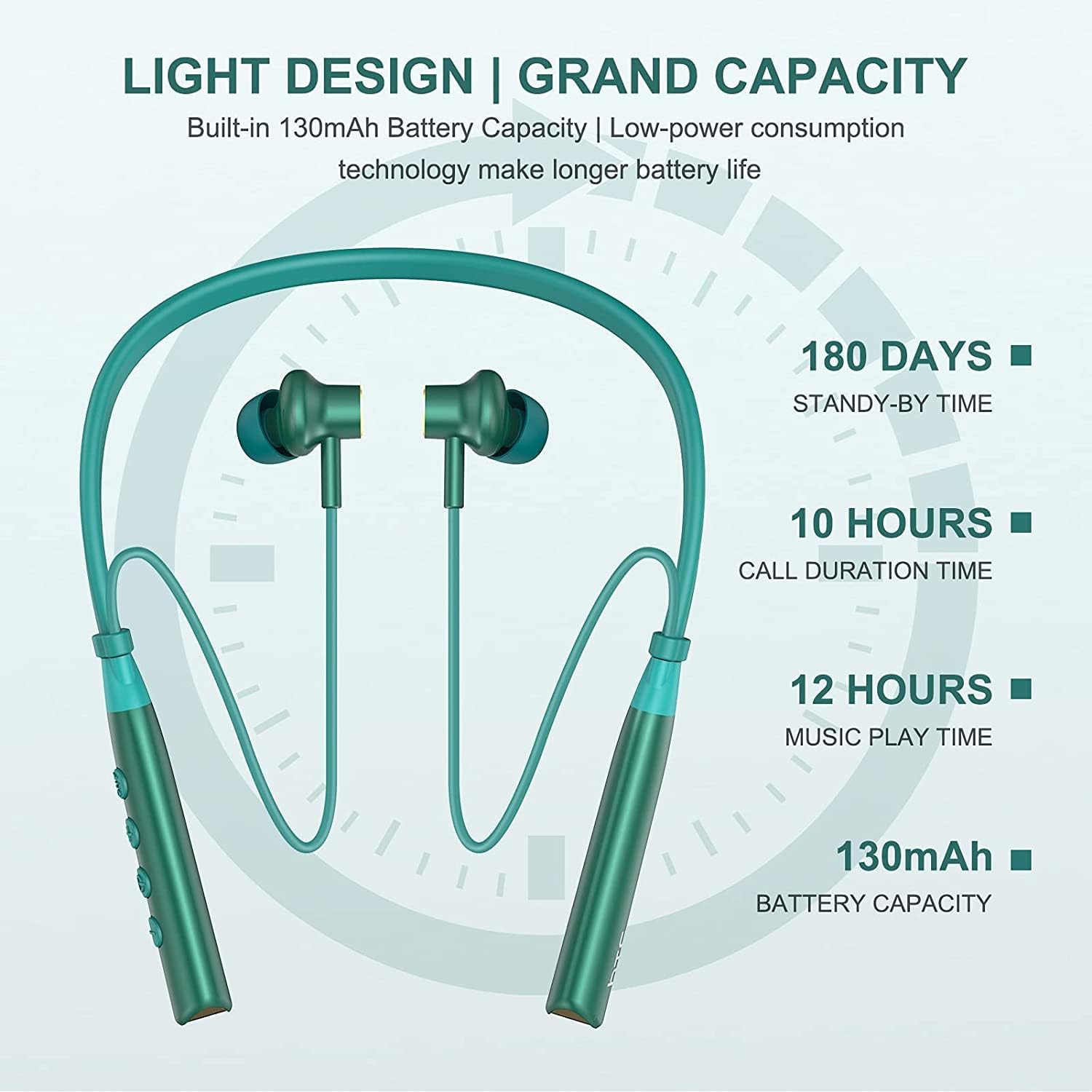
Figure 4: Detailed view of the control buttons on the neckband.

Figure 5: Man-machine interaction with control buttons.
3.2 Active Noise Cancellation (ANC)
The ANC feature reduces ambient noise, allowing for a more immersive audio experience. Press the 'ANC' button to toggle this feature on or off.

Figure 6: Visual representation of noise cancellation.
3.3 Magnetic Earbuds
The earbuds feature a magnetic design, allowing them to snap together when not in use. This helps prevent tangling and keeps the earphones secure around your neck.

Figure 7: Magnetic suction feature for convenient storage.
4. Maintenance and Care
4.1 Water and Sweat Resistance
The HTC HS01 earphones are IPX5 water resistant, meaning they can withstand splashes and sweat. They are suitable for sports and exercise. However, they are not designed for submersion in water.

Figure 8: IPX5 waterproof design for active use.

Figure 9: Earphones designed to be sweatproof.
4.2 Cleaning
To maintain the longevity and hygiene of your earphones:
- Wipe the earbuds and neckband with a soft, dry cloth after each use.
- Avoid using harsh chemicals or abrasive materials.
- Periodically remove earplugs and clean them with mild soap and water, ensuring they are completely dry before reattaching.
5. Troubleshooting
| Problem | Possible Cause | Solution |
|---|---|---|
| Earphones do not power on. | Low battery. | Charge the earphones fully. |
| Cannot pair with device. | Earphones not in pairing mode; Bluetooth off on device; device too far. | Ensure earphones are in pairing mode (flashing blue/red). Turn on Bluetooth on your device. Move device closer to earphones. |
| No sound or low volume. | Volume too low; not connected; incorrect audio output. | Increase volume on earphones and device. Re-pair earphones. Check device's audio output settings. |
| Sound cuts out intermittently. | Interference; device too far; low battery. | Move closer to the paired device. Avoid strong electromagnetic interference. Charge earphones. |
6. Specifications
- Model Number: HTC HS01
- Brand: HTC
- Wireless Communication Technology: Bluetooth 5.0
- Battery Capacity: 130mAh (from image)
- Charging Time: Approx. 1 hour 50 minutes (from video)
- Music Play Time: Up to 12 hours (from image)
- Call Duration Time: Up to 10 hours (from image)
- Standby Time: Up to 180 days (from image)
- Water Resistance Level: IPX5 (Waterproof)
- Special Features: Active Noise Cancellation (ANC), Microphone Included, Lightweight, Sweatproof
- Control Method: Press Control / Touch
- Form Factor: In Ear (Neckband)
- Material: Rubber, Silicone
- Product Dimensions: 5.8 x 4.7 x 0.94 inches
- Item Weight: 8 ounces

Figure 10: Battery and usage duration details.
7. Official Product Videos
7.1 HTC Wireless Earphones Overview
This video provides a general overview of the HTC Wireless Earphones, demonstrating their features and design.
7.2 HTC Neckband Bluetooth Headphone Features
This video highlights specific features of the HTC Neckband Bluetooth Headphone, including its ergonomic design and IPX5 water resistance.
8. Warranty and Support
For warranty information and customer support, please refer to the warranty card included in your product packaging or visit the official HTC website. Keep your proof of purchase for any warranty claims.


