
1. Product Overview
The Jaronx Door Lock Button is a direct replacement part designed to restore the appearance and functionality of worn or damaged door lock/unlock buttons in compatible Mercedes Benz vehicles. It is manufactured from durable ABS+PC material, ensuring longevity and a seamless integration with your car's interior.

Figure 1.1: Jaronx Door Lock Button Replacement Set.
2. Compatibility
This door lock button is compatible with the driver side door lock buttons for various Mercedes Benz models. Please verify your vehicle's model and year against the list below to ensure proper fitment:
- ML Class W166: 2012-2015 (Except ML250 ML300 ML320)
- B Class W246: 2012-2015
- C Class W204: 2008-2015
- CLA-CLASS W117 CLA260: 2010-2015
- E Class W212: 2010-2015
- CLS Class W218: 2012-2015
- GLK Class X204: 2010-2015
- GL Class X166: 2013-2015
- GLA Class W156: 2015-2018
- GLE Class W166 W292: 2015-2019
- GLS Class W166: 2017-2019
- G Class W463: 2013-2018
- SLK Class R172: 2012-2016
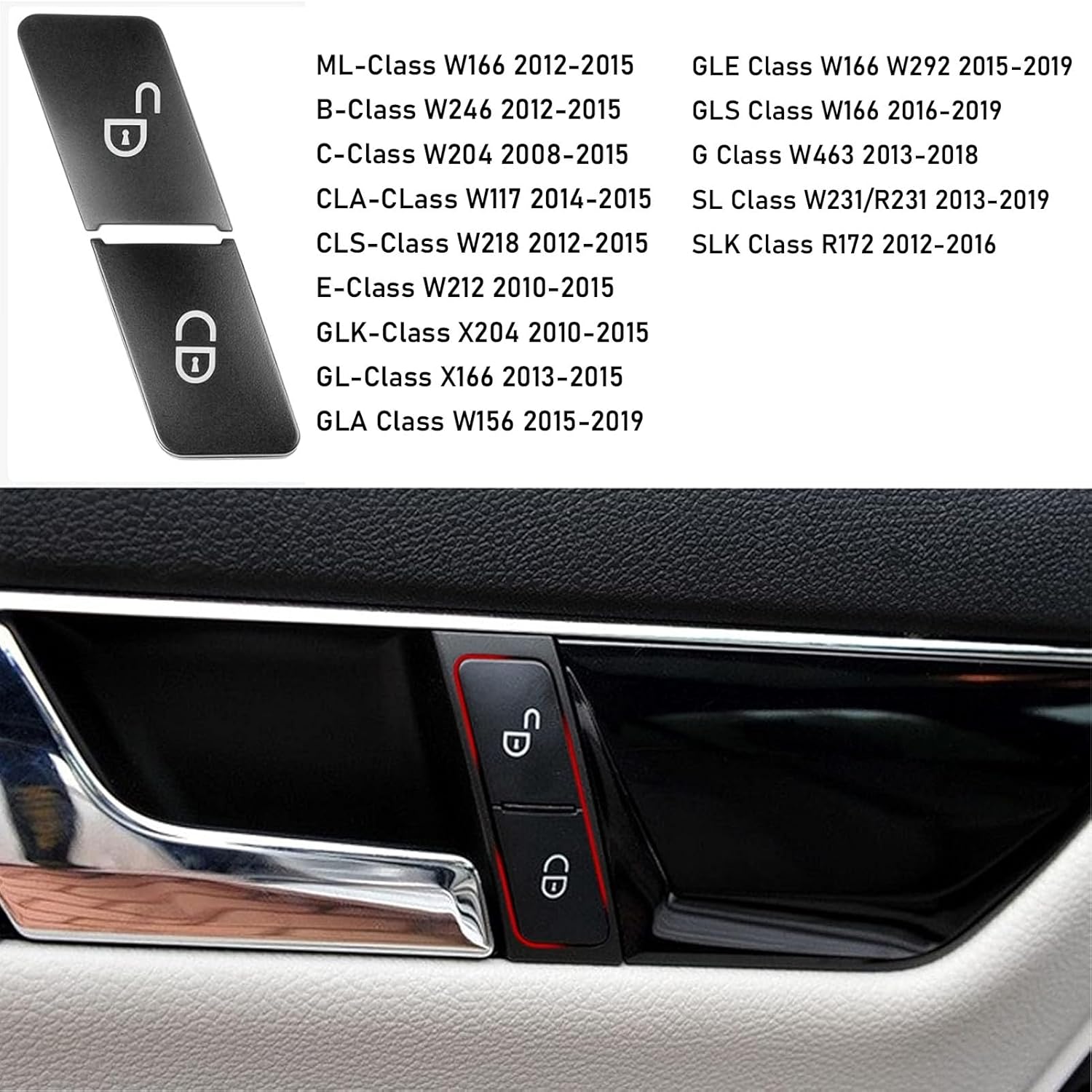
Figure 2.1: Visual representation of compatible Mercedes Benz models.
3. Product Features
- Upgraded Design: This is a full replacement button set, not a thin cover or sticker, ensuring a complete and durable repair.
- Seamless Fit: Designed using original data to retain the original car groove, providing a perfect fit.
- Enhanced Durability: Constructed from ABS+PC material to prevent scratches from fingernails and keys.
- Perfect Light Transmission: Ensures that the button's backlighting functions as effectively as the original part.
- Direct Replacement: Replaces part number 2049058402.

Figure 3.1: Key features of the Jaronx door lock button, including seamless fit, anti-scratch surface, and perfect light transmission.
4. Installation Guide
Installation of the Jaronx Door Lock Button is designed to be straightforward and can typically be completed in under 5 minutes without needing to remove the entire door panel. Two methods are commonly used:
Method 1: Drill and Pull
- Carefully drill a small pilot hole in the center of the worn button.
- Insert a screw into the pilot hole, just deep enough for it to grip the button.
- Gently pull the screw to extract the old button.
- Align the new Jaronx button with the opening and press it firmly into place until it snaps securely.
Method 2: Pry Tool
- Using a thin, non-marring pry tool (such as a plastic trim removal tool or a small flathead screwdriver wrapped in tape), carefully wedge it between the worn button and the surrounding panel.
- Gently pry the old button out of its housing.
- Align the new Jaronx button with the opening and press it firmly into place until it snaps securely.

Figure 4.1: Step-by-step visual guide for both installation methods.
Video 4.1: Official Jaronx installation guide demonstrating the replacement process for the door lock switch button.

Figure 4.2: Comparison showing the appearance of the door lock button area before and after replacement.
5. Operating the Product
Once installed, the Jaronx Door Lock Button functions identically to the original equipment. Press the button with the 'lock' icon to lock all vehicle doors. Press the button with the 'unlock' icon to unlock all vehicle doors.

Figure 5.1: The Jaronx door lock button installed in a vehicle, ready for operation.
6. Maintenance
The Jaronx Door Lock Button is made from durable ABS+PC material, designed for long-lasting performance. To maintain its appearance and functionality:
- Clean the button surface with a soft, damp cloth.
- Avoid using harsh chemicals or abrasive cleaners, as these may damage the material or the printed icons.
- Regularly inspect the button for any debris that might hinder its operation.
7. Troubleshooting
If you encounter issues after replacing the door lock button, consider the following:
- Button Not Functioning: This replacement part addresses cosmetic wear and tear of the button cover. It cannot fix power or motor issues with the underlying door lock control switch assembly. If the door lock stops working or cannot lock/unlock doors properly, the issue is likely with the entire control assembly, not just the button. In such cases, the complete door lock control assembly may need to be replaced.
- Button Not Seating Properly: Ensure the old button and any debris are completely removed from the housing. Apply firm, even pressure when installing the new button to ensure it snaps into place correctly.
8. Specifications
| Specification | Detail |
|---|---|
| Brand | Jaronx |
| Model Number | W204 Door Lock Button |
| Material | ABS+PC Plastic |
| Operation Mode | Motor (refers to the underlying mechanism) |
| Contact Type | Normally Closed |
| Connector Type | Plug In |
| Circuit Type | 1-way |
| Actuator Type | Push Button |
| International Protection Rating | IP54 |
| Number of Positions | 2 |
| Item Weight | 0.317 ounces |
| Package Dimensions | 2.09 x 2.09 x 2.05 inches |
9. Warranty and Support
For warranty information or technical support, please refer to the product packaging or contact Jaronx customer service directly through their official channels. Keep your purchase receipt for any warranty claims.