
Okin JLDK.04.07.06A
Okin Recliner Hand Control Instruction Manual
Model: JLDK.04.07.06A
Introduction
This manual provides detailed instructions for the installation, operation, and maintenance of your Okin 2 Button Round Hand Control Handset with USB. This replacement part is designed for power recliners, electric recliners, and lift chairs, ensuring comfortable and convenient control of your furniture. Please read this manual thoroughly before installation and use to ensure proper function and safety.
Safety Information
Important Safety Precautions:
- Ensure the 5-pin round plug of the new control matches your old button plug before use to avoid electrical hazards and ensure compatibility.
- Always disconnect power to the recliner or chair before attempting any installation or replacement.
- Do not attempt to modify the control unit or its wiring. Any modifications may void the warranty and create safety risks.
- Keep the control unit away from liquids and excessive moisture.
- If you encounter any issues or are unsure about the installation process, consult a qualified technician.
Product Overview
The Okin 2 Button Round Hand Control Handset is a replacement part for various electric recliners and lift chairs. It features a durable ABS construction, a 5-pin round plug for direct circuit compatibility, and an integrated USB port for charging devices.

Front view of the Okin 2 Button Round Hand Control, showing the central USB port with a blue LED light indicator.
Key Features:
- Durable Construction: Made from high-quality ABS material for long-lasting use.
- 5-Pin Plug: Designed for direct compatibility with 5-pin round plug systems found in many power recliners.
- Integrated USB Port: Allows convenient charging of essential devices like smartphones and smartwatches.
- Blue LED Light: Provides illumination for the USB port, making it easy to locate in low light conditions.
- Wide Compatibility: Fits electric furniture with OKIN single motors, and also compatible with Dewert, Limoss, and Ashley systems, provided the plug type matches.

A detailed view of the integrated USB port on the control unit, designed for charging small electronic devices.
Setup and Installation
Before beginning installation, ensure the recliner is unplugged from the power outlet.
- Verify Compatibility: Carefully check the plug type of your existing hand control. This replacement unit features a 5-pin round plug. Compare it with the plug on your current unit to ensure a match. The model number JLDK.04.07.06A is typically found on a label on the back of the control unit.
- Remove Old Control: Gently pull out the old hand control from its mounting hole in the recliner. Disconnect the 5-pin round plug from the motor or existing wiring harness.
- Connect New Control: Take the new Okin hand control. Align the 5-pin round plug with the corresponding receptacle on your recliner's motor or wiring harness. Push firmly until it clicks into place, ensuring a secure connection.
- Insert into Mounting Hole: Carefully feed the cable and the new control unit into the mounting hole in your recliner. Ensure it sits flush and securely.
- Test Functionality: Once installed, plug the recliner back into the power outlet. Test both buttons to ensure the recliner extends and retracts smoothly. Verify the USB port functions by plugging in a device.
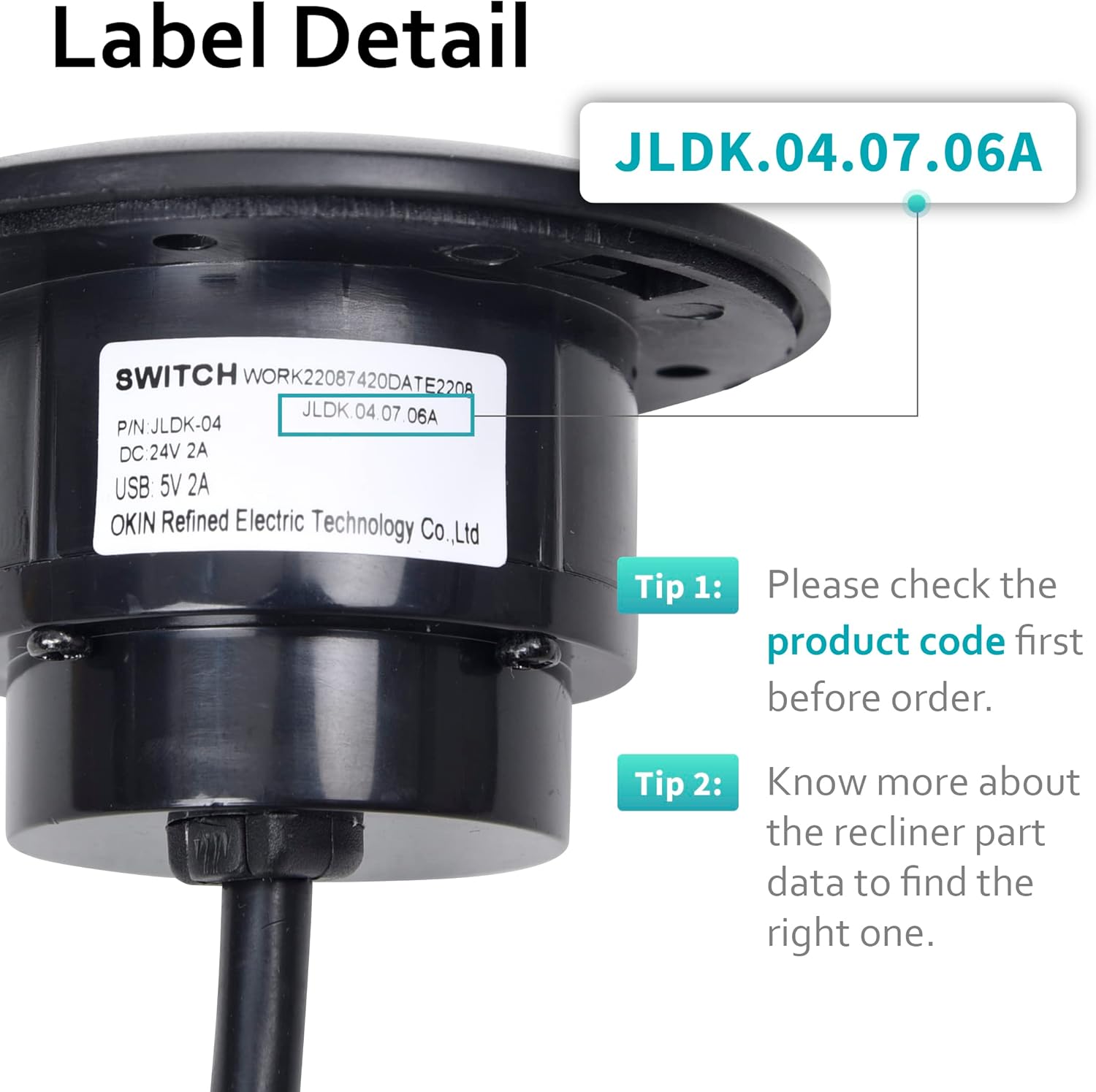
Image showing the label on the back of the control unit, highlighting the model number for verification.

The Okin hand control unit, showing the attached cable and the 5-pin round plug at its end.

A visual guide demonstrating how to connect the 5-pin straight plug to the recliner motor's receptacle.

Rear view of the control unit, illustrating the design for secure mounting within the recliner's frame.
Operating Instructions
The Okin 2 Button Round Hand Control is designed for simple and intuitive operation.
- Recline/Extend: Press and hold the appropriate button to recline the chair backward or extend the footrest. Release the button to stop at your desired position.
- Upright/Retract: Press and hold the other button to bring the chair back to an upright position or retract the footrest. Release the button to stop.
- USB Charging: To charge a device, simply plug your USB cable into the USB port located on the control unit. The blue LED light indicates power is available.
Maintenance
To ensure the longevity and optimal performance of your Okin hand control, follow these simple maintenance guidelines:
- Cleaning: Wipe the surface of the control unit with a soft, dry cloth. Avoid using abrasive cleaners, solvents, or excessive moisture, as these can damage the unit.
- Cable Inspection: Periodically inspect the cable for any signs of wear, fraying, or damage. If damage is observed, discontinue use and replace the unit.
- Connection Check: Ensure the 5-pin plug remains securely connected to the recliner's motor. A loose connection can lead to intermittent operation.
Troubleshooting
If you experience issues with your Okin hand control, refer to the following common problems and solutions:
| Problem | Possible Cause | Solution |
|---|---|---|
| Recliner does not respond to button presses. | No power to the recliner. Loose or disconnected plug. Faulty control unit. | Ensure the recliner is plugged into a working power outlet. Check that the 5-pin plug is securely connected. If connections are secure and power is present, the control unit may need replacement. |
| USB port is not charging devices. | Device cable issue. USB port malfunction. Power supply issue. | Try a different USB cable and device. Ensure the recliner is powered on. If the blue LED is off, check power connections. If the LED is on but no charge, the USB port may be faulty. |
| Buttons feel sticky or unresponsive. | Debris or liquid ingress. Internal mechanical issue. | Clean the surface of the control unit. Do not attempt to disassemble. If cleaning does not resolve the issue, the unit may need replacement. |
If the problem persists after attempting these solutions, please contact customer support.
Specifications
- Model Number: JLDK.04.07.06A
- Cable Length: 59 inches (150 cm)
- Plug Type: 5-pin round plug
- Material: ABS (Polycarbonate)
- Buttons: 2 (Up/Down)
- Features: Integrated USB port, Blue LED Light
- Compatibility: OKIN single motor systems, and compatible with Dewert, Limoss, and Ashley systems with matching 5-pin round plug.
- Item Weight: Approximately 5.9 ounces
- Package Dimensions: Approximately 8.66 x 6.65 x 2.52 inches
- Country of Origin: China
Warranty and Support
For any questions, concerns, or assistance with your Okin recliner hand control, please contact our dedicated support team. We are committed to ensuring a seamless setup process and addressing any issues you may encounter.
Please refer to your purchase documentation for specific warranty details. Keep your proof of purchase for any warranty claims.
Ask a question about this manual
Ask about setup, troubleshooting, compatibility, parts, safety, or missing instructions. Manuals+ will review the question and use this page’s manual context to help answer it.