
HB-DIGITAL 5712
HB-DIGITAL CAT 7 Tool-Free RJ45 Connector User Manual
Model: 5712
Product Overview
The HB-DIGITAL CAT 7 Tool-Free RJ45 Connector is designed for easy and reliable termination of Ethernet network cables. It supports high-speed data transfer up to 10 Gbps and operating frequencies up to 600 MHz, making it suitable for demanding network applications. Its robust shielded metal housing ensures protection against electromagnetic interference and provides a durable, corrosion-resistant connection.
This connector is compatible with various Ethernet cable categories, including CAT 5e, CAT 6, CAT 6A, and CAT 7, offering versatile application in both professional and home network setups.

Image: HB-DIGITAL CAT 7 Tool-Free RJ45 Connector, showing the assembled connector and a transparent overlay of its internal components with a cable.
Setup and Installation
This RJ45 connector features a tool-free design for simplified installation. Follow these steps for proper termination:
- Prepare the Cable: Carefully remove approximately 2-3 cm of the outer jacket of your Ethernet cable. Ensure not to damage the internal twisted pairs or shielding.
- Remove Shielding and Untwist Pairs: Untwist the individual wire pairs and remove any foil or braided shielding, leaving only the insulated wires. Trim any excess shielding or drain wire if necessary, leaving enough to connect to the connector's ground if applicable.
- Arrange Wires: Arrange the eight individual wires according to the T568B or T568A wiring standard, as indicated by the color coding on the connector's wire management block. Ensure the wires are straight and parallel.
- Insert Wires into Wire Management Block: Carefully insert each wire into its corresponding slot in the wire management block. The block is designed to guide the wires into the correct positions.
- Trim Excess Wires: Once all wires are seated correctly in the wire management block, use a wire cutter to trim any excess wire protruding from the top of the block, ensuring a flush cut.
- Insert Wire Management Block into Connector: Place the wire management block with the terminated wires into the main body of the RJ45 connector. Ensure it seats firmly.
- Close the Connector: Close the two halves of the metal housing firmly until they click into place. This action will simultaneously terminate the wires and secure the connection.
- Secure the Cable: Screw the cable strain relief cap onto the rear of the connector to provide additional cable retention and strain relief.

Image: Disassembled view of the RJ45 connector, showing the metal housing and the wire management block with color-coded slots.
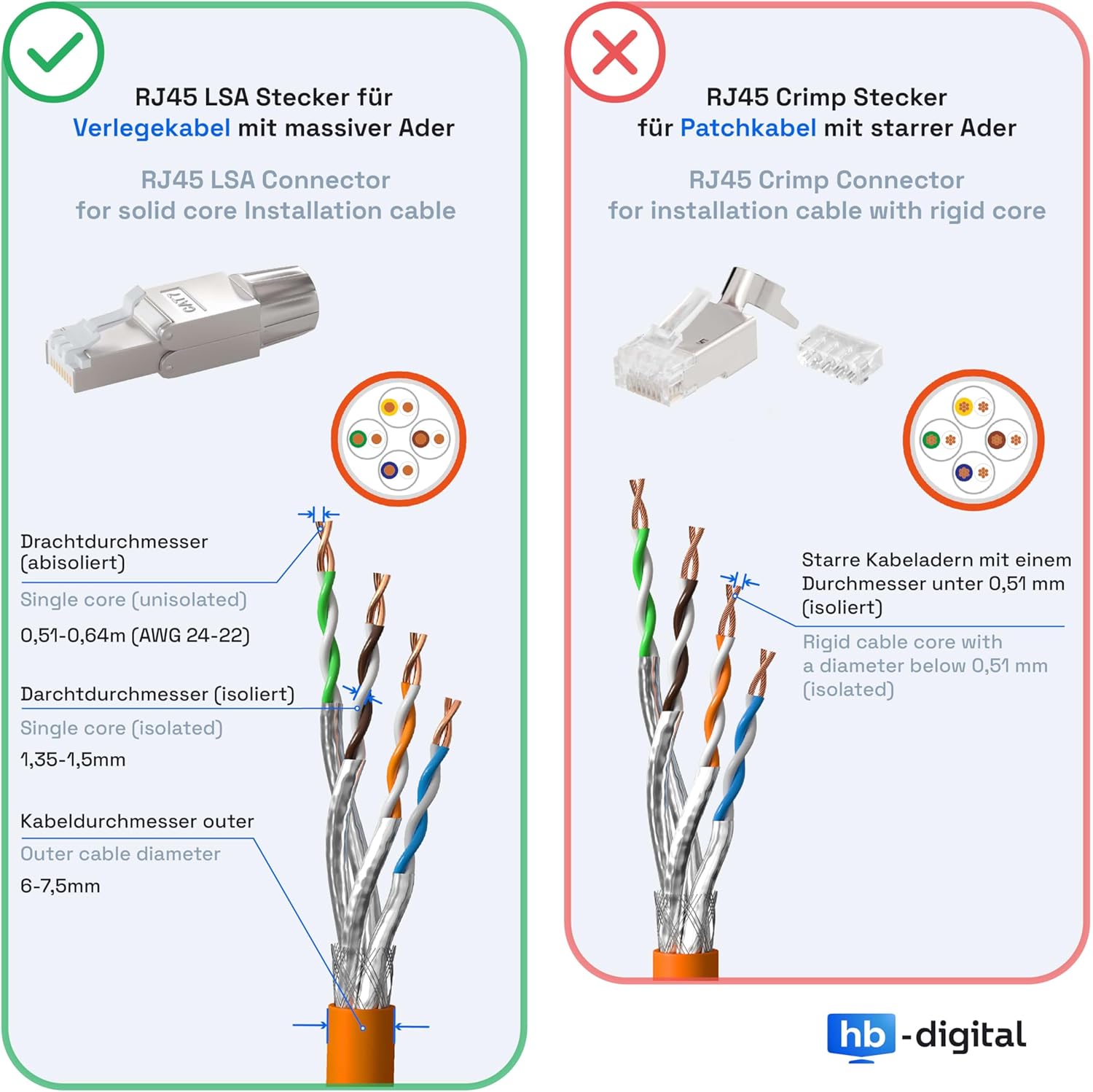
Image: Top and side views of the assembled RJ45 connector, highlighting its compact design.
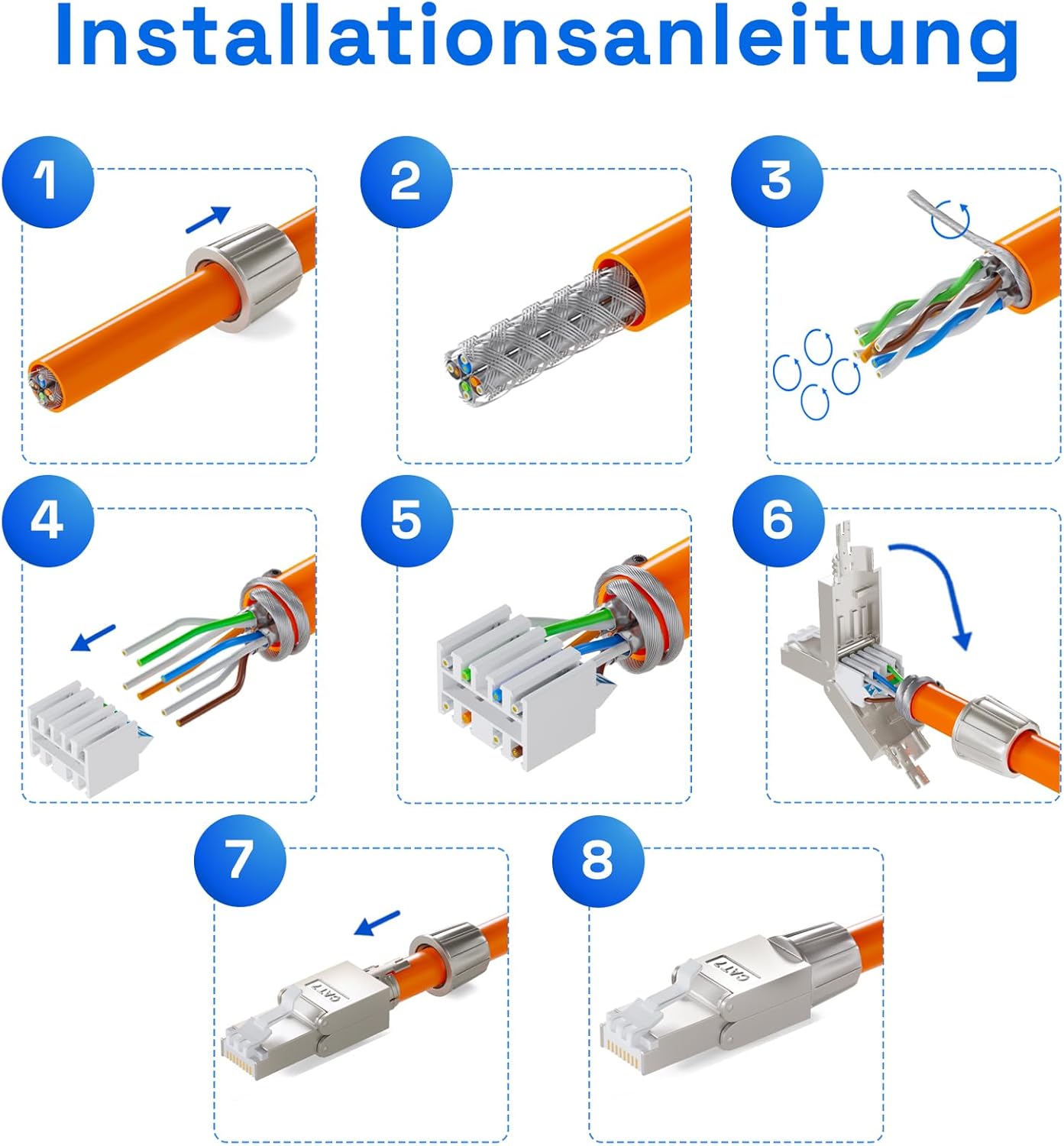
Image: Step-by-step visual guide for installing the RJ45 connector onto an Ethernet cable.

Image: Diagram illustrating the T568A and T568B wiring standards for Ethernet cables, showing wire color arrangements.
Video Guide: RJ45 CAT 7 Network Connector - Correct Installation
Video: A detailed visual guide demonstrating the correct installation process for the HB-DIGITAL CAT 7 RJ45 network connector, including cable preparation and wire termination.
Operating Principles
The HB-DIGITAL CAT 7 RJ45 connector facilitates high-speed data transmission by providing a secure and low-loss connection for Ethernet cables. It adheres to Category 7 standards, supporting frequencies up to 600 MHz and data rates of 10 Gigabit Ethernet (10GBASE-T).
The tool-free design utilizes Insulation Displacement Connectors (IDC) to pierce the wire insulation and establish electrical contact without the need for crimping tools. The shielded metal housing minimizes crosstalk and electromagnetic interference (EMI), ensuring signal integrity in various network environments.

Image: Diagram illustrating different Power over Ethernet (PoE) standards (802.3af, 802.3at, 802.3bt) and their corresponding power levels and compatible devices, demonstrating the connector's suitability for PoE applications.
Maintenance
The HB-DIGITAL CAT 7 RJ45 connector is designed for durability and requires minimal maintenance. To ensure optimal performance:
- Regular Inspection: Periodically inspect the connector and cable for any signs of physical damage, such as cracks in the housing or frayed cables.
- Cleanliness: Keep the connector free from dust and debris. Use a soft, dry cloth to gently wipe the exterior if necessary. Avoid using liquid cleaners directly on the connector pins.
- Secure Connections: Ensure the connector is securely seated in the network port. Loose connections can lead to signal degradation.
- Avoid Excessive Bending: Do not excessively bend or stress the cable near the connector, as this can damage the internal wires and affect performance.
Troubleshooting
If you experience issues with your network connection after installing the HB-DIGITAL CAT 7 RJ45 connector, consider the following troubleshooting steps:
- No Network Connection:
- Verify that the cable is correctly terminated according to the T568B or T568A standard. Incorrect wiring is a common cause of connection issues.
- Ensure the connector is fully seated in both the device and the network port.
- Check for any visible damage to the cable or connector pins.
- Test the cable with a network cable tester to confirm continuity and proper wiring.
- Slow Network Speed:
- Confirm that all components in your network chain (router, switch, network card) support 10 Gigabit Ethernet speeds.
- Ensure the cable length does not exceed the maximum recommended length for CAT 7 (typically 100 meters for 10GBASE-T).
- Check for sources of electromagnetic interference near the cable run. The shielded connector helps, but external interference can still impact performance.
- Intermittent Connection:
- Re-check the wire termination within the connector to ensure all wires are securely seated and making proper contact.
- Inspect the cable for kinks or sharp bends that could cause intermittent breaks in the internal conductors.
Specifications
| Feature | Detail |
|---|---|
| Brand | HB-DIGITAL |
| Model Number | 5712 |
| Product Dimensions | 5 x 3 x 1.5 cm; 20 g |
| Data Transfer Rate | 10 Gigabits per second (10 Gbps) |
| Frequency | 600 MHz |
| Cable Type Compatibility | CAT 5e, CAT 6, CAT 6A, CAT 7 |
| Connector Type | RJ45 |
| Housing Material | Shielded Zinc Die-Cast |
| Contact Material | 50u Gold-Plated Contacts |
| Wire Diameter Support | 6 to 7.5 mm (outer cable diameter); 1.35-1.5 mm (insulated wire diameter); 0.51-0.64 mm (bare wire diameter, AWG 24-22) |
| Special Feature | Tool-free installation, Shielded |
| Compatible Devices | DSL Routers, Fritzbox, VoIP phones, PoE devices, PCs, Laptops, Hi-Fi receivers, NAS devices, Network printers, Network cameras, Network sockets, Patch panels, Switching boxes, Smart TVs, Gaming consoles, Switches |

Image: Technical diagram showing the precise dimensions of the HB-DIGITAL CAT 7 RJ45 connector.
Warranty and Support
HB-DIGITAL GmbH stands behind the quality of its products. For any inquiries or support, please contact us directly.
Contact Information:
- Company: HB-DIGITAL GmbH
- Address: Electores. 16, 40472 Düsseldorf, Germany
- WEEE Registration Number: ES 42495639
- Phone: 0211 54 555 777 (Monday to Friday, 9:00 AM to 5:00 PM CET)
- Email: info@hb-digital.de
For more information about HB-DIGITAL and our product range, please visit our official store on Amazon: HB-DIGITAL Amazon Store.
Ask a question about this manual
Ask about setup, troubleshooting, compatibility, parts, safety, or missing instructions. Manuals+ will review the question and use this page’s manual context to help answer it.