
1. Introduction
Thank you for choosing the MELOKEA Ergonomic Office Chair. This manual provides essential information for the safe assembly, operation, and maintenance of your new office chair. Please read it thoroughly before use and retain it for future reference.

Figure 1.1: MELOKEA Ergonomic Office Chair (Grey)
The MELOKEA F007 Ergonomic Office Chair is designed to provide optimal comfort and support for extended periods of sitting. It features a robust construction, adjustable components, and breathable materials to enhance your work experience.
2. Safety Information
WARNING: Do not exceed the maximum weight capacity of 200 kg (440 lbs). Ensure the chair is suitable for your body size. Follow all assembly instructions carefully to prevent injury. Always ensure all screws and bolts are securely tightened before use. Keep children and pets away from the chair during assembly.
3. Package Contents
Before assembly, please verify that all components are present and undamaged. The package should contain:
- Office Chair components (backrest, seat, armrests, gas lift, base, wheels)
- Assembly hardware (screws, washers, Allen key)
- Instruction Manual
4. Assembly Instructions
Assembly typically takes 20-30 minutes. It is recommended to have two people for easier assembly, especially when attaching the backrest and armrests.
- Attach the Wheels to the Base: Insert the five wheels into the holes at the end of each leg of the chair base. Push firmly until they click into place.
- Insert the Gas Lift: Place the gas lift cylinder into the center hole of the chair base.
- Attach the Mechanism to the Seat: Align the chair mechanism with the screw holes on the underside of the seat cushion. Secure it with the provided screws. Ensure the front of the mechanism faces the front of the seat.
- Attach the Armrests: Connect the armrests to the seat and backrest. Important Tip: Do not fully tighten the screws on one armrest until the other armrest is aligned with its mounting hole. This allows for slight adjustment and easier alignment. Once both armrests are in place, tighten all screws securely.
- Connect the Backrest to the Seat: Align the backrest with the attachment points on the seat and armrests. Secure with screws.
- Place the Assembled Top onto the Gas Lift: Carefully place the assembled seat and backrest onto the gas lift cylinder, ensuring it is centered and stable.

Figure 4.1: Chair Dimensions and Assembly Tip

Figure 4.2: Assembly Guidance and Dimensions
5. Operating Instructions
Your MELOKEA office chair offers several adjustment features to customize your seating experience:
- Height Adjustment: To adjust the seat height (48-58 cm), pull the lever located under the right side of the seat upwards. While holding the lever, stand up to raise the chair or sit down to lower it. Release the lever to lock the height.
- Tilt Function (90°-115°): The chair features a tilt mechanism. Pull the lever located under the left side of the seat outwards to unlock the tilt function, allowing the chair to recline. Push the lever inwards to lock the chair in an upright position.
- Tilt Tension Adjustment: The round knob under the front of the seat controls the tilt tension. Turn it clockwise to increase tension (making it harder to recline) or counter-clockwise to decrease tension (making it easier to recline).
- Adjustable Headrest: The large neck pillow can be adjusted vertically by 6 cm to provide optimal support for your head and neck. Simply push or pull the headrest to the desired height.
- Lumbar Support: The uniquely designed S-shaped low back lumbar support is integrated to conform to the natural curve of your spine, providing continuous support.

Figure 5.1: Tilt Function and Headrest Adjustment

Figure 5.2: Ergonomic Lumbar Support System
6. Maintenance
Regular maintenance will prolong the life and appearance of your office chair:
- Cleaning: For the mesh backrest and fabric seat, use a soft cloth dampened with mild soap and water. Avoid harsh chemicals or abrasive cleaners. For the plastic and metal parts, wipe with a damp cloth.
- Check Fasteners: Periodically check all screws and bolts to ensure they are tight. Re-tighten if necessary to prevent wobbling or creaking.
- Wheel Cleaning: Remove any hair or debris that may accumulate around the wheels to ensure smooth rolling.
- Gas Lift: The gas lift is maintenance-free. Do not attempt to disassemble it.
7. Troubleshooting
If you encounter any issues with your MELOKEA office chair, refer to the following common solutions:
| Problem | Possible Cause | Solution |
|---|---|---|
| Chair wobbles or creaks | Loose screws or bolts | Check and tighten all assembly screws, especially those connecting the armrests and mechanism to the seat. |
| Chair does not adjust height | Gas lift issue or lever not engaged | Ensure the height adjustment lever is fully pulled. If the issue persists, contact customer service. |
| Wheels not rolling smoothly | Debris caught in wheels | Turn the chair over and remove any hair, dust, or debris from the wheel casters. |
| Backrest does not tilt or lock | Tilt lever not engaged or tension too high | Ensure the tilt lever is fully pulled out to unlock or pushed in to lock. Adjust the tilt tension knob. |
If the problem persists after attempting these solutions, please contact MELOKEA customer service for assistance.
8. Specifications
- Brand: MELOKEA
- Model Number: DECHAF007G-1
- Color: Grey
- Product Dimensions: 47 x 51 x 119.5 cm (L x W x H)
- Item Weight: 13 Kilograms
- Maximum Load Capacity: 200 kg (440 lbs)
- Gas Lift Class: Class 4 (TÜV certified)
- Height Adjustment Range: 48-58 cm
- Tilt Function: 90°-115° recline with lock function
- Headrest: Adjustable by 6 cm
- Seat Cushion: 54 x 52 x 10 cm, thickened foam
- Backrest Material: High-tensile mesh
- Certifications: EN 1335-1:2020 (for professional office chairs)

Figure 8.1: TÜV-Certified Class 4 Gas Spring
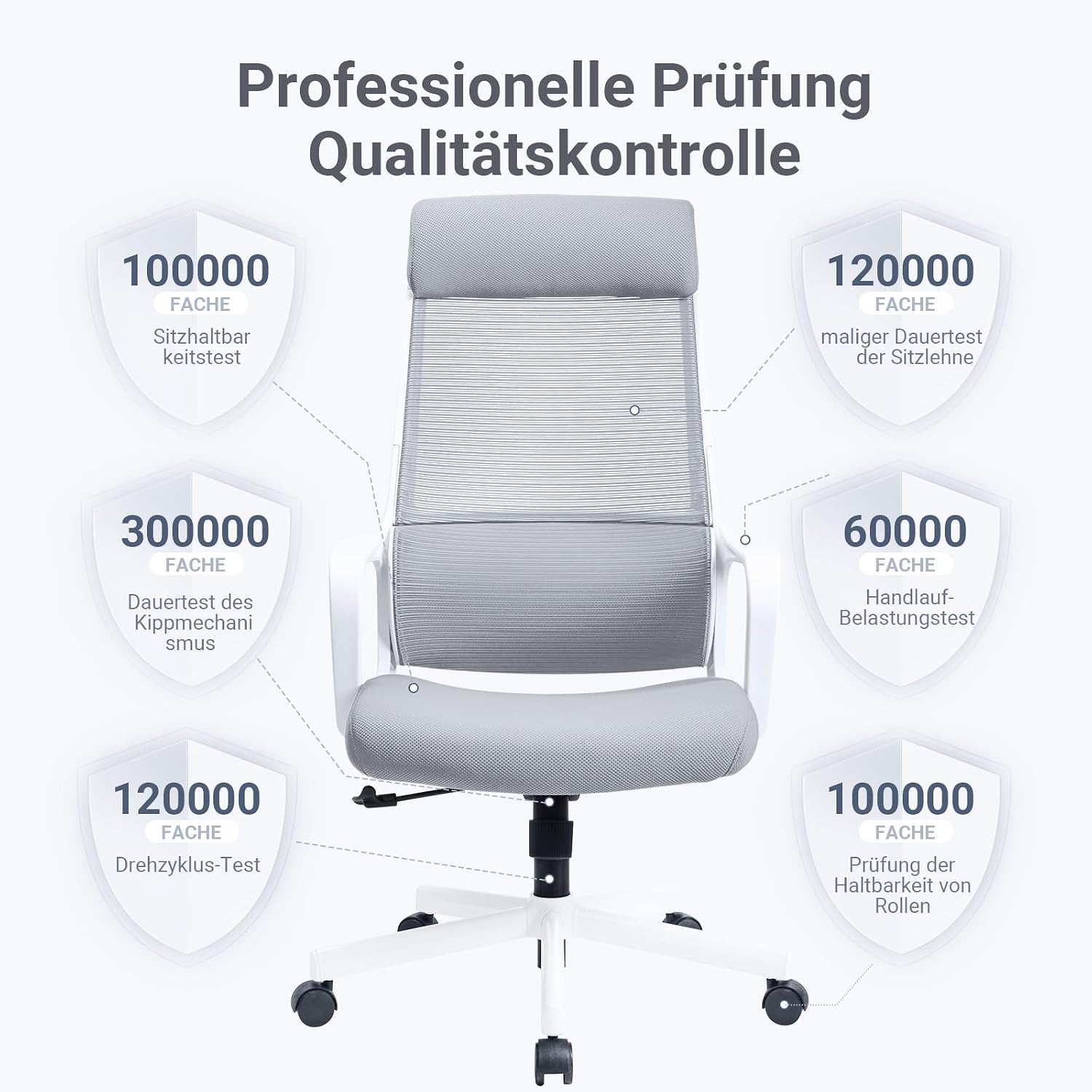
Figure 8.2: Professional Quality Control Testing
9. Warranty and Support
MELOKEA offers a 3-year after-sales service for this product, exceeding industry standards. This warranty covers manufacturing defects and significant malfunctions under normal use. If you experience any issues with your product, please contact our professional customer service team. We are committed to providing a satisfactory solution, including free replacement of defective accessories if needed.
For customer support, please visit the MELOKEA store on Amazon or contact us through the platform where you purchased the product.
MELOKEA Store Link: Visit MELOKEA Store


