
1. Product Overview
This manual provides instructions for the Easytry123 replacement remote control compatible with various Sanyo Room Air Conditioner models, including CL2462R, SAP-KMRV126EH, SAP-KMRV96EH, RCS-4VPIS4EE, SAP-KRV184GJ, RCS-3HVPSN4E-T, UHW3672R, and THW3672R. This remote is designed to provide essential control over your air conditioning unit.
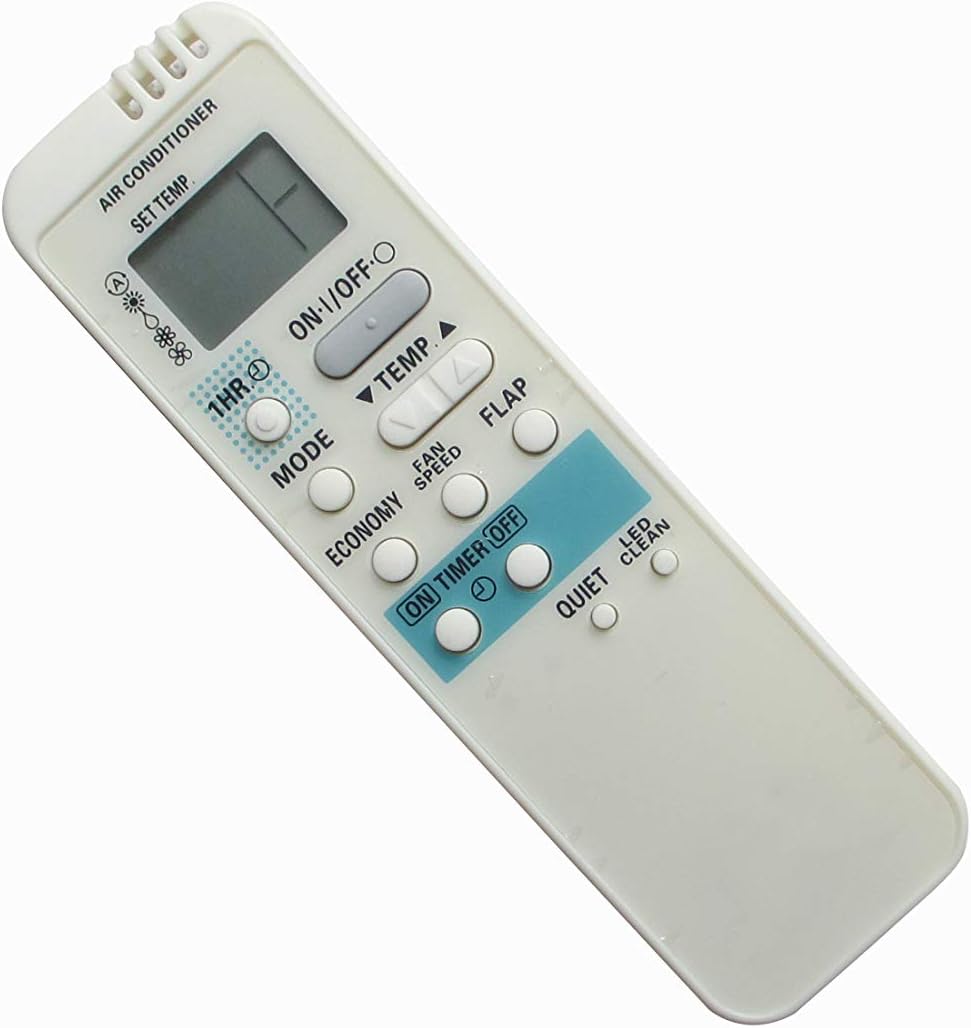
Figure 1.1: Front View of the Remote Control. This image displays the front of the remote control, showing the LCD screen, power button, temperature adjustment buttons, mode selection, fan speed, timer, economy, quiet, flap, and LED clean buttons.

Figure 1.2: Back View of the Remote Control. This image shows the rear of the remote control, highlighting the battery compartment cover and a label indicating "QC. PASS" and "MODE: RCS-AX1/3 FOR: SANYO", confirming its compatibility.
2. Setup Guide
2.1 Battery Installation
The remote control requires 2 AAA batteries (not included).
- Locate the battery compartment on the back of the remote control.
- Slide the battery compartment cover downwards to open it.
- Insert two AAA batteries, ensuring the positive (+) and negative (-) terminals align correctly with the markings inside the compartment.
- Slide the battery compartment cover back into place until it clicks securely.
2.2 Initial Use
This replacement remote control is typically pre-programmed and ready to use with compatible Sanyo air conditioner models upon battery installation. No complex pairing or setup is usually required.
3. Operating Instructions
3.1 Button Functions
| Button | Function |
|---|---|
| ON/OFF | Powers the air conditioner on or off. |
| TEMP ▲ / ▼ | Adjusts the desired temperature up or down. |
| MODE | Cycles through operating modes (e.g., Cool, Dry, Fan, Heat, Auto). |
| FAN SPEED | Adjusts the fan speed (e.g., Low, Medium, High, Auto). |
| 1HR / ON TIMER / OFF TIMER | Sets the timer for automatic power on or off. |
| ECONOMY | Activates energy-saving mode. |
| QUIET | Activates quiet operation mode. |
| FLAP | Controls the louver/flap direction. |
| LED CLEAN | Activates the LED display or a cleaning function (refer to AC unit manual). |
3.2 Basic Operation
- Power On/Off: Press the ON/OFF button to turn the air conditioner on or off.
- Adjusting Temperature: Use the TEMP ▲ or TEMP ▼ buttons to set your desired room temperature.
- Changing Mode: Press the MODE button repeatedly to cycle through available operating modes (e.g., Cool, Dry, Fan).
- Adjusting Fan Speed: Press the FAN SPEED button to select your preferred fan speed.
4. Maintenance
- Cleaning: Wipe the remote control periodically with a soft, dry cloth. Do not use liquid cleaners or abrasive materials.
- Battery Replacement: Replace batteries when the remote's range decreases or it stops responding. Always replace both batteries at the same time with new ones of the same type.
- Storage: If the remote will not be used for an extended period, remove the batteries to prevent leakage and damage.
5. Troubleshooting
| Problem | Possible Cause | Solution |
|---|---|---|
| Remote not responding. | Dead or incorrectly inserted batteries. | Replace batteries with new ones, ensuring correct polarity. |
| Short operating range. | Weak batteries or obstruction. | Replace batteries. Ensure no objects block the signal path between the remote and the AC unit. |
| Some functions not working. | Remote is a replacement and may not support all original functions. | Verify compatibility with your specific AC unit model. Not all replacement remotes replicate every function of the original. |
| LCD screen is dim or blank. | Low battery power. | Replace batteries. |
6. Specifications
- Brand: Easytry123
- Compatible Devices: Sanyo Room Air Conditioners (models: CL2462R, SAP-KMRV126EH, SAP-KMRV96EH, RCS-4VPIS4EE, SAP-KRV184GJ, RCS-3HVPSN4E-T, UHW3672R, THW3672R)
- Connectivity Technology: Infrared
- Controller Type: Button Control
- Batteries Required: 2 x AAA (not included)
- Special Feature: Ergonomic design
- ASIN: B0991WHH7X
7. Warranty and Support
As this is a replacement item, specific warranty details should be obtained directly from the seller, Easytry123, or the platform where the purchase was made. Please refer to your purchase documentation for return policies and support contact information.
For further assistance or inquiries, please contact the seller directly.