
Elitech ECS-2280neo-sp
Elitech ECS-2280neo Digital Temperature Controller User Manual
Model: ECS-2280neo-sp
1. Introduction
The Elitech ECS-2280neo is an all-purpose digital temperature controller designed for precise temperature management in various applications. It features both Fahrenheit and Celsius display options, a copy card function for easy parameter setting, and a UPS port for power backup. This manual provides detailed instructions for the installation, operation, and maintenance of the ECS-2280neo controller.
2. Safety Information
- Read all instructions carefully before installation and operation.
- Ensure the power supply matches the controller's specifications.
- Installation and wiring should only be performed by qualified personnel.
- Do not expose the controller to excessive moisture or extreme temperatures outside its operating range.
- Disconnect power before performing any maintenance or wiring.
3. Product Overview
The ECS-2280neo is a compact and robust temperature controller with a clear digital display and intuitive button interface.

Figure 3.1: Front view of the Elitech ECS-2280neo Digital Temperature Controller, showing the digital display and control buttons.
Key Features:
- Widely used in medical cupboards, kitchen cabinets, supermarket split cabinets, air curtain cabinets, island cabinets, and wine cabinets.
- Sensor error alarm for enhanced safety.
- Easy parameter setting via a copy card.
- Switchable between Celsius and Fahrenheit.
- One-piece front panel design with IP65 protection against dust and water.

Figure 3.2: Icons representing key functions: Cooling, Defrost, Fan, Buzzer, Celsius & Fahrenheit conversion, Copy Card, RS485, and Elitech iCold compatibility.
4. Setup and Installation
4.1 Dimensions
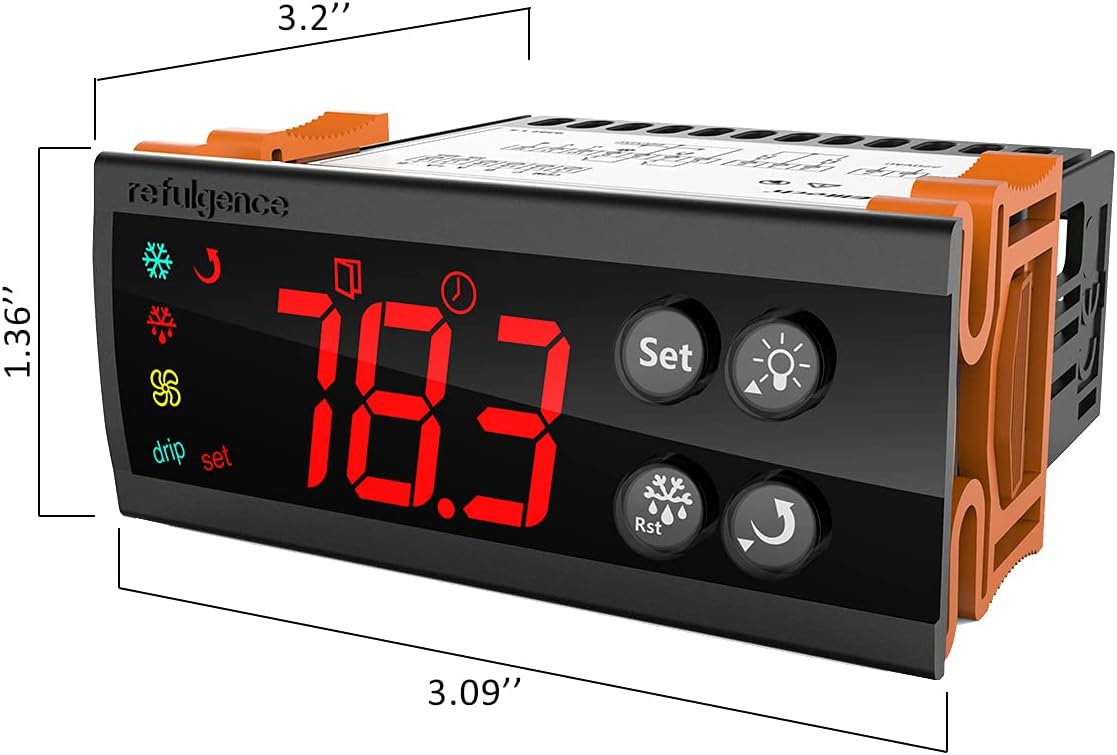
Figure 4.1: Dimensions of the ECS-2280neo controller, approximately 3.2 inches wide, 1.36 inches high, and 3.09 inches deep.
4.2 Wiring Diagram
Refer to the following diagram for proper wiring connections. Ensure all connections are secure and comply with local electrical codes.

Figure 4.2: Wiring diagram for the ECS-2280neo, showing connections for UPS, power input (L, N), outputs (10A/17A), 12V GND, communication interface (A, B), and inputs for freeze and door sensors.
4.3 Back Panel Connections
The back panel provides access to the wiring terminals. Ensure correct polarity and secure connections for all wires.
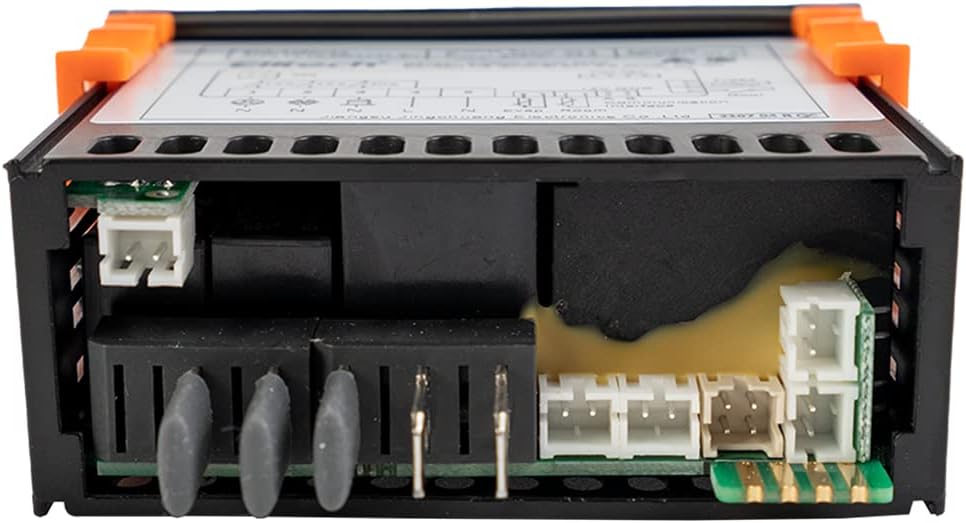
Figure 4.3: Rear view of the ECS-2280neo, showing the various terminal blocks for electrical connections and sensor inputs.
5. Operating Instructions
5.1 Basic Operation
Upon power-up, the controller will display the current temperature. Use the "Set" button to access and modify parameters. The up and down arrows adjust values, and the "Rst" button typically confirms settings or resets alarms.

Figure 5.1: Close-up of the ECS-2280neo front panel, highlighting the digital temperature display and control buttons for 'Set', 'Light', 'Rst', and 'Up/Down' functions.
5.2 Parameter Setting with Copy Card
The ECS-2280neo supports parameter configuration using a copy card. This feature allows for quick and consistent setup across multiple units. Refer to the detailed instructions provided with your copy card for the specific procedure.
6. Maintenance
- Cleaning: Wipe the front panel with a soft, damp cloth. Do not use abrasive cleaners or solvents.
- Inspection: Periodically check wiring connections for looseness or corrosion.
- Sensor Care: Ensure temperature sensors are clean and free from obstructions for accurate readings.
7. Troubleshooting
| Problem | Possible Cause | Solution |
|---|---|---|
| Display is blank | No power or incorrect wiring. | Check power supply and wiring connections. Ensure correct voltage. |
| Temperature reading is inaccurate | Faulty sensor or sensor not properly installed. | Check sensor connection. Replace sensor if damaged. |
| Controller not responding to button presses | Controller locked or internal error. | Refer to the full manual for specific lock/unlock procedures. Power cycle the device. |
| Alarm continuously active | Temperature outside set limits or sensor error. | Check temperature and set points. Verify sensor functionality. Press 'Rst' to clear alarm. |
8. Specifications
| Parameter | Value |
|---|---|
| Brand | Elitech |
| Model | ECS-2280neo-sp |
| Display Type | Digital |
| Batteries Required | No |
| Country/Region of Origin | China |
| ASIN | B0991KHS1N |
| UPC | 781454242771 |
9. Warranty and Support
For warranty information and technical support, please contact Elitech Technology, Inc. directly. Details regarding product returns and support can often be found on the official Elitech website or through your point of purchase.
Note: The product is usually dispatched within 3 to 4 weeks. Return policy allows for refund/replacement within 15 days.
Related documentsECS-2280neo-sp

Ask a question about this manual
Ask about setup, troubleshooting, compatibility, parts, safety, or missing instructions. Manuals+ will review the question and use this page’s manual context to help answer it.