
Introduction
This manual provides essential information for the proper installation, operation, and maintenance of your Mavrik Replacement Cold Control, equivalent to DANFOSS part number 077B3625. Please read these instructions carefully before proceeding with installation or operation to ensure safe and efficient use.
Product Overview
The Mavrik Cold Control (Model 077B3625) is a replacement component designed to regulate temperature in refrigeration units. It features a temperature range of 14.2°F to 24.1°F, a 42-inch capillary tube, a slot stem, and includes two 1/4-inch insulated female push-on terminals with mounting screws.
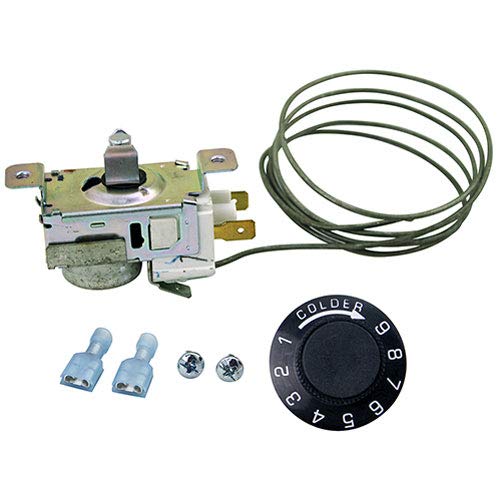
Image 1: Mavrik Replacement Cold Control 077B3625. This image displays the complete cold control unit, including the main body with electrical terminals, the coiled capillary tube, the temperature adjustment dial with numerical markings (1-9) and "COLDER" indicator, and two blue insulated female push-on connectors along with two mounting screws.
Setup and Installation
- Safety First: Before beginning any installation, ensure the power supply to the refrigeration unit is completely disconnected. Failure to do so can result in electrical shock or injury.
- Identify Existing Control: Locate the existing cold control unit within your refrigeration appliance. Note its mounting position and how the capillary tube is routed.
- Disconnect Wiring: Carefully disconnect the electrical wires from the terminals of the old cold control. Make a note or take a picture of the wiring configuration for correct re-connection.
- Remove Old Control: Unscrew and remove the old cold control from its mounting bracket. Gently remove the capillary tube from its sensing location.
- Install New Control: Position the new Mavrik Cold Control in the same location as the old unit. Use the provided mounting screws to secure it firmly.
- Route Capillary Tube: Carefully route the 42-inch capillary tube to the sensing area, ensuring it is not kinked or damaged. The capillary tube must be placed in the same location as the original for accurate temperature sensing.
- Connect Wiring: Using the previously noted wiring configuration, connect the electrical wires to the 1/4-inch insulated female push-on terminals on the new cold control. Ensure connections are secure.
- Install Temperature Dial: Attach the temperature adjustment dial to the slot stem of the cold control.
- Restore Power: Once installation is complete and all connections are secure, restore power to the refrigeration unit.
Note: If you are unsure about any step of the installation process, it is recommended to consult a qualified technician.
Operating Instructions
The Mavrik Cold Control regulates the internal temperature of your refrigeration unit. The temperature range is approximately 14.2°F to 24.1°F.
- Temperature Adjustment: Use the provided dial to adjust the desired temperature. Turning the dial towards the "COLDER" setting (higher numbers) will decrease the temperature, making the unit colder. Turning it towards lower numbers will increase the temperature.
- Initial Setting: For initial setup, it is recommended to start at a middle setting and allow the unit several hours to stabilize before making further adjustments.
- Monitoring: Monitor the internal temperature of your refrigeration unit with a thermometer to ensure it is operating within the desired range.
Maintenance
The Mavrik Cold Control is designed for reliable operation with minimal maintenance. However, periodic checks can help ensure its longevity and proper function:
- Visual Inspection: Periodically inspect the cold control and its wiring for any signs of damage, corrosion, or loose connections.
- Capillary Tube: Ensure the capillary tube remains securely in its sensing location and is not bent, kinked, or damaged.
- Cleaning: If necessary, gently wipe the exterior of the control with a dry, soft cloth. Do not use liquid cleaners directly on the control.
Troubleshooting
If your refrigeration unit is not maintaining the correct temperature after installing the Mavrik Cold Control, consider the following:
- Unit Not Cooling:
- Check if the power supply to the unit is active.
- Verify that the cold control is correctly wired and connections are secure.
- Ensure the temperature dial is set to a sufficiently cold setting.
- Confirm the capillary tube is properly positioned in the sensing area and is not damaged.
- Unit Too Cold/Freezing:
- Adjust the temperature dial to a warmer setting.
- Ensure the capillary tube is not dislodged or making direct contact with a very cold surface, which could cause it to sense an artificially low temperature.
- Intermittent Operation:
- Check for loose electrical connections at the cold control terminals.
- Inspect the capillary tube for any signs of damage that might affect its sensing capability.
If troubleshooting steps do not resolve the issue, it may indicate a fault with the cold control or another component of the refrigeration system. Professional assistance may be required.
Specifications
| Feature | Detail |
|---|---|
| Model Number | 077B3625 |
| Equivalent To | DANFOSS 077B3625 |
| Temperature Range | 14.2°F to 24.1°F |
| Capillary Tube Length | 42 inches |
| Stem Type | Slot Stem |
| Electrical Connections | Two 1/4" Insulated Female Push-ons |
| Mounting | Includes mounting screws |
| Item Weight | 8 ounces |
| Manufacturer | Mavrik |
Warranty Information
Mavrik OEM-equivalent parts are designed to meet strict quality standards. This part is covered by a manufacturer warranty. Additionally, Mavrik OEM-equivalent parts are backed by a 90-day return policy and an unbeatable 180-day warranty from the seller.
For specific details regarding warranty claims or returns, please refer to your purchase documentation or contact the seller directly.
Support
For further assistance, technical support, or inquiries regarding your Mavrik Replacement Cold Control, please contact the seller or visit the official Mavrik store online.
Mavrik Store: Visit the Mavrik Store on Amazon