
1. Introduction
Welcome to the user manual for your new Hyper Jeep Gladiator 12V Kids Ride On Car. This manual provides essential information for the safe assembly, operation, and maintenance of your vehicle. Please read it thoroughly before first use and retain it for future reference.

Image: The Hyper Jeep Gladiator 12V Kids Ride On Car, shown with two children seated inside, highlighting its two-seater design and realistic appearance.
2. Safety Information
WARNING: To reduce the risk of injury, adult supervision is required. Never use in roadways, near motor vehicles, on or near steep inclines or steps, swimming pools or other bodies of water. Always wear shoes. Never allow more than 2 riders. Recommended for children aged 36 months to 17 years. Maximum combined rider weight: 110 lbs.
- Always ensure children are supervised by an adult while operating the vehicle.
- Do not operate the vehicle on public roads, sidewalks, or near traffic.
- Avoid operating on uneven terrain, steep slopes, or near water.
- Ensure all assembly steps are completed correctly and all fasteners are secure before use.
- Only use the charger and battery specified by the manufacturer.
- Keep hands, hair, and clothing away from moving parts.

Image: A visual guide indicating the maximum capacity of 2 riders, suitable for ages 3 and up, and a maximum rider weight of 110 lbs for the vehicle.
3. Setup and Assembly
Before first use, the vehicle requires assembly and initial battery charging. Refer to the detailed assembly instructions provided in the packaging for step-by-step guidance.
3.1 Battery Charging
- Locate the charging port on the vehicle.
- Connect the charger to the charging port and then plug the charger into a standard wall outlet.
- Charge the battery for a minimum of 8-12 hours before first use. Do not charge for more than 18 hours to prevent battery damage.
- The battery requires regular charging even when not in use to maintain its lifespan. Charge at least once a month.
3.2 Initial Assembly Steps (General)
- Attach wheels and axles securely.
- Connect the steering column and steering wheel.
- Install the seats and secure them.
- Connect the battery terminals as instructed.
4. Operating Instructions
Familiarize yourself with the controls before allowing a child to operate the vehicle.
4.1 Controls Overview
- Power Button: Press to turn the vehicle on/off.
- Forward/Reverse Switch: Select desired direction.
- Speed Selector: Choose between low (2 mph) and high (5 mph) speeds.
- Accelerator Pedal: Press to move the vehicle. Release to brake.
- Steering Wheel: Turn to control direction.
- Sound Controls: Buttons on the dashboard/steering wheel activate various sounds.

Image: This image displays a child enjoying the ride-on car, with a detailed inset highlighting the steering wheel and dashboard, illustrating the interactive push-button start and sound controls.
4.2 Driving the Vehicle
- Ensure the battery is fully charged.
- Have the child sit in the seat and fasten the seat belt.
- Press the power button to turn on the vehicle.
- Select the desired speed (low or high) and direction (forward or reverse).
- Press the accelerator pedal to move. Release the pedal to stop.
- Use the steering wheel to navigate.
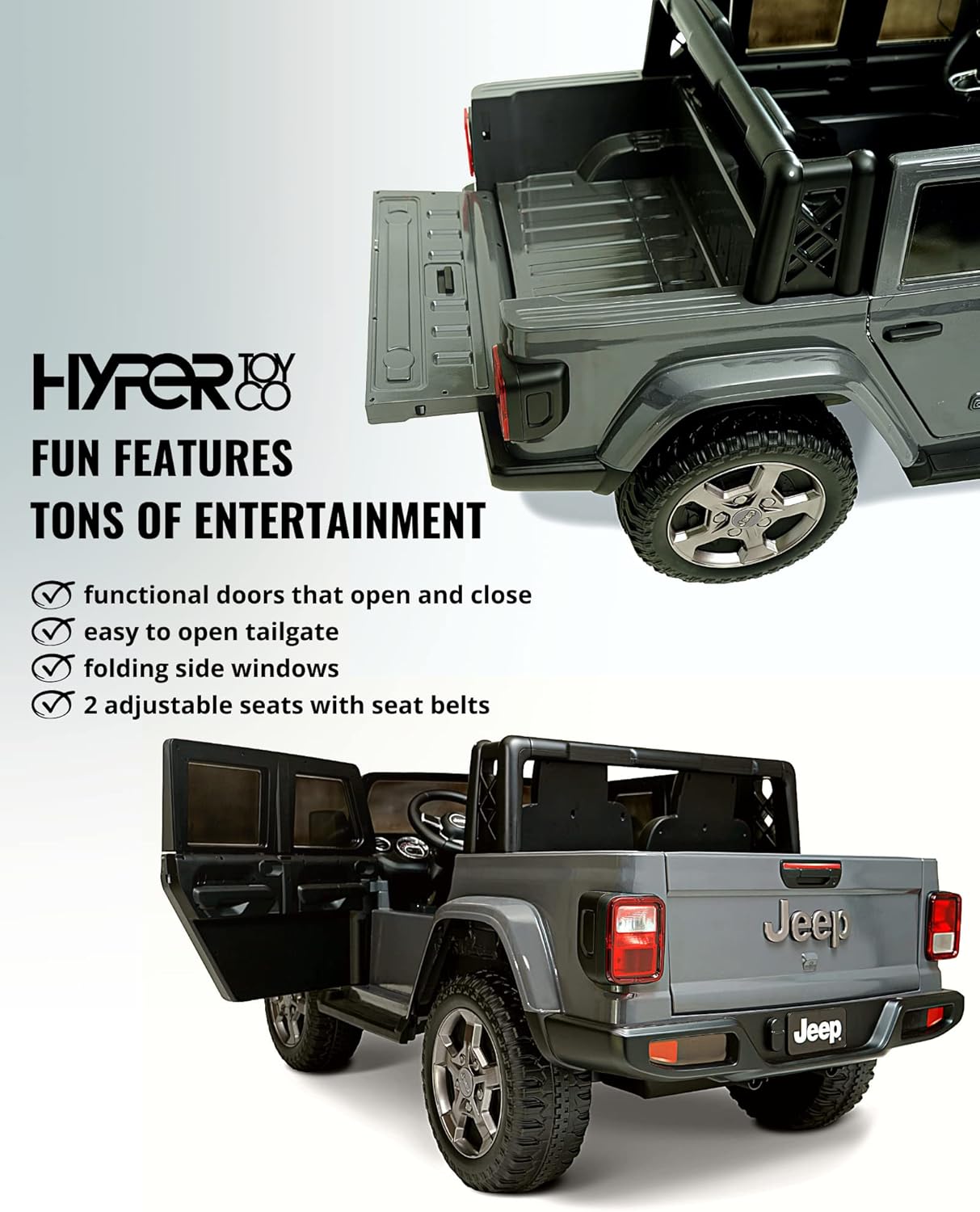
Image: The Hyper Jeep Gladiator ride-on car is shown with its functional doors open and the tailgate lowered, demonstrating its realistic design and interactive features.
5. Maintenance
Regular maintenance ensures the longevity and safe operation of your ride-on car.
5.1 Battery Care
- Always recharge the battery after each use.
- If storing the vehicle for an extended period, charge the battery fully before storage and then recharge it monthly.
- Do not completely drain the battery, as this can reduce its lifespan.
- Store the battery in a cool, dry place.
5.2 Cleaning and Storage
- Wipe the vehicle with a soft, damp cloth. Do not use abrasive cleaners or solvents.
- Do not wash the vehicle with a hose or immerse it in water.
- Store the vehicle indoors in a dry area when not in use to protect it from weather elements.
6. Troubleshooting
If you encounter issues, refer to the following common problems and solutions:
| Problem | Possible Cause | Solution |
|---|---|---|
| Vehicle does not move | Battery low or not connected; loose wire connection; motor issue. | Charge battery; check all wire connections; contact customer support if issue persists. |
| Vehicle moves slowly | Battery low; overloaded vehicle; operating on rough terrain. | Charge battery; reduce weight; move to smoother surface. |
| No sound from speakers | Sound controls off; loose wire connection. | Ensure sound controls are on; check connections. |
| Charger gets warm during charging | Normal operation. | This is normal. If it becomes excessively hot, unplug and contact support. |
7. Specifications
| Feature | Detail |
|---|---|
| Product Dimensions | 58.8 x 29 x 17 inches |
| Item Weight | 80 pounds |
| Model Number | HYP-J12-1210 |
| Recommended Age | 36 months - 17 years |
| Batteries | 1 Lithium Ion battery (included) |
| Manufacturer | Hyper Toy Company |
| Max Rider Weight | 110 lbs |
| Speed (Low) | 2 mph |
| Speed (High) | 5 mph |
| Reverse Speed | 2 mph |
8. Warranty and Support
For warranty information and customer support, please refer to the documentation included with your product or visit the official Hyper Toy Company website. Keep your proof of purchase for warranty claims.
Manufacturer: Hyper Toy Company
For further assistance, please contact Hyper Toy Company customer service.