
1. Introduction
Thank you for choosing the ZEBRONICS Zeb-Sound Bomb 1 TWS Earbuds. This manual provides detailed instructions for the proper use, setup, and maintenance of your new earbuds. Please read this manual carefully before using the product to ensure optimal performance and longevity.
2. Package Contents
- ZEBRONICS Zeb-Sound Bomb 1 TWS Earbuds (Left and Right)
- Portable Charging Case
- Type-C Charging Cable
- Extra Ear Tips (various sizes)
- User Manual
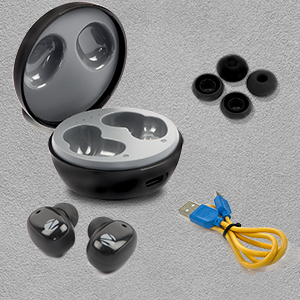
This image shows the complete package contents for the ZEBRONICS Zeb-Sound Bomb 1, including the earbuds, charging case, a Type-C charging cable, and various sizes of ear tips.
3. Product Overview
The Zeb-Sound Bomb 1 TWS Earbuds feature a compact design with touch controls and a portable charging case. Each earbud is equipped with a 6mm driver for clear audio.

This image shows the ZEBRONICS Zeb-Sound Bomb 1 TWS Earbuds securely placed within their charging case, viewed from the top. The case is open, revealing both earbuds and the charging indicator lights.

An angled view of the ZEBRONICS Zeb-Sound Bomb 1 TWS Earbuds inside their open charging case, highlighting the ergonomic design of the earbuds and the compact nature of the case.
4. Setup
4.1 Initial Charging
Before first use, ensure the earbuds and charging case are fully charged. Remove the protective stickers from the charging contacts on the earbuds.

A close-up of a ZEBRONICS Zeb-Sound Bomb 1 earbud, illustrating the protective sticker on the charging contacts that must be removed before initial use.
Place both earbuds into the charging case. Connect the Type-C charging cable to the case and a USB power source. The indicator lights on the case will show charging status. A full charge takes approximately 4 hours.

The ZEBRONICS Zeb-Sound Bomb 1 charging case with a Type-C charging cable connected, demonstrating the charging port location.
4.2 Bluetooth Pairing
- Ensure the earbuds are charged and placed in the charging case.
- Open the charging case lid. The earbuds will automatically enter pairing mode, indicated by flashing LED lights on the earbuds.
- On your mobile device, enable Bluetooth.
- Search for available devices and select "Zeb-Sound Bomb 1" from the list.
- Once connected, the earbud LEDs will stop flashing, indicating successful pairing.
5. Operating Instructions
5.1 Power On/Off
- Power On: Open the charging case lid, and the earbuds will power on automatically. Alternatively, long-press the touch area on both earbuds for 3 seconds.
- Power Off: Place the earbuds back into the charging case and close the lid. They will power off automatically. Alternatively, long-press the touch area on both earbuds for 5 seconds.
5.2 Music Control
- Play/Pause: Single tap on either earbud.
- Next Track: Double tap the right earbud.
- Previous Track: Double tap the left earbud.
5.3 Call Control
- Answer/End Call: Single tap on either earbud.
- Reject Call: Long press on either earbud for 2 seconds.
5.4 Voice Assistant
Triple tap on either earbud to activate your device's voice assistant (e.g., Google Assistant, Siri).
6. Charging
The earbuds charge automatically when placed inside the charging case. The case itself is charged via a Type-C cable. The LED indicators on the case will show the charging status and battery level.
- Earbud Charging: Place earbuds in the case. LEDs on earbuds will indicate charging.
- Case Charging: Connect the Type-C cable to the case and a power adapter. The case LEDs will indicate charging progress.
7. Maintenance
To ensure the longevity and optimal performance of your Zeb-Sound Bomb 1 TWS Earbuds, follow these maintenance guidelines:
- Cleaning: Use a soft, dry cloth to clean the earbuds and charging case. Do not use harsh chemicals or abrasive materials.
- Storage: Store the earbuds in their charging case when not in use to protect them from dust and damage.
- Water Resistance: The earbuds are splash-proof. Avoid submerging them in water or exposing them to heavy rain. Dry them thoroughly if they get wet.

An image depicting the ZEBRONICS Zeb-Sound Bomb 1 earbuds with water droplets, visually representing their splash-proof design.
8. Troubleshooting
If you encounter issues with your earbuds, refer to the following common solutions:
| Problem | Possible Solution |
|---|---|
| Earbuds not pairing | Ensure earbuds are charged. Turn off and on Bluetooth on your device. Forget "Zeb-Sound Bomb 1" from your device's Bluetooth list and re-pair. |
| Only one earbud working | Place both earbuds back in the case, close the lid, then open again. Ensure both earbuds are charged. Try re-pairing. |
| Earbuds not charging | Ensure protective stickers are removed from earbud contacts. Check Type-C cable and power source. Ensure case is charged. |
| Low volume or poor sound quality | Adjust volume on your device. Ensure ear tips fit snugly in your ears. Clean any debris from earbud speakers. |
9. Specifications
| Feature | Specification |
|---|---|
| Model Name | ZEB-SOUND BOMB 1 |
| Connectivity Technology | Bluetooth 5.0 |
| Driver Size | 6mm |
| Playback Time | Up to 12 hours (at 50% volume) |
| Charging Time | Approx. 4 hours (for case) |
| Charging Interface | Type-C |
| Control Type | Touch Control, Voice Control |
| Water Resistance Level | Water Resistant (Splash Proof) |
| Item Weight | 35 grams |
| Ear Placement | In Ear |
| Impedance | 16 Ohm |
10. Safety Information
- Do not expose the product to extreme temperatures or direct sunlight.
- Avoid using the earbuds at excessively high volumes for prolonged periods to prevent hearing damage.
- Keep the product away from children and pets.
- Do not attempt to disassemble or modify the earbuds or charging case. This will void the warranty and may cause damage.
- Dispose of the product responsibly according to local regulations.
11. Warranty and Support
Your ZEBRONICS Zeb-Sound Bomb 1 TWS Earbuds come with a standard manufacturer's warranty. For detailed warranty terms, service, or technical support, please refer to the warranty card included in your package or visit the official ZEBRONICS website. You may also contact ZEBRONICS customer service directly for assistance.


