Introduction
This manual provides comprehensive instructions for the setup, operation, maintenance, and troubleshooting of your MSI WS76 Workstation Laptop. Designed for professionals, this powerful mobile workstation features an Intel Core i9 processor, NVIDIA Quadro RTX A5000 graphics, and a 17.3-inch 144Hz FHD display, making it ideal for demanding tasks such as 3D modeling, engineering, and content creation.
What's in the Box
Upon unboxing your MSI WS76 Workstation Laptop, please ensure all the following items are present:
- MSI WS76 Workstation Laptop
- Power Adapter
Product Overview
Familiarize yourself with the key components and features of your MSI WS76 Workstation Laptop.
Front View

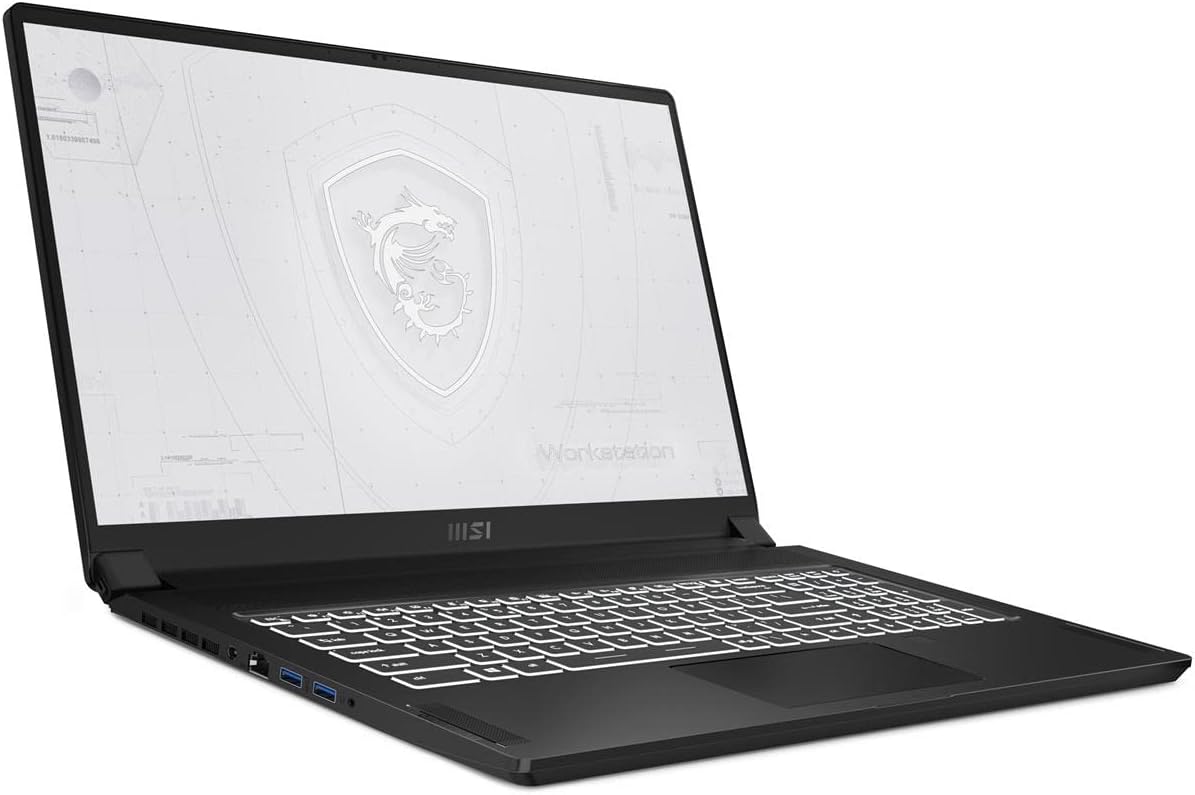
This image shows the MSI WS76 Workstation Laptop from the front, with the lid open, revealing the 17.3-inch display and the full-sized keyboard. The screen displays a stylized MSI Workstation logo.
Left Side View

This image provides a view of the left side of the laptop, highlighting the various input/output ports available, including USB ports and possibly an audio jack.
Right Side View
This image displays the right side of the laptop, showcasing additional connectivity options such as USB ports and potentially a card reader or other specialized ports.
Top View (Lid Closed)

This image presents the top surface of the laptop's lid when closed, featuring the prominent MSI dragon logo.
Rear View (Lid Closed)

This image shows the rear edge of the laptop when the lid is closed, indicating the design and any rear-facing vents or ports.
Key Features:
- Visual Performance: 17.3" 144Hz FHD display for demanding visual tasks.
- Redefined Power: 11th Gen Intel Core i9 processor with 8 cores for high performance.
- Quadro Performance: NVIDIA Quadro RTX A5000 for real-time ray tracing and advanced graphics.
- Strong Security: Integrated TPM 2.0 and fingerprint reader.
- Versatile Connections: Includes Thunderbolt 4 (with power delivery and 40Gbps data transfer) and USB 4.0.
- ISV Certified: Officially recognized and certified by major ISVs for engineering, 3D modeling, and design.
Setup
- Unpack the Laptop: Carefully remove the laptop and all accessories from the packaging.
- Connect Power: Plug the power adapter into the laptop's power input port and then into a wall outlet.
- Initial Boot: Open the laptop lid and press the power button. The system will begin the initial Windows 10 Pro setup process.
- Follow On-Screen Instructions: Complete the Windows setup, including region, language, network connection, and user account creation.
- Install Updates: After initial setup, connect to the internet and check for Windows updates and MSI driver updates to ensure optimal performance and security.
Operating the Laptop
Power Management
- Power On/Off: Press the power button located on the keyboard deck to turn the laptop on or off.
- Sleep Mode: Close the lid or select "Sleep" from the Start Menu to put the laptop into sleep mode.
- Battery Life: Optimize battery life by adjusting screen brightness, closing unused applications, and utilizing Windows power plans.
Keyboard and Touchpad
- Keyboard Backlight: Adjust keyboard backlight intensity using the dedicated function keys (Fn + Fx).
- Touchpad Gestures: Utilize multi-touch gestures for navigation, zooming, and scrolling. Refer to Windows settings for customization.
Connecting Peripherals
The MSI WS76 offers a wide range of ports:
- USB Ports: Connect USB devices such as external hard drives, mice, and keyboards.
- Thunderbolt 4: Use for high-speed data transfer (up to 40Gbps), external displays, or power delivery.
- HDMI/DisplayPort: Connect external monitors for extended display setups.
- Audio Jack: Connect headphones or external speakers.
- Ethernet Port: For wired network connections.
Maintenance
- Cleaning: Use a soft, lint-free cloth to clean the screen and chassis. For stubborn marks, dampen the cloth slightly with water or a screen cleaner. Avoid harsh chemicals.
- Software Updates: Regularly check for and install updates for Windows, graphics drivers (NVIDIA), and MSI utilities to ensure system stability and performance.
- Battery Care: To prolong battery lifespan, avoid frequently discharging the battery completely. Store the laptop in a cool, dry place if not used for extended periods.
- Ventilation: Ensure the laptop's ventilation grilles are not obstructed to prevent overheating. Use the laptop on a hard, flat surface.
Troubleshooting
This section addresses common issues you might encounter with your MSI WS76 Workstation Laptop.
No Power / Laptop Not Turning On
- Ensure the power adapter is securely connected to both the laptop and a working power outlet.
- Verify the power outlet is functional by plugging in another device.
- If the battery is completely drained, allow it to charge for at least 30 minutes before attempting to power on.
Display Issues (No Image / Flickering)
- Try connecting an external monitor to determine if the issue is with the laptop's internal display.
- Restart the laptop.
- Ensure graphics drivers are up to date.
System Performance is Slow
- Close unnecessary applications running in the background.
- Check Task Manager for processes consuming high CPU or RAM.
- Ensure sufficient free space on the SSD.
- Run a virus scan.
- Update drivers and Windows.
Overheating
- Ensure ventilation vents are clear of dust and obstructions.
- Use the laptop on a hard, flat surface.
- Consider using a laptop cooling pad for prolonged heavy workloads.
Fingerprint Reader Not Working
- Ensure your finger is clean and dry.
- Re-register your fingerprint in Windows settings.
- Check for driver updates for the fingerprint sensor.
Specifications
| Feature | Detail |
|---|---|
| Model Name | WS76 11UM-468 |
| Processor | Intel Core i9-11900H (2.5 GHz, 8 Cores) |
| Graphics | NVIDIA Quadro RTX A5000 (16 GB GDDR6) |
| Display | 17.3 Inches, 144Hz FHD (1920 x 1080 pixels) |
| RAM | 64 GB DDR4 (3200 MHz) |
| Storage | 1 TB SSD |
| Operating System | Windows 10 Pro |
| Connectivity | Thunderbolt 4, USB 4.0, USB 3.0 (x2), WiFi 6E, Bluetooth |
| Security Features | TPM 2.0, Fingerprint Reader |
| Dimensions (LxWxH) | 0.8 x 15.59 x 10.21 inches |
| Weight | 5.39 pounds |
| Color | Black |
Warranty and Support
Your MSI WS76 Workstation Laptop comes with a 3-year onsite warranty, as specified by the manufacturer. For warranty claims or technical support, please contact MSI customer service directly.
Before contacting support, please have your product model number (WS76 11UM-468) and serial number ready. You may also find helpful resources, drivers, and FAQs on the official MSI support website.
For the most up-to-date support information, please visit the official MSI website or refer to the documentation included with your product.