MSI Creator 17 Professional Laptop User Manual
1. Introduction
This manual provides essential information and instructions for the MSI Creator 17 Professional Laptop, model B11UE-471. It covers setup, operation, maintenance, and troubleshooting to ensure optimal performance and user experience.
2. Product Overview
The MSI Creator 17 is a high-performance laptop designed for creative professionals. It features a 17.3-inch UHD display, an Intel Core i7-11800H processor, and NVIDIA GeForce RTX 3060 graphics.

Front view of the MSI Creator 17 Professional Laptop, showcasing its 17.3-inch display with vibrant colors.

Angled view of the laptop from the left, highlighting its sleek design.
3. What's in the Box
Upon unboxing your MSI Creator 17 Professional Laptop, verify that all the following items are included:
- MSI Creator 17 Professional Laptop
- Power Adapter
- User Guide
- Warranty Information

The image shows the MSI Creator 17 laptop, power adapter, and various user manuals and warranty cards laid out on a dark surface.
4. Setup
- Unboxing: Carefully remove the laptop and all accessories from the packaging.
- Connect Power: Connect the power adapter to the laptop's DC-in port and then plug it into a power outlet.
- Initial Boot: Open the laptop lid and press the power button. Follow the on-screen instructions to complete the Windows 10 Home setup.
5. Operating Instructions
5.1 Power On/Off
To power on the laptop, simply open the lid or press the power button located on the keyboard deck. To shut down, navigate through the Windows Start menu.
5.2 Keyboard and Touchpad
The laptop features a full-size backlit keyboard with a numeric keypad for enhanced productivity. The touchpad supports multi-touch gestures for navigation. A fingerprint sensor is integrated for secure login via Windows Hello.

The laptop's keyboard and touchpad area, with the fingerprint sensor clearly visible.
5.3 Display Modes (True Color)
Utilize the MSI True Color application to switch between various display modes optimized for different tasks, such as sRGB, Adobe RGB, DCI-P3, Anti-Blue Light, Office, and Movie modes. Custom settings are also available.
6. Connectivity
The MSI Creator 17 offers a wide range of ports for versatile connectivity:
- Left Side: DC-in, RJ45 (Ethernet), 2x USB 3.2 Gen 2 Type-A, Audio Combo Jack.
- Right Side: Battery Indicator Light, USB 3.2 Gen 2 Type-C / DisplayPort, SD Card Reader, Thunderbolt™ 4, HDMI, Kensington Security Lock.
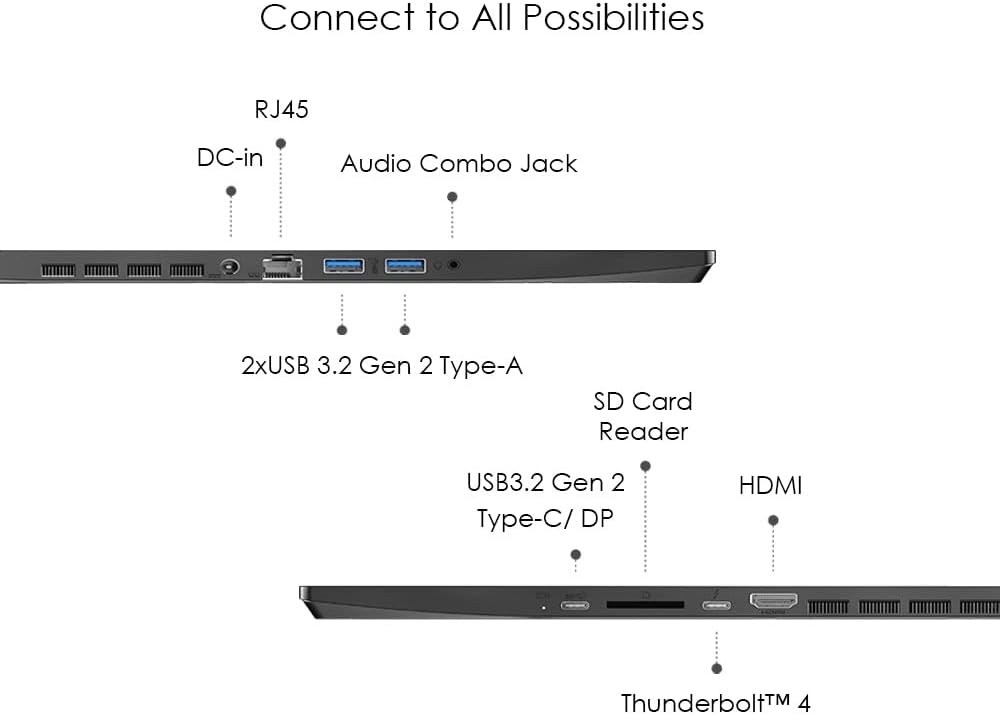
Detailed diagram illustrating the various input/output ports available on the MSI Creator 17 laptop.
The laptop also supports Wi-Fi 6E for high-speed wireless connectivity.

Visual representation of the laptop's Wi-Fi 6E capabilities for extraordinary wireless experience.
7. Performance
The MSI Creator 17 is equipped with an 11th Gen Intel Core i7-11800H processor, featuring 8 cores and 16 threads, boosting up to 4.9 GHz. Graphics are handled by an NVIDIA GeForce RTX 3060 GPU. It includes 16GB of DDR4 RAM and a 512GB NVME SSD for fast storage and multitasking.

The laptop's powerful 11th Gen Intel Core i7 processor is designed for demanding tasks.

The NVIDIA GeForce RTX 3060 GPU provides accelerated performance for creative workflows.
8. Cooling System
The Creator 17 features MSI's exclusive Cooler Boost Trinity+ technology, ensuring optimal thermal dissipation. It includes 3 fans, 6 heat pipes, and 0.1mm sharp-edged fan blade design for up to 15% increased airflow.

A detailed diagram of the Cooler Boost Trinity+ system, showing its advanced fan and heat pipe configuration.
9. Camera and Audio
The laptop is equipped with a 720p webcam, suitable for video conferencing. For audio, it features world-class Dynaudio system speakers with Hi-Res Audio certification, providing clear and powerful sound.
10. Display Features
The 17.3-inch UHD (3840x2160) 120Hz display offers vibrant colors and fast response times. It features True Pixel Mini LED technology, VESA Certified DisplayHDR 1000, and CalMAN verification for precise color accuracy (Delta-E < 2).

The MSI Creator 17 features a Mini LED display, combining advanced technology with aesthetic design.

The world's first Creator Laptop with True Pixel Mini LED Display, offering brilliant visuals and 1000 nits brightness.
11. Battery and Portability
The laptop is equipped with a 99Whr battery, providing over 9 hours of productivity on the go. Its lightweight aluminum chassis enhances portability.

The Creator 17 offers extended battery life for creativity on the go.
12. Security Features
Access your Creator 17 securely with Windows Hello, supporting facial recognition and a fingerprint reader. It also supports the latest FIDO 2 authentication for enhanced security.
13. Pre-installed Software
The laptop comes with Windows 10 Home pre-installed. It also includes MSI's proprietary software suite for system management and display customization. Some third-party applications may also be pre-loaded.

The MSI Creator 17 is optimized and tested to run demanding creative software like Adobe Photoshop and Premiere Pro.
14. Maintenance
- Keep the laptop clean by regularly wiping surfaces with a soft, dry cloth.
- Ensure software and drivers are updated regularly through Windows Update and MSI's utility software.
- Avoid placing the laptop on soft surfaces that may block ventilation.
15. Troubleshooting
If you encounter any issues, refer to the detailed user guide provided with your laptop. For common problems like power issues, display anomalies, or connectivity troubles, try the following:
- Restart the laptop.
- Ensure all cables and peripherals are securely connected.
- Check for available software and driver updates.
If problems persist, contact MSI customer support for assistance.
16. Specifications
| Feature | Detail |
|---|
| Standing screen display size | 17.3 Inches |
| Screen Resolution | 3840 x 2160 pixels (UHD) |
| Processor | 2.4 GHz Intel Core i7-11800H |
| RAM | 16 GB DDR4 (3200 MHz) |
| Hard Drive | 512 GB NVME SSD |
| Graphics Coprocessor | NVIDIA GeForce RTX 3060 (6 GB) |
| Operating System | Windows 10 Home |
| Wireless Type | Bluetooth, Wi-Fi 6E |
| Average Battery Life | 9 Hours (99Whr) |
| Item Weight | 5.4 pounds |
| Product Dimensions | 0.8 x 15.59 x 10.21 inches |
17. Warranty and Support
The MSI Creator 17 Professional Laptop comes with a 12-month manufacturer's warranty. For technical support, warranty claims, or service inquiries, please refer to the contact information provided in your warranty card or visit the official MSI support website.
Official MSI Creator 17 Product Video, showcasing key features and design elements.
18. Military-Grade Durability
The MSI Creator 17 is built to meet the MIL-STD-810G military standard, ensuring reliability and durability for professional use.

The laptop's military-grade durability ensures it can withstand challenging environments.


