
Introduction
The Kemei KM-690 is a versatile 5-in-1 professional grooming kit designed for comprehensive personal care. This multifunctional device combines a hair trimmer, beard shaver, and nose trimmer into a single unit, offering precision and convenience for various grooming needs. Its ergonomic design and cordless operation make it suitable for both home and travel use.
This manual provides detailed instructions on the safe and effective use, maintenance, and care of your Kemei KM-690 grooming kit.
Safety Information
Please read all safety instructions carefully before using the appliance for the first time and keep them for future reference. Improper use may result in injury or damage.
- Always unplug the trimmer before cleaning.
- Avoid contact with skin and eyes.
- Keep away from water sources. Do not use this appliance near bathtubs, showers, basins, or other vessels containing water.
- Do not use on infants or children.
- Follow recommended cleaning and maintenance procedures to prevent skin irritation.
- Do not use the appliance if it is damaged or not functioning correctly.
- This product is intended for personal use only.
Package Contents
Verify that all items are present in the package:
- Kemei KM-690 Main Trimmer Unit
- Haircut Tool Bit (Hair Clipper Head)
- Lettering Tool Bit (Precision Trimmer Head)
- Shaving Tool Bit (Foil Shaver Head)
- Nasal Hair Tool Bit (Nose/Ear Trimmer Head)
- Barbering Tool Bit (Body Groomer Head)
- Adjustable Limit Combs (e.g., 3mm, 5mm, 7mm, 9mm, 11mm)
- Cleaning Brush
- Lubricating Oil
- USB Charging Cable
- Charging Adapter
- Charging Base/Bracket
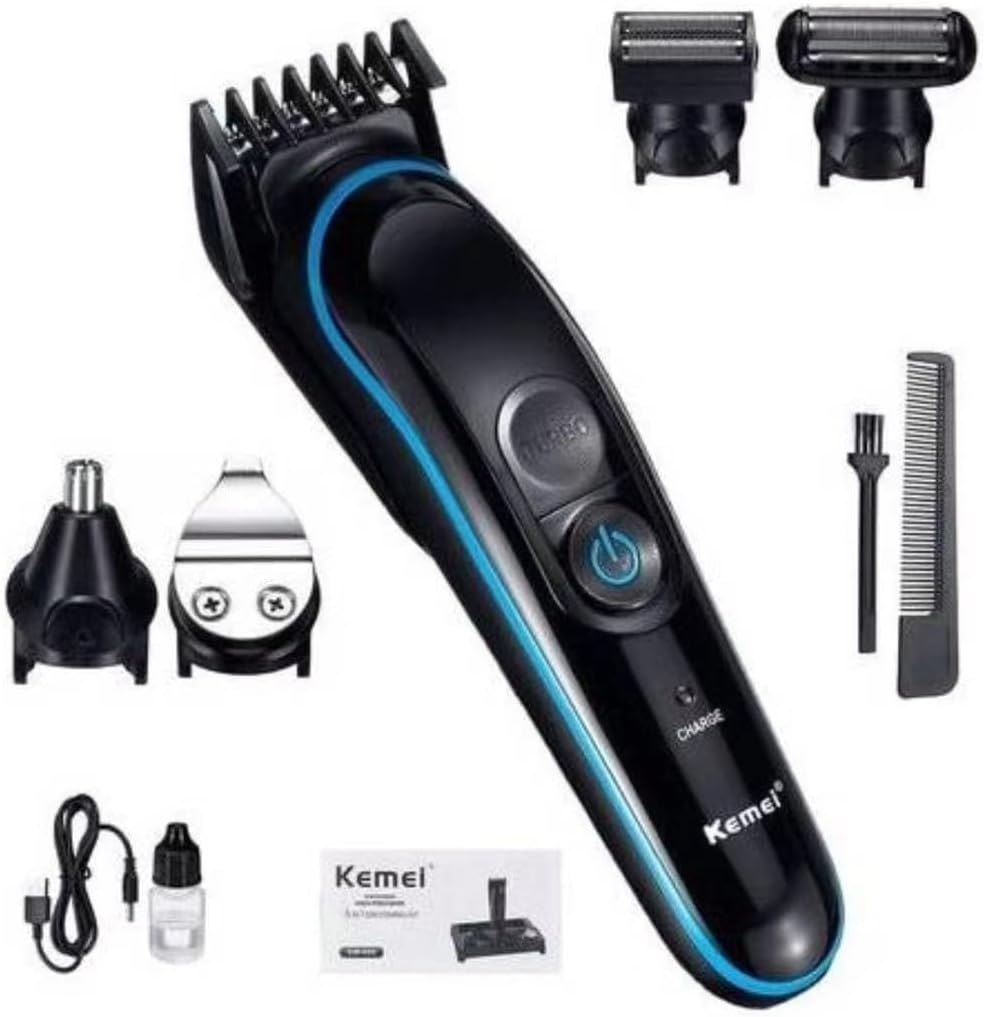
This image displays the Kemei KM-690 main unit along with its various interchangeable heads, including the hair trimmer, beard shaver, nose trimmer, and precision trimmer. Also shown are the charging cable, cleaning brush, and lubricating oil.
Product Overview / Components
The Kemei KM-690 grooming kit consists of a main power unit and five specialized interchangeable heads, along with essential accessories for maintenance and charging.
Main Unit Features:
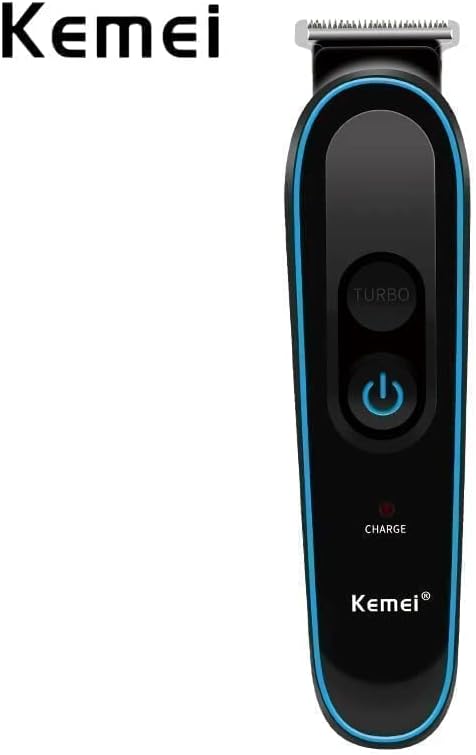
- Power Button: Turns the device On/Off.
- Turbo Button: Activates a higher speed for thicker hair.
- LED Display: Shows battery life and charging status.
- Charge Indicator: Illuminates when charging.
Interchangeable Heads:
- Haircut Tool Bit: Standard hair clipper for general hair trimming and cutting.
- Lettering Tool Bit: Narrow precision blade for detailing, outlining, and creating sharp lines.
- Shaving Tool Bit: Foil shaver for a close, smooth shave on the face or body.
- Nasal Hair Tool Bit: Rotary blade designed for safe and comfortable trimming of nose and ear hair.
- Barbering Tool Bit: Wider blade for efficient body hair grooming.
A detailed view of the five interchangeable tool bits for the Kemei KM-690 grooming kit: haircut tool bit, lettering tool bit, shaving tool bit, nasal hair tool bit, and barbering tool bit.
Setup
Charging the Device:
- Ensure the trimmer is turned off.
- Connect the USB charging cable to the charging port on the trimmer or place the trimmer onto the charging base.
- Plug the USB cable into the charging adapter, and then plug the adapter into a standard electrical outlet.
- The LED display will indicate the charging status. A full charge typically takes approximately 1.5 hours.
- Once fully charged, the device provides up to 120 minutes of cordless runtime.

The Kemei KM-690 trimmer placed on its blue charging base, surrounded by its various attachments and the charging cable, illustrating the organized storage and charging solution.
Attaching/Detaching Heads:
- To attach a head, align the head with the main unit and gently push until it clicks into place.
- To detach a head, hold the main unit firmly and pull the head upwards or outwards, depending on the head type, until it releases. Refer to the specific head's design for the correct removal method.
Operating Instructions
General Operation:
- Power On/Off: Press the power button once to turn the trimmer on. Press it again to turn it off.
- Turbo Mode: While the trimmer is on, press the 'Turbo' button to activate a higher speed setting for more powerful cutting, especially useful for thicker or denser hair. Press it again to return to normal speed.
Using the Haircut Tool Bit:
- Attach the Haircut Tool Bit to the main unit.
- Select the desired cutting length by attaching one of the adjustable limit combs. The combs typically offer lengths such as 3mm, 5mm, 7mm, 9mm, and 11mm.
- Turn on the trimmer and gently guide it against the direction of hair growth.
- For best results, ensure the comb attachment is flat against the skin.

A close-up of the Kemei KM-690 trimmer showing the adjustable limit comb, which allows for various cutting lengths from 3mm to 11mm.
Using the Shaving Tool Bit:
- Attach the Shaving Tool Bit.
- Turn on the trimmer.
- Hold the shaver flat against your skin and move it in short, gentle strokes against the direction of hair growth.
Using the Nasal Hair Tool Bit:
- Attach the Nasal Hair Tool Bit.
- Turn on the trimmer.
- Gently insert the tip of the trimmer into your nostril or ear canal. Move it in a circular motion to trim unwanted hair. Do not insert too deeply.
Using the Lettering Tool Bit and Barbering Tool Bit:
- Attach the desired precision head.
- Turn on the trimmer.
- Use the Lettering Tool Bit for precise lines, edges, and intricate designs.
- Use the Barbering Tool Bit for general body hair trimming or larger areas requiring a close trim.
Maintenance and Cleaning
Regular cleaning ensures optimal performance and extends the lifespan of your grooming kit.
- Before Cleaning: Always ensure the trimmer is turned off and unplugged from the power source.
- Cleaning Blades: Use the provided cleaning brush to remove hair clippings from the blades and comb attachments. For a more thorough clean, some heads may be rinsed under running water (check product specifications for water resistance). Ensure the heads are completely dry before reattaching or storing.
- Oiling Blades: After every few uses, or if the blades feel sluggish, apply a small drop of the lubricating oil (provided) to the blades. Turn on the trimmer for a few seconds to distribute the oil evenly. This helps maintain blade sharpness and smooth operation.
- Cleaning the Main Unit: Wipe the main unit with a dry or slightly damp cloth. Do not submerge the main unit in water.
- Storage: Store the trimmer and its accessories in a dry place, away from direct sunlight and moisture. The charging base can be used for organized storage.
Troubleshooting
If you encounter issues with your Kemei KM-690, refer to the following common problems and solutions:
| Problem | Possible Cause | Solution |
|---|---|---|
| Trimmer does not turn on. | Battery is depleted. | Charge the trimmer for at least 1.5 hours. |
| Poor cutting performance / pulling hair. | Blades are clogged with hair or not lubricated. | Clean the blades thoroughly with the brush and apply lubricating oil. |
| Trimmer makes unusual noise. | Blades may be misaligned or require lubrication. | Ensure the head is properly attached. Clean and oil the blades. If the issue persists, contact customer support. |
| Charging indicator not working. | Charging cable or adapter issue. | Ensure the cable is securely connected to both the trimmer and the power source. Try a different USB port or adapter if available. |
Specifications
| Feature | Detail |
|---|---|
| Brand | KEMEI |
| Model Number | KM-690 |
| Power Source | Electric & Battery |
| Battery Type | 1 Lithium Ion battery (included) |
| Charging Time | Approximately 1.5 hours |
| Usage Time | Up to 120 minutes (cordless) |
| Blade Material | Alloy Steel |
| Color | Black |
| Item Weight | 0.5 Kilograms |
| Package Dimensions | 22.4 x 18.2 x 6.9 cm |
| Special Features | LED Display, Turbo Mode, Noise-free operation |
Warranty and Support
For warranty information, technical support, or service inquiries, please refer to the warranty card included with your product or contact KEMEI customer service directly. Keep your purchase receipt as proof of purchase.
For further assistance, you may visit the official KEMEI website or contact their authorized service centers.


