
1. Introduction
Thank you for choosing the Redragon H250 Themis Gaming Headset. This manual provides essential information for setting up, operating, and maintaining your headset to ensure optimal performance and longevity. Please read these instructions carefully before using the product.
2. Product Overview
The Redragon H250 Themis is an over-ear gaming headset designed for PC use, featuring a built-in microphone, volume control, and LED backlighting. It connects via 3.5mm audio jacks and a USB connector for the LED lights.
2.1 Headset Components
- Adjustable Headband: For a comfortable fit.
- Over-Ear Earcups: Designed for comfort during extended use.
- Integrated Microphone: Flexible and adjustable for clear communication.
- Inline Control Unit: For volume adjustment.
- Audio Cable (3.5mm jacks): Separate jacks for audio output and microphone input.
- USB Cable: Powers the LED backlighting.
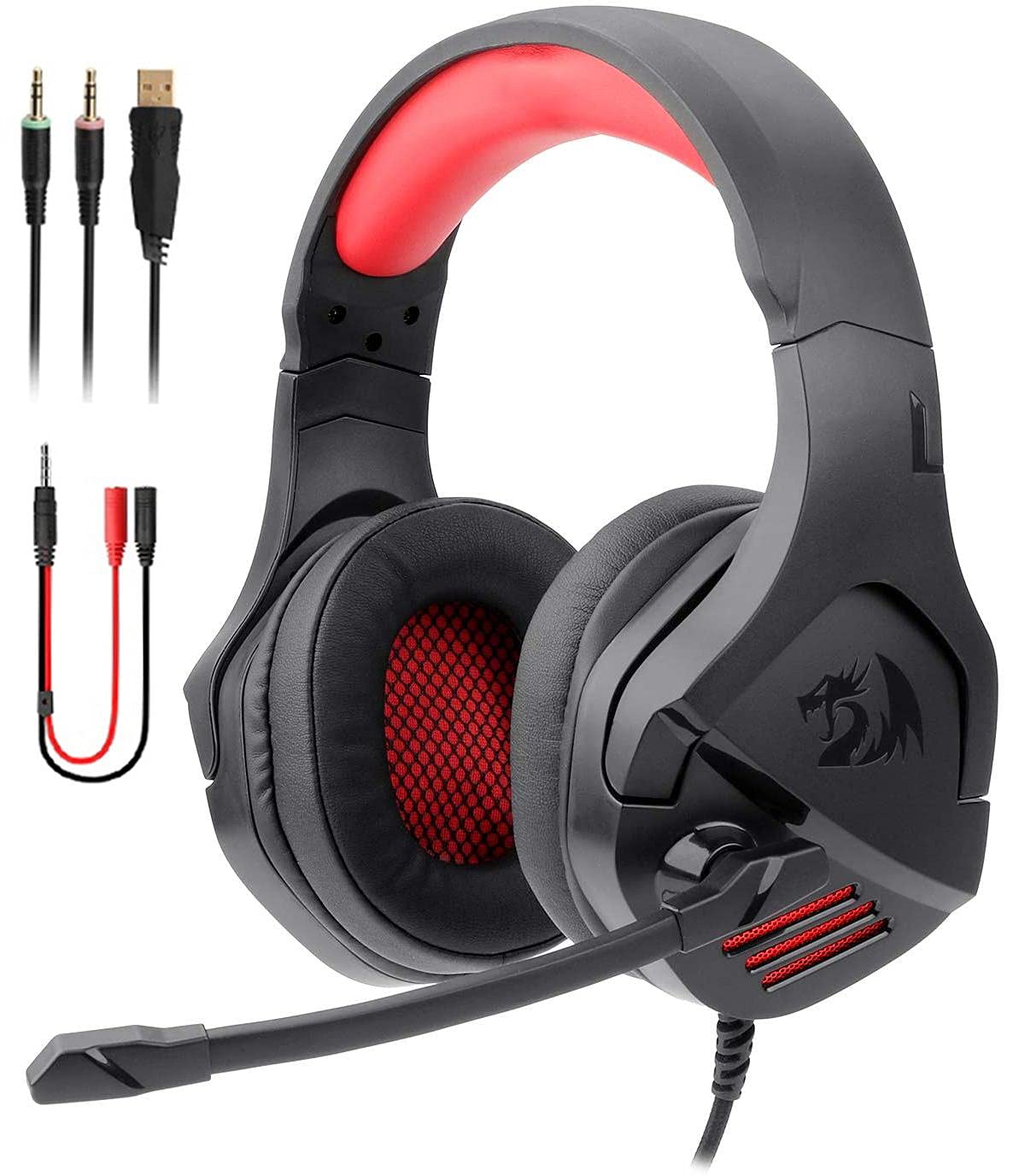
Figure 2.1: Overview of the Redragon H250 Themis Gaming Headset.

Figure 2.2: Detail of the earcup design and LED mesh.

Figure 2.3: Headband adjustment mechanism for a customized fit.
3. Setup Instructions
3.1 Connecting to a PC
- Identify Ports: Locate the 3.5mm audio output (usually green) and microphone input (usually pink) ports on your computer. Also, identify an available USB port.
- Connect Audio: Plug the green 3.5mm jack from the headset into your PC's audio output port.
- Connect Microphone: Plug the pink 3.5mm jack from the headset into your PC's microphone input port.
- Connect USB for LED: Plug the USB connector into an available USB port on your PC. This will power the headset's LED backlighting.
- Adjust Settings: After connecting, you may need to adjust your PC's sound settings to select the headset as the default playback and recording device.
4. Operating Instructions
4.1 Volume Control
The headset features an inline control unit on the cable. Use the scroll wheel or dedicated buttons on this unit to adjust the audio volume up or down. Ensure your PC's master volume is also set appropriately.
4.2 Microphone Usage
The integrated microphone is flexible. Position it close to your mouth for optimal voice clarity. If the microphone is not working, check your PC's sound settings to ensure it is selected as the active input device.
4.3 LED Backlighting
The LED backlighting on the earcups will illuminate automatically when the USB connector is plugged into a powered USB port. There are no separate controls for the LED lighting on the headset itself.
5. Maintenance
5.1 Cleaning
- Use a soft, dry cloth to wipe the exterior of the headset.
- For ear cushions, gently wipe with a slightly damp cloth and allow to air dry completely before use.
- Do not use harsh chemicals, solvents, or abrasive cleaners.
5.2 Storage
Store the headset in a cool, dry place away from direct sunlight and extreme temperatures. Avoid placing heavy objects on the headset.
5.3 Cable Care
The cable is designed to be foldable for convenience. Avoid sharp bends or excessive pulling on the cables to prevent damage. Always grasp the plug, not the cable, when disconnecting.
6. Troubleshooting
| Problem | Possible Cause | Solution |
|---|---|---|
| No sound from headset | Incorrect audio jack connection; PC audio settings; Headset volume too low. | Ensure green 3.5mm jack is fully inserted into PC's audio output. Check PC sound settings to select headset as default playback device. Increase headset inline volume and PC master volume. |
| Microphone not working | Incorrect microphone jack connection; PC microphone settings. | Ensure pink 3.5mm jack is fully inserted into PC's microphone input. Check PC sound settings to select headset microphone as default recording device. |
| LED backlighting not on | USB connector not plugged in or not receiving power. | Ensure USB connector is firmly plugged into a working USB port on your PC. Try a different USB port. |
7. Specifications
| Model Name | Redragon Themis H250 |
| Connectivity Technology | Wired (3.5mm Jack, USB for LED) |
| Headphone Form Factor | Over-Ear |
| Compatible Devices | PC |
| Microphone | Yes |
| Noise Control | No Noise Cancellation |
| Control Type | Volume Control (Inline) |
| Cable Feature | Foldable |
| Materials | Plastic |
| Color | Black |
| Item Weight | 11 grams |
| Shipping Dimensions | 25.7 x 22.5 x 10.1 cm |
| Water Resistance Level | Not Water Resistant |
| Included Components | Ear Cushions |
8. Safety Information
- Avoid prolonged listening at high volumes to prevent hearing damage.
- Do not expose the headset to water or excessive moisture.
- Keep out of reach of children.
- Do not attempt to disassemble or modify the headset. This will void the warranty.
- Use only as intended for gaming and audio playback on compatible devices.
9. Warranty and Support
Redragon products are designed for reliability and performance. For warranty information or technical support, please refer to the documentation included with your purchase or visit the official Redragon website. Keep your proof of purchase for warranty claims.


