
1. Introduction and Overview
Thank you for choosing the SKMEI Analog-Digital Watch Model 8899.0. This watch combines classic analog timekeeping with modern digital functions, offering versatility and durability. It features a robust design, a comfortable rubber strap, and is water-resistant up to 50 meters, making it suitable for daily wear and various activities.
Key features include:
- Analog and Digital Time Display
- Date and Day Display
- Alarm Function
- Stopwatch Function
- Electroluminescent (EL) Backlight
- 50-Meter Water Resistance

Image 1.1: Overview of the SKMEI Model 8899.0 watch components. This image displays the central watch with surrounding callouts pointing to specific parts: the watch case, watch dial, watch band, watch mirror, watch clasp, and the back cover, illustrating the watch's construction.
2. Setup
2.1 Button Functions
Your SKMEI watch typically features four buttons for operation, usually labeled A, B, C, D or similar, located around the watch case. Refer to the diagram below for common button placements and their primary functions:
- Button A (Top Left): Used for activating the backlight.
- Button B (Top Right): Used for starting/stopping stopwatch, adjusting values in setting mode.
- Button C (Bottom Left): Used for changing modes (Time, Alarm, Stopwatch, etc.).
- Button D (Bottom Right): Used for resetting stopwatch, selecting items in setting mode.
2.2 Initial Time and Date Setting
- In normal time display mode, press Button C repeatedly until the digital time display starts flashing, indicating you are in setting mode.
- Press Button D to cycle through the settings: seconds, hour, minute, month, date, day.
- Use Button B to adjust the flashing value (increase or decrease).
- Once all settings are correct, press Button C again to exit setting mode.
- To set the analog hands, pull out the crown (small knob on the side, usually right) and rotate it to adjust the hands. Push the crown back in to synchronize with the digital time.
3. Operating Instructions
3.1 Using the Alarm
- From normal time display, press Button C until the alarm mode is displayed.
- Press Button D to select the hour or minute to set.
- Use Button B to adjust the alarm time.
- Press Button C to confirm and exit alarm setting.
- To turn the alarm ON/OFF, press Button B while in alarm mode. An alarm icon will appear/disappear.
3.2 Using the Stopwatch
- From normal time display, press Button C until the stopwatch mode is displayed (usually shows 00:00:00).
- Press Button B to start the stopwatch.
- Press Button B again to pause the stopwatch.
- Press Button D to reset the stopwatch to zero.
- To resume from a paused state, press Button B.
3.3 Activating the Backlight
Press Button A (top left) to illuminate the digital display for a few seconds, allowing for visibility in low-light conditions.
3.4 Water Resistance Guidelines
This watch is water-resistant up to 50 meters (5 ATM). This means it is suitable for everyday use, showering, and swimming in shallow water. It is not suitable for diving, snorkeling, or high-pressure water activities. Do not operate buttons or pull the crown while the watch is wet or submerged, as this can compromise the water resistance.
4. Maintenance
4.1 Cleaning Your Watch
To clean your watch, wipe it gently with a soft, damp cloth. For the rubber strap, a mild soap solution can be used, followed by rinsing with clean water and drying thoroughly. Avoid using harsh chemicals, solvents, or abrasive cleaners, as these can damage the watch's finish or materials.
4.2 Battery Replacement
When the display becomes dim or the watch stops functioning, it may be time to replace the battery. Battery replacement should ideally be performed by a qualified watch technician to ensure proper sealing and maintain water resistance. Attempting to replace the battery yourself may void the warranty and compromise the watch's integrity.
4.3 Storage
Store your watch in a cool, dry place away from direct sunlight, extreme temperatures, and strong magnetic fields when not in use. This helps preserve the battery life and the watch's overall condition.
5. Troubleshooting
5.1 Digital Display Not Working
- Check if the battery needs replacement.
- Ensure the watch has not been exposed to extreme shock or water ingress.
5.2 Analog Hands Not Moving
- Ensure the crown is pushed in completely.
- Check if the battery needs replacement.
5.3 Incorrect Time Display
- Re-set the time and date following the instructions in Section 2.2.
- For analog hands, pull out the crown and adjust manually.
5.4 Condensation Inside Watch
If you notice condensation inside the watch, it indicates a breach in the water resistance. Stop using the watch immediately and take it to a professional watch repair service. Do not attempt to dry it yourself, as this can cause further damage.
6. Specifications
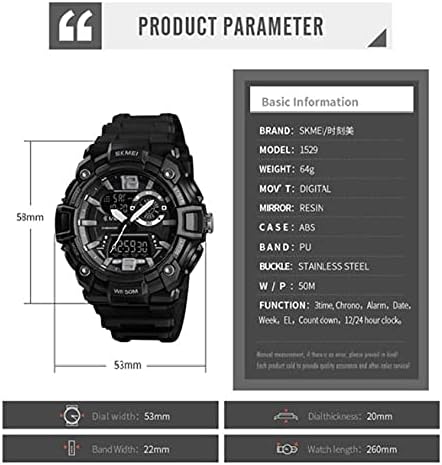
Image 6.1: Detailed product parameters for the SKMEI Model 8899.0 watch. This image provides information on brand, model, weight, movement type, mirror material, case material, band material, buckle material, water resistance, and various functions, along with key dimensions like dial width, thickness, band width, and watch length.
| Feature | Detail |
|---|---|
| Brand | SKMEI |
| Model Number | 8899.0 |
| Display Type | Analog-Digital |
| Movement | Quartz |
| Case Material | ABS |
| Case Diameter | 55 mm |
| Case Thickness | 20 mm |
| Band Material Type | Rubber (PU) |
| Band Width | 22 mm |
| Watch Length | 260 mm |
| Clasp Type | Buckle |
| Mirror Material | Resin |
| Buckle Material | Stainless Steel |
| Water Resistance | 50 Meters (5 ATM) |
| Functions | 3 Time Zones, Chronograph (Stopwatch), Alarm, Date, Week, EL Backlight, Countdown, 12/24 Hour Clock |
| Item Weight | 64 grams |
| Power Source | Battery Powered |
| Department | Men's |
| First Available Date | July 7, 2021 |
7. Warranty and Support
For warranty information and customer support, please refer to the documentation provided with your purchase or contact the retailer where the watch was acquired. Keep your proof of purchase for any warranty claims.
For technical assistance or service inquiries, please reach out to SKMEI authorized service centers or your point of purchase.
