1. Introduction
Thank you for choosing the Kemei KM-1974A Professional Hair Trimmer. This manual provides essential information for the safe and effective operation, maintenance, and care of your new trimmer. Please read it thoroughly before first use and retain it for future reference. This device is designed for trimming hair on the head and neck for men.

Figure 1: Kemei KM-1974A Professional Hair Trimmer. This image shows the main unit of the hair trimmer with its distinctive gold-colored body and intricate design, featuring a Buddha head motif. The stainless steel blade is visible at the top.
2. Important Safety Information
To reduce the risk of injury, electric shock, fire, or damage to the product, always observe the following safety precautions:
- Always use this product as directed, primarily for hair trimming on the head and neck.
- Keep the trimmer away from water sources. Do not use it near bathtubs, showers, basins, or other vessels containing water.
- Exercise caution when handling the sharp blades to prevent cuts or injuries.
- Adhere strictly to the recommended cleaning and maintenance procedures outlined in this manual.
- Always charge the product on a flat, stable, and non-flammable surface.
- Never leave the product charging unattended.
- This appliance is not intended for use by persons (including children) with reduced physical, sensory or mental capabilities, or lack of experience and knowledge, unless they have been given supervision or instruction concerning use of the appliance by a person responsible for their safety.
- Children should be supervised to ensure that they do not play with the appliance.
3. Package Contents
Upon opening the package, please verify that all the following items are included:
- Kemei KM-1974A Hair Trimmer Unit
- USB Charging Cable (Adapter not always included, check packaging)
- Cleaning Brush
- Lubricating Oil
- Multiple Guide Combs (e.g., 1mm, 2mm, 3mm, 4mm)
- User Manual

Figure 2: Product box detail indicating included accessories. This image displays the back of the product packaging, highlighting the trimmer unit and its accompanying parts: a charging adapter (or cable), batteries (internal), a cleaning brush, and lubricating oil.
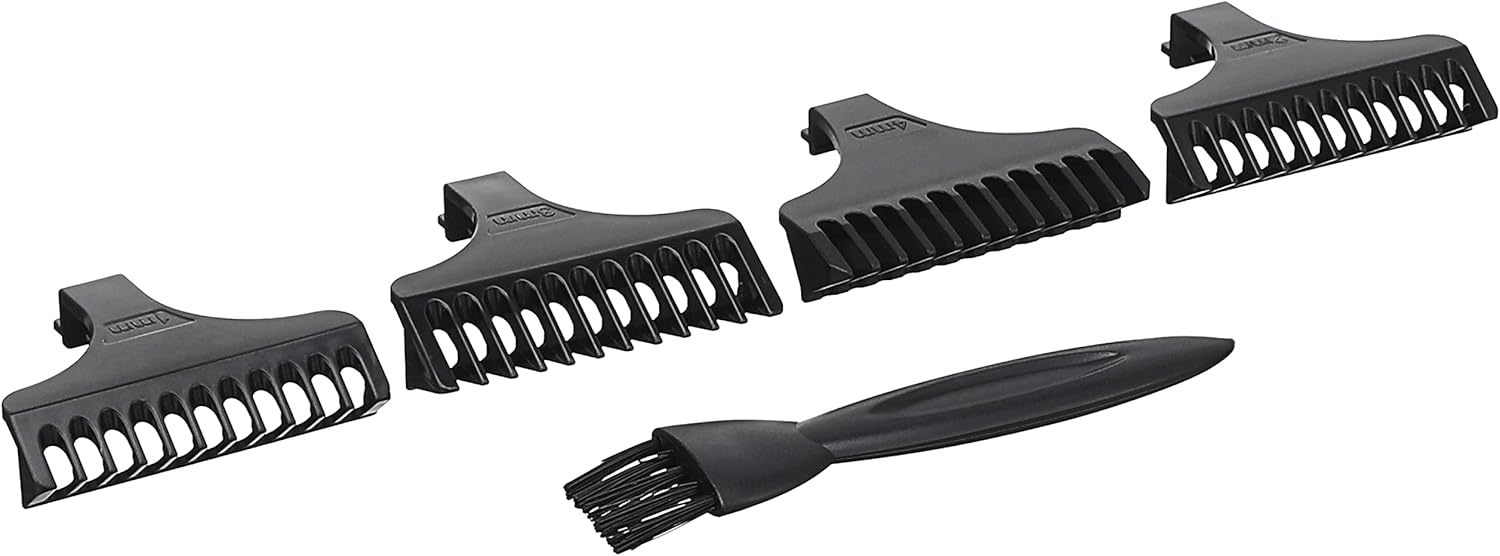
Figure 3: Guide combs and cleaning brush. This image shows four black plastic guide combs of varying lengths (e.g., 1mm, 2mm, 3mm, 4mm) and a small black cleaning brush, essential accessories for precise trimming and maintenance.
4. Setup and Charging
4.1 Initial Charge
- Before first use, fully charge the trimmer for approximately 3 hours.
- Connect the USB charging cable to the trimmer's charging port.
- Plug the other end of the USB cable into a compatible USB power source (e.g., computer, USB wall adapter).
- The charging indicator light will illuminate during charging. It may change color or turn off when fully charged, depending on the model.
- A full charge provides approximately 120 minutes of cordless use.
4.2 Attaching Guide Combs
- Ensure the trimmer is turned off before attaching or detaching guide combs.
- Select the desired guide comb for your preferred hair length.
- Align the comb with the trimmer blade and push it firmly until it clicks into place.
- To remove, gently pull the comb away from the blade.
5. Operating Instructions
5.1 Basic Operation
- Ensure your hair is clean and dry before trimming.
- Attach the appropriate guide comb for your desired hair length.
- Press the power button to turn the trimmer on. The device operates with a single speed setting.
- Hold the trimmer with the blade flat against the skin or at a slight angle, moving it against the direction of hair growth.
- Use slow, controlled strokes for an even trim.
- For detailing or edging without a comb, carefully use the bare blade, ensuring not to press too hard against the skin.
- After use, press the power button to turn the trimmer off.

Figure 4: Close-up view of the trimmer's alloy steel blade. This image provides a detailed look at the precision-engineered blade, highlighting its sharp teeth and the mechanism for hair cutting.
6. Maintenance and Cleaning
Regular cleaning and maintenance will ensure optimal performance and extend the lifespan of your Kemei KM-1974A trimmer.
6.1 Cleaning the Trimmer
- Ensure the trimmer is turned off and disconnected from any power source before cleaning.
- Remove any attached guide combs.
- Use the provided cleaning brush to remove loose hairs from the blades and the trimmer body.
- For a more thorough clean, the blades can often be detached (refer to specific instructions if provided in the physical manual for blade removal). Do not rinse the entire unit under water as it is not waterproof.
- Wipe the body of the trimmer with a dry or slightly damp cloth.
- Allow all parts to dry completely before reassembling or storing.
6.2 Oiling the Blades
- After cleaning, apply 1-2 drops of the lubricating oil (provided) to the blades.
- Turn the trimmer on for a few seconds to allow the oil to distribute evenly across the blades.
- Wipe off any excess oil with a soft cloth.
- Oiling the blades regularly (e.g., after every few uses) helps maintain their sharpness and smooth operation.
7. Troubleshooting
If you encounter any issues with your Kemei KM-1974A trimmer, please refer to the following common problems and solutions:
| Problem | Possible Cause | Solution |
|---|---|---|
| Trimmer does not turn on. | Battery is depleted. | Charge the trimmer for 3 hours. |
| Trimmer pulls hair or cuts poorly. | Blades are dull, dirty, or not oiled. | Clean the blades thoroughly and apply lubricating oil. If the problem persists, blades may need replacement (contact support). |
| Trimmer makes unusual noise. | Blades are obstructed or require lubrication. | Clean and oil the blades. Ensure no hair or debris is lodged in the mechanism. |
| Charging indicator not working. | Faulty cable or power source. | Try a different USB cable or power adapter. Ensure connections are secure. |
8. Specifications
| Feature | Detail |
|---|---|
| Model Name | KM-1974A |
| Brand | KEMEI |
| Power Source | Battery Powered |
| Battery Type | Lithium-ion (1200mA capacity) |
| Charging Time | Approximately 3 hours |
| Usage Time (Full Charge) | Approximately 120 minutes |
| Blade Material | Alloy Steel |
| Target Audience | Men |
| Operating Function | Dry |
| Number of Speed Settings | 1 |
| Item Weight | 0.25 Kilograms |
| Package Dimensions | 19.5 x 8.7 x 5 cm |
9. Warranty and Support
Kemei products are manufactured to high-quality standards. For information regarding warranty coverage, please refer to the warranty card included with your purchase or contact your retailer.
For technical support, spare parts, or service inquiries, please contact the Kemei customer service department or your local distributor. Contact information can typically be found on the product packaging or the official Kemei website.