
Introduction
This manual provides essential instructions for the safe and efficient use of your Lava P240 Dual SIM mobile phone. Please read this manual carefully before using your device to ensure proper operation and to prevent damage.

Image 1: Front view of the Lava P240 Dual SIM mobile phone, showing the display, keypad, and navigation buttons.
1. Setup
1.1 Package Contents
Ensure your package contains the following items:
- Lava P240 Mobile Phone
- Battery
- Charger
- User Manual (this document)
1.2 Inserting the SIM Card(s) and Battery
- Remove the Back Cover: Gently pry open the back cover from the notch located at the bottom or side of the phone.
- Insert SIM Card(s): Locate the SIM card slots. Your Lava P240 supports Dual SIM. Carefully insert the SIM card(s) into the designated slots with the gold contacts facing down.
- Insert Battery: Align the battery contacts with the phone's contacts and gently press the battery into place.
- Replace Back Cover: Align the back cover and press it firmly until it clicks into place.
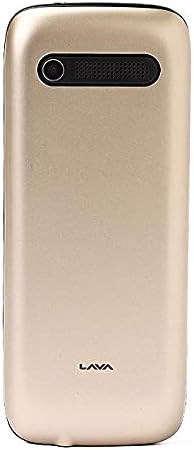
Image 2: Back view of the Lava P240 Dual SIM mobile phone, showing the camera and speaker grille.
1.3 Charging the Battery
Before first use, fully charge the battery. Connect the charger to the phone's charging port and then plug it into a power outlet. The charging indicator will show the charging status. Disconnect the charger once the battery is full.
2. Operating Instructions
2.1 Power On/Off
- To Power On: Press and hold the Power/End Call button until the screen lights up.
- To Power Off: Press and hold the Power/End Call button until the power-off options appear, then select "Power Off".
2.2 Making Calls
- From the idle screen, enter the phone number using the keypad.
- Press the Call button (green receiver icon) to initiate the call.
- To end a call, press the Power/End Call button (red receiver icon).
2.3 Sending SMS Messages
- Go to Menu > Messages > Write Message.
- Enter your message using the keypad.
- Enter the recipient's phone number or select from contacts.
- Press Send.
2.4 Contacts
To save a new contact:
- Go to Menu > Contacts > Add New Contact.
- Enter the name and phone number.
- Select Save.
2.5 Menu Navigation
Use the navigation keys (up, down, left, right) and the central selection key to navigate through the phone's menu options. The "Menu" button typically opens the main menu, and the "Back" or "Clear" button can be used to return to the previous screen.
3. Maintenance
- Cleaning: Use a soft, dry cloth to clean the phone's screen and body. Avoid using liquid cleaners or abrasive materials.
- Battery Care:
- Do not expose the battery to extreme temperatures.
- Avoid overcharging or completely draining the battery frequently.
- If the phone will not be used for an extended period, charge the battery to about 50% before storing.
- Storage: Store the phone in a cool, dry place away from direct sunlight and moisture.
4. Troubleshooting
| Problem | Possible Solution |
|---|---|
| Phone does not power on. |
|
| Cannot make or receive calls. |
|
| Battery drains quickly. |
|
| Keypad not responding. |
|
5. Specifications
| Feature | Detail |
|---|---|
| Brand | Lava |
| Model Number | P240 |
| Display Size | 2.4 Inches |
| SIM Card Slot Count | Dual SIM |
| Cellular Network Technology | 2G |
| Rear Camera Resolution | Less than 2 MP |
| Storage Capacity | 32 MB |
| RAM Memory Installed | 256 MB |
| Battery Capacity | 1000 - 2000 mAH |
| Connectivity Technology | Bluetooth |
| Operating System | Unavailable |
| Color | Gold |
| Item Weight | 420 g |
| Package Dimensions | 7.1 x 3.8 x 2.5 cm |
6. Support and Warranty Information
Specific warranty details and direct support contact information are not provided in this manual. For warranty claims or technical assistance, please refer to the documentation included with your purchase or visit the official Lava website for regional support contacts.


