
Introduction
The Altec Lansing HydraMini Bluetooth speaker is engineered for durability and portability, making it an ideal companion for any adventure. Its robust design ensures it can withstand various environmental conditions, while its compact size allows for easy transport. Enjoy your favorite music with clear, powerful sound and dynamic LED lighting effects, whether you're indoors or exploring the great outdoors.

Figure 1: Altec Lansing HydraMini Wireless Bluetooth Speaker (Black)
Key Features
- IP67 Everything Proof: Designed to be waterproof, snowproof, dustproof, and shockproof, ensuring reliable performance in diverse environments.
- Compact & Portable: Lightweight and small enough to fit in a pocket, featuring a carabineer clip for easy attachment to bags or belts.
- Dynamic LED Lighting: Equipped with built-in LED lights offering 5 light modes that can pulse, strobe, and beat to the music, enhancing the atmosphere.
- True Wireless Pairing: Connect two HydraMini speakers wirelessly to create a stereo sound experience and amplify your audio.
- Long Playtime: Provides up to 6 hours of continuous music playback on a single charge.
- USB-C Charging: Convenient and fast recharging via a USB-C port.

Figure 2: HydraMini highlighting key features including IP67 rating, 6-hour playtime, USB-C charging, true wireless pairing, and LED light modes.

Figure 3: The HydraMini's compact design and carabiner clip allow for easy portability, such as attaching to a backpack.
Setup
Charging the Speaker
Before first use, fully charge your HydraMini speaker. Connect the provided USB-C charging cable to the speaker's USB-C port and the other end to a compatible USB power source. The charging indicator light will show the charging status. A full charge takes approximately 6 hours.
Powering On/Off
- To power on: Press and hold the Power button (
 ) located on the top panel until you hear an audible prompt.
 - To power off: Press and hold the Power button again until the speaker powers down.
Bluetooth Pairing
Once powered on, the speaker will automatically enter Bluetooth pairing mode, indicated by a flashing blue LED. On your device (smartphone, tablet, laptop), enable Bluetooth and select "AL HydraMini" from the list of available devices. A confirmation tone will sound once successfully paired.
True Wireless Pairing (TWS)
To pair two HydraMini speakers for stereo sound:
- Ensure both HydraMini speakers are powered on and not connected to any other Bluetooth device.
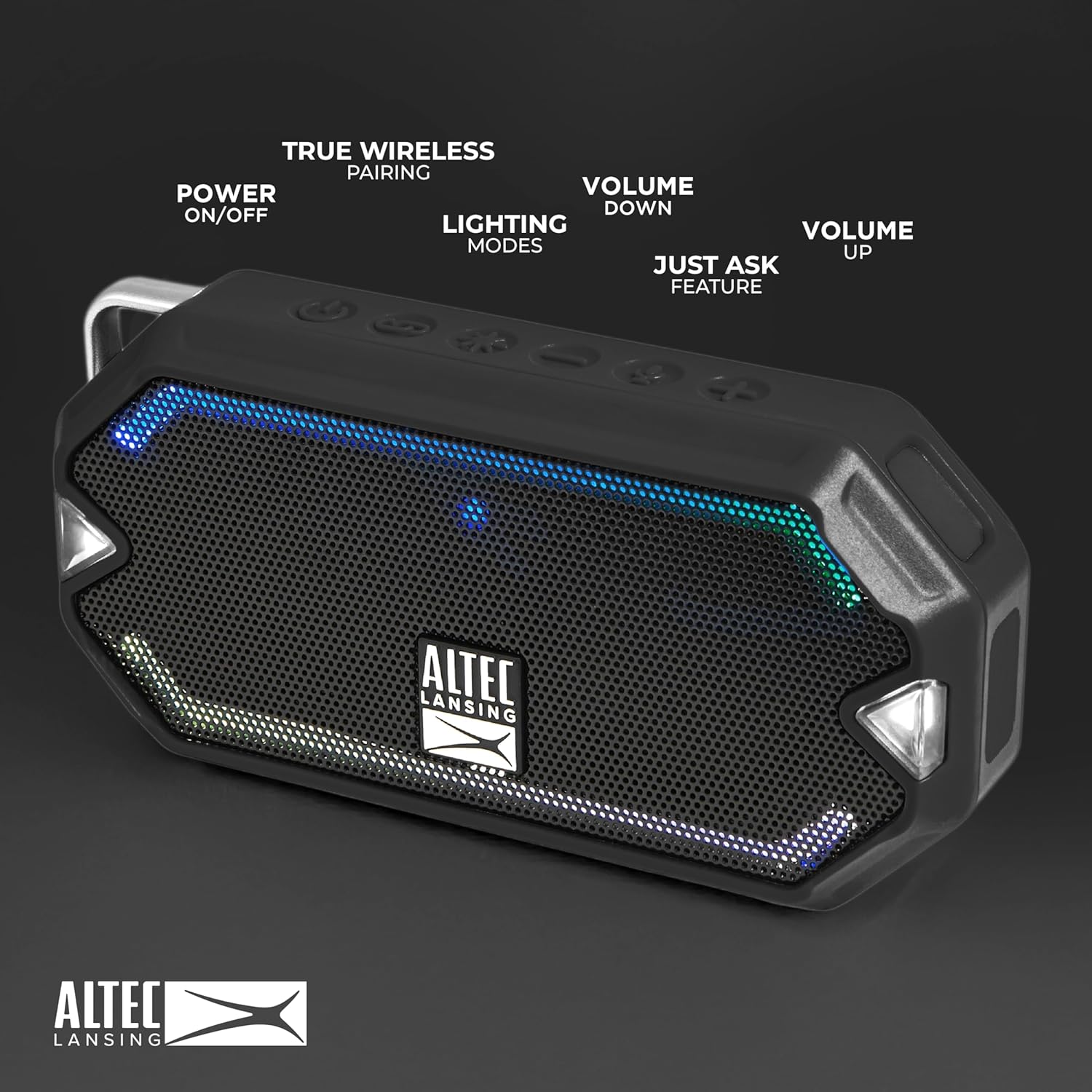
- On one speaker, press and hold the Link button () for a few seconds. It will search for the second speaker.
- Once connected, a confirmation tone will sound, and the LED indicators on both speakers will change.
- Now, connect your device to one of the paired HydraMini speakers via Bluetooth. Audio will play through both speakers in stereo.
Figure 4: Top panel controls including Power, Link, Lighting Modes, Volume Down, Just Ask Feature, and Volume Up buttons.
Operating Instructions
Basic Controls
- Play/Pause: Press the Play/Pause button (usually integrated with the Power button or a dedicated button, refer to Figure 4).
- Volume Up: Press the Volume Up button ().
- Volume Down: Press the Volume Down button ().
- Skip Track: Press and hold the Volume Up button for next track, or Volume Down button for previous track.
- Answer/End Call: Press the Play/Pause button.
- Activate Voice Assistant: Press the Just Ask button () to activate your device's voice assistant (Siri, Google Assistant).
LED Lighting Modes
The HydraMini features 5 distinct LED lighting modes. To cycle through these modes, press the Lighting Modes button () on the top panel. Each press will switch to the next available mode, including options that react to the music's rhythm.
Maintenance
Cleaning
To clean the speaker, use a soft, damp cloth. Avoid using harsh chemicals or abrasive cleaners, as these may damage the speaker's finish or waterproof seals. Ensure the USB-C port cover is securely closed before cleaning or exposing to water.
Water & Environmental Protection
The HydraMini is IP67 Everything Proof, meaning it is protected against dust ingress and can withstand immersion in water up to 1 meter for 30 minutes. While highly durable, it is recommended to:
- Always ensure the USB-C charging port cover is firmly sealed when not charging, especially before exposure to water or dust.
- Avoid prolonged submersion or exposure to high-pressure water jets.
- Rinse with fresh water after exposure to saltwater or chlorinated water to prevent corrosion.
- Allow the speaker to dry completely before opening the port cover for charging.

Figure 5: The HydraMini is designed to float, making it ideal for use around water without fear of sinking.
Troubleshooting
No Power
- Ensure the speaker is fully charged.
- Verify the charging cable and power adapter are working correctly.
- Try a different USB-C cable or power source.
Bluetooth Connection Issues
- Make sure the speaker is in pairing mode (flashing blue LED).
- Ensure your device's Bluetooth is enabled and within range (up to 100 feet).
- Forget/unpair "AL HydraMini" from your device's Bluetooth settings and attempt to re-pair.
- Restart both the speaker and your Bluetooth device.
- If using TWS, ensure both speakers are properly paired to each other before connecting to your device.
Poor Sound Quality
- Ensure the speaker and your device's volume are turned up.
- Move the speaker closer to your device to avoid interference.
- Check for obstructions between the speaker and your device.
- If using TWS, ensure both speakers are placed optimally for stereo sound.
Specifications
| Feature | Detail |
|---|---|
| Model Name | HydraMini |
| Model Number | IMW1000-BLK-STK-2 |
| Speaker Type | Outdoor |
| Connectivity Technology | Bluetooth, USB |
| Wireless Communication Technology | Bluetooth |
| Water Resistance Level | IP67 Waterproof |
| Battery Life | Up to 6 Hours |
| Charging Time | 6 Hours |
| Power Source | Battery Powered |
| Speaker Maximum Output Power | 10 Watts |
| Product Dimensions | 6.1"D x 2.1"W x 5.4"H |
| Item Weight | 8.4 ounces (0.24 Kilograms) |
| Included Components | Carabineer clip, Built-in LED lighting |
| Compatible Devices | Smartphone, Tablet, Laptop |
| Country of Origin | China |
Warranty and Support
The Altec Lansing HydraMini Wireless Bluetooth Speaker comes with a Limited Warranty. For specific details regarding warranty coverage, duration, and terms, please refer to the warranty information included in your product packaging or visit the official Altec Lansing website. For technical support, troubleshooting assistance, or service inquiries, please contact Altec Lansing customer support through their official channels.
