
1. Introduction
Thank you for choosing the EDIS 40W Speakers, Model EA014. This manual provides essential information for the safe and efficient use of your new speaker system. Please read this manual thoroughly before installation and operation, and retain it for future reference.
2. Safety Information
To ensure safe operation and prevent damage, please observe the following precautions:
- Do not expose the speakers to water or moisture.
- Do not block ventilation openings.
- Place the speakers on a stable surface to prevent falling.
- Use only the power adapter supplied with the unit.
- Keep out of reach of children.
- Disconnect power during lightning storms or when unused for long periods.
3. Package Contents
Please check that all items are present in your package:
- EDIS 40W Speakers (2 units)
- Infrared Remote Control
- Power Cable
- Audio Connection Cables
- User Manual (this document)
4. Product Overview
The EDIS 40W Speakers are designed to deliver clear audio. They feature a robust design with a steel grille for protection and offer multiple input options.
4.1 Speaker Units

Figure 1: Front view of the EDIS 40W Speakers. Each speaker unit features two drivers and a protective steel grille.
4.2 Remote Control
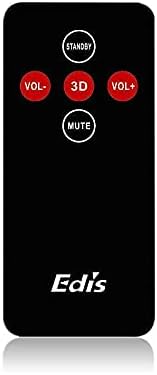
Figure 2: The infrared remote control for the EDIS 40W Speakers. It includes buttons for power, volume adjustment, 3D audio mode, and mute.
4.3 Media Player Panel

Figure 3: The integrated USB and SD Card Media Player panel. This panel allows direct playback from USB drives and SD/MMC memory cards.
5. Setup
Follow these steps to set up your EDIS 40W Speakers:
- Placement: Position the speakers on a flat, stable surface or mount them securely to a wall. Ensure adequate space for ventilation.
- Connect Audio Source: Connect your audio source (e.g., computer, TV, interactive whiteboard) to the speaker system using the appropriate audio cables.
- Power Connection: Connect the power cable to the main speaker unit and then plug it into a standard electrical outlet.
- Power On: Press the power button on the main speaker unit or the 'STANDBY' button on the remote control to turn on the speakers.
6. Operating Instructions
Your EDIS 40W Speakers can be operated using the integrated controls or the infrared remote control.
6.1 Using the Remote Control
- STANDBY: Press to turn the speakers on or off (standby mode).
- VOL+: Increase the volume.
- VOL-: Decrease the volume.
- MUTE: Mute or unmute the audio output.
- 3D: Activate or deactivate the 3D audio effect.
6.2 Using the Media Player Panel
Insert a USB drive or SD/MMC card into the respective slot on the media player panel.
- MODE: Press to switch between input sources (e.g., AUX, USB, SD Card).
- PREVIOUS (◀◀): Skip to the previous track.
- PLAY/PAUSE (►▌▌): Play or pause the current track.
- NEXT (►►): Skip to the next track.
- LED: Indicates power status or playback activity.
7. Maintenance
Proper maintenance ensures the longevity of your speakers:
- Cleaning: Use a soft, dry cloth to clean the speaker surfaces. Do not use liquid cleaners or abrasive materials.
- Storage: If storing the speakers for an extended period, disconnect them from power and store them in a cool, dry place.
- Ventilation: Ensure that the speaker's ventilation openings are not obstructed to prevent overheating.
8. Troubleshooting
If you encounter issues with your EDIS 40W Speakers, refer to the following common problems and solutions:
| Problem | Possible Cause | Solution |
|---|---|---|
| No power | Power cable not connected; power outlet not working | Check power cable connection; try a different outlet. |
| No sound | Volume too low; incorrect input source; audio cable loose/faulty | Increase volume; press MODE to select correct input; check audio cable connections. |
| Remote control not working | Batteries depleted; obstruction between remote and speaker; remote not pointed correctly | Replace remote batteries; remove obstructions; point remote directly at the speaker's IR receiver. |
| USB/SD card not playing | Incorrect file format; card/drive not inserted correctly; corrupted media | Ensure files are compatible (e.g., MP3); reinsert media; try a different USB drive/SD card. |
9. Specifications
| Feature | Specification |
|---|---|
| Brand | EDIS |
| Model Number | EA014 |
| Max Speaker Output Power | 40 Watts |
| Color | Gray |
| Item Weight | 8 kg |
| Control Method | Remote |
| Connectivity Technology | Wired |
| Power Source | Corded Electric |
| Audio Output Mode | Surround |
| Mounting Type | Floor Standing |
| Material | Wood |
| Speaker Type | Outdoor |
| Special Features | Amplifier |
| Compatible Devices | All devices |
| Surround Sound Channel Configuration | 2 |
10. Warranty and Support
For warranty information and customer support, please refer to the documentation provided at the time of purchase or contact your retailer. Keep your proof of purchase for any warranty claims.


