
1. Introduction
This manual provides instructions for the proper installation, operation, and maintenance of your CTKcom Clear TV Key Digital Indoor Antenna. Please read this manual thoroughly before using the product to ensure optimal performance and longevity.

Figure 1: CTKcom Clear TV Key Digital Indoor Antenna in its retail packaging.
2. Product Overview
The CTKcom Clear TV Key is a digital indoor antenna designed to receive free over-the-air digital and HD broadcast television signals. Its sleek and slim design allows for discreet placement behind most televisions. The antenna is constructed from ABS material and operates within a frequency range of 146-176MHz.
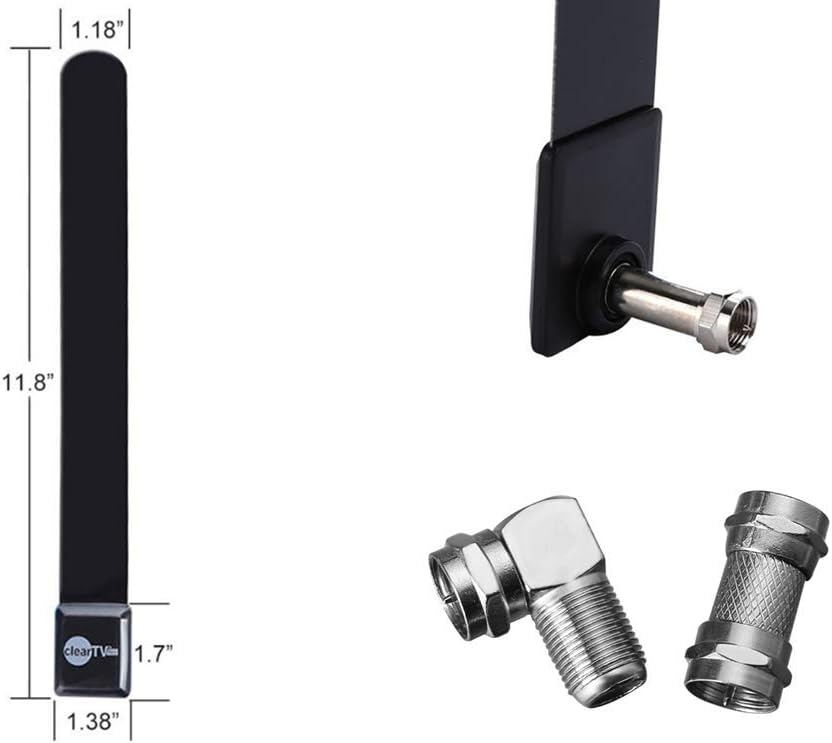
Figure 2: Antenna dimensions (approximately 11.8 inches long, 1.38 inches wide, 1.18 inches thick) and included coaxial connectors.

Figure 3: Detailed view of the standard and right-angle coaxial connectors.
3. Setup Instructions
Follow these steps to install your Clear TV Key antenna:
3.1. Connecting to a TV with a Digital Tuner
-
Identify TV Antenna Input: Locate the antenna input port on the back of your television. Determine if it is a horizontal or vertical configuration.

Figure 4: Examples of horizontal and vertical antenna input ports on a TV.
-
Mount the Antenna: The TV Key antenna should be mounted in a vertical position, extending upward. If your TV's antenna connection faces downward, use the provided right-angle coaxial connector.
Figure 5: Right-angle connector and proper vertical antenna mounting.
-
Connect the Antenna: Screw the antenna connector directly into the "Antenna In" or "Cable IN" port on the back of your TV. If a right-angle connector is needed, attach it to the antenna first, then to the TV. Ensure the antenna is vertically mounted and connectors are tightened securely.
Figure 6: Antenna securely connected to the TV's input port.
3.2. Connecting to a TV without a Digital Tuner (Using a Set-Top Box)
- Connect to Set-Top Box: Screw the antenna connector into the "Antenna In" or "Cable IN" port on the back of your Set-Top Box (STB) converter.
-
Connect STB to TV: Connect your STB to your television using the appropriate cables (e.g., HDMI, coaxial).
Figure 7: Antenna connected to a Set-Top Box, which then connects to the TV.
3.3. Auto Program Scan
- Access TV Menu: Using your TV's remote control, navigate to the system menu.
- Set Input to Antenna: Change the TV's input source to "Antenna" or "Air."
-
Start Scan: Initiate an "Auto Search" or "Auto Program" function to find available channels.
Figure 8: Example of a TV's "Auto Program" menu.
Note:
- After installation, you can use your Set-Top Box (if applicable) to check signal strength and quality.
- If the picture is not steady, adjust the antenna's position to achieve better reception.
- The Clear TV Key is recommended for use with TV transmitting stations located within 10-25 miles. Signal reception can vary based on geographical location, building materials, and local interference.
4. Operating Instructions
Once installed and channels are scanned, your Clear TV Key antenna will allow you to receive free digital and HD broadcast television channels. The antenna enhances TV signals, providing access to local news, weather, sports, and other programming without monthly fees or contracts.
The primary function of this product is signal enhancement. The number and quality of channels received are directly related to your distance from broadcast towers and local environmental factors.
In the event of a power outage, the Clear TV Key can continue to function as long as your television and any connected Set-Top Box have power.
5. Maintenance
The CTKcom Clear TV Key Digital Indoor Antenna requires minimal maintenance. To ensure optimal performance:
- Keep the antenna clean by gently wiping it with a soft, dry cloth.
- Avoid placing the antenna near strong electromagnetic interference sources.
- Do not expose the antenna to extreme temperatures or moisture.
- Ensure all connections remain secure.
6. Troubleshooting
If you experience issues with your Clear TV Key antenna, consider the following troubleshooting steps:
-
No Signal or Poor Picture Quality:
- Verify that the antenna is securely connected to the TV or Set-Top Box.
- Ensure the TV input is set to "Antenna" or "Air."
- Perform a new channel scan (Auto Program Scan) on your TV.
- Adjust the antenna's position. Try different locations, such as higher on a wall or closer to a window, to find the best reception.
- Check for local signal availability and strength using online resources that map broadcast towers in your area.
- Ensure the antenna is mounted vertically as recommended.
-
Limited Number of Channels:
- Channel reception is highly dependent on your geographical location and proximity to broadcast towers.
- Obstructions like buildings, mountains, or dense foliage can affect signal reception.
- Try repositioning the antenna and performing another channel scan.
-
Antenna Connector Issues:
- Ensure the coaxial connectors are not damaged and are screwed in firmly.
- Avoid overtightening, which can damage the connectors.
7. Specifications
| Feature | Specification |
|---|---|
| Model Number | 015-CKBL |
| Brand | CTKcom |
| Antenna Type | Indoor Digital TV Antenna |
| Material | ABS |
| Frequency Range | 146-176MHz |
| Color | Black |
| Impedance | 50 Ohms |
| Item Weight | 1.13 ounces |
| Package Dimensions | 11 x 11 x 0.5 inches |
8. Warranty and Support
For information regarding product warranty, please refer to the documentation provided at the time of purchase or contact your retailer. For technical support or further assistance, please reach out to the manufacturer, CTKcom, through their official support channels.