
Danfoss 130B1135
Danfoss VLT PROFINET Card (MCA 120) Instruction Manual
Model: 130B1135
Product Overview
The Danfoss VLT PROFINET Card, model 130B1135 (MCA 120), is an accessory designed for integration with Danfoss VLT Low Voltage Drives, specifically the FC 202 series. This card enables seamless communication and control of the drive within a PROFINET industrial Ethernet network, facilitating data exchange and remote operation. It is provided in an uncoated variant, suitable for various industrial environments.
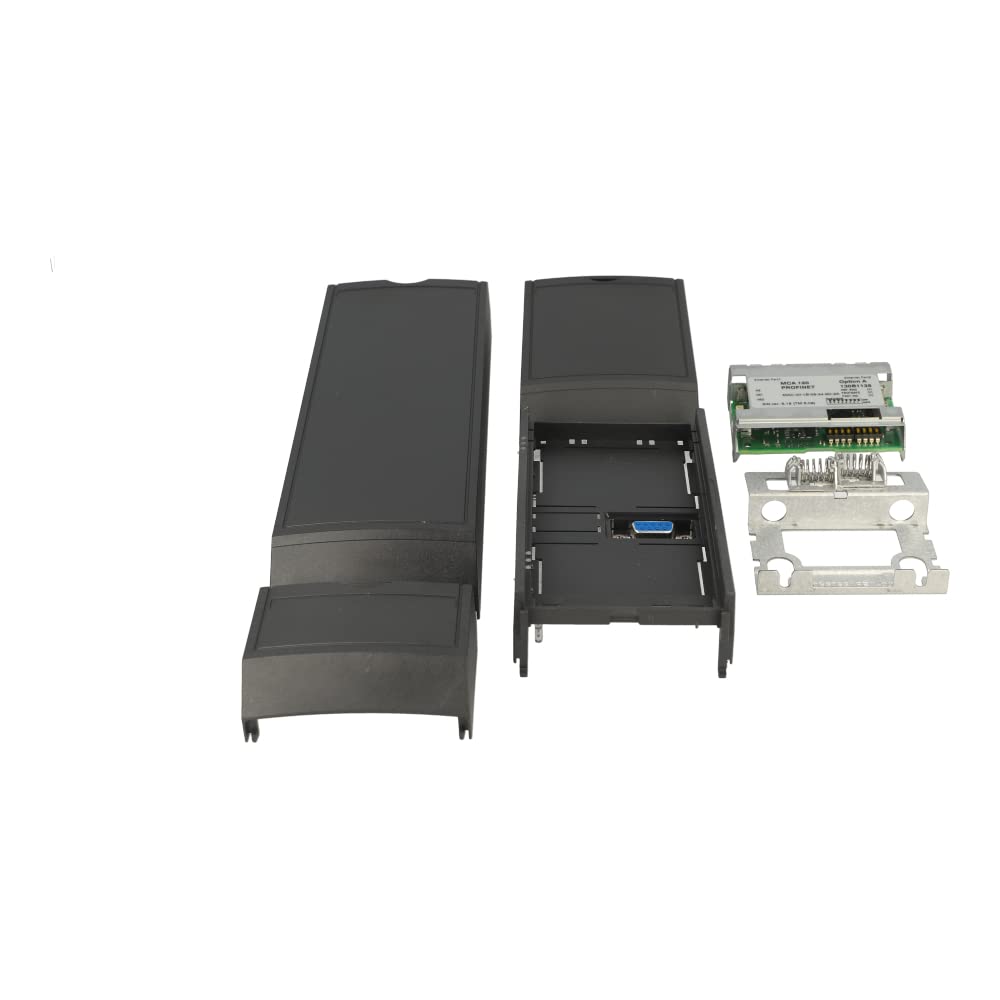
This image displays the Danfoss VLT PROFINET Card (MCA 120) in its disassembled state. It shows the electronic circuit board, the two-part plastic housing, and a metal mounting bracket. The components are laid out to illustrate how they fit together, revealing the internal connectors and the external PROFINET port.
Setup and Installation
Proper installation of the PROFINET card is crucial for reliable operation. Always ensure the drive is powered off and disconnected from the main supply before beginning installation to prevent electric shock or damage to equipment.
Installation Steps:
- Power Disconnection: Turn off the main power to the VLT drive and wait for all indicator lights to extinguish. Verify zero voltage before proceeding.
- Access Slot: Locate the option slot on your VLT drive. Refer to your specific drive's manual for the exact location and access procedure.
- Insert Card: Carefully align the PROFINET card with the slot and gently push it in until it is fully seated. Ensure the connectors are properly engaged.
- Secure Card: Use any provided screws or clips to secure the card firmly in place within the drive.
- Connect PROFINET Cable: Connect a standard PROFINET cable to the designated port on the newly installed card. Ensure a secure connection.
- Power On: Once the card is securely installed and cabled, restore power to the VLT drive.
- Initial Configuration: Refer to the VLT drive's programming manual for specific steps to enable and configure the PROFINET option card within the drive's menu system. This typically involves setting up the IP address, device name, and other network parameters.
Operating Instructions
The PROFINET card facilitates communication between the VLT drive and a PROFINET controller (e.g., PLC). Once installed and configured, the drive becomes a node on the PROFINET network, allowing for remote control, monitoring, and data exchange.
Key Operational Aspects:
- Network Integration: The card enables the VLT drive to be recognized and controlled by a PROFINET master controller.
- Data Exchange: Process data (e.g., speed reference, actual speed, motor current) and diagnostic data can be exchanged between the drive and the controller.
- Control Commands: Start/stop commands, speed/torque references, and other operational parameters can be sent to the drive via the PROFINET network.
- Status Indicators: Observe the LED indicators on the PROFINET card for network status (e.g., link activity, communication errors). Refer to the card's specific documentation for LED behavior interpretation.
- GSDML File: Ensure the correct GSDML (General Station Description Markup Language) file for the MCA 120 card is imported into your PROFINET engineering software for proper device recognition and configuration.
Maintenance
The Danfoss VLT PROFINET Card (MCA 120) is designed for robust industrial use and requires minimal maintenance. Adhering to the following guidelines will help ensure its longevity and reliable performance:
- Environmental Conditions: Ensure the operating environment for the VLT drive and the installed card remains within the specified temperature, humidity, and vibration limits. Avoid exposure to excessive dust, moisture, or corrosive substances.
- Cleaning: If necessary, gently clean the exterior of the card and its connectors using a soft, dry, lint-free cloth. Do not use liquid cleaners or solvents. Ensure power is disconnected before any cleaning.
- Connection Integrity: Periodically check all cable connections to the PROFINET card to ensure they are secure and free from damage. Loose connections can lead to intermittent communication issues.
- Firmware Updates: While rare for option cards, check the Danfoss official website periodically for any recommended firmware updates for the MCA 120 card or your VLT drive. Follow manufacturer instructions carefully for any update procedures.
Troubleshooting
If you encounter issues with the PROFINET card, consider the following troubleshooting steps:
Common Issues and Solutions:
- No Communication:
- Verify the PROFINET cable is securely connected at both the card and the controller ends.
- Check the LED indicators on the card. Refer to the card's manual for LED status meanings (e.g., link status, error codes).
- Ensure the IP address and device name configured in the drive and the PROFINET controller match.
- Confirm the correct GSDML file is loaded into the PROFINET engineering software.
- Check for network conflicts (e.g., duplicate IP addresses).
- Drive Not Responding to Commands:
- Verify that the drive's control source is set to
Ask a question about this manual
Ask about setup, troubleshooting, compatibility, parts, safety, or missing instructions. Manuals+ will review the question and use this page’s manual context to help answer it.