
Introduction
Thank you for choosing the LYMAX Monitor Light Bar D013. This instruction manual provides detailed information on the installation, operation, and maintenance of your new monitor light bar. Please read this manual thoroughly before use to ensure proper function and longevity of the product.
The LYMAX Monitor Light Bar is designed with an asymmetrical light source to illuminate your desktop and keyboard without causing glare or flicker on your screen. Its 60 LED bulbs are engineered to reduce harmful blue light, promoting eye comfort during extended use.

Image: Illustration demonstrating the glare-free and eye-caring design of the LYMAX Monitor Light Bar, directing light downwards onto the desk area.
Safety Information
- Ensure the power source provides 5V/1A. Using an incompatible power source may damage the device.
- Do not disassemble or modify the light bar. Unauthorized modifications can lead to malfunction or safety hazards.
- Keep the device away from water and high humidity environments.
- Avoid direct eye exposure to the LED light for extended periods.
- Clean the device with a soft, dry cloth only. Do not use abrasive cleaners or solvents.
- Keep out of reach of children.
Package Contents
Verify that all items are present in your package:
- LYMAX Monitor Light Bar D013
- USB-C Power Cable (59 inches)
- User Manual (this document)
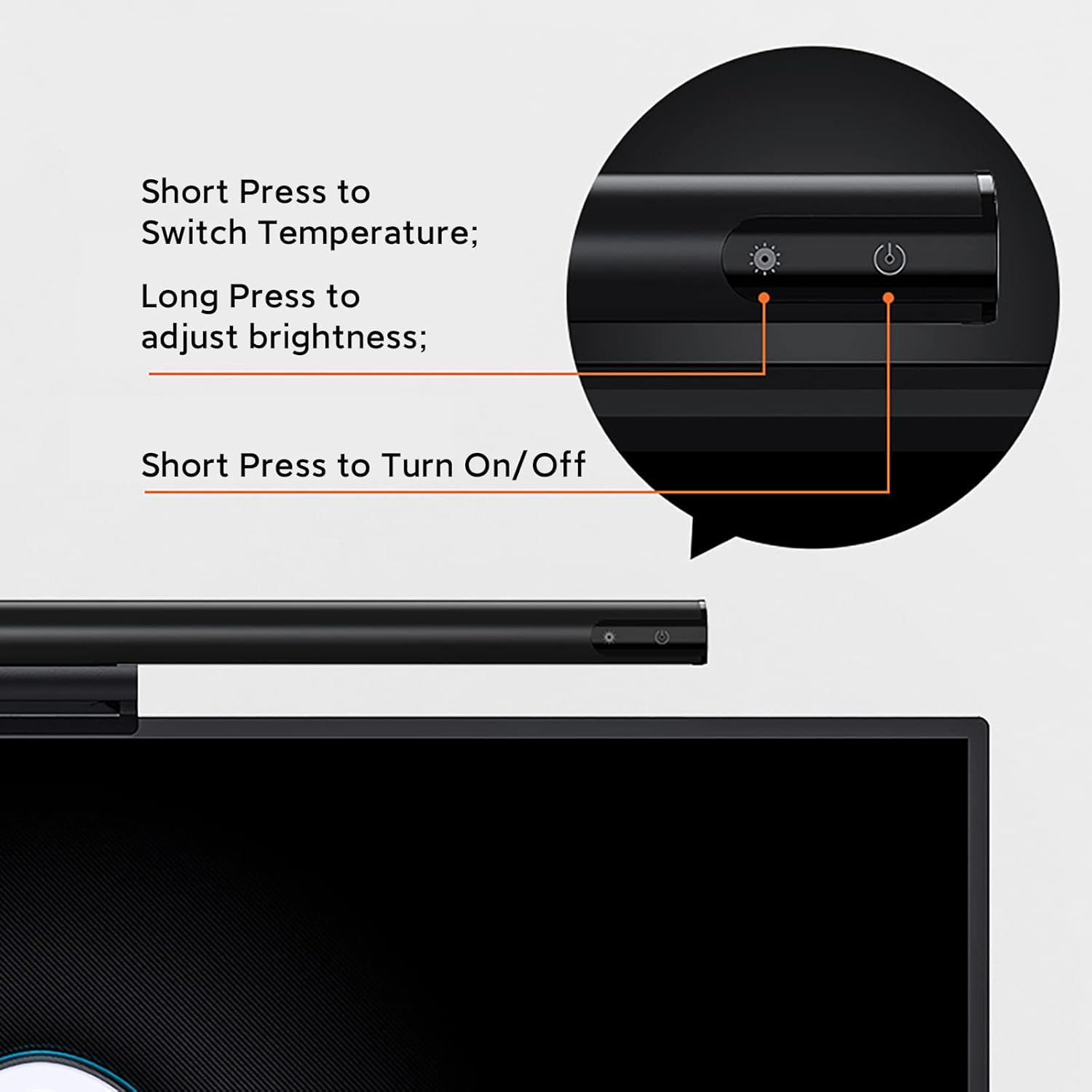
Image: The LYMAX Monitor Light Bar D013 with its included USB-C power cable.
Product Overview
Familiarize yourself with the components of your LYMAX Monitor Light Bar:

Image: Detailed diagram of the LYMAX Monitor Light Bar, highlighting its aluminum body, 60 LED beads, Type-C port, and touch sensor/memory function. Dimensions are shown as 16.5 inches in length and 1 inch in diameter.
- Light Bar: Contains 60 LED beads for illumination.
- Gravity Damper Bracket: Designed for stable mounting on monitors.
- USB-C Port: For power connection.
- Touch Sensor/Control Panel: Located on the light bar for power, brightness, and color temperature adjustments.
- Soft Silicone Mat: Protects the monitor surface and enhances stability.
Setup Instructions
Follow these steps to install your LYMAX Monitor Light Bar:
- Position the Light Bar: Gently place the light bar's gravity damper bracket on top of your monitor. Ensure the light bar is centered and stable. The bracket is designed to fit monitors with a top edge thickness between 0.2 and 1.5 inches.
- Connect Power: Insert the USB-C end of the provided cable into the USB-C port on the light bar.
- Connect to Power Source: Plug the standard USB-A end of the cable into a compatible 5V/1A USB power source (e.g., computer USB port, wall adapter, power bank).
- Adjust Angle: The light bar features an adjustable angle. Rotate the light bar to direct the light downwards onto your desk, ensuring no glare on your screen.

Image: Close-up view of the gravity damper bracket and soft silicone mat, illustrating how the light bar securely rests on top of a monitor without clamping.

Image: Illustrations demonstrating the adjustable angle feature of the light bar, allowing users to direct light towards the desktop for work or away from the face to avoid glare.
Operating Instructions
The LYMAX Monitor Light Bar features intuitive touch controls for easy operation.

Image: A detailed view of the touch control panel on the light bar, indicating the power button and the light mode/brightness adjustment button.
- Power On/Off:
- Short press the Power button (⏻) to turn the light bar on or off.
- Adjust Color Temperature:
- Short press the Light Mode button (💡) to cycle through the three color temperature modes:
- Cool Light (6000K): Ideal for focused work and efficiency.
- Mixed Light (4000K): Suitable for reading and general tasks.
- Warm Light (2900K): Best for relaxation and entertainment.
- Short press the Light Mode button (💡) to cycle through the three color temperature modes:
- Adjust Brightness:
- Long press the Light Mode button (💡) to steplessly adjust the brightness level. Release the button when the desired brightness is reached.
- Memory Function: The light bar will remember your last used brightness and color temperature settings when turned off and on again.
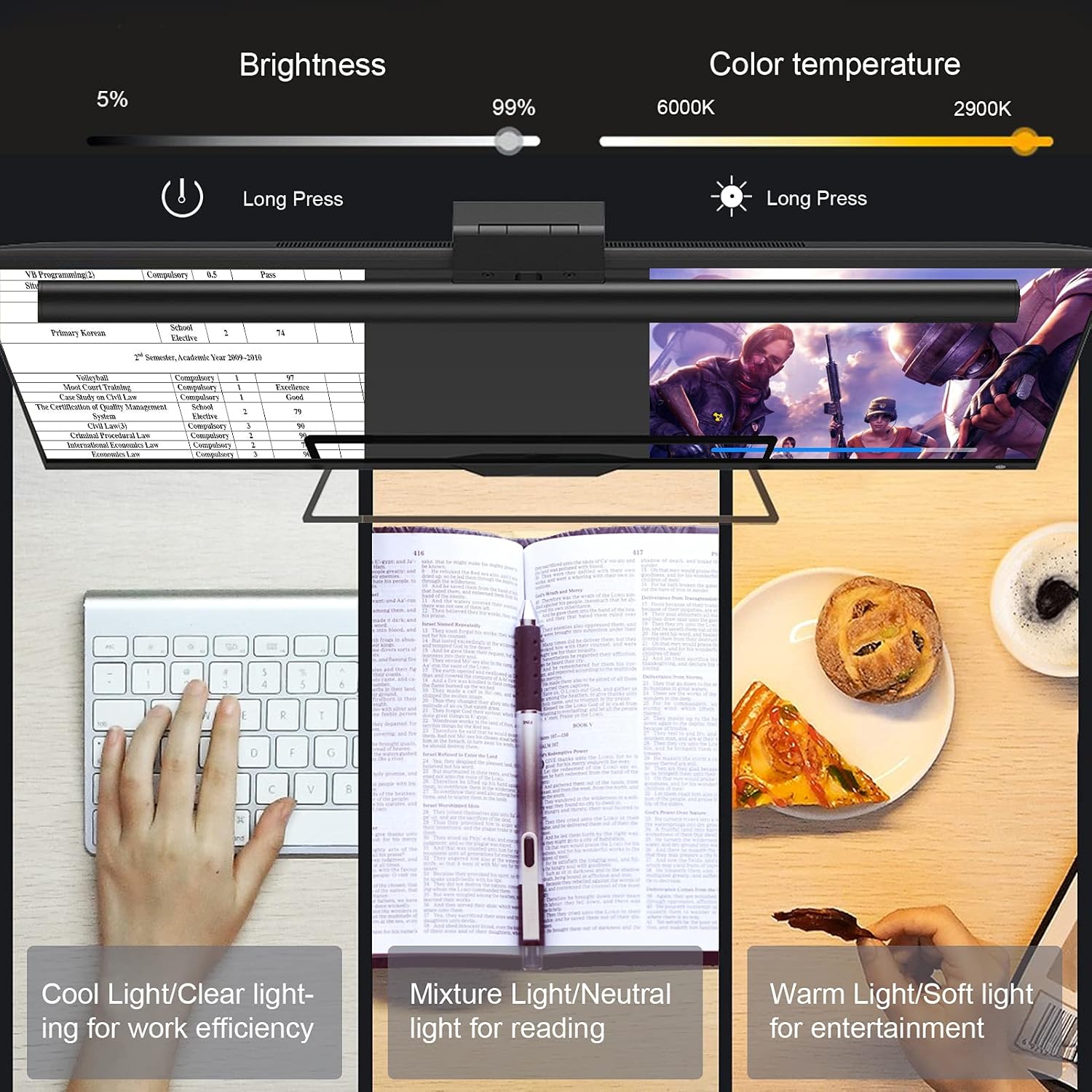
Image: Visual representation of the brightness adjustment from 5% to 99% and color temperature adjustment from 6000K (cool) to 2900K (warm), illustrating their effects on a workspace.
Compatibility
The LYMAX Monitor Light Bar is designed for versatility and fits a wide range of displays:
- Monitor Thickness: Compatible with monitors having a top edge thickness between 0.2 inches (0.5 cm) and 1.5 inches (3.8 cm).
- Screen Size: Suitable for most 15-24 inch flat or curved computer monitors and 14-17 inch laptops.
- Examples of Compatible Devices:
- MacBook Pro 15.6/16 inch
- iMac 21.5/24 inch
- Surface Laptop/Book 15 inch
- Dell XPS 15 inch, Dell Inspiron 21.5/23.8 inch
- HP Envy 15.6 inch, HP 20/22/24 inch, HP Pavilion 24 inch
- Lenovo ThinkPad/IdealPad 15.6 inch, Lenovo Ideacentre 23.8
- Acer 21.5/23.8 inch
- BenQ 24 inch
- Philips 24 inch
- ViewSonic 24 inch
- AOC G2460PF 24 inch
Image: Illustrations depicting various monitor profiles (25°, 35°, 45° angles) and indicating compatibility for monitor thicknesses ranging from 0.2 to 1.5 inches.
Maintenance
To ensure the longevity and optimal performance of your LYMAX Monitor Light Bar, follow these maintenance guidelines:
- Cleaning: Use a soft, dry, lint-free cloth to wipe the surface of the light bar. Do not use liquid cleaners, sprays, or abrasive materials, as these can damage the finish or electronic components.
- Storage: If not in use for an extended period, store the light bar in a cool, dry place, away from direct sunlight and extreme temperatures.
- Handling: Handle the light bar with care to avoid dropping or impacting it, which could damage internal components.
Troubleshooting
If you encounter any issues with your LYMAX Monitor Light Bar, refer to the following common problems and solutions:
| Problem | Possible Cause | Solution |
|---|---|---|
| Light bar does not turn on. | No power or insufficient power. |
|
| Light flickers or is unstable. | Insufficient power or loose connection. |
|
| Touch controls are unresponsive. | Temporary software glitch or power issue. |
|
| Light bar is not stable on the monitor. | Incorrect placement or incompatible monitor thickness. |
|
Specifications
| Model | D013 |
| Brand | LYMAX |
| Dimensions (Light Bar) | 16.5 inches (Length) x 1 inch (Diameter) |
| Item Weight | 0.52 Kilograms (1.15 pounds) |
| Material | Aluminum, PC, Silicone |
| Light Source | LED (60 LED beads) |
| Color Temperature | 2900K - 6000K (Warm, Mixed, Cool) |
| Control Method | Touch Sensor |
| Power Input | USB-C, 5V/1A |
| Cable Length | 59 inches |
| Monitor Thickness Compatibility | 0.2 to 1.5 inches |
| Special Features | Asymmetrical Light Source, Gravity Damper Bracket, Eye-friendly, Glare-free, Flicker-free, Anti-blue, Space-saving, Memory Function |
Warranty and Support
The LYMAX Monitor Light Bar D013 comes with a reliable warranty. For specific warranty details, please refer to the warranty card included with your product or contact LYMAX customer support.
If you have any questions, require technical assistance, or need to report an issue, please contact our customer support team:
- Customer Service: Refer to the contact information provided on the product packaging or the official LYMAX website.
- Online Resources: Visit the official LYMAX website for FAQs, product updates, and additional support.

