
1. Introduction
Thank you for choosing HIQUE Replacement Ear Pads. These ear pads are designed to restore comfort and sound quality to your headphones. Made with soft protein leather and upgraded memory foam, they provide enhanced comfort and improved noise isolation. This manual provides instructions for proper installation and care.

Figure 1: HIQUE 95 MM Replacement Ear Pads
2. Compatibility
These 95 MM replacement ear pads are suitable for a variety of headphones, including but not limited to:
- Sony MDR-DS7000
- Sony RF6000
- Sony MDR-MA300
- Sony CD470
- Beyerdynamic DTX 900
- Philips SHP1900
Please verify the diameter of your existing ear pads to ensure a proper fit. These ear pads have a diameter of 95mm.

Figure 2: Ear Pad Diameter Measurement
3. Package Contents
- 1 pair of HIQUE 95 MM Replacement Ear Pads
4. Installation Instructions
Replacing your headphone ear pads can improve comfort and sound quality. Follow these steps for proper installation:
- Remove Old Ear Pads: Carefully pull out the old ear cushions from your headphones. Ensure all remnants of the original adhesive are completely removed from the headphone cups. This is a critical step for a secure fit.
- Position New Ear Pad: Take one new ear pad. Hook the edge of the ear pad over a notched area or a specific point on the headphone cup.
- Secure the Ear Pad: While holding the hooked part firmly, gently rotate the headphone cup. Work the remaining material of the ear pad into the groove around the headphone speaker. Ensure the material is taut and fully seated in the groove.
- Repeat for Second Ear Pad: Follow the same procedure for the other ear pad.
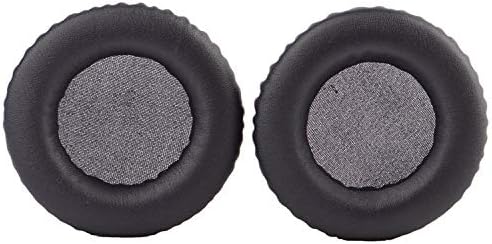
Figure 3: Ear Pad Installation Diagram
For a visual guide, please refer to the installation videos below:
Video 1: HIQUE Ear Pads Installation Guide. This video demonstrates the step-by-step process of replacing headphone ear pads, showing how to remove old pads and install new ones.
Video 2: Universal Headphone Ear Pads Installation. A concise video illustrating the general method for installing universal headphone ear pads.
5. Operating and Benefits
Once installed, your new HIQUE ear pads will provide:
- Enhanced Comfort: The protein leather and memory foam conform to your ears for a personalized and comfortable fit during extended listening sessions.
- Improved Sound Quality: A proper seal from new ear pads can enhance bass response and overall audio clarity.
- Noise Blocking: The upgraded memory foam contributes to better noise isolation, allowing for a more immersive audio experience.


Figure 4: Benefits of HIQUE Ear Pads
6. Maintenance
To ensure the longevity and hygiene of your ear pads:
- Regular Cleaning: Gently wipe the surface of the ear pads with a soft, damp cloth. Avoid using harsh chemicals or abrasive cleaners.
- Hygiene: Worn-out ear pads can accumulate sweat and bacteria. Replacing them regularly, or cleaning them properly, contributes to better hygiene and a healthier listening experience.
- Storage: When not in use, store your headphones in a clean, dry place away from direct sunlight and extreme temperatures.
7. Troubleshooting
If you encounter issues with your replacement ear pads:
- Ear Pads Don't Fit: Double-check the diameter of your headphone cups against the 95 MM size of these ear pads. Ensure you have removed all old adhesive and material from the headphone groove.
- Difficulty Installing: Review the installation steps and videos provided in Section 4. Sometimes, a firm but gentle approach is needed to stretch the ear pad material over the headphone cup.
- Reduced Sound Quality: Ensure the ear pads are fully seated and creating a proper seal around the headphone speakers. Any gaps can affect sound performance.
8. Specifications
| Feature | Specification |
|---|---|
| Brand | HIQUE |
| Model | 95 MM Replacement Ear Pads |
| Material | Protein Leather, Memory Foam |
| Compatible Devices | Headphones |
| Item Weight | 0.317 ounces |
| Package Dimensions | 5.59 x 3.82 x 1.81 inches |
9. Warranty and Support
Specific warranty information for this product is not provided in the available data. For any product inquiries, technical support, or warranty claims, please contact HIQUE customer service directly through their official channels or the retailer where the product was purchased.