
Introduction
Thank you for choosing the Aquael ULTRAMAX 2000 External Filter. This manual provides essential information for the safe and efficient installation, operation, and maintenance of your new aquarium filter. Please read these instructions carefully before use and retain them for future reference.
Safety Information
- Always disconnect the power supply before performing any maintenance or cleaning.
- Ensure all electrical connections are dry and away from water.
- Do not operate the filter if any part is damaged or if the power cord is frayed.
- This appliance is not intended for use by persons (including children) with reduced physical, sensory or mental capabilities, or lack of experience and knowledge, unless they have been given supervision or instruction concerning use of the appliance by a person responsible for their safety.
- Children should be supervised to ensure that they do not play with the appliance.
- For indoor use only.
Package Contents
The Aquael ULTRAMAX 2000 External Filter package includes the following components:
- 1x Canister Filter Unit
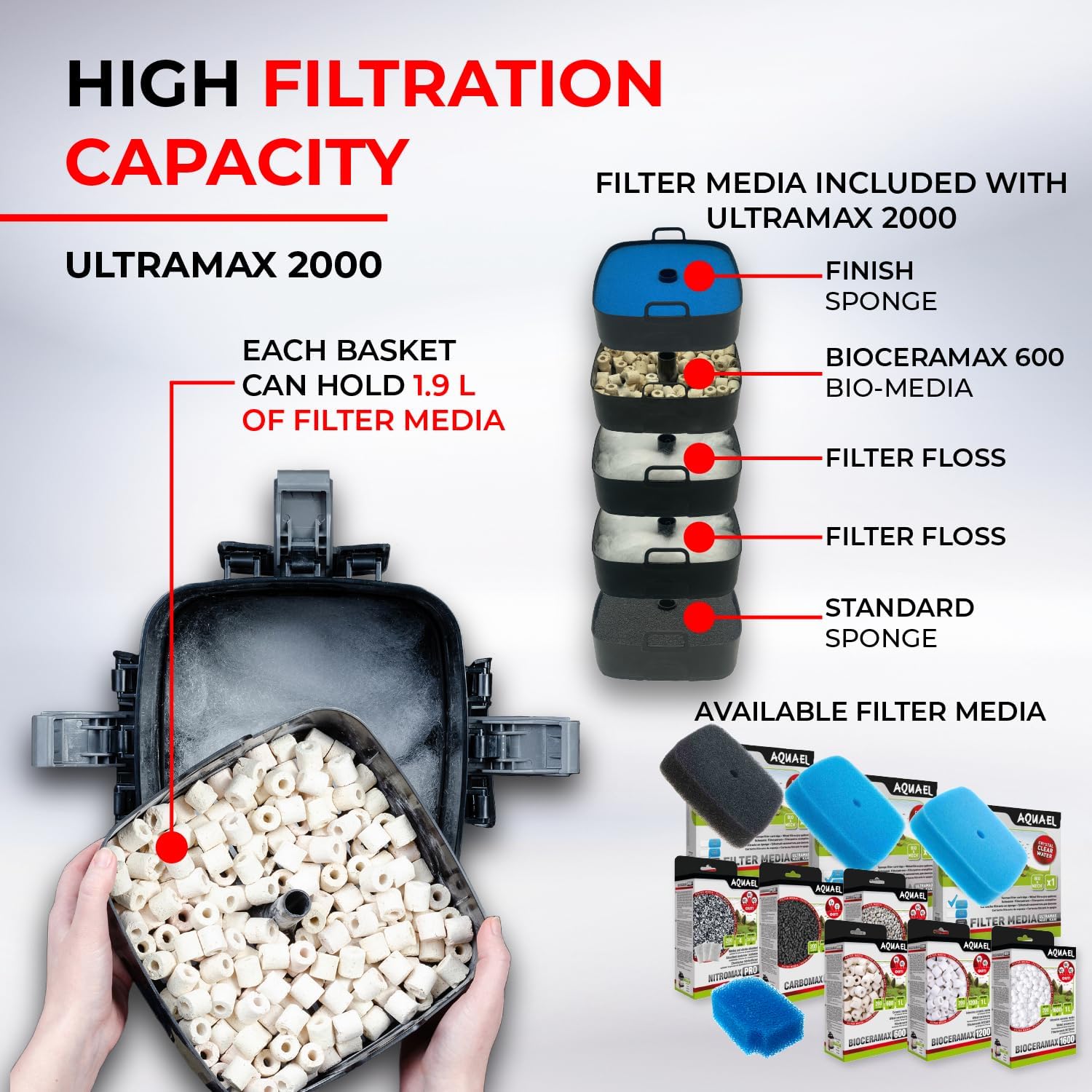
- 5x Filter Media Baskets
- Mechanical Filter Media (Standard Sponge, Finish Sponge)
- Biological Filter Media (BioCeraMax 600)
- Filter Floss
- 2x Hoses
- 2x Water Stop Valves
- 1x Inlet Tube & Screen
- 1x Outlet Nozzle & Connector
- 2x Connecting Tubes
- 1x Spray Bar Kit
- 4x Suction Cups
- 1x Silicone Lubricant

Setup and Installation
1. Preparing the Filter Media
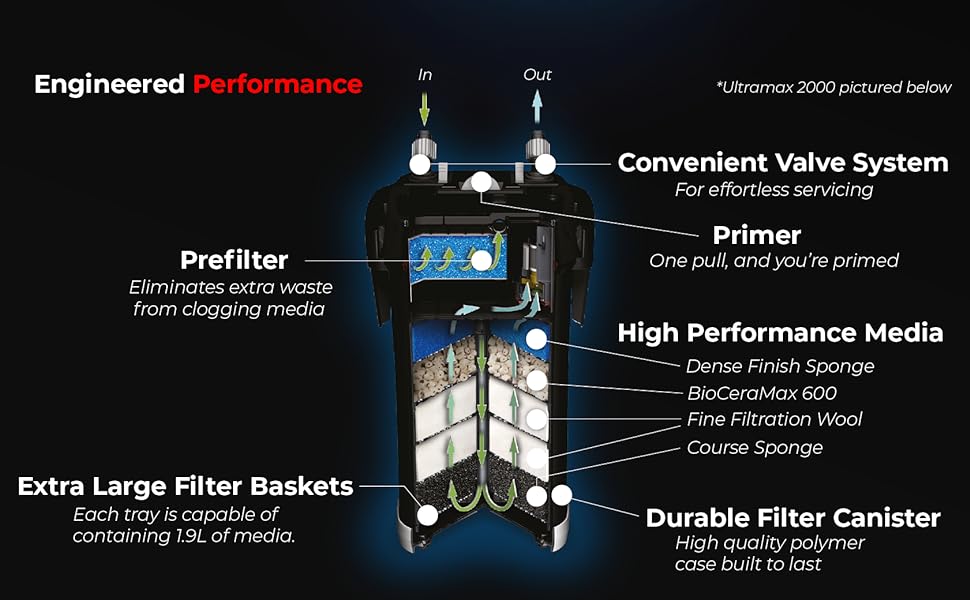
- Open the safety buckles and remove the filter head.
- Remove the prefilter chamber cover and the prefilter sponge.
- Remove all filter media baskets from the main compartment.
- Unpack all filter media (BioCeraMax, filter floss, sponges) from their packaging.
- Rinse the BioCeraMax ceramics thoroughly under running water to remove any dust or debris before placing them into their designated basket.
- Place the filter floss evenly at the bottom of the media basket, followed by the BioCeraMax ceramics, and then the sponges.
- Insert the filled media baskets back into the main compartment of the filter.
- Insert the prefilter sponge into its dedicated compartment and close the prefilter cover.
- Install the filter head, ensuring it is symmetrical and can be installed in any position. Close all safety buckles securely.

2. Installing the Valves and Hoses
- Install the water stop valves onto the filter head. Note that the valves are not identical and must be mounted in their dedicated locations (inlet and outlet). Press them down and secure the lever.
- Assemble the water intake hose: Install a reduction on one end of the overflow tube, then attach connecting tubes, and finally install the intake pipe with a basket. Adjust the number of connecting tubes to fit your aquarium's size.
- Assemble the drainage hose: Install a reduction and an elbow on one end of the overflow tube, then install the deflector. Adjust the length suitable for your needs.
- Connect the hoses to the respective valves on the filter head. Ensure a secure connection.
- Place both the intake and drainage hoses on the tank wall, securing them with suction cup holders.
- Ensure the hoses are not twisted or kinked. If necessary, shorten the hoses to the appropriate length to prevent stretching and ensure adequate water flow.

Video 1: Detailed setup guide for the Aquael Ultramax Filter, demonstrating media placement, head installation, and hose connections.
Operation
- Once all connections are secure and the filter is placed in its final position (typically below the aquarium), ensure the water stop valves are open.
- Use the priming pump (piston) on the filter head to draw water into the filter. Make several movements with the piston until water begins to flow into the filter and out through the drainage hose into the aquarium.
- After the filter is filled with water, connect the power plug to an electrical outlet. The filter should start operating.
- After start-up, tilt the filter to the side of the prefilter cover at an angle of approximately 30 degrees for about 30 seconds to help release any trapped air. Repeat if necessary until the filter runs quietly.
Maintenance
Regular Cleaning
- Prefilter: The prefilter should be cleaned regularly, typically weekly or bi-weekly, depending on the aquarium's bioload. Disconnect power, close the water stop valves, open the prefilter cover, remove the sponge, rinse it thoroughly with aquarium water (not tap water, to preserve beneficial bacteria), and reinsert.
- Main Filter Media: The main filter media (BioCeraMax, filter floss, sponges) should be cleaned or replaced less frequently, usually every 1-3 months. Always use old aquarium water for rinsing biological media to protect beneficial bacteria. Replace mechanical media (sponges, floss) as they become clogged or degraded.
- Hoses and Pipes: Periodically clean the intake and drainage hoses and pipes to prevent buildup that can restrict flow. Specialized aquarium hose brushes are recommended.
Disassembly and Reassembly for Maintenance
- Disconnect the filter from the power supply.
- Close both water stop valves on the filter head.
- Disconnect the hoses from the filter head.
- Unclip the safety buckles and remove the filter head.
- Carefully remove the media baskets.
- Clean or replace media as needed.
- Reassemble the filter in reverse order, ensuring all seals and buckles are correctly seated and secured to prevent leaks.
Specifications
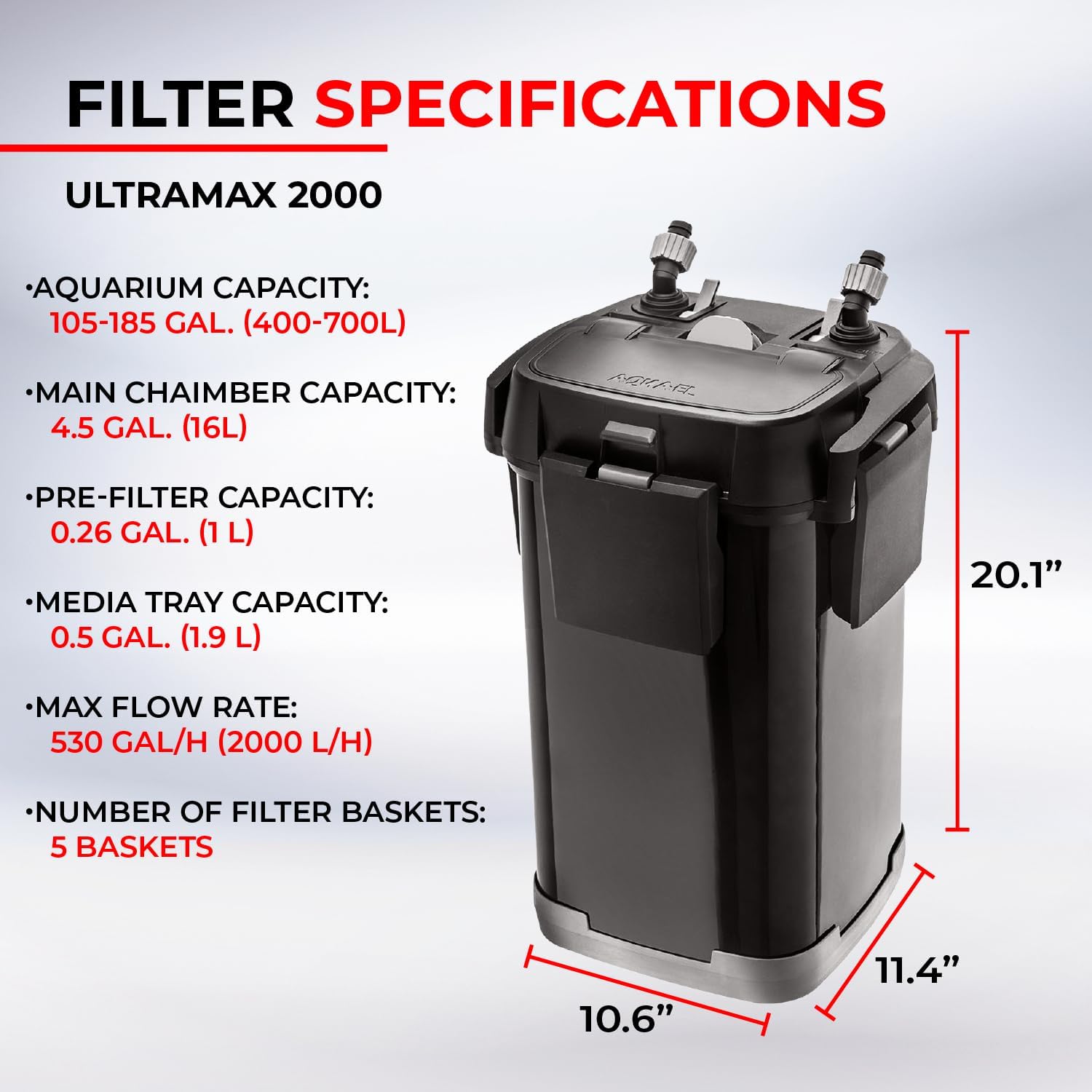
| Feature | Specification |
|---|---|
| Model | ULTRAMAX 2000 |
| Aquarium Capacity | 105-185 Gallons (400-700 Liters) |
| Max Flow Rate | 530 GPH (2000 L/H) |
| Main Chamber Capacity | 4.5 Gallons (16 Liters) |
| Pre-filter Capacity | 0.26 Gallons (1 Liter) |
| Media Tray Capacity | 0.5 Gallons (1.9 Liters) per basket |
| Number of Filter Baskets | 5 Baskets |
| Item Weight | 22.6 pounds |
| Item Package Dimensions | 19.5 x 17.8 x 15.5 inches |
| Suitable for | Freshwater and Saltwater Aquariums |
| Operation | Virtually silent |

Troubleshooting
- Reduced Flow: Check for clogged prefilter sponge, dirty main filter media, or kinks in the hoses. Ensure the water stop valves are fully open.
- Noise/Air Bubbles: This often indicates trapped air. Tilt the filter gently from side to side to release air. Ensure all hose connections are tight and the filter head is securely fastened. Check water level in the aquarium.
- Leaks: Immediately disconnect power. Check all seals, O-rings, and hose connections. Ensure the filter head is properly seated and all buckles are securely closed. Apply silicone lubricant to O-rings if they appear dry or stiff.
- Filter Not Starting: Check power connection. Ensure the impeller is clean and free of obstructions.
Warranty and Support
The Aquael ULTRAMAX 2000 External Filter comes with a manufacturer's warranty. Please refer to the warranty card included in your product packaging for specific terms and conditions. For technical support, spare parts, or further assistance, please contact Aquael customer service or visit the official Aquael website.
For additional information and product details, you may visit the Aquael Store on Amazon.


