
1. Introduction
This manual provides detailed instructions for the assembly, operation, and maintenance of your Treocho Oxford Black Console Table. Please read this manual thoroughly before assembly and use to ensure safe and correct operation.
2. Safety Information
- Weight Limit: Do not exceed the maximum weight recommendation of 39.2 pounds on the tabletop.
- Stability: Ensure the table is properly assembled and placed on a level surface to prevent tipping.
- Anchoring: For added stability, especially in households with children or pets, consider anchoring the table to the wall using appropriate hardware (not included).
- Assembly: Follow all assembly instructions carefully. Do not overtighten screws.
- Children: Keep small parts and packaging materials away from children during assembly.
3. Package Contents
Before beginning assembly, verify that all parts and hardware are present. Refer to the included assembly guide for a complete list of numbered parts and accessories.
- Tabletop
- Drawer components
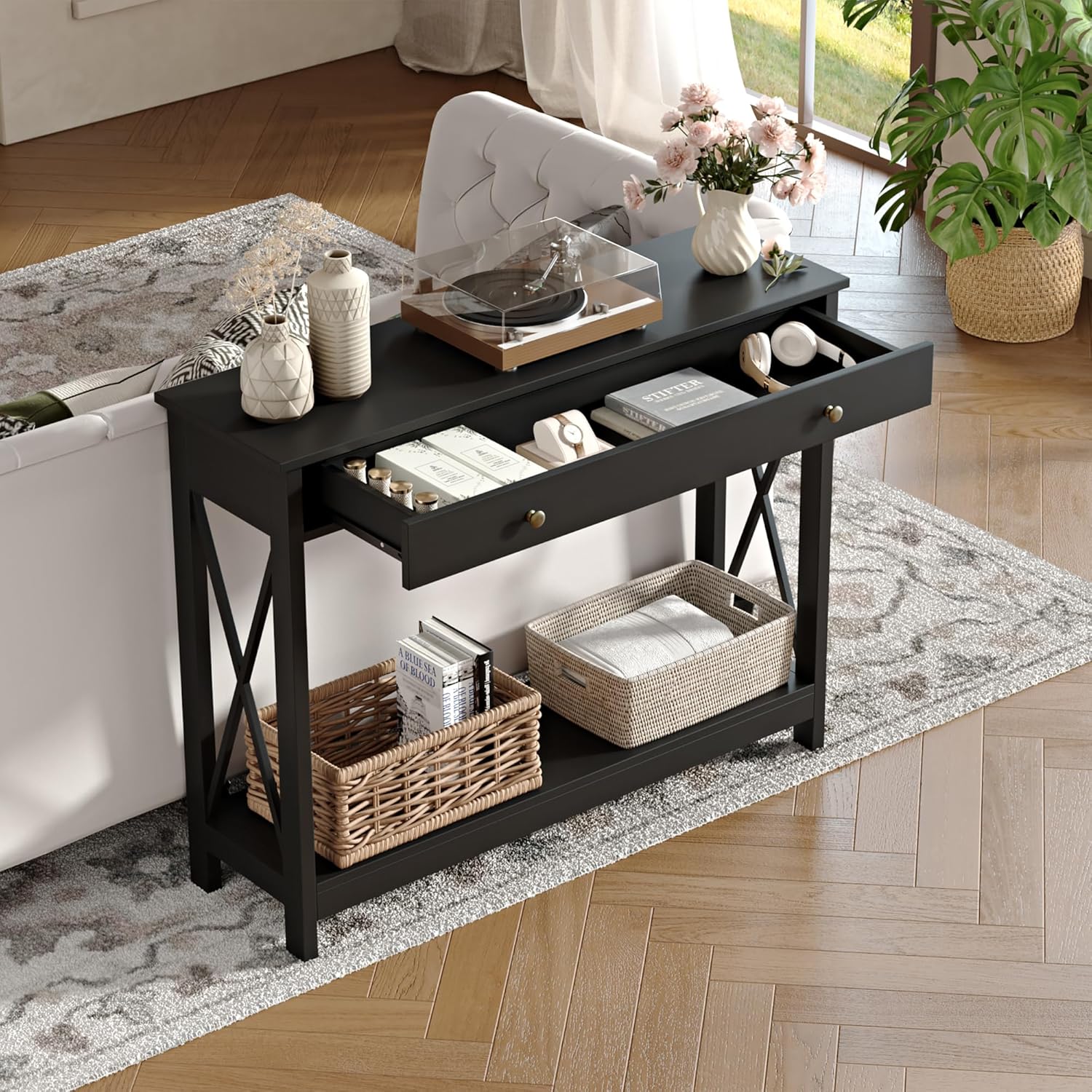
- Side frames with X-design
- Bottom storage shelf
- Hardware (screws, dowels, drawer slides, handles)
- Assembly Guide
4. Assembly Instructions
Assembly is recommended for one person. A screwdriver is recommended for assembly. Detailed instructions will guide the assembly step by step, with parts and accessories numbered for easy identification.
- Unpack Components: Carefully remove all parts from the packaging and lay them out on a clean, soft surface to prevent scratches. Verify all parts against the included parts list.
- Assemble Side Frames: Attach the X-design crossbars to the side frame uprights as per the assembly guide.
- Attach Bottom Shelf: Secure the bottom storage shelf to the assembled side frames.
- Assemble Drawer: Construct the drawer box and attach the ball-bearing slides.
- Install Drawer: Mount the drawer into the main table frame, ensuring smooth operation of the slides.
- Attach Tabletop: Secure the tabletop to the assembled frame.
- Install Handles: Attach the rounded metal handles to the drawer front.


5. Operating Instructions
The Treocho Oxford Console Table is designed for versatile use in various rooms, offering both display and storage capabilities.
- Drawer Usage: The table features one spacious drawer with soft-close smooth steel ball slides for easy opening and closing. Use it to store small items, keys, or personal belongings.
- Storage Shelves: The bottom shelf provides an open storage area, ideal for decorative baskets, books, or other items.
- Placement: This table functions well as a console table, sofa table, entry table, or a space-saving desk in entryways, living rooms, bedrooms, dining rooms, foyers, balconies, offices, and hallways.

6. Maintenance
To maintain the appearance and longevity of your console table, follow these care instructions:
- Cleaning: Wipe the surface with a dry cloth. Avoid using harsh chemicals or abrasive cleaners, which can damage the finish.
- Spills: Clean up spills immediately with a soft, dry cloth.
- Sunlight: Avoid prolonged exposure to direct sunlight to prevent fading or discoloration.
- Heat: Do not place hot items directly on the surface. Use coasters or protective pads.
7. Troubleshooting
- Wobbly Table: Ensure all screws are tightened securely. If the table is still wobbly, check that it is placed on a completely level surface. Adjust leg levelers if available.
- Drawer Binding: If the drawer binds, ensure that the table top is not deflecting due to excessive weight. Redistribute items on the tabletop or reduce the load. Check that the drawer slides are properly aligned and free of obstructions.
- Loose Screws: Periodically check and retighten all screws to maintain structural integrity.
8. Specifications
| Feature | Detail |
|---|---|
| Brand | Treocho |
| Model Name | Oxford |
| Product Dimensions (D x W x H) | 11.82" x 40.1" x 30.92" |
| Maximum Weight Recommendation | 39.2 Pounds |
| Frame Material | Engineered Wood |
| Color | Black |
| Number of Drawers | 1 |
| Number of Shelves | 1 |
| Recommended People for Assembly | 1 |
9. Warranty and Support
For any questions or concerns regarding your Treocho Oxford Black Console Table, please contact our customer service team. We are committed to providing assistance and ensuring your satisfaction.