
HSP 1:10 Scale Nitro RC Truck Instruction Manual
Model: 94102
Introduction
Thank you for purchasing the HSP 1:10 Scale Nitro RC Truck. This high-speed, 4-wheel drive off-road vehicle is designed for enthusiasts seeking thrilling remote control experiences. This manual provides essential information for safe operation, maintenance, and troubleshooting to ensure optimal performance and longevity of your RC truck.
What's in the Box
Upon opening the package, please verify that all components listed below are present:
- 1x 1/10 Scale RC Nitro Car
- 1x 2.4GHz Remote Control
- 1x Tools Kit

Image: Contents of the HSP Nitro RC Truck package, including the vehicle, remote control, and various tools.
What You'll Need (Not Included)
- Nitro Fuel (16% or 20% Nitromethane content recommended)
- 8 x AA Batteries for the Remote Control
- Receiver/Servo Battery (1 A battery type, specific type may vary, consult car's internal wiring for details)
- Glow Plug Igniter
- Fuel Bottle
Safety Information
Operating a nitro-powered RC vehicle requires adherence to specific safety guidelines. Please read and understand all warnings before use.
- Adult Supervision: Adult supervision is required for users under 14 years of age.
- Fuel Handling: Nitro fuel is flammable and toxic. Store in a well-ventilated area, away from heat sources and open flames. Use appropriate protective gear (gloves, eye protection) when handling.
- Engine Heat: The engine and exhaust components become extremely hot during operation. Avoid touching them immediately after use to prevent burns.
- Moving Parts: Keep fingers, hair, and loose clothing away from rotating parts such as wheels, gears, and the engine flywheel.
- Ventilation: Operate the vehicle in a well-ventilated outdoor area. Engine exhaust contains carbon monoxide, which is dangerous in enclosed spaces.
- Battery Safety: Ensure correct battery polarity when installing. Do not mix old and new batteries or different types of batteries. Remove batteries when the vehicle is not in use for extended periods.
- Operating Environment: Do not operate near people, pets, or obstacles. Avoid public roads and areas with heavy pedestrian traffic.
- First Aid: In case of fuel ingestion or contact with eyes, seek immediate medical attention.
Setup
Follow these steps to prepare your RC truck for its first run.
- Install Remote Control Batteries: Open the battery compartment on the 2.4GHz remote control and insert 8 AA batteries, observing correct polarity.
- Install Receiver/Servo Battery: Locate the battery compartment for the receiver/servos on the vehicle chassis. Install the 1 A battery, ensuring proper connection.
- Fuel Tank Filling: Carefully fill the fuel tank with 16% or 20% nitro fuel using a fuel bottle. Ensure the overflow pipe is clear and the spring-load fill cover is securely closed.
- Glow Plug Installation: Ensure the glow plug is securely installed in the engine head.
- Pre-Run Checks:
- Check all screws and fasteners for tightness.
- Verify that the wheels are securely attached.
- Inspect the fuel lines for any kinks or leaks.
- Ensure the air filter is clean and properly seated.

Image: The 2.4GHz digital proportional remote control system.
Operating Your RC Truck
This section covers the basic operation and features of your HSP Nitro RC Truck.
Engine Starting Procedure
- Place the vehicle on a stable surface with wheels off the ground.
- Turn on the remote control first, then the receiver on the vehicle.
- Attach the glow plug igniter to the glow plug.
- Pull the recoil starter cord firmly and smoothly until the engine starts. Do not over-pull.
- Once the engine starts, remove the glow plug igniter. Allow the engine to warm up for a few moments.
Driving Controls
The 2.4GHz remote control provides precise proportional control:
- Throttle Trigger: Pull to accelerate forward. Push to apply brake/reverse.
- Steering Wheel: Turn left or right to steer the vehicle.
- Trim Adjustments: Use the trim dials on the remote to fine-tune steering and throttle neutral positions if the vehicle pulls to one side or idles incorrectly.
Performance Features
- High Speed: Capable of reaching speeds up to 65 km/h (approximately 40 mph) thanks to its 13.8g super-light-weight flywheel.
- 4-Wheel Drive (4WD): The shaft-driven 4WD system provides excellent traction and stability on various terrains, supporting the vehicle against unexpected drops and unstable surfaces.
- Durable Tires: Equipped with pre-trimmed V-tread durable tires suitable for both off-road and on-road environments.
- Advanced Suspension: Features independent suspension, oil-filled shock-absorbing springs, and premium shock absorbers for superior handling and impact protection.
- Braking System: Fibreglass Disc brake system with user-replaceable pads provides quick and responsive braking.
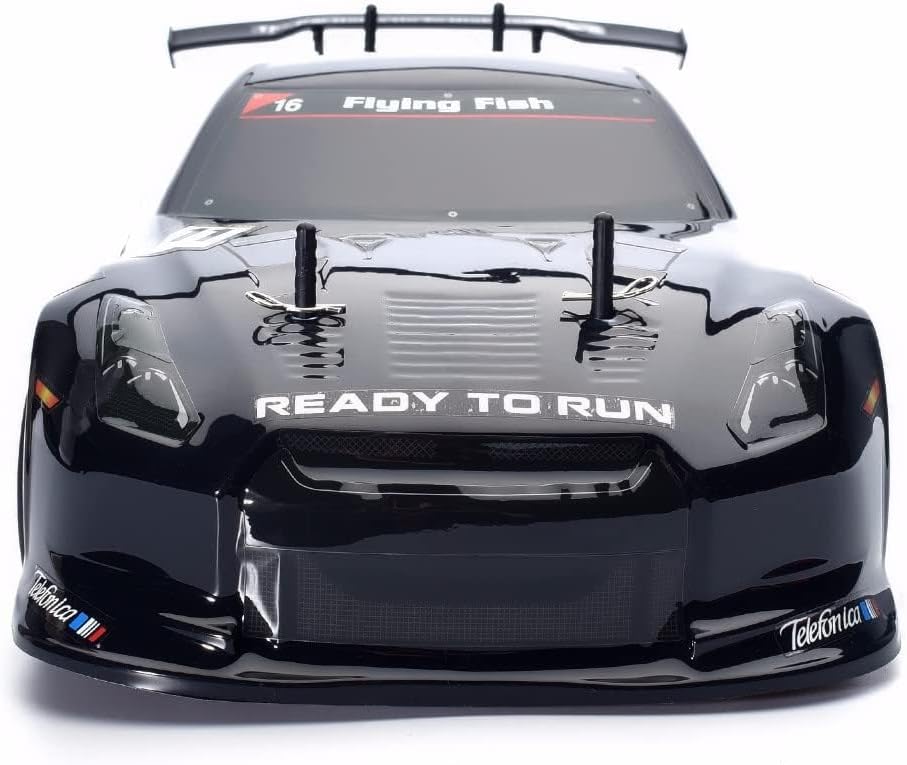
Image: Front view of the HSP Nitro RC Truck, showcasing its "READY TO RUN" design and sleek body.

Image: Side profile of the HSP Nitro RC Truck, highlighting its drift car body and wheel design.

Image: Rear view of the HSP Nitro RC Truck, showing the "HSP racing" branding and 4WD designation.
Maintenance
Regular maintenance is crucial for the longevity and performance of your nitro RC truck.
- After Each Run:
- Clean the vehicle thoroughly to remove dirt, dust, and debris. Use a soft brush or compressed air.
- Inspect for any loose screws, damaged parts, or worn tires.
- Empty any remaining fuel from the tank.
- Apply after-run oil to the engine to prevent corrosion.
- Periodic Maintenance:
- Check and clean the air filter regularly. A dirty air filter can lead to poor engine performance.
- Inspect and lubricate moving parts such as universal joints, bearings, and suspension components.
- Check the condition of the glow plug and replace if necessary.
- Ensure the fuel lines are not cracked or brittle.
- Verify proper operation of the steering and throttle servos.
- Storage: Store the vehicle in a cool, dry place away from direct sunlight and extreme temperatures.

Image: Underside view of the HSP Nitro RC Truck, showing the engine, exhaust, fuel lines, and chassis components.

Image: Underside view of the HSP Nitro RC Truck, highlighting the durable blue anodized aluminum chassis plate.
Troubleshooting
Refer to this section for common issues and their solutions.
| Problem | Possible Cause | Solution |
|---|---|---|
| Engine won't start | No fuel, dead glow plug, flooded engine, incorrect engine tuning. | Check fuel level. Replace glow plug. Clear flooded engine by removing glow plug and pulling starter. Adjust carburetor needles. |
| Loss of control/range | Low remote control batteries, interference, loose antenna wire. | Replace remote control batteries. Operate in an open area away from other radio signals. Check antenna connections. |
| Vehicle pulls to one side | Steering trim off, bent steering linkage, uneven tire wear. | Adjust steering trim on remote. Inspect and replace bent parts. Check and rotate/replace tires. |
| Engine stalls frequently | Improper engine tuning, dirty air filter, low fuel. | Adjust carburetor needles. Clean or replace air filter. Refuel. |
Specifications
| Model Number | 94102 |
| Scale | 1:10 |
| Drive System | 4-Wheel Drive (4WD) |
| Max Speed | Up to 65 km/h (40 mph) |
| Engine Type | Nitro Power |
| Product Dimensions (L x W x H) | 14 x 8 x 4.5 inches |
| Item Weight | 5 pounds |
| Manufacturer | RGT |
| Recommended Age | 14 - 17 years (Adult supervision required for users under 14) |
Warranty and Support
For warranty information, technical support, or replacement parts, please contact the seller or manufacturer directly. Keep your purchase receipt as proof of purchase.
Manufacturer: RGT
Brand: oein