Introduction
This manual provides detailed instructions for the safe and efficient operation of your Sanyo DVW7100 DVD/VCR Combo Player. Please read this manual thoroughly before using the unit and retain it for future reference. The Sanyo DVW7100 combines a DVD player with a 4-head Hi-Fi VCR, offering versatile media playback and recording capabilities.
Safety Information
To ensure safe operation and prevent damage, observe the following precautions:
- Do not expose the unit to rain or moisture.
- Do not block ventilation openings. Ensure adequate space around the unit for proper airflow.
- Do not place the unit on an unstable cart, stand, tripod, bracket, or table.
- Unplug the unit during lightning storms or when unused for long periods.
- Refer all servicing to qualified service personnel.
- Avoid placing heavy objects on top of the unit.
Product Overview
The Sanyo DVW7100 integrates both DVD and VCR functionalities into a single unit. Below is an image illustrating the front panel controls and features.
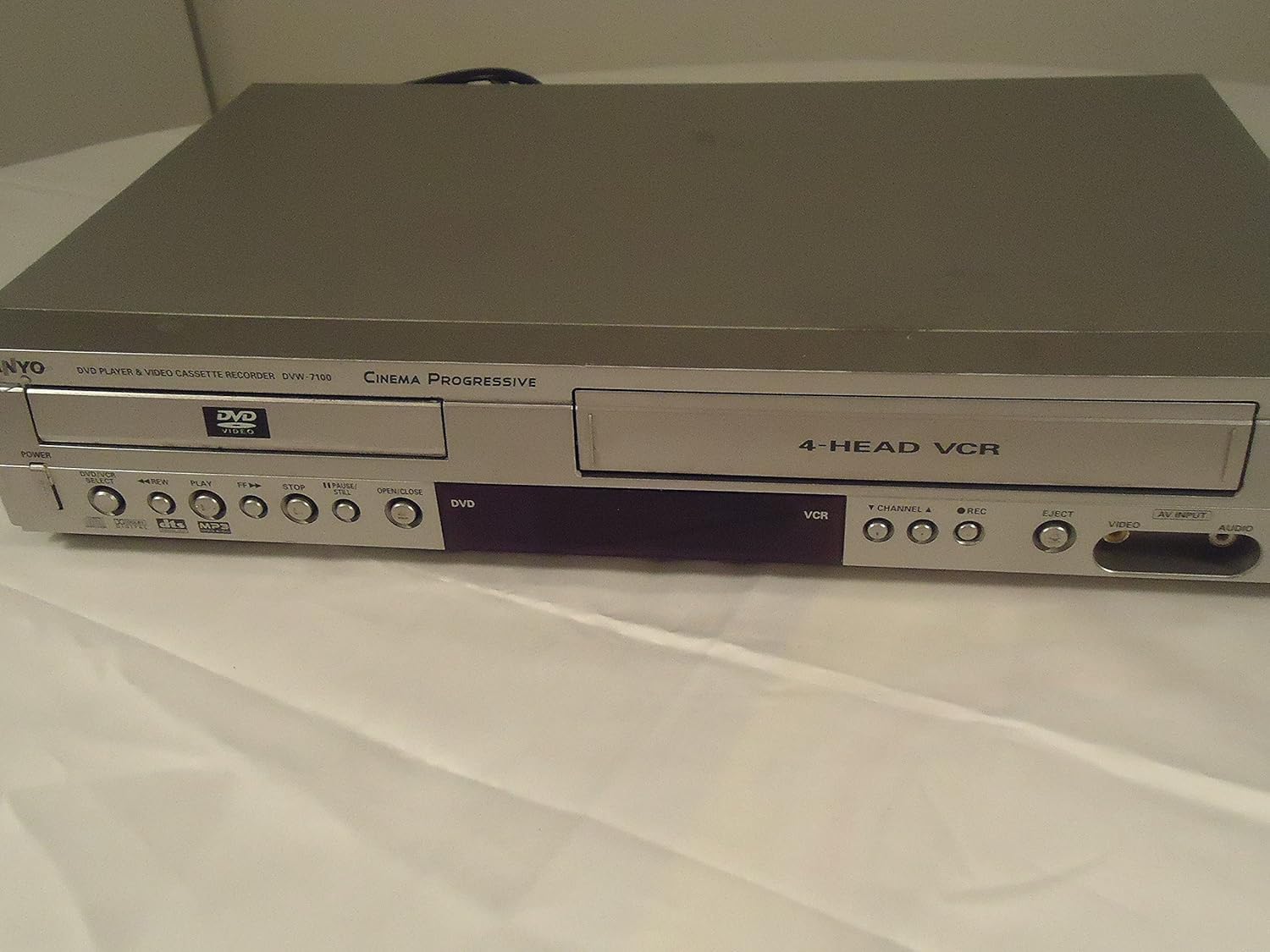
Image Description: Front view of the Sanyo DVW7100 DVD/VCR combo player. The left side features the DVD tray with 'DVD VIDEO' logo, and below it, buttons for POWER, DVD/VCR SELECT, REW, PLAY, FF, STOP, PAUSE/STILL, and OPEN/CLOSE. The right side shows the VCR slot labeled '4-HEAD VCR', with buttons for VCR functions including CHANNEL, REC, EJECT, and AV INPUT (Video and Audio jacks).
The front panel provides convenient access to essential controls for both DVD and VCR operations, including power, media selection, playback controls, and input ports.
Setup
1. Connecting to a Television
To connect your Sanyo DVW7100 to a television, use the appropriate audio/video cables. The unit supports Component, S-video, and RCA (Composite Video) connections.
- RCA (Composite Video) Connection: Connect the yellow video cable from the unit's 'VIDEO OUT' jack to the TV's 'VIDEO IN' jack. Connect the red and white audio cables from the unit's 'AUDIO OUT' jacks to the TV's 'AUDIO IN' jacks.
- S-Video Connection: Connect an S-video cable from the unit's 'S-VIDEO OUT' jack to the TV's 'S-VIDEO IN' jack. For audio, use the red and white RCA audio cables.
- Component Video Connection: Connect the red, green, and blue component video cables from the unit's 'COMPONENT VIDEO OUT' jacks to the TV's corresponding 'COMPONENT VIDEO IN' jacks. For audio, use the red and white RCA audio cables.
Ensure your TV is set to the correct input source (e.g., Video 1, S-Video, Component) to view the player's output.
2. Power Connection
Plug the AC power cord into a standard 120V AC, 60 Hz wall outlet.
3. Initial Setup
Upon first power-on, the unit may prompt you to set the clock and other basic preferences. Follow the on-screen instructions using the remote control (if available) or front panel buttons. The unit features an auto clock set function.
Operating the DVD Player
1. Loading and Ejecting a DVD
- Press the DVD/VCR SELECT button to choose DVD mode.
- Press the OPEN/CLOSE button to open the DVD tray.
- Place a DVD disc, label side up, into the tray.
- Press OPEN/CLOSE again to close the tray. The disc will load, and playback may begin automatically or display a menu.
- To eject, press OPEN/CLOSE.
2. Playback Controls
- PLAY: Starts or resumes disc playback.
- STOP: Stops playback.
- PAUSE/STILL: Pauses playback. Press again to resume.
- REW (Rewind): Scans backward through the disc.
- FF (Fast Forward): Scans forward through the disc.
3. Supported Media
The DVD player supports CD, CD-R, CD-RW, and MP3 discs in addition to standard DVDs.
Operating the VCR
1. Loading and Ejecting a Videocassette
- Press the DVD/VCR SELECT button to choose VCR mode.
- Insert a VHS videocassette into the VCR slot. The unit will automatically load the tape.
- To eject, press the EJECT button.
2. Playback Controls
- PLAY: Starts or resumes tape playback.
- STOP: Stops playback.
- PAUSE/STILL: Pauses playback. Press again to resume.
- REW (Rewind): Rewinds the tape.
- FF (Fast Forward): Fast forwards the tape.
3. Recording
The Sanyo DVW7100 is a 4-head Hi-Fi VCR recorder. To record:
- Ensure a blank or recordable videocassette is inserted.
- Select the desired input source (e.g., TV channel using the CHANNEL buttons, or an external device connected to the AV INPUT).
- Press the REC button to begin recording. Press STOP to end recording.
- Features like SP/EP auto recording and commercial skip function enhance the recording experience.
Maintenance
1. Cleaning the Unit
- Wipe the exterior of the unit with a soft, dry cloth.
- Do not use liquid cleaners or aerosol cleaners, as they may damage the finish or internal components.
- The VCR features an automatic head cleaner, reducing the need for manual cleaning of video heads.
2. Disc and Tape Care
- Handle discs by their edges to avoid fingerprints and scratches.
- Store discs and videocassettes in their cases when not in use, away from direct sunlight and extreme temperatures.
Troubleshooting
If you encounter issues with your Sanyo DVW7100, refer to the following common problems and solutions:
| Problem | Possible Cause / Solution |
|---|---|
| No power | Ensure the power cord is securely plugged into a working outlet. |
| No picture/sound | Check all audio/video cable connections. Ensure the TV is set to the correct input source. |
| Disc/Tape does not play | Ensure the disc/tape is inserted correctly. Clean the disc/tape if it appears dirty or damaged. Ensure the correct mode (DVD/VCR) is selected. |
| Poor picture quality (VCR) | The 4-head Hi-Fi VCR has an automatic head cleaner. If issues persist, the tape may be old or damaged. |
| Remote control not working | Check batteries. Ensure no obstructions between the remote and the unit. Note: This renewed unit may not include a remote. |
Specifications
| Feature | Description |
|---|---|
| Brand | SANYO |
| Model Name | DVW7100 |
| Item Weight | 11 pounds |
| Product Dimensions | 17 x 10.25 x 3.25 inches |
| Color | Grey |
| Media Type | CD, DVD |
| Supported Audio Format | CD, CD-R, CD-RW, MP3 |
| Audio Output Mode | Stereo |
| Surround Sound Channel Configuration | 5.1 |
| Connector Type | Component, S-video, RCA |
| Connectivity Technology | HDMI, Composite Video (RCA) |
| Special Features | Auto clock set, Auto tracking, Tape remaining time display, Commercial skip function, Automatic head cleaner, Time search, 3D surround, 19 micron heads, Front A/V input jacks, Clock/counter display, MTS Hi-Fi stereo, SP/EP auto recording, Random and repeat playback, Super imposed on-screen displays, Icon menu on-screen displays, Trilingual on-screen display, Unified remote control, Zoom |
| Power Supply | 120 V AC, 60 Hz |
| Power Consumption | 23W |
| Antenna Terminal | 75 Ohm (F-Type) UHF/VHF/CATV |
Warranty and Support
This Sanyo DVW7100 unit is a renewed product. Renewed products are typically backed by the Amazon Renewed Guarantee, which provides eligibility for replacement or refund if you are not satisfied with your purchase.
Important Note: This specific renewed unit is described as being in excellent working condition but does not include a remote control. Please consider this when planning your setup and operation.
For further support or warranty claims related to renewed products, please refer to the Amazon Renewed program details or contact Amazon customer service.


