
1. Introduction
Thank you for choosing the Behringer T-BUDS High-Fidelity True Wireless Stereo Earbuds. These earbuds are designed to provide an exceptional audio experience with the convenience of wireless connectivity and advanced features like Active Noise Cancellation (ANC). This manual will guide you through the setup, operation, and maintenance of your new T-BUDS.

Image: Behringer T-BUDS earbuds shown with their charging case, illustrating the product's design.
2. What's in the Box
Upon unboxing your Behringer T-BUDS, please ensure all the following components are present:
- Behringer T-BUDS True Wireless Stereo Earbuds (Left and Right)
- Charging Case
- USB Charging Cable (typically USB-C)
- Multiple sizes of ear tips (usually S, M, L)
- User Manual (this document)
3. Setup
3.1 Initial Charge
Before first use, it is recommended to fully charge both the earbuds and the charging case. Place the earbuds into the charging case. Connect the charging case to a USB power source using the provided USB cable. The indicator lights on the case will show charging status.

Image: The Behringer T-BUDS earbuds are securely placed within their open charging case, indicating readiness for charging or use.
Important: Some users have reported small protective stickers on the charging terminals of the earbuds. Ensure these are removed before placing the earbuds in the case for charging, as they can prevent proper contact and charging.
3.2 Pairing with a Device
- Ensure the earbuds are charged and placed in the charging case.
- Open the charging case lid. The earbuds will automatically enter pairing mode, indicated by flashing lights (refer to product specific light indicators if available).
- On your device (smartphone, tablet, computer), go to the Bluetooth settings.
- Search for new devices and select "Behringer T-BUDS" from the list.
- Once connected, the earbuds will indicate successful pairing (e.g., a voice prompt or solid light).
The T-BUDS utilize Bluetooth 5.0 technology, providing a stable wireless connection up to 10 meters (33 feet).
3.3 Achieving Optimal Fit
For the best sound quality and active noise cancellation performance, a secure and comfortable fit is crucial. Experiment with the different sizes of ear tips provided to find the pair that creates a good seal in your ear canal.

Image: A detailed view of the Behringer T-BUDS earbuds, highlighting their ergonomic design and ear tip.
4. Operating Instructions
The Behringer T-BUDS feature intuitive touch controls on each earbud for easy management of audio playback and calls.
4.1 Power On/Off
- Power On: Open the charging case lid, or take the earbuds out of the case. They will automatically power on and attempt to reconnect to the last paired device.
- Power Off: Place the earbuds back into the charging case and close the lid. They will automatically power off and begin charging.
4.2 Music Playback
- Play/Pause: Single tap on either earbud.
- Next Track: Double tap on the right earbud.
- Previous Track: Double tap on the left earbud.
- Volume Up: Triple tap on the right earbud.
- Volume Down: Triple tap on the left earbud.
4.3 Call Management
- Answer/End Call: Single tap on either earbud.
- Reject Call: Press and hold either earbud for 2 seconds.
4.4 Voice Assistant
- Activate Voice Assistant: Press and hold either earbud for 3 seconds (when not on a call).
5. Active Noise Cancellation (ANC) and Transparent Mode
The T-BUDS feature state-of-the-art Active Noise Cancellation to reduce ambient noise, and a Transparent Mode to allow you to hear your surroundings without removing the earbuds.
- Toggle ANC/Transparent Mode: Press and hold the touch area on the left earbud for 2 seconds to cycle through ANC On, Transparent Mode, and ANC Off.
Note: Active Noise Cancellation is most effective at reducing consistent low-frequency sounds. Transparent Mode is useful for situational awareness, such as hearing announcements or conversations.
6. Charging
The T-BUDS earbuds charge automatically when placed in the charging case. The case itself is charged via a USB-C port.
- Charging the Earbuds: Place both earbuds into their respective slots in the charging case. Close the lid. The earbuds will begin charging.
- Charging the Case: Connect the provided USB-C cable to the charging port on the back of the case and the other end to a USB power adapter (not included) or a computer's USB port.
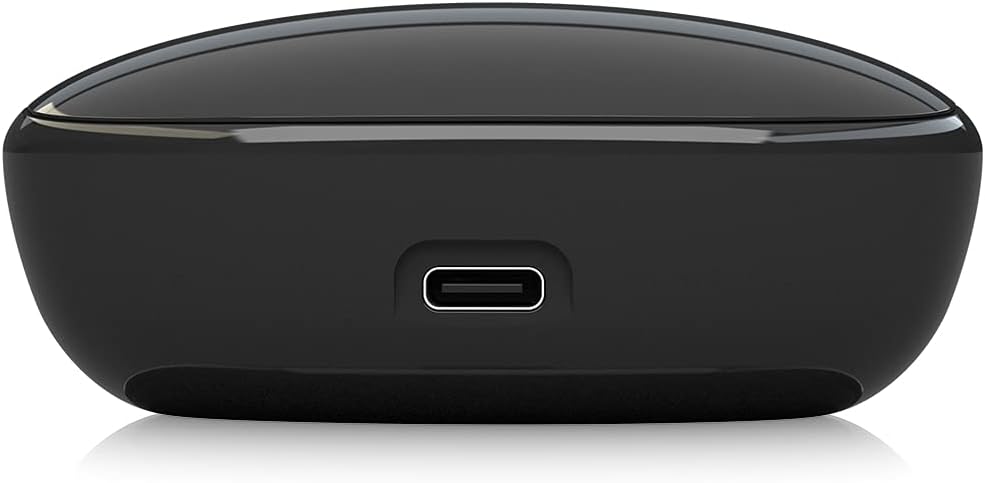
Image: The USB-C charging port located on the rear of the Behringer T-BUDS charging case, used for recharging the case's internal battery.
The charging case has LED indicators to show its battery level and charging status. Refer to the quick start guide for specific LED behaviors.
7. Maintenance
Proper maintenance will ensure the longevity and optimal performance of your T-BUDS.
- Cleaning: Regularly clean the earbuds and charging case with a soft, dry, lint-free cloth. For ear tips, remove them and clean with mild soap and water, then dry thoroughly before reattaching. Do not use harsh chemicals or abrasive materials.
- Water Resistance: The T-BUDS feature a splash-proof construction (IPX4 rating). This means they are resistant to splashing water from any direction, making them suitable for sports and workouts. However, they are not designed for submersion in water. Do not expose them to strong jets of water or prolonged immersion.
- Storage: When not in use, store the earbuds in their charging case to protect them and keep them charged. Store in a cool, dry place away from extreme temperatures.
8. Troubleshooting
If you encounter issues with your Behringer T-BUDS, please refer to the following common solutions:
| Problem | Possible Cause / Solution |
|---|---|
| Earbuds not charging |
|
| Cannot pair with device |
|
| No sound or poor sound quality |
|
| Active Noise Cancellation not effective |
|
9. Specifications
| Feature | Detail |
|---|---|
| Model Name | T-BUDS |
| Connectivity Technology | Bluetooth |
| Wireless Communication Technology | Bluetooth |
| Included Components | Charging Case |
| Material | Plastic |
| Compatible Devices | Devices with Bluetooth connectivity |
| Control Type | Media Control |
| Item Weight | 70 Grams (2.47 ounces) |
| Frequency Range | 20 Hz - 20 kHz |
| Unit Count | 2.0 Count |
| Number of Items | 1 |
| Audio Driver Type | Dynamic Driver |
| Bluetooth Range | 10 Meters (33 Feet) |
| Bluetooth Version | 5.0 |
| Carrying Case Color | Black |
| Earpiece Shape | Rounded tip |
| Manufacturer | Music Tribe US |
| Product Dimensions | 1.1 x 9.7 x 6.5 inches |
| Country of Origin | China |
| ASIN | B098NHYVD9 |
| Item model number | 000-F6R00-00010 |
| Batteries | 1 Lithium Polymer batteries required (included) |
| Color | Black |
| Ear Placement | In Ear |
| Form Factor | In Ear |
| Noise Control | Active Noise Cancellation |

Image: Regulatory and manufacturing information labels found on the Behringer T-BUDS charging case.
10. Warranty and Support
Behringer products are designed for reliability and performance. For information regarding warranty terms and conditions, please refer to the warranty card included with your product or visit the official Behringer website. For technical support, product registration, or service inquiries, please contact Behringer customer support through their official channels.
You can visit the official Behringer Store for more information and support: Behringer Store on Amazon

