
Metabo HPT M1808DAQ4
Metabo HPT 18V Cordless Trim Router Instruction Manual
Model: M1808DAQ4
Introduction
This manual provides essential information for the safe and effective operation, maintenance, and troubleshooting of your Metabo HPT 18V Cordless Trim Router, Model M1808DAQ4. Please read this manual thoroughly before using the tool to ensure proper handling and to prevent injury or damage.
Safety Information
Always follow basic safety precautions when using power tools to reduce the risk of fire, electric shock, and personal injury. Keep this manual for future reference.
- Work Area Safety: Keep your work area clean and well-lit. Cluttered or dark areas invite accidents. Do not operate power tools in explosive atmospheres, such as in the presence of flammable liquids, gases, or dust.
- Electrical Safety: Avoid body contact with earthed or grounded surfaces. Do not expose power tools to rain or wet conditions.
- Personal Safety: Always wear eye protection. Use hearing protection when operating the tool for extended periods. Dress properly; avoid loose clothing or jewelry. Secure long hair.
- Tool Use and Care: Do not force the power tool. Use the correct power tool for your application. Disconnect the battery pack from the power tool before making any adjustments, changing accessories, or storing power tools.
- Battery Tool Use and Care: Recharge only with the charger specified by the manufacturer. Use power tools only with specifically designated battery packs.
Product Overview
The Metabo HPT 18V Cordless Trim Router is designed for precision woodworking tasks. It features a lightweight, compact design with variable speed control and an integrated LED work light.

Image: The Metabo HPT 18V Cordless Trim Router, showing its compact design and clear base.
Key Components
- Brushless Motor: Provides efficient power and extended tool life.
- Variable Speed Dial: Allows adjustment of RPM from 10,000 to 30,000 for different materials and applications.
- LED Work Light: Illuminates the work area for improved visibility.
- Lock-On Button: For continuous operation.
- Collet: Accepts 1/4-inch and 3/8-inch router bits.
- Depth Adjustment: Mechanism for precise routing depth control.

Image: Diagram highlighting the Lock-On Button, Variable Speed Dial, and Bright LED Light on the router.
Setup
Package Contents
Verify that all items are present in your package:
- 18V Cordless Trim Router (M1808DAQ4)
- 1/4" Collet Cone (Part No. 377118)
- 3/8" Collet Cone (Part No. 377134)
- Trimmer Guide (Part No. 377127)
- Straight Guide Set (Part No. 377126)
- Template Guide (Part No. 377129)
- Dust Collector Port (Part No. 377131)
- Wrench (Part No. 377128)

Image: All included components: the router, two collet cones, trimmer guide, straight guide set, template guide, dust collector port, and wrench.
Battery Installation
The router is compatible with Metabo HPT 18V and 18V/36V MultiVolt batteries. Batteries and charger are sold separately.
- Ensure the router is turned off.
- Align the battery pack with the battery port on the router.
- Slide the battery pack into the port until it clicks securely into place.
- To remove, press the battery release button and slide the battery out.

Image: A selection of compatible Metabo HPT 1.5Ah, 2.0Ah, 3.0Ah, 4.0Ah, 5.0Ah, and 8.0Ah batteries.
Collet and Bit Installation
- Ensure the battery is removed for safety.
- Insert the desired collet (1/4-inch or 3/8-inch) into the spindle.
- Insert the router bit into the collet, ensuring at least 3/4 of the shank is seated.
- Tighten the collet nut firmly with the provided wrench. Do not overtighten.
Accessory Installation
Refer to the specific accessory instructions for detailed installation steps for the trimmer guide, straight guide set, template guide, and dust collector port.
Operating Instructions
Powering On/Off
The router features a two-step power-on system for enhanced safety.
- To turn on, press the safety lock button, then press the power switch.
- To turn off, release the power switch. The quick brake feature will rapidly stop the bit rotation.
Variable Speed Adjustment
Adjust the rotational speed using the variable speed dial located on the top of the router. Higher speeds are generally used for smaller bits and softer materials, while lower speeds are for larger bits and harder materials.

Image: A close-up view of the variable speed dial, allowing precise control over the router's RPM.
Depth Adjustment
The router features a micro-adjustment system for precise depth setting.
- Loosen the base locking lever.
- Adjust the router base up or down to achieve the desired depth.
- Use the fine adjustment knob for precise depth settings.
- Securely tighten the base locking lever before operation.
Using the LED Work Light
The integrated LED work light automatically illuminates when the router is powered on, providing improved visibility of the cutting line, especially in dimly lit conditions.
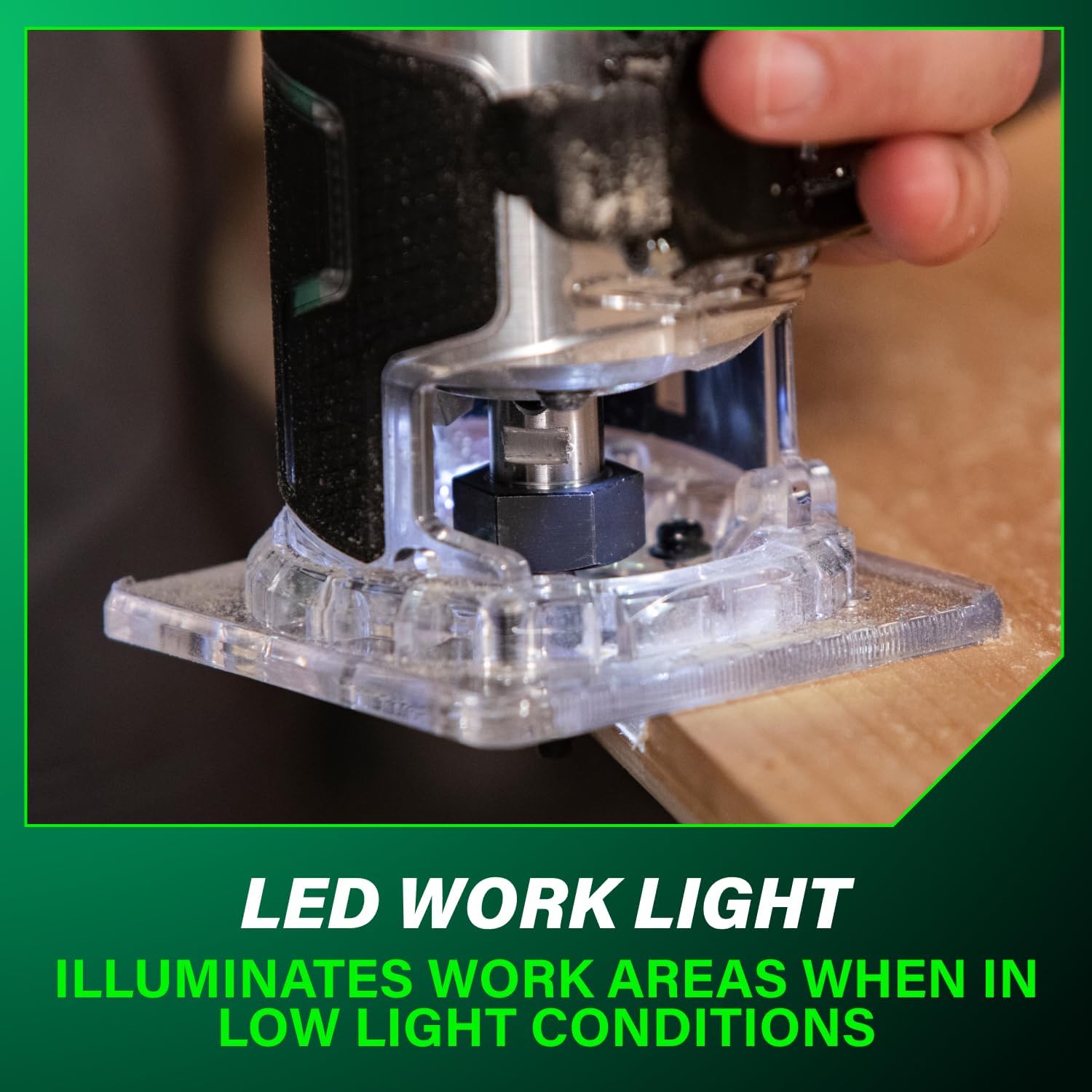
Image: The LED work light on the router base illuminating the area around the router bit.
Routing Techniques
Always perform a test cut on scrap material before routing your final workpiece. Maintain a firm grip on the router and move it smoothly and consistently across the material. Ensure the workpiece is securely clamped.

Image: A user operating the Metabo HPT trim router to create an edge profile on a piece of wood.
Maintenance
Cleaning
Regularly clean the router to ensure optimal performance and longevity.
- Disconnect the battery before cleaning.
- Use a soft, dry cloth to wipe down the tool's exterior.
- Remove any sawdust or debris from the collet area and ventilation openings using compressed air or a brush.
- Do not use harsh chemicals or abrasive cleaners.
Storage
Store the router in a clean, dry place, out of reach of children. Remove the battery pack before storing for extended periods.
Bit Care
Keep router bits sharp and clean. Dull bits can cause kickback and poor cut quality. Clean resin and pitch buildup from bits using a specialized bit cleaner.
Troubleshooting
| Problem | Possible Cause | Solution |
|---|---|---|
| Router does not start | Battery not installed correctly or discharged; Power switch not engaged properly. | Ensure battery is fully charged and correctly inserted. Press safety lock button then power switch. |
| Poor cut quality / Burning wood | Dull router bit; Incorrect speed setting; Feeding too fast or too slow. | Replace or sharpen bit. Adjust speed according to material. Maintain consistent feed rate. |
| Excessive vibration | Loose bit or collet nut; Damaged bit; Worn bearings. | Ensure bit and collet nut are tight. Replace damaged bit. If problem persists, contact service. |
| LED light not working | Tool not powered on; LED malfunction. | Ensure tool is powered on. If still not working, contact service. |
Specifications
| Feature | Specification |
|---|---|
| Model Number | M1808DAQ4 |
| Voltage | 18 Volts |
| Power Source | Battery Powered |
| Maximum Rotational Speed | 10,000 - 30,000 RPM |
| Collet Capacity | 1/4-inch and 3/8-inch |
| Item Weight | 2.5 Pounds |
| Product Dimensions | 6.97"W x 5.35"H |
| Material | Aluminum, Plastic |
| Manufacturer | Koki Holdings America, Ltd |
| UPC | 717709028180 |
Warranty
The Metabo HPT 18V Cordless Trim Router (Model M1808DAQ4) comes with a Lifetime Lithium Ion Metabo HPT battery warranty and a Lifetime Tool Body Warranty. For detailed terms and conditions, please refer to the official Metabo HPT warranty documentation or visit the manufacturer's website.

Image: The Metabo HPT router highlighting the lifetime tool body warranty.
Support
For further assistance, technical support, or to locate authorized service centers, please contact Metabo HPT customer service or visit their official website. Keep your model number (M1808DAQ4) and UPC (717709028180) readily available when seeking support.
You can find more information and contact details on the Metabo HPT Store.
Related documentsM1808DAQ4


Ask a question about this manual
Ask about setup, troubleshooting, compatibility, parts, safety, or missing instructions. Manuals+ will review the question and use this page’s manual context to help answer it.