
1. Introduction
The HUUM UKU WiFi Control System provides a convenient and modern way to manage your sauna experience. This system allows you to operate all features of your sauna control, including lighting, ventilation, timer, and temperature, directly from a wall-mounted unit or remotely via the HUUM Wi-Fi smartphone application. This manual provides essential information for the safe and effective use of your HUUM UKU WiFi Control.

Image 1.1: The HUUM UKU WiFi Control unit, featuring a sleek black design with the HUUM logo.
2. Safety Information
Your safety is paramount. The HUUM UKU WiFi Control system incorporates several safety features to ensure secure operation. Always adhere to the following guidelines and consult the full installation and safety instructions provided with your sauna heater and control unit.
- Child Safety Lock: The system includes a child safety lock feature to prevent unauthorized use. Refer to the operating instructions for activation and deactivation.
- Overheating Protection: Integrated overheating protection automatically shuts down the heater if temperatures exceed safe limits.
- Door Sensor: A door sensor is included to ensure the sauna door is closed before heating can commence, enhancing safety.
- Ensure all electrical connections are performed by a qualified electrician in accordance with local codes and regulations.
- Do not operate the sauna control if it appears damaged or is not functioning correctly.
3. Package Contents
Verify that all components are present in your package:
- HUUM UKU WiFi Control Unit (Black)
- Wall Mount Bracket
- Wi-Fi Connectivity Cables
- Installation and User Manual (this document)
4. Setup
4.1. Installation
The HUUM UKU WiFi Control unit is designed for wall mounting. Ensure the installation location is dry, easily accessible, and within reach of necessary electrical and Wi-Fi connections. Refer to the detailed installation guide for wiring diagrams and mounting instructions. For heaters exceeding 9kW, an extension box is required.
4.2. Wi-Fi Connection
The UKU WiFi Control requires a stable Wi-Fi network connection for remote operation. During initial setup, follow the on-screen prompts on the control unit or the instructions within the HUUM app to connect to your home Wi-Fi network.
4.3. App Download and Pairing
Download the official HUUM Wi-Fi application from your smartphone's app store (available for Android and iOS devices). Once installed, open the app and follow the instructions to pair it with your UKU WiFi Control unit. This will enable remote control functionality.

Image 4.1: A smartphone displaying the HUUM app interface alongside a HUUM control unit, illustrating the integration of app and physical control.
Image 4.2: A smartphone screen displaying the HUUM application's main logo, indicating the app is ready for use.
5. Operating Instructions
The HUUM UKU WiFi Control offers flexible operation through its wall-mounted display or the dedicated smartphone application.
5.1. Basic Operation (Wall-Mounted Control)
The sleek black control display panel allows for direct adjustment of sauna settings. Use the integrated buttons or dial to navigate menus and set parameters such as:
- On/Off: Power the sauna heater.
- Temperature: Adjust the desired sauna temperature within the range of 122-230°F (50-110°C).
- Time: Set the duration of the sauna session.
- Delay: Program a delayed start for your sauna session, up to 48 hours in advance.
5.2. App Control (Smartphone Application)
The HUUM Wi-Fi app provides comprehensive control over your sauna from anywhere with an internet connection. This allows you to preheat your sauna to the perfect temperature before you arrive. The app mirrors the functionalities of the wall-mounted control and may offer additional features such as:
- Remote activation and deactivation of the sauna.
- Precise temperature setting and monitoring.
- Scheduling of sauna sessions with advanced delay options.
- Control of integrated lighting and ventilation systems (if connected).
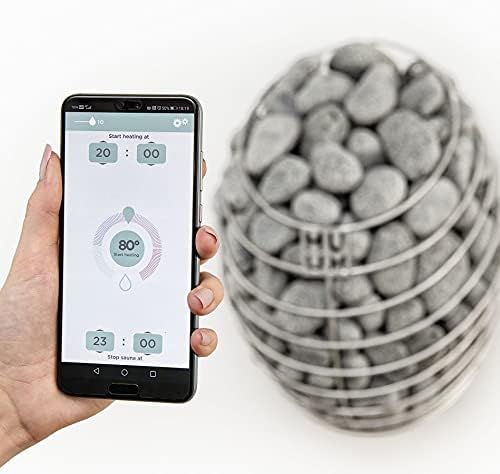
Image 5.1: A hand holding a smartphone displaying the HUUM app, which shows temperature and timer settings, with a sauna heater visible in the background.
6. Maintenance
To ensure the longevity and optimal performance of your HUUM UKU WiFi Control, follow these general maintenance guidelines:
- Cleaning: Wipe the control unit's display panel with a soft, dry cloth. Avoid abrasive cleaners or solvents that could damage the finish.
- Environment: Ensure the control unit is kept in a dry environment, away from direct water splashes or excessive humidity.
- Software Updates: Periodically check the HUUM app for any available software or firmware updates for your control unit to ensure you have the latest features and security enhancements.
7. Troubleshooting
If you encounter issues with your HUUM UKU WiFi Control, consider the following troubleshooting steps:
- No Power: Check the main power supply to the control unit and the sauna heater. Ensure all circuit breakers are in the ON position.
- Wi-Fi Connectivity Issues: Verify that your home Wi-Fi network is active and the signal strength at the control unit's location is adequate. Restart your Wi-Fi router if necessary. Re-pair the control unit with the app if connection is lost.
- App Not Responding: Close and reopen the HUUM app. Ensure your smartphone has a stable internet connection. Check for app updates in your app store.
- Sauna Not Heating: Confirm that the door sensor indicates the sauna door is closed. Check the set temperature and timer settings. Ensure the sauna heater itself is functioning correctly.
- Error Messages: If an error message appears on the control unit's display or in the app, consult the detailed troubleshooting section of the full product manual or contact HUUM customer support.
8. Specifications
| Feature | Specification |
|---|---|
| Brand | HUUM |
| Model Number | 44180017774749 |
| UPC | 810041112392 |
| Controller Type | WI-FI APP |
| Color | Black |
| Specific Uses For Product | Sauna |
| Temperature Control Type | Remote |
| Connectivity Technology | Wi-Fi |
| Included Components | Wall mount, Wi-Fi connectivity cables |
| Power Source | Hardwire |
| Voltage | 24 Volts (AC) |
| Shape | Rectangular |
| Display Type | LCD |
| Finish Type | Glossy |
| Control Type | App Control |
| Control Method | App |
| Connectivity Protocol | Wi-Fi |
| Mounting Type | Wall Mount |
| Style | Modern |
| Backlight | Yes |
| Heater Compatibility | Up to 18kW (extension box required for over 9kW) |
| Temperature Range | 122-230°F (50-110°C) |
| Delayed Start | Up to 48 hours |
| Special Feature | Child Safety Lock |
9. Warranty and Support
For information regarding product warranty, please refer to the warranty card included with your purchase or visit the official HUUM website. For technical support, troubleshooting assistance beyond this manual, or to inquire about replacement parts, please contact HUUM customer service through their official channels.
You can often find additional resources, FAQs, and contact information on the HUUM Store on Amazon or the manufacturer's official website.


