
CooSpo BC200
Contents
COOSPO BC200 Wireless Bike Computer
Instruction Manual
1. Introduction
Thank you for choosing the COOSPO BC200 Wireless Bike Computer. This manual provides essential information for setting up, operating, and maintaining your device. The BC200 is designed to enhance your cycling experience by providing accurate data, comprehensive tracking, and seamless connectivity.
Key features include accurate GPS positioning, a large auto-backlit display, ANT+ and Bluetooth sensor compatibility, multi-data display options, and Strava synchronization.
2. Product Overview

Figure 2.1: Front view of the COOSPO BC200 Bike Computer, showing its large display and side buttons.
The COOSPO BC200 features a 2.4-inch FSTN anti-glare LCD screen, designed for clear readability in various lighting conditions, including direct sunlight. It includes an automatic backlight function that adjusts based on ambient light.

Figure 2.2: The BC200 display showing clear visibility in both day and night conditions with auto backlight.
The device supports both ANT+ and Bluetooth connectivity, allowing it to pair with a wide range of external sensors such as heart rate monitors, speed sensors, cadence sensors, and power meters. This enables comprehensive data collection for your rides.

Figure 2.3: The BC200's compatibility with various ANT+ and Bluetooth sensors, including heart rate, speed, cadence, and power.
The BC200 provides over 70 cycling data points and allows for 5 customized display pages, each configurable to show 2-9 data types. This customization ensures you see the most relevant information during your ride.

Figure 2.4: Examples of the BC200's multi-data display and custom setting capabilities.
The device is IP67 waterproof, providing protection against dust and water immersion up to 1 meter for 30 minutes, making it suitable for various weather conditions.

Figure 2.5: The BC200 demonstrating its IP67 waterproof capability while mounted on a bicycle.
3. Setup
3.1 Package Contents
- COOSPO BC200 GPS Bike Computer
- Front Bike Computer Mount
- User Manual (this document)
3.2 Mounting the Device
The BC200 comes with a front bike computer mount for easy installation on your handlebar. Follow the instructions provided with the mount for secure attachment.
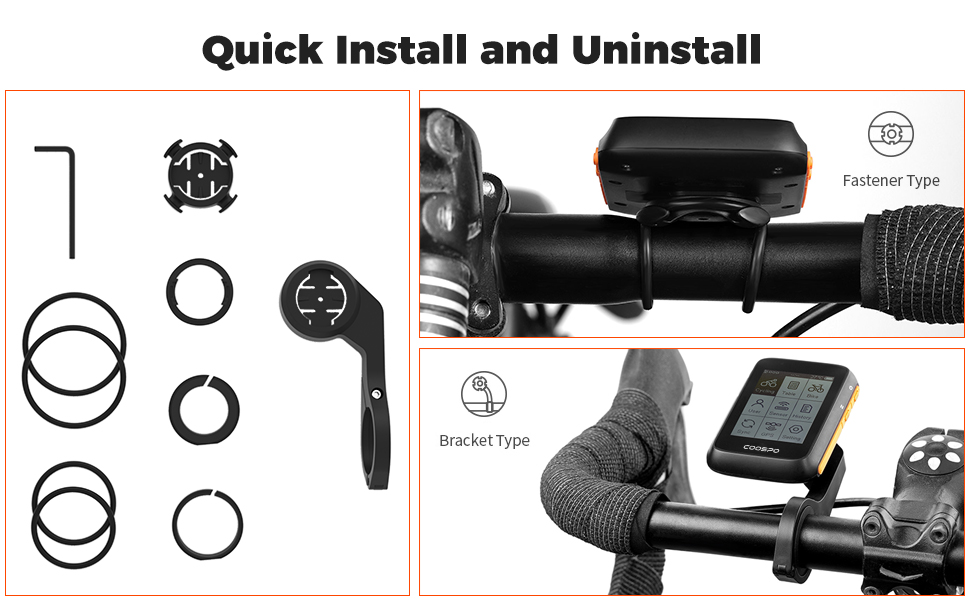
Figure 3.1: Quick installation and uninstallation methods for the BC200 mount.
3.3 Initial GPS Positioning
For accurate GPS data, ensure you are outdoors for the first-time positioning. This process may take 3-5 minutes. The BC200 supports GPS, GPS & BEIDOU, and GPS & GLONASS modes for global positioning. GPS can be closed for indoor cycling.
3.4 Sensor Pairing
The BC200 can connect to multiple ANT+ and Bluetooth sensors. Refer to the device's on-screen menu for sensor pairing instructions. Ensure your sensors are active and within range during the pairing process.
3.5 CoospoRide App Setup
Download the CoospoRide App to your smartphone for easy device settings, recording and analyzing cycling activity records, and firmware updates. The app provides a convenient interface for managing your BC200.

Figure 3.2: The CoospoRide App interface for managing your bike computer settings and data.
4. Operating
4.1 Basic Navigation
The BC200 is operated using its physical buttons. Refer to the device's on-screen prompts and the full user manual for detailed button functions and menu navigation.

Figure 4.1: The main menu screen of the BC200, showing options like Cycling, Dial, Bike, User, Sensor, History, Sync, GPS, and Setting.
4.2 Customizing Display Pages
You can customize up to 5 display pages, each showing 2-9 data types. This allows you to prioritize the information most important to your ride, such as speed, distance, heart rate, cadence, power, altitude, temperature, and calories.
4.3 Data Synchronization
After your ride, you can upload your .Fit file to Strava. This can be done via USB transmission on your PC or by syncing the .Fit file through the CoospoRide App on your phone.

Figure 4.2: Data synchronization options for the BC200, including direct USB transfer to PC and wireless sync via the CoospoRide App to Strava.
4.4 Multiple Bike Profiles
The BC200 allows you to easily set and save parameters for up to 3 different bikes, enabling quick switching between profiles without reconfiguring settings.

Figure 4.3: The BC200's ability to save data for up to 3 bikes and its 36-hour battery life.
4.5 Battery Life and Charging
The BC200 offers a battery life of up to 36 hours on a single charge. It is rechargeable via a standard USB connection.
4.6 Language Settings
The device supports multiple languages. You can change the display language through the settings menu.

Figure 4.4: The BC200's multi-language selection screen.
4.7 Official Product Video
Video 4.1: An official product video titled "bc200 bike computer" from the seller, demonstrating the device's features and use during cycling. This video highlights the passion for cycling and how the BC200 helps track performance.
5. Maintenance
To ensure the longevity and optimal performance of your COOSPO BC200, follow these maintenance guidelines:
- Cleaning: Wipe the device with a soft, damp cloth. Avoid using harsh chemicals or abrasive cleaners.
- Water Exposure: While the device is IP67 waterproof, prolonged submersion or high-pressure water jets should be avoided. Ensure the USB port cover is securely closed when exposed to water.
- Storage: Store the device in a cool, dry place away from direct sunlight and extreme temperatures.
- Charging: Charge the device regularly, especially if it will be stored for an extended period, to maintain battery health.
6. Troubleshooting
If you encounter issues with your COOSPO BC200, refer to the following common troubleshooting steps:
- GPS Acquisition Time: If the device takes a long time to acquire GPS signal, ensure you are in an open outdoor area with a clear view of the sky. First-time acquisition can take up to 5 minutes.
- Sensor Pairing Issues: Ensure sensors are active, have fresh batteries, and are within range of the BC200. Try re-pairing the sensor through the device's settings menu.
- Display Not Responding: Try restarting the device by holding down the power button. If unresponsive, ensure the battery is charged.
- Battery Draining Quickly: Check if the backlight is set to always on or if GPS is constantly searching in an indoor environment. Adjust settings to optimize battery life.
- Data Sync Problems: Ensure a stable Bluetooth connection to your phone or a proper USB connection to your PC. Check the CoospoRide App for any error messages or updates.
For more detailed troubleshooting or issues not covered here, please refer to the full User Manual (PDF) or contact customer support.
7. Specifications
| Feature | Specification |
|---|---|
| Brand | CooSpo |
| Model | BC200 |
| Screen Size | 2.4 Inches |
| Display Type | LCD |
| Sensor Type | GPS Sensor |
| Connectivity Technology | ANT, Bluetooth |
| International Protection Rating | IP67 |
| Battery Cell Composition | Lithium-Nickel Manganese Cobalt (NMC) |
| Item Weight | 0.19 Kilograms |
| Human Interface Input | Buttons |
| Mounting Type | Handlebar Mount |
8. Warranty and Support
8.1 Warranty Information
The COOSPO BC200 GPS Bike Computer comes with a 1-Year Manufacturer Warranty. Please retain your proof of purchase for warranty claims.
8.2 Customer Support
For further assistance, technical support, or warranty inquiries, please refer to the official User Manual (PDF) or visit the CooSpo official website for contact information. The CoospoRide App also provides support features and firmware updates.
Ask a question about this manual
Ask about setup, troubleshooting, compatibility, parts, safety, or missing instructions. Manuals+ will review the question and use this page’s manual context to help answer it.