
1. Introduction
Thank you for choosing the KEWIG Car Charger, Model Z8-A. This device is designed to provide efficient and safe charging for your electronic devices while on the go. Featuring dual USB Quick Charge 3.0 ports, a colorful voltmeter, and an integrated ON/OFF switch, it offers convenience and protection for your vehicle's battery and connected devices. Please read this manual thoroughly before use to ensure optimal performance and safety.

Image 1.1: The KEWIG Car Charger, Model Z8-A, showcasing its dual USB ports, ON/OFF button, and integrated colorful voltmeter display.
2. Safety Information
To ensure safe operation and prevent damage to the product or your vehicle, please observe the following safety guidelines:
- Do not disassemble, modify, or repair the device.
- Keep the device away from water, moisture, and extreme temperatures.
- Avoid dropping or subjecting the device to strong impacts.
- Ensure the car charger is securely inserted into the cigarette lighter socket.
- Do not operate the device if it appears damaged.
- This product is designed for 12V vehicle power outlets.
For detailed safety information, please refer to the official Safety Information PDF.
3. Package Contents
The KEWIG Car Charger package includes:
- 1 x KEWIG Car Charger (Model Z8-A)
4. Product Features
The KEWIG Car Charger is equipped with several advanced features for optimal performance:
- Dual QC3.0 USB Ports: Two Quick Charge 3.0 ports deliver up to 18W (3A) per port, with a total output of 36W. This allows for rapid charging of two compatible devices simultaneously, up to 4 times faster than conventional chargers.
- Colorful Voltmeter: An integrated LED voltmeter monitors your car battery's voltage in real-time. The colored lights (red, yellow, green) provide a quick visual indication of the battery level and charging status.
- ON/OFF Switch: A dedicated button allows you to control the power to the voltmeter LED and USB ports, helping to conserve vehicle battery when the charger is not in active use.
- Premium Construction: Manufactured with high-quality materials resistant to both high and low temperatures, ensuring reliable operation in environments ranging from -20°C to 60°C.
- Advanced Safety Protection: Certified by UL, FCC, ROHS, and EMC, the charger incorporates a smart chip that provides protection against overvoltage, overcurrent, overcharge, overheating, and short-circuits, safeguarding both the charger and your devices.
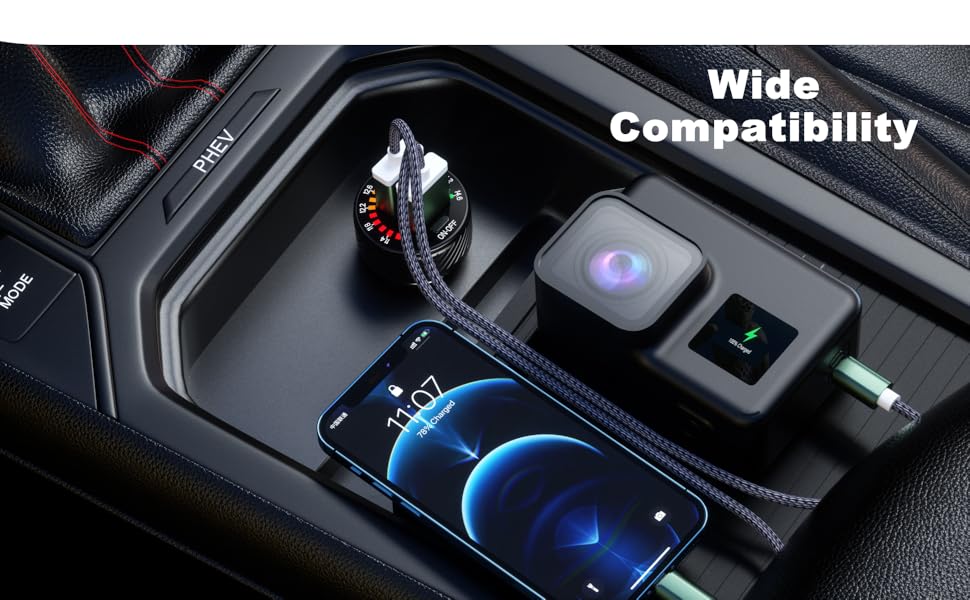
Image 4.1: Illustration of the multi-protection features including overcharge, overcurrent, over-temperature, and short-circuit protection.
5. Setup
Installing your KEWIG Car Charger is a simple process:
- Ensure your vehicle's engine is off before installation.
- Locate the 12V cigarette lighter socket in your vehicle.
- Insert the KEWIG Car Charger firmly into the 12V socket until it is seated securely.
- Once inserted, you may start your vehicle. The voltmeter LED will illuminate, indicating power.

Image 5.1: The car charger properly installed in a vehicle's power outlet, demonstrating its compact fit and ability to charge two devices simultaneously.
6. Operating Instructions
The KEWIG Car Charger features an intuitive ON/OFF switch for controlling its functions:
- Step 1: Activate Voltmeter and USB Ports
Press the ON/OFF switch lightly. The voltmeter LED will illuminate, and both USB ports will become active, ready for charging.
- Step 2: Turn Off Voltmeter LED (USB Ports Remain Active)
Press the ON/OFF switch lightly again. The voltmeter LED display will turn off, but the USB ports will remain active, allowing you to continue charging devices without the visual display.
- Step 3: Power Off Voltmeter and USB Ports Completely
Press and hold the ON/OFF switch for approximately two seconds. Both the voltmeter LED and the USB ports will power off completely. This is recommended when the charger is not in use to prevent battery drain, especially if your vehicle's 12V socket is always powered.
To charge your devices, connect them to the USB ports using appropriate charging cables. The charger will automatically detect and deliver optimal charging current.

Image 6.1: Visual representation of the ON/OFF switch operation, showing the voltmeter display active and inactive states.
6.1. Voltmeter Functionality
The colorful LED voltmeter provides a visual indication of your car battery's voltage:
- Red Lights: Typically indicate a lower voltage, potentially below optimal levels.
- Yellow Lights: Suggest a moderate or acceptable voltage level.
- Green Lights: Indicate a healthy and optimal battery voltage.
This feature allows you to quickly assess your vehicle's battery health at a glance.
6.2. Wide Compatibility
The KEWIG Car Charger is designed for broad compatibility with a variety of devices and vehicle models. It supports fast charging for:
- Smartphones: Including iPhone 14/14 Pro/13/13 Pro/12/12 Mini/12 Pro/12 Pro Max/11/Pro/Max/8 Plus/8/7 Plus/7/6S/6/6 Plus, Samsung Galaxy S21/S20/S10/S9/S8/S7/S6/Plus/Note series, Huawei Mate/P series, Xiaomi MI/MIX series, Nokia, Pixel, LG, HTC, BLU, OnePlus, and more.
- Tablets: Various models compatible with USB charging.
- Other USB-Powered Devices: Such as cameras, game controllers, and other portable electronics.

Image 6.2: The car charger demonstrating its universal compatibility with a range of electronic devices.
7. Maintenance
To ensure the longevity and optimal performance of your KEWIG Car Charger, follow these simple maintenance tips:
- Cleaning: Use a soft, dry cloth to wipe the exterior of the charger. Do not use liquid cleaners or solvents.
- Storage: When not in use for extended periods, store the charger in a cool, dry place away from direct sunlight and extreme temperatures.
- Inspection: Periodically check the charger for any signs of damage, such as cracks or loose connections. If damage is found, discontinue use.
8. Troubleshooting
If you encounter issues with your KEWIG Car Charger, please refer to the following common problems and solutions:
| Problem | Possible Cause | Solution |
|---|---|---|
| Charger not powering on / No LED display |
|
|
| Devices not charging or charging slowly |
|
|
| Voltmeter LED is off, but USB ports are charging |
|
|
9. Specifications
| Feature | Detail |
|---|---|
| Model Number | Z8-A |
| Input Voltage | 12 Volts |
| Total USB Ports | 2 (Dual QC3.0) |
| Output (Each Port) | 18W / 3A |
| Total Output | 36W |
| Special Features | Colorful Voltmeter, ON/OFF Switch |
| Operating Temperature | -20°C to 60°C (-4°F to 140°F) |
| Certifications | UL, FCC, ROHS, EMC |
| Dimensions | 3.19 x 2.32 x 1.57 inches (Package) |
| Item Weight | 1.41 ounces |
10. Warranty & Support
KEWIG products are manufactured to high-quality standards. For information regarding warranty coverage, please refer to the warranty card included with your purchase or visit the official KEWIG website.
If you experience any issues or have questions about your KEWIG Car Charger, please contact our customer support team. Contact details can typically be found on our official website or through your purchase platform.
We are committed to providing excellent customer satisfaction and support.

