
1. Introduction
Thank you for choosing the HALO Portable PowerStation. This device provides a versatile and reliable power source for various electronic devices, ideal for outdoor activities, travel, and emergency backup. This manual contains important information regarding the safe operation, maintenance, and specifications of your PowerStation. Please read it thoroughly before use and retain it for future reference.
2. Safety Information
To ensure safe operation, always follow these guidelines:
- Do not expose the PowerStation to water, moisture, or extreme temperatures.
- Avoid dropping or subjecting the device to strong impacts.
- Do not attempt to disassemble, repair, or modify the PowerStation. Contact qualified service personnel if maintenance is required.
- Keep the PowerStation away from flammable materials and direct sunlight.
- Ensure proper ventilation during use and charging to prevent overheating.
- This PowerStation has a maximum output of 400W. Do not connect devices that exceed this wattage, such as microwaves, hair dryers, blenders, drills, or heaters. Always check your device's power requirements before connecting.
- Store the PowerStation in a cool, dry place when not in use.
- UL Safety Certified Models: PS-CL026C35US, PS-403, T400.
3. Package Contents
Verify that all items are present in your package:
- HALO Portable PowerStation
- Wall Charging Adapter
- Owner's Manual (this document)
4. Product Overview
The HALO Portable PowerStation features multiple output ports and an LCD screen for monitoring status.
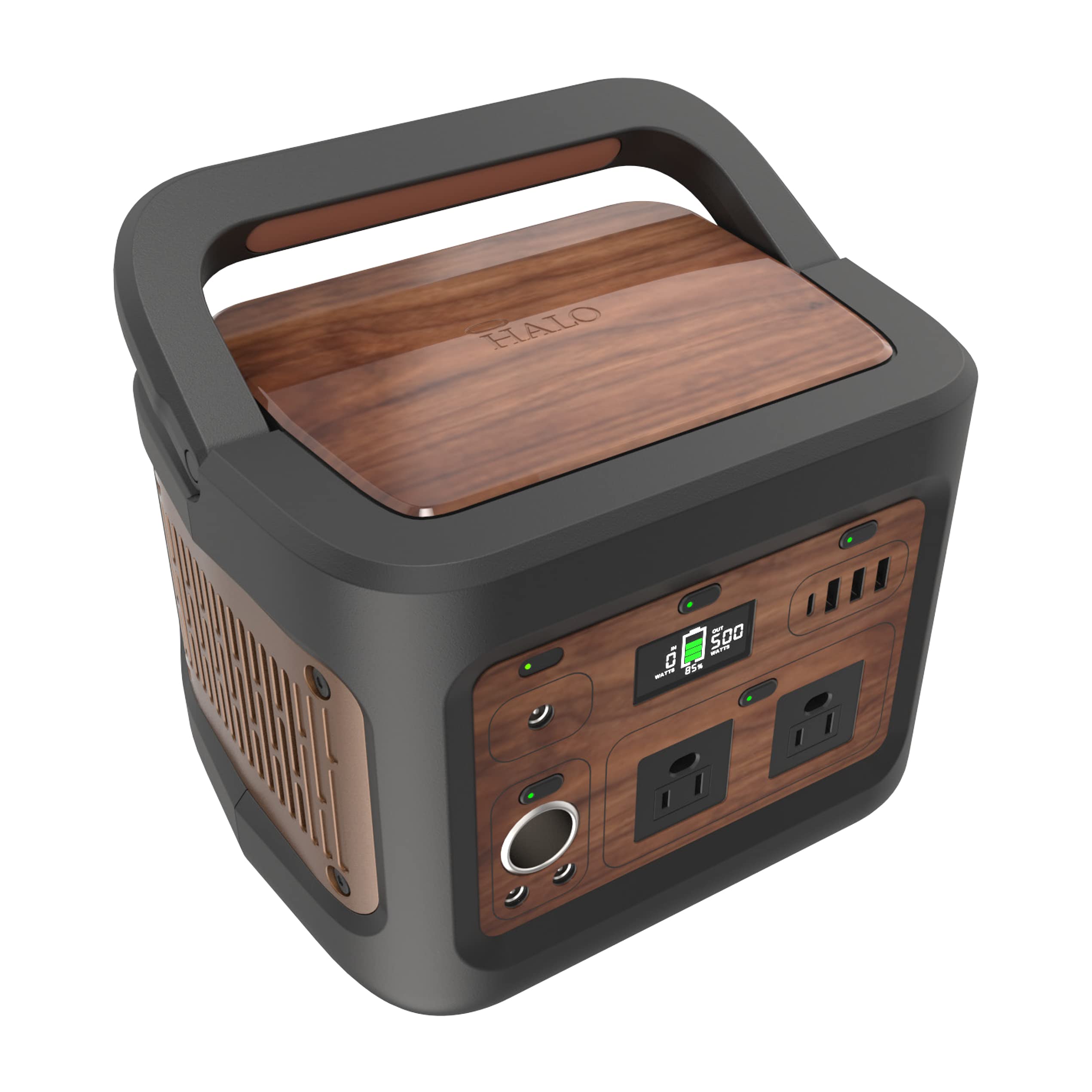
This image shows the HALO Portable PowerStation, highlighting its compact design, various output ports (AC, USB, DC), and the easy-to-read LCD display.
Key Features:
- 403.2Wh Internal Battery: Provides substantial power capacity.
- 400W Max Output: Capable of powering a wide range of devices.
- Multiple Output Ports: Includes 2 AC outlets, 3 USB-A ports, 1 USB-C port, and 1 DC port.
- LCD Display: Shows input/output wattage and remaining battery life.
5. Charging the PowerStation
Before initial use or storage, fully charge your PowerStation. The LCD screen will indicate charging status and battery level.
Charging Methods:
- Wall Charger (110V): Connect the included wall charging adapter to the PowerStation's input port and a standard wall outlet.
- Car Charger (120W): Use a compatible car charger (not included) to charge from your vehicle's 12V outlet.
- USB-C Input (100W): Utilize a 100W USB-C power delivery charger (not included) for fast charging.
- Solar Panels (100W, Sold Separately): Connect compatible 100W solar panels to the PowerStation's solar input port for environmentally friendly charging.
Important: Always ensure the PowerStation is fully charged before using it for the first time or storing it for extended periods to maintain battery health.
6. Operating the PowerStation
The PowerStation is designed for ease of use. Simply connect your devices to the appropriate output ports.
6.1. AC Output
The PowerStation provides two standard AC outlets for devices requiring up to 400W of power.
- Press the AC power button to activate the AC outlets. The LCD screen will indicate that AC output is active.
- Plug your AC-powered device into one of the AC outlets.
- When finished, press the AC power button again to turn off the AC output and conserve battery.
Note: If the connected device exceeds 400W, the PowerStation's overload protection will activate, and the AC output will shut down.
6.2. USB Output (USB-A & USB-C)
The PowerStation features three USB-A ports and one USB-C Power Delivery (PD) port for charging mobile devices, tablets, and USB-C laptops.
- The USB ports are typically always active when the PowerStation is on.
- Connect your device's USB charging cable to the appropriate USB-A or USB-C port.
- The USB-C PD port can charge compatible devices up to 100W, such as MacBook Pro 16”, Dell XPS 13, iPhone, iPad Pro, and Nintendo Switch.
6.3. DC Output
A DC output port is available for devices that require 12V DC power.
- Press the DC power button to activate the DC output.
- Plug your 12V DC device into the DC output port.
- When finished, press the DC power button again to turn off the DC output.
7. Maintenance
Proper maintenance ensures the longevity and performance of your PowerStation.
- Cleaning: Use a soft, dry cloth to clean the exterior of the PowerStation. Do not use abrasive cleaners or solvents.
- Storage: If storing for an extended period, fully charge the PowerStation every 3-6 months to prevent battery degradation. Store in a cool, dry environment.
- Battery Health: Avoid completely draining the battery frequently. Recharge when the battery level is low.
8. Troubleshooting
If you encounter issues with your PowerStation, refer to the following common problems and solutions:
- PowerStation not turning on: Ensure the battery is charged. Connect to the wall charger and attempt to power on.
- AC output not working: Check if the AC button is pressed. Verify that the connected device's wattage does not exceed 400W. Disconnect and reconnect the device.
- USB ports not charging: Ensure the PowerStation is powered on. Try a different USB cable or port.
- Slow charging: Ensure you are using the correct charging adapter and cable. For solar charging, ensure panels are in direct sunlight and properly connected.
- Overload warning on LCD: Disconnect the high-power device immediately. The PowerStation has an internal protection mechanism. Reduce the load before attempting to use AC output again.
If problems persist, contact customer support.
9. Specifications
| Feature | Specification |
|---|---|
| Brand | HALO |
| Model Numbers | PS-CL026C35US, PS-403, T400, 801107374 |
| Battery Capacity | 403.2Wh |
| Max Output Wattage | 400 Watts |
| AC Output Voltage | 110 Volts |
| Frequency | 60 Hz |
| Output Ports | 2x AC, 3x USB-A, 1x USB-C (100W PD), 1x DC |
| Charging Inputs | Wall Charger, Car Charger, 100W USB-C, 100W Solar Panel (sold separately) |
| Item Weight | 10.5 Pounds |
| Special Features | Heavy Duty, Portable, LCD Display |
| UPC | 840056137103 |
10. Warranty and Support
The HALO Portable PowerStation comes with a 90-Day Manufacturer's Warranty. This warranty covers defects in materials and workmanship under normal use.
For warranty claims, technical support, or further assistance, please refer to the contact information provided on the HALO official website or your purchase documentation.
