
1. Product Overview
The Imoo Z1 Smartwatch is designed for children, offering a range of communication and safety features. It includes 4G connectivity for video and voice calls, real-time GPS tracking, and a durable, water-resistant design. This manual provides essential information for setting up, operating, and maintaining your device.

The Imoo Z1 Smartwatch, shown in green, features a rectangular display and a durable silicone band, designed for children.
2. Setup Guide
2.1 Unboxing and Initial Charge
Upon receiving your Imoo Z1 Smartwatch, carefully unbox all components. Before first use, fully charge the device using the provided charging cable. Connect the magnetic charger to the watch's charging port and plug the USB end into a compatible power adapter.
2.2 SIM Card Installation
The Imoo Z1 requires a Nano-SIM card for 4G connectivity, calls, and data. Ensure the SIM card is active and compatible with supported network operators (e.g., Orange, SFR, Bouygues, Free Mobile in some regions).
- Power off the smartwatch.
- Locate the SIM card slot on the side of the watch.
- Gently open the SIM card tray cover.
- Insert the Nano-SIM card into the tray with the gold contacts facing up and the notched corner aligned correctly.
- Close the SIM card tray cover securely.
- Power on the smartwatch.

To enable calling and data features, an active Nano-SIM card must be inserted into the Imoo Z1 Smartwatch.
2.3 App Pairing
To manage the smartwatch and access its features, download the official Imoo app on a parent's smartphone.
- Download the "Imoo" app from your smartphone's app store (iOS or Android).
- Create an account and follow the on-screen instructions to register.
- In the app, select the option to add a new device.
- Scan the QR code displayed on the smartwatch screen using the app.
- Complete the pairing process by setting up child profiles and emergency contacts.
3. Operating Instructions
3.1 Basic Navigation
The Imoo Z1 features a touchscreen display for navigation. Swipe left/right to access different functions and tap to select. The side button typically serves as a power button and a back button.
3.2 Making and Receiving Calls
The smartwatch supports two-way video and voice calls with approved contacts.
- To make a call: From the watch interface, navigate to the contacts list, select a contact, and choose to initiate a voice or video call.
- To receive a call: When a call comes in, the watch will ring and display the caller ID. Tap the green icon to answer or the red icon to reject.

This image illustrates the two-way video calling feature of the Imoo Z1 Smartwatch, allowing children to communicate face-to-face with family members via the watch and a smartphone.
3.3 Real-time Location Tracking (GPS)
Parents can monitor their child's location in real-time through the Imoo app on their smartphone.
- Open the Imoo app on your paired smartphone.
- Navigate to the location tracking feature.
- The app will display the current location of the smartwatch on a map.

The Imoo Z1 Smartwatch provides real-time location tracking, visible on a connected smartphone app, ensuring parents can monitor their child's whereabouts.
3.4 Class Mode
The Class Mode feature allows parents to set specific times during which the watch's functions are limited to prevent distractions during school hours.
- Access Class Mode settings via the Imoo app.
- Set the start and end times for Class Mode.
- During these times, only essential functions like time display and emergency calls (if configured) will be active.

The 'Class Mode' feature on the Imoo Z1 Smartwatch allows parents to disable distracting functions during school hours, helping children focus on their studies.
3.5 Stranger Rejection
This safety feature allows parents to block calls from unknown numbers, ensuring only approved contacts can reach the child.
- Configure stranger rejection settings within the Imoo app.
- Only numbers saved in the watch's contact list will be able to call the device.
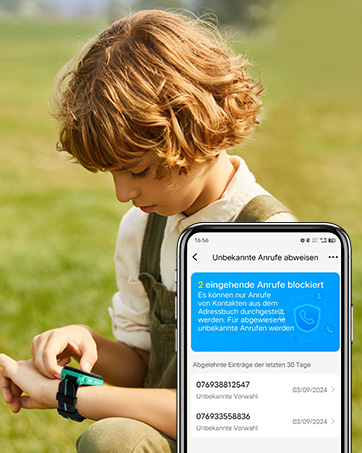
The stranger rejection feature on the Imoo Z1 Smartwatch allows parents to control who can contact their child, blocking unknown numbers for enhanced safety.
4. Maintenance
4.1 Cleaning
Regularly clean the smartwatch with a soft, dry cloth. For stubborn dirt, a slightly damp cloth can be used. Avoid harsh chemicals or abrasive materials.
4.2 Water Resistance (IPX8)
The Imoo Z1 is IPX8 water-resistant, meaning it can withstand immersion in water up to 1 meter deep for a limited time. It is suitable for splashes, rain, and brief shallow water activities. However, it is not recommended for diving, snorkeling, or high-pressure water activities.

The Imoo Z1 Smartwatch is IPX8 water-resistant, allowing children to wear it during water activities without concern for damage.
4.3 Battery Care
To prolong battery life, avoid extreme temperatures and do not allow the battery to fully discharge frequently. Charge the watch regularly, especially if it will be stored for an extended period.

Equipped with a 740mAh battery, the Imoo Z1 Smartwatch offers extended usage time, reducing the need for frequent charging.
5. Troubleshooting
- Watch not powering on: Ensure the watch is fully charged. If it still doesn't power on, try a hard reset by pressing and holding the power button for 10-15 seconds.
- No network signal: Check if the Nano-SIM card is correctly inserted and active. Verify that your network operator is supported and that there is network coverage in your area. Restart the watch.
- GPS inaccuracy: GPS accuracy can be affected by environmental factors (e.g., dense buildings, indoors). Ensure the watch has a clear view of the sky for optimal performance.
- Cannot pair with app: Ensure Bluetooth is enabled on your smartphone and the watch. Try restarting both devices and re-attempting the pairing process. Make sure the app is updated to the latest version.
- Calls not connecting: Verify that the SIM card has sufficient credit or an active plan. Check if the contact numbers are correctly saved and if stranger rejection is blocking the call.
6. Specifications
| Feature | Detail |
|---|---|
| Model Number | Z1A |
| Brand | imoo |
| Operating System | Mocor OS |
| Connectivity | 4G Cellular, GPS, Bluetooth |
| SIM Card Type | Nano-SIM |
| Display Size | 1.3 Inches |
| Display Resolution | 240 x 240 |
| Camera | 2MP Wide-angle |
| Battery Capacity | 740 mAh Lithium-polymer |
| Average Battery Life | Up to 2 years (estimated) |
| Memory Storage | 128 MB |
| Water Resistance | IPX8 (up to 1 meter depth) |
| Weight | 51 Grams |
| Case Material | Resin |
| Band Material | Silicone |
| Input Method | Touchscreen |
7. Warranty and Support
7.1 Warranty Information
The Imoo Z1 Smartwatch comes with a standard warranty. Please refer to your purchase documentation or the official imoo website for specific terms and conditions, including warranty duration and coverage details.
7.2 Customer Support
For technical assistance, troubleshooting beyond this manual, or warranty claims, please contact imoo customer support through their official website or the retailer from whom the product was purchased. Keep your proof of purchase handy when contacting support.

