
Introduction
The iDOO Hydroponics Growing System Kit 12Pods WiFi is designed for indoor cultivation of herbs, vegetables, and flowers. This system utilizes hydroponic technology, providing plants with water and nutrients directly to their roots, supported by an integrated LED grow light, fan, and water pump. The system features WiFi connectivity for remote control via the 'Gennec' app, allowing for convenient management of light cycles, pump operation, and monitoring of plant growth.

This image shows the iDOO Hydroponics Growing System in black, featuring thriving basil plants under the LED grow light. A smartphone on the right displays the 'Smart Garden' app, illustrating remote control capabilities for light and pump settings.
Safety Information
Please read and adhere to the following safety precautions to ensure safe operation and prevent damage to the product or personal injury:
- Do not allow water to contact hot LED Grow Lights.
- To prevent any damage to the machine, ensure no electric part is directly submerged in water. If any water is spilled or scattered over any electric part, thoroughly dry all cables and any electricity-related parts before use.
- Wipe off any dirt or water on the power plug before inserting it into an outlet.
- Never operate the garden kit if it has a damaged cord or plug.
- Keep the power cord away from heated surfaces.
- This product is intended for household and residential use only. Failure to do so may result in electric shock, fire, or short circuiting.

A close-up of the caution sticker, detailing important safety instructions for the hydroponics system.
Setup
1. Assembly
- Unpack all components and ensure they are intact.
- Insert the LED grow light assembly into the main unit's adjustable pole. Secure it with the adjustment knob.
- Place the 12 planting pods into the designated holes on the top cover.
- If not using all 12 pods, cover the empty holes with the provided decorative cactus covers to prevent algae growth and maintain cleanliness.

A close-up view of one of the decorative green cactus covers, designed to fit into unused planting pods, keeping them clean and adding a playful aesthetic.
2. Adding Water and Nutrients
- Open the water inlet cover.
- Fill the water tank with clean water up to the 'Max' line indicated on the water level window. The tank has a 6.5L capacity.
- Add the appropriate amount of hydroponic nutrient solution according to the plant type and growth stage. Refer to the nutrient solution instructions for specific ratios.
- Close the water inlet cover securely.

A detailed view of the hydroponics system's water tank, emphasizing its 6.5-liter capacity. This large tank reduces the frequency of refills, providing sufficient water for plants for approximately 2-3 weeks.

The image illustrates the process of adding water or nutrient solution to the hydroponics system through one of the designated planting holes.
3. Planting Seeds/Pods
- Place your chosen seeds into the grow sponges (if not pre-seeded pods).
- Insert the grow sponges into the planting baskets.
- Place the planting baskets into the holes on the top cover of the system.
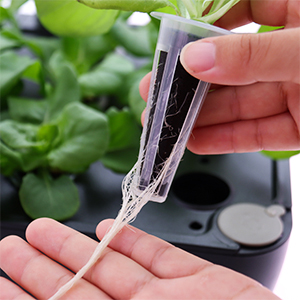
This image shows a plant pod with well-developed, healthy white roots, demonstrating the effectiveness of the hydroponic growing method in fostering robust root systems.
4. Power Connection & App Setup
- Connect the power adapter to the system and then plug it into a standard electrical outlet.
- Download the 'Gennec' app from your smartphone's app store.
- Open the app and follow the on-screen instructions to pair your iDOO Hydroponics Growing System with your WiFi network. Note: The system is only compatible with 2.4GHz networks, not 5.0GHz networks.
Operating Instructions
1. LED Grow Light Operation
- Adjustable Height: The LED grow light's height can be adjusted up to 14.5 inches (total height 21 inches) to accommodate different plant growth stages. Use the adjustment knob on the pole to raise or lower the light.
- Planting Modes: Select between 'Vegetable' or 'Flowers & Fruits' modes via the Gennec app or control panel. These modes provide specific light spectrums and durations optimized for different plant types.
- Full Spectrum LED: The 22-Watt LED light includes red, blue, white, and far-red diodes to simulate natural sunlight and promote healthy growth.

A visual representation of the adjustable light height feature. The LED grow light can be raised or lowered using an adjustment knob, accommodating plant growth up to a maximum height of 14.5 inches from the water tank surface (total height up to 21 inches).

A detailed view of the 22-Watt full spectrum LED grow light. It includes red lights to enhance photosynthesis, blue lights to promote chlorophyll synthesis, white lights for all wavelengths, and far-red lights to stimulate the growth of covered plants.
2. Water Pump and Fan Control
- Customizable Pump Run Time: Use the Gennec app to set specific 'on' and 'off' durations for the water pump. This improves water circulation and oxygenation for plant roots.
- Built-in Fan: The integrated fan helps disperse heat during germination and aids in pollen distribution to promote flowering. The fan can also be controlled via the app.

This image demonstrates the customizable pump run time feature. The Gennec app allows users to set specific 'on' and 'off' durations for the water pump, optimizing water circulation and oxygenation for plant roots.
3. App Control Features
The 'Gennec' app provides comprehensive remote control and monitoring capabilities:
- Light & Pump Runtime Setting: Adjust light and pump schedules to fit your daily routine or plant needs.
- Fan Control: Turn the built-in fan on or off as required.
- Plant Diary: Record and track the growth milestones of your plants from germination to harvest.
- Water Shortage Reminder: Receive alerts when the water level is low.

App screenshot demonstrating light timer settings.

App screenshot displaying pump, fan controls, and water level.

App screenshot of the plant diary feature.
Maintenance
1. Water Level Monitoring
The system is equipped with a water shortage reminder. When the water in the tank is less than 1 liter, the 'Fan&Water' indicator light on the control panel will flash, and the pump icon within the Gennec app will change from blue to orange. This indicates that water needs to be added.

The image highlights the water shortage reminder feature, showing the flashing indicator and low water level.
2. Adding Water and Nutrients
Regularly check the water level and replenish as needed. For optimal plant health, it is recommended to change the water and nutrient solution every 2-3 weeks, or as advised by your specific nutrient solution's instructions.
3. Cleaning
Periodically clean the water tank and pump to prevent algae buildup and ensure efficient operation. Disconnect the power before cleaning. Use a soft brush or cloth and mild soap, then rinse thoroughly. Do not use abrasive cleaners.
Troubleshooting
- Light not turning on: Check power connection. Ensure the light timer in the app is set correctly and not in an 'off' cycle.
- Pump not working: Verify power connection. Check if the pump is clogged or if the water level is too low. Ensure pump settings in the app are correct.
- Plants not growing well: Review nutrient solution concentration and water pH. Ensure adequate light duration and height adjustment. Check for proper seed germination.
- App connectivity issues: Ensure your smartphone is connected to a 2.4GHz WiFi network. Restart the app and the hydroponics system. Re-pair the device if necessary.
- Algae growth: Ensure unused planting holes are covered. Maintain proper nutrient levels and consider cleaning the tank more frequently.
Specifications
| Feature | Specification |
|---|---|
| Model Number | ID-IG302S |
| Product Dimensions | 7.87 x 15.35 x 11.81 inches |
| Item Weight | 5.85 pounds |
| Input Voltage | 12V 3A |
| Power | 22W (LED Grow Light) |
| Water Tank Capacity | 6.5 Liters |
| Noise Level | <40dB |
| Max Light Height Adjustment | 14.5 inches |
| WiFi Compatibility | 2.4GHz Network Only |
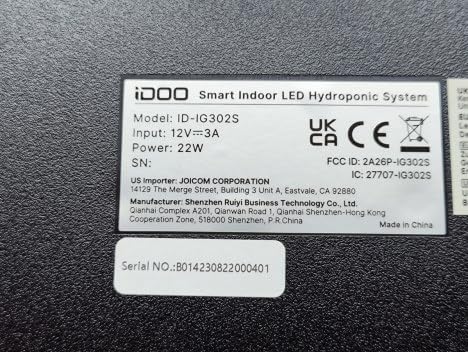
A clear view of the product's identification label, confirming the model number ID-IG302S and electrical specifications.

The AC adaptor's label, providing electrical specifications.
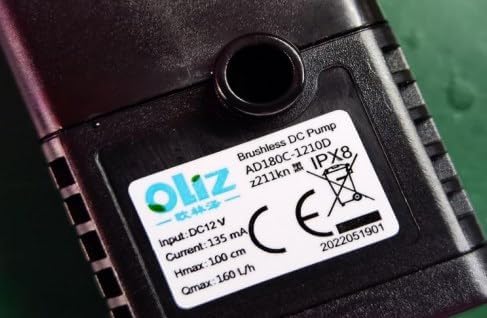
Details of the brushless DC pump, including model and performance metrics.
Warranty and Support
For warranty information, technical support, or customer service inquiries, please refer to the contact information provided with your product packaging or visit the official iDOO website. Please have your model number (ID-IG302S) and purchase details ready when contacting support.

