
TOPENS A5131
TOPENS A5131 Single Swing Gate Opener User Manual
Model: A5131
1. Introduction
This manual provides comprehensive instructions for the installation, operation, and maintenance of the TOPENS A5131 Single Swing Gate Opener. Please read this manual thoroughly before installation and use to ensure proper function and safety. Keep this manual for future reference.
2. Safety Information
Observe all safety warnings and instructions to prevent injury or damage. Improper installation or use can lead to serious hazards.
- Ensure the gate area is clear of obstructions before operation.
- Do not allow children to play near the gate or with the gate opener controls.
- Disconnect power before performing any maintenance or repairs.
- The gate opener is designed for single swing gates up to 5 meters in length or 250 kg in weight. Do not exceed these limits.
- Use only TOPENS approved accessories and replacement parts.
- The system includes a photoelectric beam sensor (TC102) and an alarm lamp for enhanced safety. Ensure these are correctly installed and functioning.
- In case of power failure or remote control loss, use the manual release key to operate the gate.
3. Package Contents
Verify that all items listed below are included in your package:
- 1 x Gate Opener Actuator with 1.5m 5-core cable
- 1 x UPS01 Power Supply (IP65 waterproof)
- 1 x Waterproof Control Box
- 1 x Alarm Lamp
- 1 x Photoelectric Beam Sensor (TC102)
- 2 x M12 Remote Controls
- 2 x Manual Release Keys
- 1 x Pull-to-Open Bracket (for inward opening installation)
- 1 x Push-to-Open Bracket (for outward opening installation)
- 1 x Complete Set of Installation Hardware
- 2 x Warning Signs (German and English)
- 1 x German User Manual
- 1 x English User Manual
4. Specifications
| Feature | Specification |
|---|---|
| Product Model | A5131 |
| Motor Voltage | 24 V DC |
| Motor Power | 50 W |
| Rated Current | 2 A |
| Gate Open/Close Time | Approx. 15 seconds (under ideal conditions) |
| Max. Opening Angle | 68° - 120° (depending on installation mode) |
| Remote Control Range | 20 m |
| Max. Number of Remotes | 8 (standalone), up to 250 with external TOPENS ERM12 receiver (sold separately) |
| Ambient Temperature | -20℃ to +50℃ |
| Noise Level | 50 dB |
| Protection Class | IP44 (waterproof) |
| Actuator Dimensions | 855 x 84 x 104 mm |
| UPS01 Power Supply Dimensions | 205 x 193 x 63 mm |
| Control Box Dimensions | 182 x 160 x 55 mm |
| Max Gate Length | 5 m |
| Max Gate Weight | 250 kg |
The A5131 is suitable for various gate types including steel, wood, and vinyl, in tube, panel, or chain link forms. It supports both inward and outward opening installations.
5. Installation
The TOPENS A5131 gate opener is designed for DIY installation. Follow the step-by-step instructions provided in the included English user manual. No welding is required for typical installations.
5.1 Gate Weight and Length Capacity
Refer to the chart below for the maximum gate weight supported based on gate length.
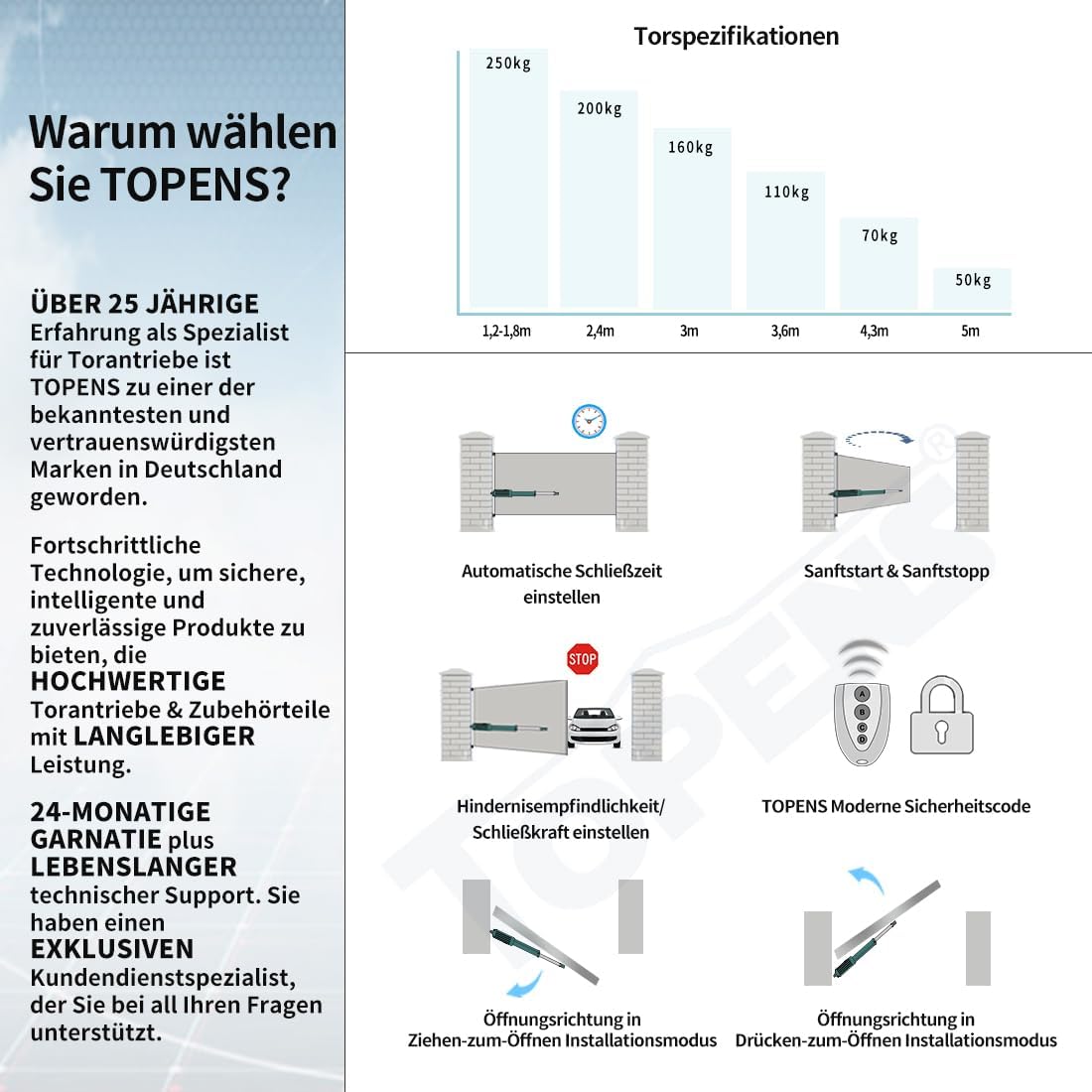
Image: Chart illustrating maximum gate weight (250kg, 200kg, 160kg, 110kg, 70kg, 50kg) corresponding to gate lengths (1.2-1.8m, 2.4m, 3m, 3.6m, 4.3m, 5m).
5.2 Installation Modes
The A5131 supports two installation modes: pull-to-open (for inward opening gates) and push-to-open (for outward opening gates). Specific brackets are provided for each mode.

Image: Detailed diagram of the gate opener's internal structure, highlighting the reliable electromagnetic limit switch, manual release key, alarm lamp, and photoelectric beam sensor. Also shows the UPS01 power supply and control box.
6. Power Supply Options
The TOPENS A5131 offers flexible power supply configurations using the included UPS01 power supply.
- AC Power Only: Direct connection to 100-240 VAC via the UPS01.
- AC Power with Backup Batteries: Connects to 100-240 VAC and two 12V 12Ah automotive/marine batteries (not included) for backup power.
- Solar Power with Batteries: Utilizes a 20W solar module (not included) and two 12V 12Ah batteries (not included).
- AC Power, Solar Module, and Backup Batteries: A comprehensive setup combining all power sources for maximum reliability.

Image: Four diagrams illustrating different power supply setups: AC only, AC with backup batteries, solar with batteries, and AC with solar and backup batteries. Each diagram shows the UPS01, control box, and gate opener connections.
7. Operation
7.1 Remote Control
The gate opener is operated using the included M12 remote controls. Pressing the button on the remote will open or close the gate automatically.
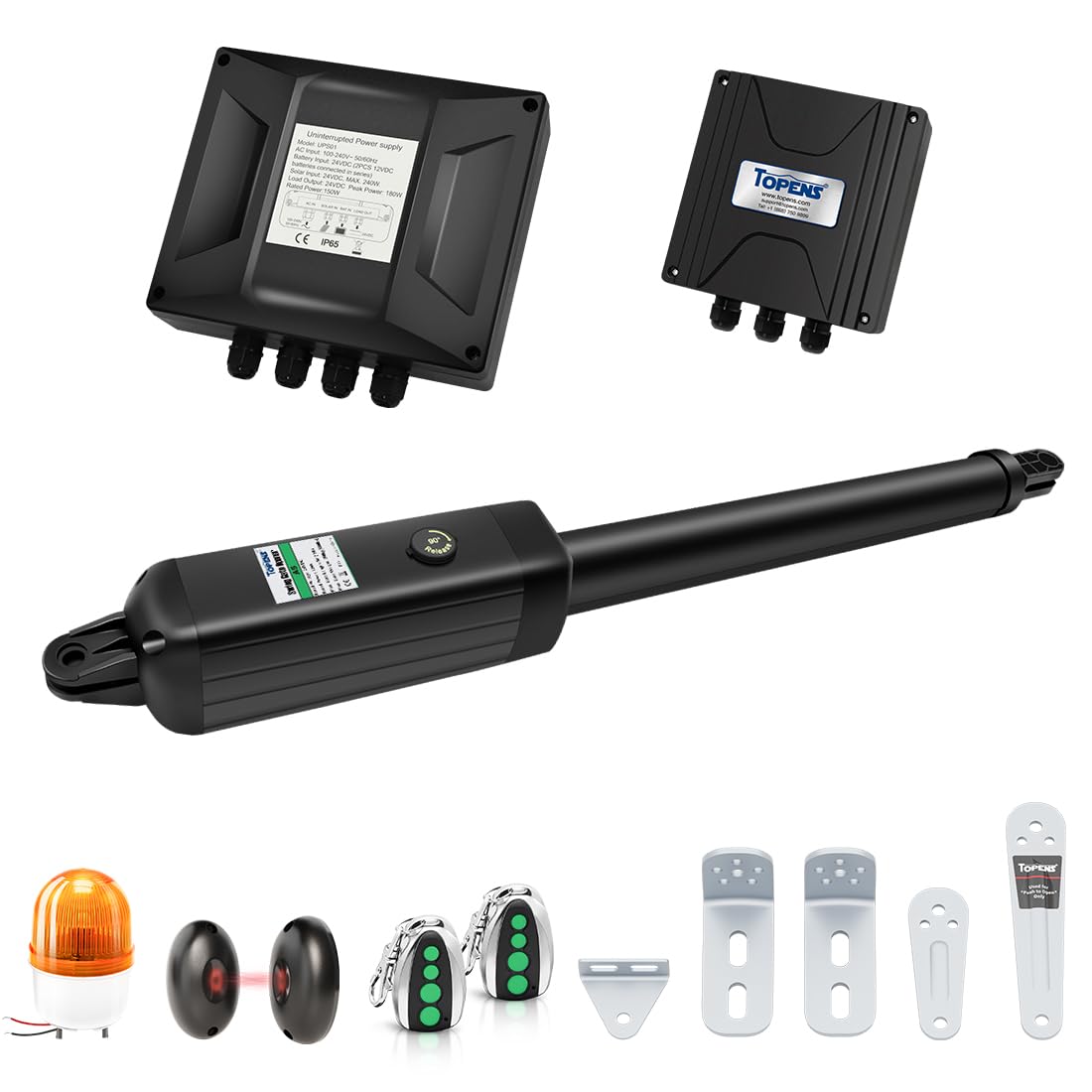
Image: A person in a car using a remote control to activate the TOPENS A5131 gate opener, demonstrating automatic gate operation.
7.2 Key Features
- Stop and Reverse Function: Detects obstacles during gate movement and reverses direction to prevent damage or injury.
- Automatic Closing: The gate can be configured to close automatically after a set period.
- Soft Start and Soft Stop: Ensures smooth gate movement, reducing wear and tear on the motor and extending product lifespan.
- Electromagnetic Limit Switch: Provides reliable and easy-to-adjust gate positioning.
- TOPENS Code Technology: Enhances security by preventing unauthorized access.

Image: Visual representation of TOPENS gate opener features, including adjustable automatic closing time, soft start and stop, obstacle sensitivity, and TOPENS modern security codes.
7.3 Compatible Accessories
The A5131 is compatible with a range of TOPENS accessories to enhance functionality and convenience:
- TC196 WiFi Remote Control
- TC188 Universal Keypad
- TC175P Wired Keypad
- TKP3 Wireless Keypad
- TC148 Waterproof Wall Switch
- TC173 Wireless Wall Switch
- M12 Remote Control (additional)
- ERM12 External Receiver (for up to 250 remotes)
- TEW3 Vehicle Sensor
- ET24 Electric Lock
- TC102 Photoelectric Beam Sensor (included)
- JD24VY Alarm Lamp (included)
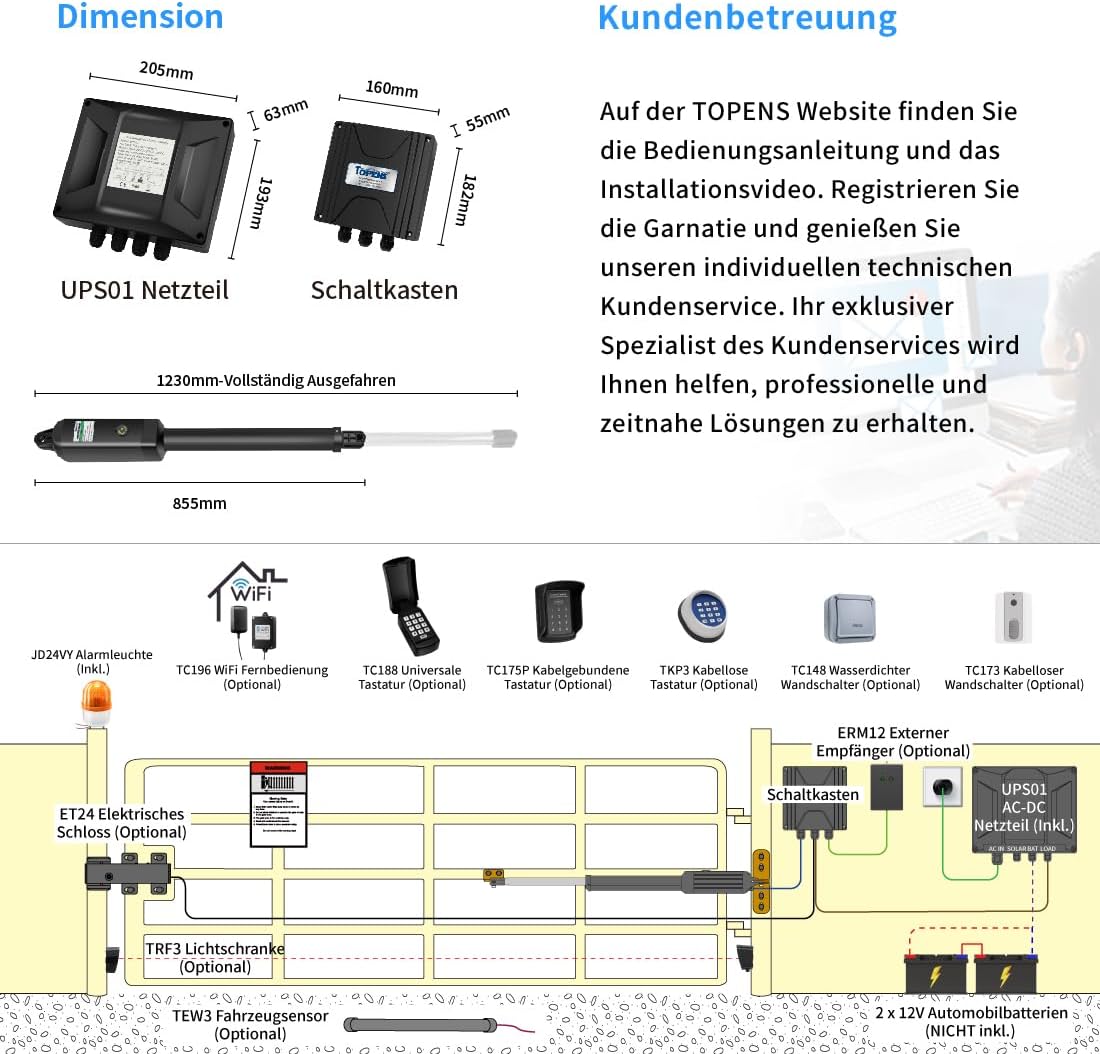
Image: An overview of compatible TOPENS accessories, including various remote controls, keypads, wall switches, external receivers, vehicle sensors, electric locks, and safety sensors.
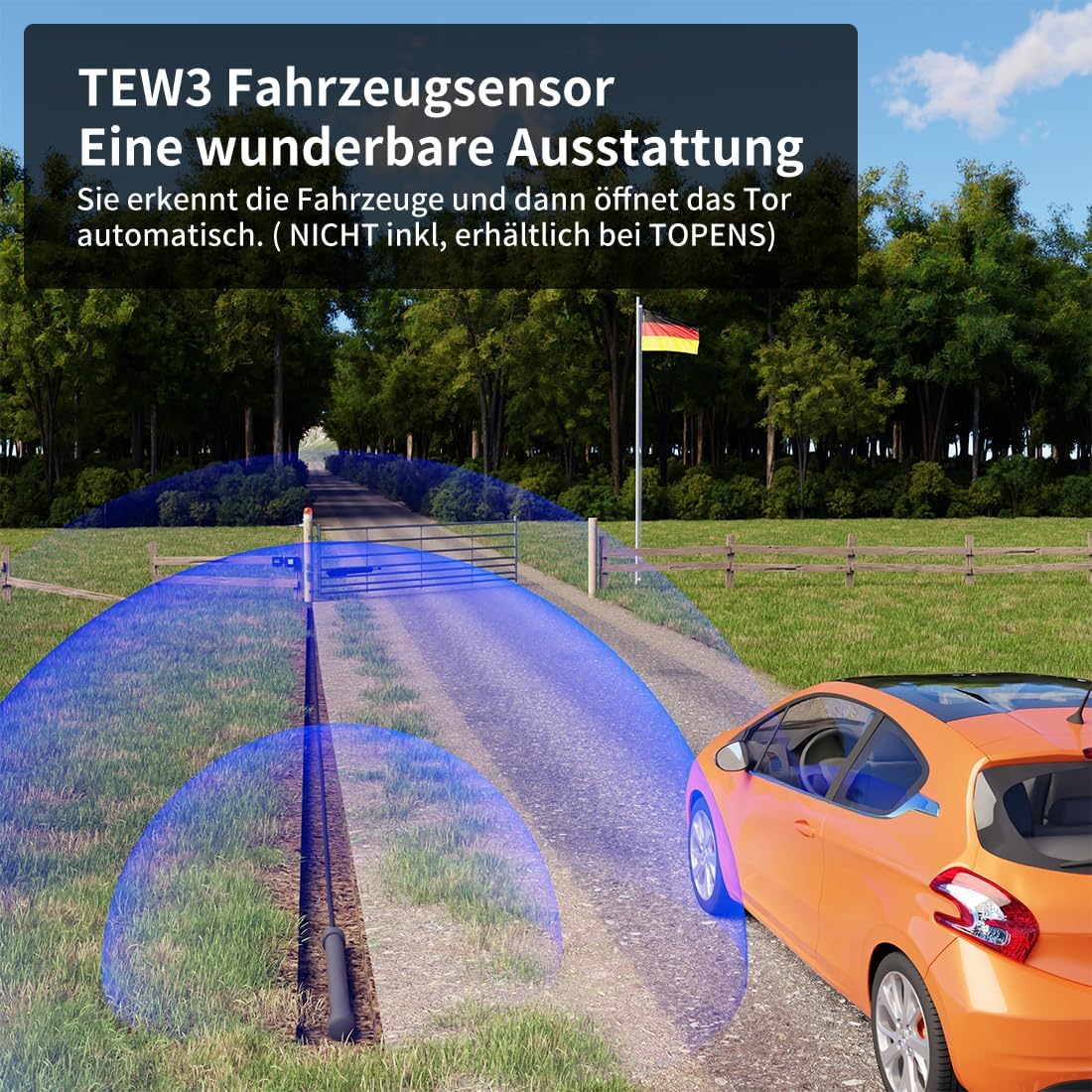
Image: A visual representation of the TEW3 vehicle sensor in action, detecting an approaching car and automatically opening the gate.
8. Maintenance
Regular maintenance ensures the longevity and reliable operation of your TOPENS A5131 gate opener.
- Monthly: Inspect the gate and its hinges for proper alignment and free movement. Lubricate hinges if necessary.
- Quarterly: Check all electrical connections for tightness and signs of corrosion. Ensure the photoelectric beam sensor is clean and unobstructed.
- Annually: Test the manual release mechanism. Verify the functionality of safety features like obstacle detection and the alarm lamp.
- Keep the actuator arm clean and free from debris.
9. Troubleshooting
This section provides solutions to common issues you might encounter with your gate opener.
| Problem | Possible Cause | Solution |
|---|---|---|
| Gate does not respond to remote. | Dead remote battery, power outage, remote not programmed. | Replace remote battery. Check main power supply. Reprogram remote control. |
| Gate stops or reverses unexpectedly. | Obstruction detected by photoelectric sensor or motor overload. | Clear any obstructions from the gate path. Check sensor alignment. Reduce gate friction. |
| Gate opens/closes partially. | Limit switch misadjustment, low power. | Adjust limit switches according to the installation manual. Check power supply and battery charge. |
| Motor makes noise but gate does not move. | Manual release engaged, mechanical obstruction. | Disengage manual release. Check for physical obstructions preventing gate movement. |
For more detailed troubleshooting or issues not listed here, please refer to the complete user manual or contact TOPENS customer support.
10. Warranty and Support
TOPENS offers a 24-month warranty on the A5131 gate opener. Additionally, lifetime technical support is provided by TOPENS customer service specialists.
For warranty registration, detailed installation videos, and further assistance, please visit the official TOPENS website. Their customer service team is available to provide professional and timely solutions.

Image: Information on TOPENS customer support, including website details for manuals, installation videos, and warranty registration. Also displays dimensions for the UPS01 power supply, control box, and actuator.
Related documentsA5131


Ask a question about this manual
Ask about setup, troubleshooting, compatibility, parts, safety, or missing instructions. Manuals+ will review the question and use this page’s manual context to help answer it.