
STARLYF SM
Starlyf Bread Maker SM Instruction Manual
Model: SM
Introduction
Thank you for choosing the Starlyf Bread Maker SM. This appliance is designed to simplify the process of baking fresh bread and cakes at home. With its 14 versatile programs and convenient features, you can enjoy a variety of homemade baked goods. Please read this manual carefully before first use to ensure safe and optimal operation of your new bread maker.

Image: Starlyf Bread Maker SM highlighting its key features.
Important Safety Instructions
When using electrical appliances, basic safety precautions should always be followed, including the following:
- Read all instructions before use.
- Do not touch hot surfaces. Use handles or knobs.
- To protect against electric shock, do not immerse cord, plugs, or appliance in water or other liquid.
- Close supervision is necessary when any appliance is used by or near children.
- Unplug from outlet when not in use and before cleaning. Allow to cool before putting on or taking off parts.
- Do not operate any appliance with a damaged cord or plug, or after the appliance malfunctions or has been damaged in any manner.
- Do not use outdoors.
- Do not let cord hang over edge of table or counter, or touch hot surfaces.
- Do not place on or near a hot gas or electric burner, or in a heated oven.
- Extreme caution must be used when moving an appliance containing hot oil or other hot liquids.
- Do not use appliance for other than intended use.
Package Contents
Please check the package contents upon unpacking. Ensure all items are present and in good condition.
- 1 Starlyf Bread Maker SM unit
- 1 Baking Chamber (Bread Pan)
- 1 Measuring Spoon
- 1 Mixing Paddle
- 1 Paddle Hook
- 1 Measuring Cup
- 1 Recipe Book
Product Components
Familiarize yourself with the different parts of your Starlyf Bread Maker SM.

Image: Exploded view diagram of the Starlyf Bread Maker SM with labeled components and included accessories.
- Top Lid: Covers the baking chamber.
- Knead Paddle: Detachable paddle for mixing and kneading ingredients.
- Bake Chamber: The removable bread pan where ingredients are placed and bread is baked.
- LCD Display: Shows program number, time, and other settings.
- Control Panel: Buttons for program selection, timer, crust color, and start/stop.
- Housing: The main body of the bread maker.
- Handle: For carrying the bread maker.
- Hook: Used to remove the kneading paddle from the baked bread.
- Measuring Cup: For accurate liquid measurements.
- Measuring Spoon: For accurate dry ingredient measurements.
Setup
Before using your bread maker for the first time, follow these steps:
- Unpack: Carefully remove all packaging materials and accessories.
- Clean: Wash the bread pan, kneading paddle, measuring cup, and measuring spoon with warm, soapy water. Rinse thoroughly and dry completely. Wipe the exterior of the bread maker with a damp cloth.
- Ventilate: Place the bread maker on a stable, heat-resistant surface with adequate ventilation around it.
- Initial Bake (Optional): Some users prefer to run the bread maker on a short bake cycle (e.g., 'Bake' program for 10 minutes) without ingredients to burn off any manufacturing residues. Ensure good ventilation during this process.
Operating Instructions
The Starlyf Bread Maker SM offers 9 programs for bread and 5 programs for cakes, along with a convenient timer function.

Image: Detailed view of the control panel and LCD display.
Basic Operation Steps:
- Place the Kneading Paddle: Insert the kneading paddle onto the shaft at the bottom of the bread pan.
- Add Ingredients: Add ingredients to the bread pan in the order specified by your recipe (typically liquids first, then dry ingredients, with yeast last). Ensure all ingredients are pre-measured accurately.
- Insert Bread Pan: Place the bread pan into the bread maker and press down firmly until it clicks into place. Close the lid.
- Select Program: Plug in the bread maker. The LCD display will default to Program 1. Press the PROGRAM MENU button repeatedly until your desired program number is displayed.
- Select Crust Color (if applicable): For bread programs, press the COLOR button to select light, medium, or dark crust.
- Set Timer (Optional): If you wish to delay the start of baking, press the TIME buttons to set the desired delay time. The delay time includes the baking time.
- Start Baking: Press the START/STOP button to begin the selected program. The bread maker will beep, and the indicator light will turn on.
- End of Cycle: Once the program is complete, the bread maker will beep several times and may enter a 'Keep Warm' cycle (check specific program details in the recipe book). Press START/STOP to cancel the 'Keep Warm' function.
- Remove Bread: Using oven mitts, carefully remove the bread pan from the bread maker. Invert the pan to release the bread onto a wire rack to cool. If the kneading paddle remains in the bread, use the provided hook to carefully remove it.
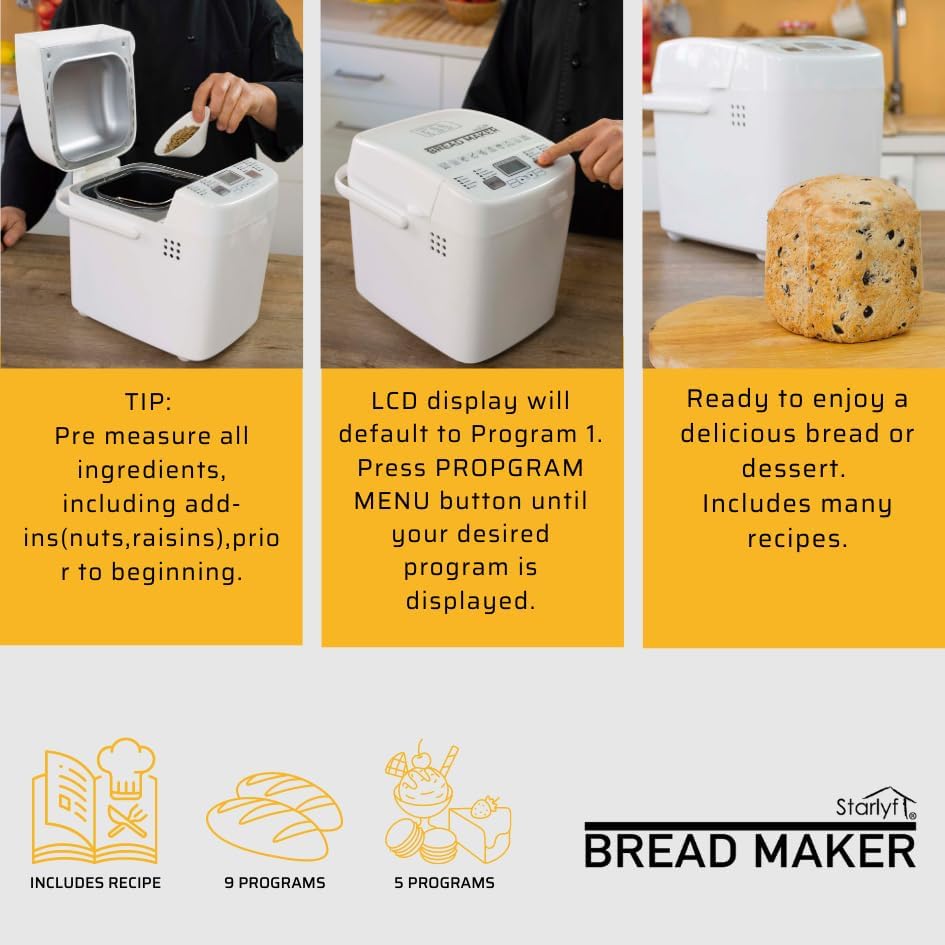
Image: Visual guide to the bread making process: adding ingredients, program selection, and finished product.
Programs Overview
The Starlyf Bread Maker SM features 14 programs to cater to various baking needs:
- 9 Bread Programs: Designed for different types of bread, including basic, whole wheat, French, sweet, ultra-fast, gluten-free, rice bread, corn bread, and dough.
- 5 Cake Programs: Dedicated programs for baking various cakes and desserts.
Refer to the included recipe book for detailed descriptions of each program and recommended recipes.
Recipes
Your Starlyf Bread Maker SM comes with a comprehensive recipe book. This book provides specific ingredient quantities and program recommendations for a wide range of breads and cakes. Always follow the recipes carefully for best results, paying close attention to ingredient order and measurements.
Cleaning and Maintenance
Proper cleaning and maintenance will extend the life of your bread maker.
- Unplug and Cool: Always unplug the appliance from the power outlet and allow it to cool completely before cleaning.
- Clean Bread Pan and Paddle: Remove the bread pan and kneading paddle. Wash them with warm, soapy water. If the paddle is stuck, soak the pan in warm water for about 30 minutes to loosen it. Do not use abrasive cleaners or metal scouring pads, as these can damage the non-stick coating.
- Clean Housing: Wipe the exterior of the bread maker with a soft, damp cloth. Do not immerse the main unit in water or any other liquid.
- Clean Lid: The lid can be wiped clean with a damp cloth. Ensure no crumbs or residue are left in the viewing window or around the edges.
- Storage: Ensure all parts are completely dry before reassembling and storing the bread maker in a cool, dry place.
Troubleshooting
If you encounter issues with your bread maker, refer to the following common problems and solutions:
| Problem | Possible Cause | Solution |
|---|---|---|
| Bread does not rise | Expired yeast, incorrect water temperature, too much salt/sugar, incorrect flour type. | Check yeast expiration date. Use lukewarm water (35-40°C). Ensure correct ingredient measurements. |
| Bread is too dense | Too much flour, not enough liquid, yeast inactive. | Measure ingredients precisely. Ensure yeast is active. |
| Bread collapses in the middle | Too much liquid, too much yeast, high humidity. | Reduce liquid slightly. Reduce yeast slightly. |
| Kneading paddle stuck in bread | Normal occurrence. | Use the provided hook to carefully remove the paddle after the bread has cooled slightly. |
| Bread maker not starting | Not plugged in, lid not closed, program not selected. | Ensure power cord is securely plugged in. Close the lid properly. Select a program and press START/STOP. |
Technical Specifications
- Brand: STARLYF
- Model: SM
- Color: White
- Material: Stainless Steel
- Product Dimensions (L x W x H): 31 x 21 x 26.5 cm
- Item Weight: 3.72 Kilograms
- Programs: 14 (9 bread, 5 cake)
- Features: Timer function, Crust color selection
- UPC: 644812055621
Warranty and Support
The Starlyf Bread Maker SM is covered by a manufacturer's warranty. Please refer to the warranty card included in your package for specific terms and conditions. For technical support, spare parts, or service inquiries, please contact your retailer or the manufacturer's customer service department. Keep your proof of purchase for warranty claims.
Related documentsSM


Ask a question about this manual
Ask about setup, troubleshooting, compatibility, parts, safety, or missing instructions. Manuals+ will review the question and use this page’s manual context to help answer it.