
1. Product Overview
The Connects2 Grundig GRKFD01 is an all-in-one double DIN stereo kit designed to upgrade your vehicle's factory stereo system. This kit is specifically engineered for use in the Ford Fiesta models from 2008 to 2010. It provides a modern multimedia experience while retaining essential factory features of your vehicle.
The kit includes the Grundig GX-3800 double DIN head unit, featuring a 6.8-inch capacitive touchscreen. This system offers advanced connectivity and entertainment options, enhancing your in-car audio and visual experience.
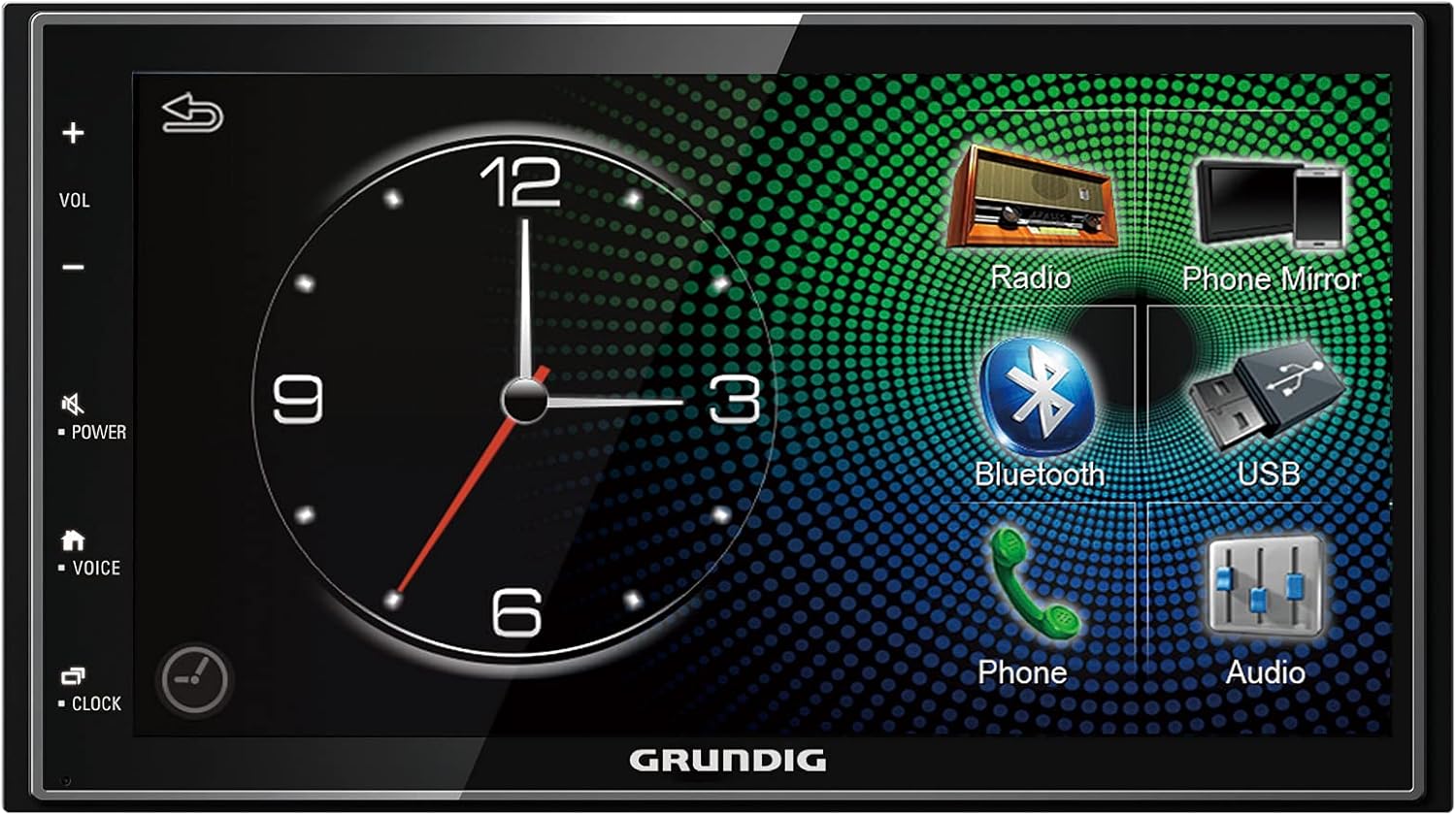
Image: The Grundig GX-3800 head unit, showcasing its 6.8-inch touchscreen interface with various function icons like Radio, Phone Mirror, Bluetooth, USB, Phone, and Audio settings.
2. Components Included
The GRKFD01 kit comes with all necessary components for a seamless integration into your Ford Fiesta:
- Grundig GX-3800 Double DIN Head Unit: Features a 6.8-inch capacitive touchscreen display.
- Ford Steering Wheel Control Interface: Allows retention of factory multi-function steering wheel controls. Note: This system is suitable for vehicles with a red display only.
- ISO to DIN Antenna Adapter: For connecting the vehicle's antenna to the new head unit.
- Universal Patch Lead: Connects an aftermarket stereo to a Connects2 interface.
- Double DIN Fascia Plate: Black finish with a grey display frame, specifically designed for the 2008-2010 Ford Fiesta.

Image: A comprehensive view of all components included in the GRKFD01 kit, including the fascia plate, mounting cage, wiring harnesses, antenna adapter, and the head unit itself.
3. Setup and Installation
Installation of the GRKFD01 kit involves replacing the factory stereo system in your Ford Fiesta. Due to the complexity of vehicle electronics and the need for precise wiring, professional installation is highly recommended. If you choose to install it yourself, ensure you have access to the vehicle's specific wiring diagrams and follow all safety precautions.
3.1. Pre-Installation Checks
- Verify that your Ford Fiesta is within the 2008-2010 model year range.
- Confirm that your vehicle's factory display is red, as the steering wheel control interface is compatible with this type only.
- Ensure all components listed in Section 2 are present and undamaged.
3.2. General Installation Steps (Overview)
- Disconnect the vehicle's battery to prevent electrical shorts.
- Carefully remove the existing factory stereo and fascia.
- Assemble the new double DIN fascia plate and mounting cage.
- Connect the Grundig GX-3800 head unit to the vehicle's wiring harness using the provided universal patch lead and the Ford steering wheel control interface.
- Connect the ISO to DIN antenna adapter.
- Secure the head unit within the mounting cage and fascia.
- Reinstall the new fascia assembly into the dashboard.
- Reconnect the vehicle's battery and test the system.
For detailed, vehicle-specific installation instructions, please refer to a professional installer or a specialized automotive electronics guide for your Ford Fiesta model.

Image: Close-up of the various wiring harnesses and connectors, including the main power/speaker harness and the steering wheel control interface, essential for connecting the new head unit to the vehicle's electrical system.

Image: The Grundig GX-3800 head unit seamlessly integrated into the dashboard of a Ford Fiesta, demonstrating the finished appearance after installation.
4. Operating Instructions
The Grundig GX-3800 head unit features an intuitive touchscreen interface for easy navigation and control of its various functions.
4.1. Basic Operation
- Power On/Off: Press the POWER button on the left side of the unit.
- Volume Control: Use the VOL + and VOL - buttons on the left side, or adjust via the touchscreen.
- Mute: Press the MUTE button.
- Home Screen: Press the HOME button to return to the main menu.
4.2. Main Functions
- Radio (DAB/DAB+): Access the radio function for digital and analog broadcasts. Scan for stations and save presets.
- Apple CarPlay & Android Auto: Connect your compatible smartphone via USB to access navigation, music, messages, and more directly on the head unit's screen. Follow on-screen prompts for initial setup.
- Bluetooth: Pair your smartphone for hands-free calling and audio streaming.
- Go to the Bluetooth menu on the head unit.
- Enable Bluetooth on your phone and search for available devices.
- Select "Grundig GX-3800" (or similar) from your phone's list and confirm pairing.
- USB Playback: Connect a USB device to play audio and video files. The unit supports Full HD 1080p media playback. It also provides USB charging for your phone.
- Phone Mirroring: Mirror your smartphone's screen directly onto the head unit's display with direct control via the touchscreen.
- Audio Settings: Access the 24-bit digital audio processor with a 13-band equalizer and dynamic bass amplifier to customize your sound experience.
- Steering Wheel Controls: Utilize your vehicle's existing steering wheel controls for volume, track changes, and other functions, thanks to the included interface.
5. Maintenance
Proper maintenance ensures the longevity and optimal performance of your Grundig GX-3800 head unit.
- Screen Cleaning: Use a soft, lint-free cloth specifically designed for electronic screens. Do not use abrasive cleaners or solvents. Gently wipe the screen to remove dust and fingerprints.
- General Cleaning: Keep the unit and surrounding fascia free from dust and debris. Use a soft, dry cloth.
- Temperature Control: Avoid exposing the unit to extreme temperatures (very hot or very cold) for extended periods, as this can affect performance and lifespan.
- Software Updates: While specific software update information is not available, it is generally good practice to check the manufacturer's website (Connects2 or Grundig) periodically for any firmware updates that may improve performance or add features.
6. Troubleshooting
If you encounter issues with your GRKFD01 kit, try the following troubleshooting steps before seeking professional assistance.
| Problem | Possible Cause | Solution |
|---|---|---|
| Unit does not power on. | Loose power connection, blown fuse, vehicle battery issue. | Check all wiring connections. Inspect vehicle fuses and the unit's fuse. Ensure vehicle battery is charged. |
| No sound from speakers. | Speaker wires disconnected, volume too low, mute activated, incorrect audio source. | Verify speaker connections. Increase volume. Deactivate mute. Select correct audio source. |
| Bluetooth not connecting. | Bluetooth not enabled on unit/phone, incorrect pairing process, interference. | Ensure Bluetooth is enabled on both devices. Delete previous pairings and re-pair. Move phone closer to unit. |
| Apple CarPlay/Android Auto not launching. | Faulty USB cable, phone not compatible, app not installed/updated, incorrect USB port. | Use a high-quality, certified USB cable. Ensure your phone's OS and apps are updated. Try a different USB port if available. |
| Steering wheel controls not working. | Interface not connected correctly, vehicle compatibility issue (red display only). | Check connections to the steering wheel control interface. Confirm your vehicle has a red factory display. |
7. Specifications
| Feature | Detail |
|---|---|
| Brand | Connects2 (C2) / Grundig (Head Unit) |
| Model Number | GRKFD01 |
| Screen Size | 6.8 Inches |
| Display Type | Capacitive Touchscreen, 32-bit True Color |
| Connectivity Technology | Bluetooth, USB |
| Compatible Devices | Smartphone (Apple CarPlay, Android Auto, Phone Mirroring) |
| Controller Type | Android (referring to Android Auto compatibility) |
| Audio Encoding | Stereo |
| Number of Channels | 4 |
| Output Power | 50 Watts (per channel, typical for car stereos) |
| Audio Processor | 24-bit Digital Audio Processor with 13-band Equalizer and Dynamic Bass Amplifier |
| Media Playback | Full HD 1080p (via USB) |
| Vehicle Compatibility | Ford Fiesta (2008-2010 models with red factory display) |
8. Warranty and Support
For information regarding product warranty, returns, or technical support, please refer to the retailer where the product was purchased or visit the official Connects2 or Grundig websites. Warranty terms and conditions may vary by region and retailer.
Always ensure you have your proof of purchase and the product model number (GRKFD01) available when contacting support.


