
Temtop M2000 2nd V2
Temtop Air Quality Monitor M2000 2nd
User Manual
Introduction
The Temtop M2000 2nd Air Quality Monitor is a professional device designed for comprehensive indoor air quality assessment. It accurately measures various parameters including Carbon Dioxide (CO2), Particulate Matter (PM2.5 and PM10), Formaldehyde (HCHO), Temperature, and Humidity. This manual provides detailed instructions for setting up, operating, maintaining, and troubleshooting your device to ensure optimal performance and accurate readings.

Figure 1: Temtop M2000 2nd Air Quality Monitor, a professional device for comprehensive air quality assessment.
Product Features and Components
The Temtop M2000 2nd is equipped with advanced sensors for precise measurements and a user-friendly interface for easy operation. Key features include real-time monitoring, data export capabilities, and an audible alarm system.
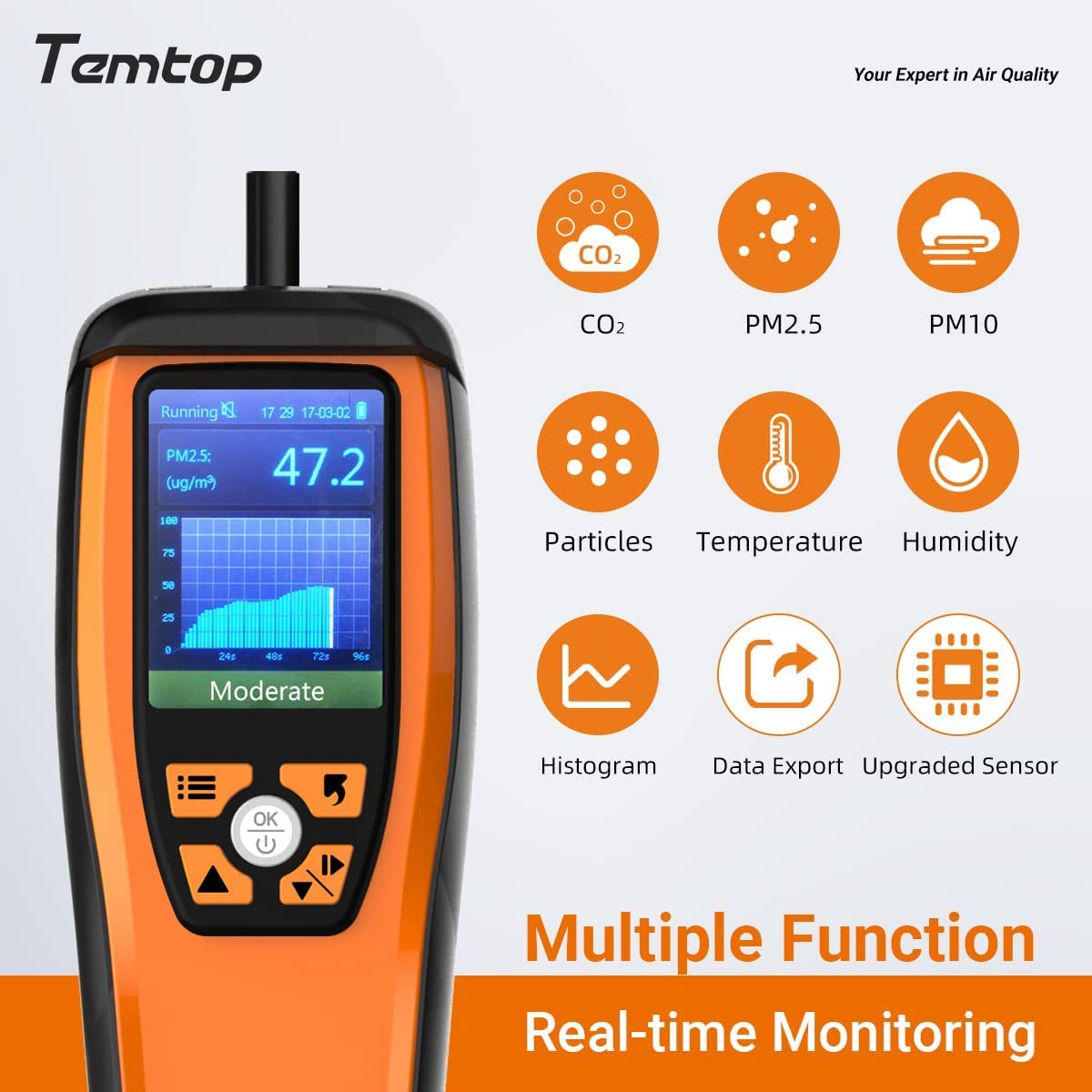
Figure 2: Overview of the Temtop M2000 2nd's multiple functions, including CO2, PM2.5, PM10, Particles, Temperature, Humidity, Histogram, Data Export, and an Upgraded Sensor.
Device Layout:

Figure 3: Labeled components of the Temtop M2000 2nd, showing the USB Port, Buzzer Status, Measuring Status, Display, Menu Button, Increase/Up Button, Back Button, Power/OK Button, and Decrease/Down/Switch (Start/Pause) Button.
Internal Sensors:

Figure 4: Internal view of the Temtop M2000 2nd, highlighting the Sensirion Temp & Humi Sensor, SenseAir NDIR CO2 Sensor, Temtop Laser PM2.5 Sensor (4th Gen), and Dart electrochemical HCHO Sensor, ensuring worldwide high precision measurements.
Setup
1. Charging the Device:
Before first use, fully charge the device using the provided USB cable. Connect the USB cable to the device's USB port and a compatible USB power adapter (not included) or a computer's USB port. A full charge typically provides 6-8 hours of operation. Ensure the charger's specifications are appropriate for the device to avoid damage.

Figure 5: Contents of the Temtop M2000 2nd package, including the monitor and USB charging cable. The device features a built-in 3,000mAh battery for 6-8 hours of duration time.
2. Initial Power On and Acclimation:
Press and hold the Power/OK button to turn on the device. For optimal accuracy, especially for CO2 readings, allow the monitor to acclimate to its environment for at least 8 hours of continuous operation. This allows the sensors to stabilize and provide more precise values.
3. Setting Date and Time:
Navigate to the 'Set' menu using the Menu button and arrow keys. Adjust the date and time settings to ensure accurate data logging and timestamping of your measurements.
Operating Instructions
1. Understanding the Display:
The device's display shows real-time readings for various air quality parameters. Familiarize yourself with the layout:
- PM2.5 / PM10: Particulate matter concentrations in µg/m³.
- Particles: Number of particles per liter.
- CO2: Carbon Dioxide concentration in parts per million (ppm).
- HCHO: Formaldehyde concentration in mg/m³.
- Temperature: Ambient temperature in °F or °C.
- Humidity: Relative humidity in %.

Figure 6: The Temtop M2000 2nd in use, demonstrating its portability and real-time display of CO2 levels. It features Senseair CO2 Sensor with Automatic Background Calibration (ABC function) and Manual Calibration.
2. Navigation and Settings:
- Use the Menu Button to access different functions and settings.
- Use the Increase/Up and Decrease/Down/Switch buttons to navigate through options and adjust values.
- Press the Power/OK Button to confirm selections.
- The Back Button allows you to return to the previous screen.
3. Alarm and Alerts:
The device features a buzzer alarm and indicator alerts to notify you when air quality parameters exceed preset thresholds. The buzzer alarm can be muted if desired.

Figure 7: Visual representation of the Temtop M2000 2nd's Buzzer Alarm, Bar Graph display for air pollution levels, and Indicator Alert system.
4. Data Export:
The M2000 2nd model supports data export. Connect the device to your computer via the USB port to transfer recorded air quality data for further analysis and record-keeping. Refer to the device's on-screen instructions or accompanying software (if any) for detailed export procedures.
Maintenance
1. Cleaning:
Wipe the device regularly with a soft, dry cloth. Do not use abrasive cleaners or solvents, as these can damage the casing or internal components. Keep the sensor inlets clear of dust and debris.
2. Battery Care:
To prolong battery life, avoid fully discharging the device frequently. Charge it when the battery indicator is low. If storing the device for an extended period, charge it to about 50% and recharge every few months.
3. Sensor Calibration:
The CO2 sensor supports automatic background calibration (ABC function). For manual calibration or to ensure continued accuracy, especially if readings seem off, follow the calibration instructions in the device's settings menu. It is recommended to calibrate the CO2 sensor in a well-ventilated outdoor environment where CO2 concentration is typically around 400-450 ppm.
Troubleshooting
| Problem | Possible Cause | Solution |
|---|---|---|
| Inaccurate Readings | Lack of sensor acclimation, sensor contamination, or need for calibration. | Allow device to acclimate for 8+ hours. Ensure sensor inlets are clean. Perform CO2 calibration in fresh air. |
| Short Battery Life | Battery not fully charged, aging battery, or continuous high-power usage. | Ensure full charge before use. If battery life significantly degrades, contact support for replacement options. |
| Device Not Turning On | Battery depleted or device malfunction. | Charge the device for several hours. If it still doesn't turn on, contact customer support. |
| No HCHO Reading (0.000) | Sensor issue or specific model variant (M2000C 2nd and M2000C do not measure HCHO). | Verify your model (M2000 2nd measures HCHO). If it's the correct model and still reads 0.000 in an environment with expected HCHO, contact support. |
Specifications
- Product Dimensions: 1.4 x 2.8 x 8.8 inches
- Weight: 2.01 Pounds
- Item Model Number: M2000 2nd V2
- Batteries: 1 Lithium Ion battery required
- Manufacturer: Elitech
- First Available Date: January 6, 2023
- Measured Parameters: CO2, PM2.5, PM10, Formaldehyde (HCHO), Temperature, Humidity, Particle Count.
- CO2 Sensor: SenseAir NDIR CO2 Sensor (±50 ppm + 5% reading)
- PM2.5 Sensor: Temtop Laser PM2.5 Sensor (4th Gen) (±10µg/m³ (0-100 µg/m³), ±10% (100-500 µg/m³))
- HCHO Sensor: Dart Electrochemical HCHO Sensor (±0.03 mg/m³ (0-0.3 mg/m³), ±10% (0.3-1 mg/m³))
- Temperature & Humidity Sensor: Sensirion Temp & Humi Sensor (Temperature range: 0-50°C (32-122°F), Humidity range: 0-90% RH)
Warranty and Support
Temtop products are designed for reliability and performance. For information regarding warranty coverage, please refer to the warranty card included with your product or visit the official Temtop website. If you encounter any issues or require technical assistance, please contact Temtop customer support through their official channels. Provide your model number (M2000 2nd V2) and a detailed description of the issue for efficient service.
For additional resources and FAQs, you may visit the Temtop Store on Amazon.
Related documentsM2000 2nd V2


Ask a question about this manual
Ask about setup, troubleshooting, compatibility, parts, safety, or missing instructions. Manuals+ will review the question and use this page’s manual context to help answer it.