
PETLIBRO PLAF006
PETLIBRO Automatic Pet Feeder User Manual
Model: PLAF006
Brand: PETLIBRO
Introduction
The PETLIBRO Automatic Pet Feeder (Model PLAF006) is designed to provide convenient and consistent feeding for your cats and dogs. This feeder ensures your pet receives fresh, portion-controlled meals on a schedule, even when you are away. With features like freshness preservation, customizable meal calls, and smart infrared detection, it simplifies pet care and promotes healthy eating habits.
This manual provides detailed instructions on the setup, operation, maintenance, and troubleshooting of your PETLIBRO Automatic Pet Feeder.
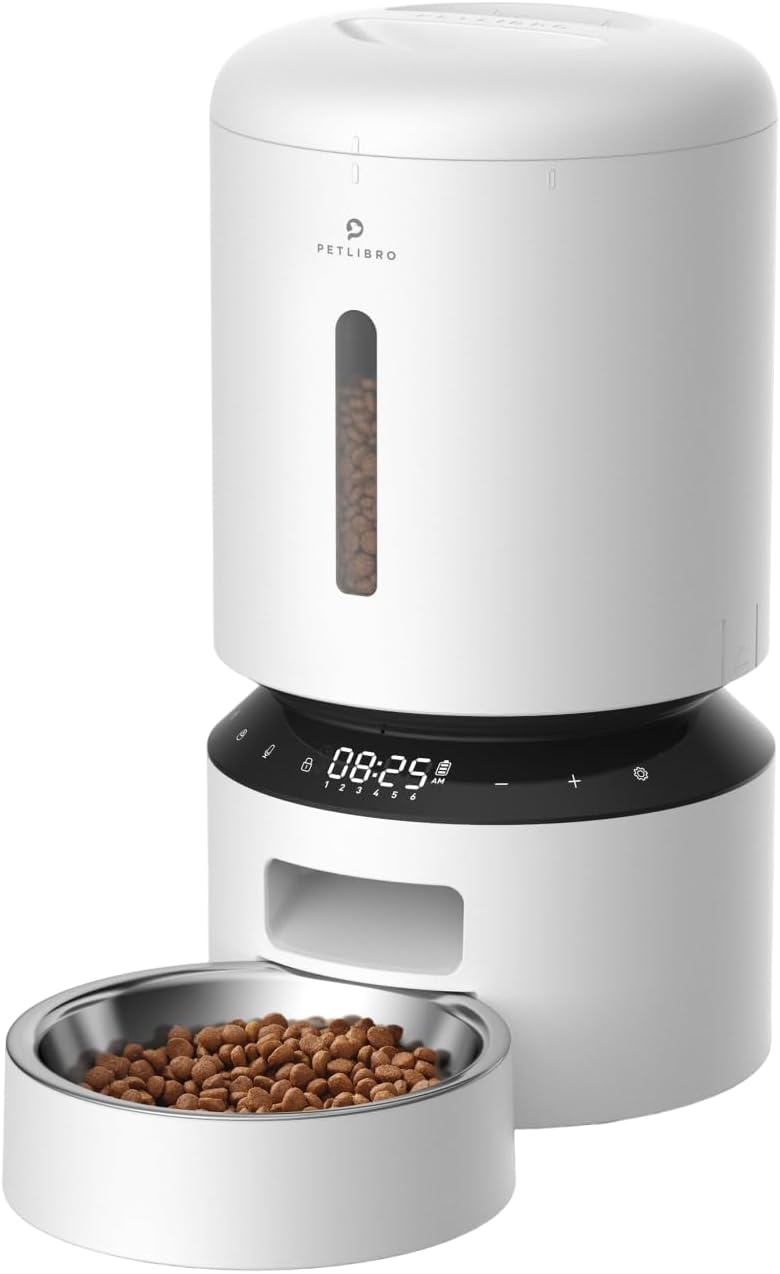
Image: Front view of the PETLIBRO Automatic Pet Feeder, showing the main unit, food reservoir, control panel, and stainless steel bowl filled with kibble.
Product Overview
Key Features:
- Easy to Set Up and Program: Schedule up to six meals daily and up to 50 portions per meal.
- Freshness Preservation: Features a patent rotor, secure twist-lock lid, desiccant bag, and sealing strip to keep food fresh.
- Personalized Meal Call: Record a 10-second message to call your pet to eat, playable up to five times.
- Smart Infrared Detection: Automatically suspends feeding if an obstruction is detected at the food outlet.
- Dual Power Supply: Can be powered by a USB-C adapter or 3 D alkaline batteries (not included) for backup.
- Detachable Design: Components are easily detachable for thorough cleaning.
Components:
The PETLIBRO Automatic Pet Feeder consists of the following main components:
- Food Storage Tank with secure twist-lock lid
- Control Panel with LED display
- Food Dispenser Outlet with infrared sensor
- Stainless Steel Food Bowl
- Base Unit with battery compartment
- USB-C Power Adapter
- Desiccant Bag (one included)

Image: Exploded view of the PETLIBRO feeder showing its detachable parts for easy cleaning, including the food tank, lid, desiccant tray, and food bowl.
Setup
1. Unpacking and Assembly:
- Remove all components from the packaging.
- Assemble the feeder by placing the food tank securely onto the base unit.
- Insert the stainless steel bowl into its designated tray at the front of the feeder.
- Ensure the desiccant bag is placed in its compartment under the lid to maintain food freshness.
2. Power Supply:
- Connect the USB-C power adapter to the feeder and plug it into a wall outlet.
- For backup power during outages, install 3 D alkaline batteries (not included) into the battery compartment at the bottom of the feeder.

Image: Illustration showing the PETLIBRO feeder connected to a wall outlet via USB-C and the internal battery compartment for D alkaline batteries, highlighting its dual power options.
3. Filling the Food Tank:
- Open the twist-lock lid.
- Fill the food tank with dry pet food. The feeder supports kibble sizes between 2-15 mm (0.07-0.6 inches) in diameter.
- Securely close the twist-lock lid to maintain freshness and prevent pets from accessing food.

Image: Visual guide illustrating recommended kibble sizes (2-15mm) and suitable food types such as single-shaped dry kibble, mixed-shaped dry kibble, and freeze-dried food. A reminder warns against using kibble over 15mm to prevent jamming.
Setup Video Guide:
Video: This official PETLIBRO video demonstrates the assembly and initial setting process for the PLAF005 & PLAF006 models, guiding users through physical setup and basic programming.
Operating Instructions
1. Scheduling Meals:
- Use the control panel and LED display to set up to 6 daily meals.
- For each meal, specify the time and the number of portions (1-50 portions).
- One portion is approximately 20ml (1/12 cup or 3 tbsp). Refer to the recommended daily feeding portions table for guidance.

Image: A visual representation of the customized feeding schedule feature, showing multiple meal times (e.g., 8:20 AM, 1:00 PM, 7:30 PM, 11:00 PM) and corresponding portion sizes, designed to help pets eat on time.

Image: A table providing recommended daily feeding portions based on cup measurements, milliliters, and tablespoons, along with corresponding portion counts for the feeder. It also includes an example for calculating daily portions for a pet.
2. Manual Feeding:
- Press the manual feeding button on the control panel to dispense a snack.
- You can dispense up to 5 portions manually.
3. Personalized Meal Call:
- Record a 10-second voice message that will play at meal times.
- The message can be set to play 0 to 5 times per meal.

Image: A beagle dog sitting next to the PETLIBRO feeder, with a speech bubble indicating the 10-second voice message feature, allowing owners to call their pets to eat.
4. Smart Infrared Detection:
- The built-in infrared sensor detects if the food outlet is blocked (e.g., by excess food).
- If an obstruction is detected, the feeder will automatically suspend dispensing to prevent overfilling or jamming.

Image: A close-up view of the PETLIBRO feeder's food outlet, highlighting the infrared sensor with red beams, demonstrating how it detects and prevents food spills by stopping dispensing when the outlet is blocked.
Video: An official PETLIBRO video showcasing the ease of use and hassle-free operation of the feeder, demonstrating its automatic dispensing and smart features.
Maintenance
1. Cleaning:
- The detachable design allows for thorough cleaning.
- The stainless steel bowl is dishwasher safe.
- Other components should be hand-washed with mild soap and water. Ensure all parts are completely dry before reassembling.
2. Desiccant Bag Replacement:
- The built-in desiccant bag helps keep the food dry and fresh.
- It is recommended to replace the desiccant bag every two weeks to maintain optimal freshness.

Image: A close-up view of the PETLIBRO feeder's lid, showing the desiccant bag being inserted into its compartment, emphasizing its role in keeping pet food dry and fresh.
Troubleshooting
| Problem | Possible Cause | Solution |
|---|---|---|
| Feeder not dispensing food / Motor stuck (E-00 error) | Food blockage in the dispenser outlet; motor malfunction. |
|
| Food not fresh / Moisture in food tank | Lid not properly sealed; desiccant bag needs replacement. |
|
| Pet accessing food outside scheduled times | Lid not secure; pet manipulating the feeder. |
|
Specifications
| Attribute | Detail |
|---|---|
| Model Name | automatic cat food dispenser |
| Item Model Number | PLAF006 |
| Brand | PETLIBRO |
| Capacity | 5 Liters |
| Item Weight | 4.6 Pounds (approx. 2.09 kg) |
| Product Dimensions (LxWxH) | 14.17 x 7.72 x 7.72 inches (approx. 36 x 19.6 x 19.6 cm) |
| Material | Stainless Steel (bowl), Plastic (main body) |
| Color | White |
| Power Source | USB-C Power Adapter, 3 x D Alkaline Batteries (backup) |
| Recommended Kibble Size | 2-15 mm (0.07-0.6 inches) |
| Max Meals Per Day | 6 |
| Max Portions Per Meal | 50 |
| Voice Recording Length | 10 seconds |
| Target Species | Cats, Dogs, Small Animals |

Image: Diagram showing the dimensions of the PETLIBRO Automatic Pet Feeder, with height and width measurements indicated.
Warranty and Support
Warranty Information:
The PETLIBRO Automatic Pet Feeder comes with a 12-month warranty from the date of purchase. This warranty covers manufacturing defects and malfunctions under normal use. Please retain your proof of purchase for warranty claims.
Customer Support:
For any questions, technical assistance, or warranty claims, please contact PETLIBRO customer service. Support is available 24 hours on weekdays. You can also refer to the official User Manual (PDF) for detailed instructions.
Related documentsPLAF006


Ask a question about this manual
Ask about setup, troubleshooting, compatibility, parts, safety, or missing instructions. Manuals+ will review the question and use this page’s manual context to help answer it.