
1. Introduction and Overview
This user manual provides comprehensive instructions for the safe and efficient operation, installation, and maintenance of your Concept OPP1250SS Under-Cabinet Range Hood. Please read this manual thoroughly before using the appliance and retain it for future reference.
The Concept OPP1250SS is an ultra-slim 50cm under-cabinet range hood designed to effectively remove cooking odors and steam from your kitchen. It features LED lighting for improved visibility and push-button controls for ease of use.

Figure 1: Front view of the Concept OPP1250SS Under-Cabinet Range Hood.
2. Safety Information
General Safety:
- Ensure the appliance is correctly installed by a qualified person.
- Do not operate the range hood if it is damaged.
- Keep children away from the appliance during operation.
- Regularly clean the filters to prevent grease buildup, which can be a fire hazard.
- Ensure adequate ventilation in the room when the range hood is used simultaneously with gas or other fuel-burning appliances.
Electrical Safety:
- Before cleaning or maintenance, always disconnect the appliance from the power supply.
- Do not pull on the power cord to unplug the appliance.
- If the power cord is damaged, it must be replaced by the manufacturer, its service agent, or similarly qualified persons to avoid a hazard.
3. What's in the Box
Upon unpacking, please verify that all components are present and undamaged:
- 1x Concept OPP1250SS Under-Cabinet Range Hood
- 1x LED light bulb (6500 K) (pre-installed or separate)
- 2x Metallic anti-particulate filters (pre-installed)
- User Manual (this document)
- Mounting hardware (screws, wall plugs, etc. - check packaging for specifics)
4. Setup and Installation
Placement Requirements:
- The minimum distance above an electric hob is 65 cm.
- The minimum distance above a gas hob is 70 cm.
- Ensure the installation area allows for proper air circulation, especially if using the recirculation option.
Installation Steps:
- Carefully unpack the range hood and check for any damage.
- Determine the desired mounting location under the cabinet, adhering to the minimum distance requirements from the hob.
- Mark the drilling points for mounting the hood. Refer to the included mounting template (if provided) for precise measurements.
- Drill the necessary holes and insert wall plugs.
- Secure the range hood to the cabinet using the provided screws.
- Connect the power supply. Ensure the power is off at the main circuit breaker before making any electrical connections.
- If using the ducted extraction option, connect the 120mm diameter extraction duct to the outlet.
- If using the recirculation option, ensure the carbon filters are installed (sold separately for some models) and the air outlet is clear for filtered air to return to the kitchen.

Figure 2: Dimensions of the Concept OPP1250SS Under-Cabinet Range Hood (Height: 82mm).
5. Operating Instructions
The Concept OPP1250SS features intuitive push-button controls located on the front panel.

Figure 3: Control panel of the range hood.
Power On/Off:
- Press the power button (usually marked with a circle and a vertical line) to turn the hood on or off.
Fan Speed Selection:
- The hood offers 3 power levels. Press the corresponding fan speed buttons (often marked with I, II, III or fan symbols) to adjust the extraction power according to your cooking needs.
- Use lower speeds for light cooking and higher speeds for heavy frying or grilling.
LED Lighting:
- Press the light button (usually marked with a light bulb symbol) to turn the LED illumination on or off. The LED light provides bright, energy-efficient lighting for your cooking surface.
6. Maintenance
Regular maintenance ensures optimal performance and longevity of your range hood.
Cleaning the Metallic Anti-Particulate Filters:
- The metallic filters capture grease and should be cleaned regularly (approximately every 2-4 weeks, depending on usage).
- To remove the filters, locate the release latches or handles and gently pull them down or slide them out.
- Clean the filters by hand using warm soapy water or in a dishwasher. Ensure they are completely dry before re-installing.
- Do not bend the filters during cleaning or re-installation.
Replacing Carbon Filters (for Recirculation Mode):
- If your hood is operating in recirculation mode, carbon filters (not included with all models) are used to remove odors. These filters cannot be washed and must be replaced every 3-6 months, depending on usage.
- Refer to the specific instructions provided with your carbon filters for replacement procedures.
Cleaning the Hood Exterior:
- Wipe the exterior surfaces of the hood with a soft cloth dampened with mild detergent.
- Do not use abrasive cleaners, corrosive detergents, or harsh brushes, as these can damage the finish.
Replacing the LED Bulb:
- Ensure the appliance is disconnected from the power supply before attempting to replace the bulb.
- Carefully remove the old LED bulb.
- Install a new LED bulb of the same type and wattage (1x LED lamp, 6500 K).
7. Troubleshooting
If you encounter issues with your range hood, consult the following common troubleshooting tips:
- Hood not turning on: Check if the power cord is securely plugged into the outlet and if the circuit breaker has tripped.
- Low suction power: Ensure the metallic filters are clean and not clogged. If using recirculation, check if the carbon filters need replacement. Verify that the ducting (if applicable) is not obstructed.
- Excessive noise: Check for loose components or obstructions in the fan. Ensure the hood is securely mounted.
- Lights not working: Check if the LED bulb needs replacement. Ensure the light button is pressed.
If the problem persists after attempting these solutions, please contact customer support.
8. Specifications
| Feature | Specification |
|---|---|
| Brand | Concept |
| Model Number | OPP1250BC |
| Color | Black |
| Material | Stainless Steel |
| Dimensions (D x W x H) | 8.2P x 50l x 8.2H cm |
| Energy Efficiency Class | D |
| Control Type | Push Button |
| Fan Speeds | 3 Levels |
| Maximum Airflow Capacity | 136 m³/h |
| Maximum Noise Level | 60 dB |
| Lighting | 1x LED bulb (6500 K) |
| Duct Diameter | 120mm |
| Filter Type | Metallic Anti-Particulate Filters |
| Ventilation Type | Recirculation option |
| Power in Watts | 67 watts |
| Voltage | 240 Volt |
| Weight | 4.6 Kilograms |
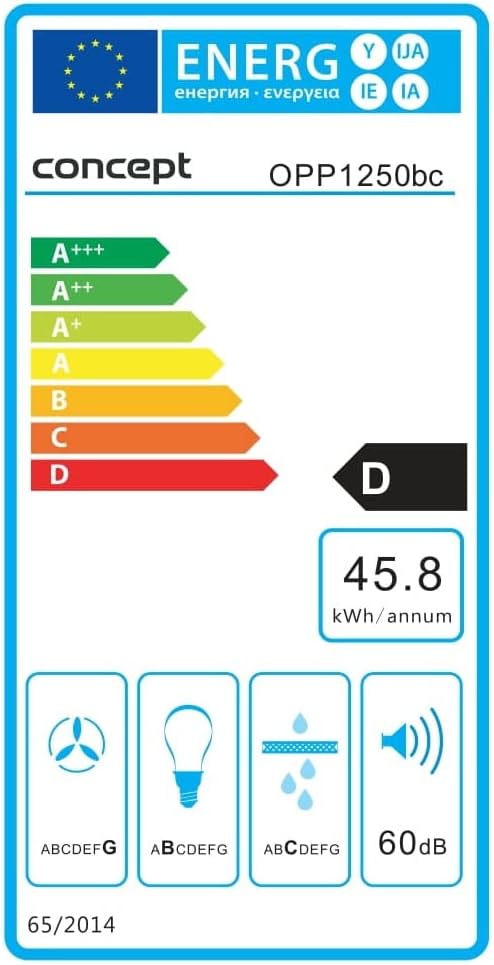
Figure 4: Energy Efficiency Label for the Concept OPP1250BC.
9. Warranty and Support
Your Concept OPP1250SS Under-Cabinet Range Hood comes with a standard manufacturer's warranty. Please refer to the warranty card included in your product packaging for specific terms and conditions, including warranty duration and coverage details.
For technical support, spare parts, or warranty claims, please contact the Concept customer service department. Contact information can typically be found on the manufacturer's website or in the product packaging.


