
EZ EAR CCZ Coffee Bean
EZ EAR CCZ Coffee Bean Wired Earbuds Instruction Manual
Model: CCZ Coffee Bean (LX668E2Brown)
1. Introduction
Thank you for choosing the EZ EAR CCZ Coffee Bean Wired Earbuds. These in-ear monitors are designed to provide a high-fidelity audio experience with a focus on clear musical details and comfortable wear. This manual provides essential information for proper setup, operation, maintenance, and troubleshooting to ensure optimal performance and longevity of your earbuds.

Image 1.1: EZ EAR CCZ Coffee Bean Wired Earbuds
2. Product Features
The EZ EAR CCZ Coffee Bean earbuds incorporate several design and technological features for an enhanced listening experience:
- Dual Magnetic Circuit Dynamic Driver: Equipped with a 10mm dual magnetic circuit single dynamic driver unit, offering improved energy efficiency and transient response due to low impedance and high sensitivity.
- PET Composite Diaphragm: Features a PET composite diaphragm for elastic low frequencies, accurate resolution, and rich details.
- Patented Ear Tips: TPE material ear tips with a groove design and short sound guide tubes reduce sound loss and bring a more stereo sound.
- Patented Ear Hooks: Designed for comfortable, lightweight, and stable wear, preventing the cable from resting or being pulled down during movement.
- UV-Curing PC Cavity: The cavity is constructed from solid, anti-impact high-density PC materials with a German nice-fit UV varnish, resembling coffee beans in appearance.
- Lightweight Design: Each earbud weighs approximately 2.3g, ensuring comfortable wear without pressure.
- 4 Core 4N OFC Cable: Utilizes a 0.78MM 2-pin detachable cable made of professional 4 core 4N Oxygen-Free Copper (OFC), enhancing transparency, separation, and soundstage.

Image 2.1: 10mm Dual Magnetic Circuit Dynamic Driver

Image 2.2: Key Features Overview
3. Setup and Wearing Instructions
Follow these steps to properly set up and wear your EZ EAR CCZ Coffee Bean earbuds for optimal comfort and sound quality:
- Identify Left and Right: Locate the 'L' and 'R' markings on the earbuds and the cable connectors to ensure correct placement.
- Connect the Cable: Carefully align the 2-pin connectors on the cable with the corresponding ports on each earbud. Push firmly until they are securely connected.
- Select Ear Tips: Choose the ear tip size (small, medium, large) that provides the best seal and comfort for your ears. A good seal is crucial for bass response and sound isolation.
- Insert Earbuds: Gently insert the earbuds into your ear canals. The patented ear hooks are designed to go over your ears, securing the cable and preventing accidental dislodgement.
- Adjust for Fit: Press and hold the earbud panel to adjust the seal. Ensure the ear fins sit snugly around the inner part of your ear for stability.
- Cable Management: Fix the headset wire behind your ear to prevent it from snagging or pulling.

Image 3.1: Earbud Installation Guide
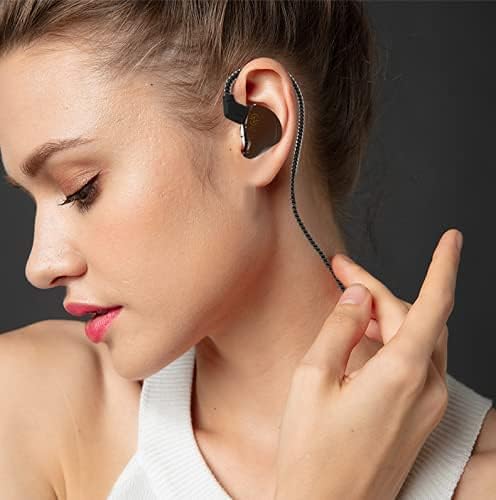
Image 3.2: Proper Wearing Technique
Video 3.1: Demonstration of earbud fit, comfort, and sound quality, including proper wearing technique.
4. Operating Instructions
These wired earbuds are designed for straightforward use with any device featuring a 3.5mm audio jack.
- Connecting to a Device: Plug the 3.5mm single-end plug into the audio output jack of your smartphone, computer, game console, or other compatible device.
- Volume Control: Adjust the volume directly on your connected playback device. If your model includes an inline microphone with control, it may offer call control functionality.
- Call Control (if applicable): For models with a microphone, the inline control typically allows you to answer/end calls with a single press. Refer to your device's specific instructions for further control options.

Image 4.1: Device Compatibility
5. Maintenance
Proper care will extend the life and maintain the performance of your earbuds:
- Cleaning Ear Tips: Regularly remove the ear tips and clean them with a soft, damp cloth. Ensure they are completely dry before reattaching.
- Cleaning Earbuds: Wipe the earbud bodies with a dry, soft cloth. Avoid using harsh chemicals or abrasive materials.
- Cable Care: Handle the cable gently. Avoid sharp bends or excessive pulling to prevent damage.
- Storage: When not in use, store your earbuds in a clean, dry place, preferably in a protective case, to prevent tangling and damage.
- Water Resistance: These earbuds are not water resistant. Avoid exposure to water, sweat, or high humidity.
6. Troubleshooting
If you encounter issues with your earbuds, refer to the following common solutions:
| Problem | Possible Cause | Solution |
|---|---|---|
| No sound or low volume | Incorrect connection, low device volume, dirty ear tips, improper fit. | Ensure cable is fully connected. Increase device volume. Clean ear tips. Adjust earbuds for a secure fit. |
| Poor sound quality (e.g., weak bass, muffled sound) | Improper ear tip seal, incorrect ear tip size, dirty ear tips. | Experiment with different ear tip sizes to achieve a tight seal. Clean ear tips. Ensure earbuds are inserted correctly. |
| Earbuds fall out easily | Incorrect ear tip size, improper wearing technique. | Try a larger ear tip size. Ensure ear hooks are correctly positioned over your ears. |
| Microphone not working (if applicable) | Device compatibility, cable connection issue. | Ensure your device supports inline microphone functionality. Check cable connection. |
If the problem persists after trying these solutions, please contact customer support.
7. Specifications
| Feature | Detail |
|---|---|
| Model Name | Coffee Bean (LX668E2Brown) |
| Brand | EZ EAR |
| Connectivity Technology | Wired |
| Headphones Jack | 3.5 mm Jack |
| Driver Type | 10mm Dual Magnetic Circuit Dynamic Driver |
| Frequency Response | 20 Hz - 20,000 Hz |
| Sensitivity | 111 dB |
| Impedance | 18 Ohms |
| Noise Control | Sound Isolation |
| Material | Polycarbonate (PC), Thermoplastic Elastomer (TPE) |
| Item Weight (single earbud) | 2.3g (0.09 Kilograms for pair / 3.2 ounces for pair) |
| Water Resistance Level | Not Water Resistant |
| Cable Feature | Detachable 0.78MM 2 PIN, 4 Core 4N OFC |
| Control Type | Call Control (if mic included) |
8. Warranty and Support
Your EZ EAR CCZ Coffee Bean earbuds come with a 12-month warranty from the date of purchase. This warranty covers manufacturing defects under normal use.
What the Warranty Covers:
- Defects in materials and workmanship.
What the Warranty Does Not Cover:
- Damage caused by misuse, abuse, accident, or negligence.
- Normal wear and tear.
- Unauthorized repairs or modifications.
To Claim Warranty or for Support:
If you have any questions, experience issues with your product, or need to make a warranty claim, please contact EZ EAR customer support. We aim to respond within 24 hours to assist you.
For the most up-to-date contact information, please visit the official EZ EAR store on Amazon: EZ EAR Store
Video 8.1: Overview of CCZ Coffee Bean features and 12-month warranty information.
Ask a question about this manual
Ask about setup, troubleshooting, compatibility, parts, safety, or missing instructions. Manuals+ will review the question and use this page’s manual context to help answer it.