
1. Introduction
The Red Sea ReefDose 2 is a wireless dosing pump designed for precise and automated supplementation in saltwater aquariums. It features two independent dosing heads, controlled via the ReefBeat App, allowing for accurate delivery of supplements, foods, and trace elements. This manual provides essential information for the safe and effective operation of your ReefDose 2.

Image 1.1: The Red Sea ReefDose 2 packaging, illustrating the product and its key features.
2. Safety Information
Please read and understand all safety instructions before operating the ReefDose 2. Failure to follow these instructions may result in product damage, injury, or electric shock.
- Ensure the device is placed on a stable, dry surface, away from direct water splashes.
- Only use the power adapter supplied with the unit.
- Do not operate the device if the power cord or plug is damaged.
- Keep out of reach of children and pets.
- Disconnect power before performing any maintenance or cleaning.
- This device is intended for indoor use only.
3. Package Contents
Verify that all items are present in the package:
- Red Sea ReefDose 2 Unit
- Power Adapter
- Mounting Bracket and Screws
- Dosing Tubing (Note: Dosing tubes are not always included and may be sold separately as per product information.)
- Quick Start Guide
4. Setup
4.1 Physical Installation
Choose a suitable location for your ReefDose 2, ensuring it is close enough to your aquarium and supplement containers for tubing connections. Mount the unit using the provided bracket and screws, or place it on a flat, stable surface.
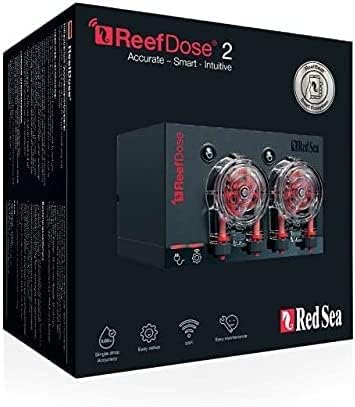
Image 4.1: The Red Sea ReefDose 2 unit, showing the two dosing heads and control buttons.
4.2 Tubing Connection
- Connect the intake tubing from your supplement containers to the inlet ports of the dosing heads.
- Connect the outlet tubing from the dosing heads to your aquarium or sump. Ensure tubing is secured to prevent accidental disconnections.

Image 4.2: Example of multiple ReefDose units with color-coded tubing for various supplements.
4.3 Power Connection
Connect the power adapter to the ReefDose 2 unit and then plug it into a suitable power outlet. The unit will power on, and indicator lights will illuminate.
4.4 ReefBeat App Installation & Initial Pairing
- Download the Red Sea ReefBeat App from your device's app store.
- Open the app and follow the on-screen instructions to create an account or log in.
- Select 'Add New Device' and choose the ReefDose 2.
- Follow the app's prompts to connect the ReefDose 2 to your home Wi-Fi network and pair it with your ReefBeat account.
4.5 Calibration
Before setting up dosing schedules, calibrate each dosing head for accurate delivery. This process is typically guided by the ReefBeat App during initial setup. You will need a measuring cylinder to verify the dispensed volume. Do not prime or calibrate until the pump is fully set up in the app to avoid wasting product.
5. Operating the ReefDose 2
The ReefDose 2 is controlled exclusively through the Red Sea ReefBeat App, offering flexible and precise dosing schedules.
5.1 Basic Dosing Schedule Setup
- In the ReefBeat App, navigate to your ReefDose 2 device.
- Select the dosing head you wish to configure.
- Choose your desired dosing program:
- Easy-Set Dosing: For common supplements, the app can suggest a schedule based on your aquarium size and desired concentration.
- Individual Doses: Manually set specific times and volumes for each dose.
- Confirm and save your schedule. The ReefDose 2 will begin dosing according to your settings.

Image 5.1: The ReefBeat app displaying active dosing schedules and remaining supplement volumes.
5.2 Advanced Dosing Features
- Whisper Mode: For quieter operation, select 'Whisper' mode in the app settings for a reduced flow rate.
- Turbo Mode: To complete dosing quickly, select 'Turbo' mode for an increased flow rate.
- Food Head: Designate a dosing head as a 'Food Head' in the app. This will automatically trigger 'Feed mode' in other ReefBeat devices when liquid food is dispensed.
- Supplement Volume Monitor: The app can track remaining supplement volume and notify you when refills are needed.
- Missed Dose Compensation: Automatically reschedules missed doses due to power outages or other interruptions.

Image 5.2: ReefBeat app interface detailing advanced features such as volume monitoring and dose compensation.
6. Maintenance
Regular maintenance ensures the longevity and accuracy of your ReefDose 2.
6.1 Routine Cleaning
Periodically inspect the dosing heads and tubing for any blockages or buildup. Clean the exterior of the unit with a damp cloth. Do not use harsh chemicals.
6.2 Dosing Head and Tubing Replacement
The peristaltic tubing within the dosing heads is a wear-and-tear component and will require replacement over time to maintain accuracy. Refer to Red Sea's official documentation or support channels for instructions on replacing dosing heads or internal tubing. Signs of wear include reduced accuracy or visible damage to the tubing.
7. Troubleshooting
This section addresses common issues you might encounter with your ReefDose 2.
| Problem | Possible Cause | Solution |
|---|---|---|
| Device not powering on | No power, faulty adapter | Check power connection, try a different outlet. Ensure the power adapter is correctly connected. |
| Cannot connect to ReefBeat App | Wi-Fi issue, incorrect pairing process | Ensure your phone and ReefDose 2 are on the same 2.4GHz Wi-Fi network. Restart the app and the ReefDose 2. Re-attempt the pairing process as per app instructions. |
| Inaccurate dosing | Tubing wear, air bubbles, incorrect calibration | Recalibrate the dosing head. Check tubing for kinks, blockages, or air bubbles. Consider replacing worn dosing head tubing. |
| Dosing head motor failure | Component wear | Contact Red Sea support for replacement parts or service. Dosing head motors are consumable parts that may require replacement over time. |
8. Specifications
| Feature | Detail |
|---|---|
| Product Dimensions | 6.63 x 6.75 x 5.15 inches |
| Weight | 2.15 Pounds |
| Manufacturer | Red Sea |
| Material | Plastic |
| Item Volume (for reference) | 1000 Milliliters |
| Connectivity | Wireless (ReefBeat App controlled) |
| Dosing Heads | 2 |
9. Warranty and Support
The Red Sea ReefDose 2 comes with a manufacturer's warranty. Please refer to the warranty card included with your product or visit the official Red Sea website for detailed warranty terms and conditions. For technical support, troubleshooting assistance, or to inquire about replacement parts, please contact Red Sea customer service directly through their website or the ReefBeat App support section.
Red Sea Official Website: www.redseafish.com
