
1. Introduction
The Deeoee XH-M604 is a versatile DC 6-60V battery charger control module designed to manage the charging process of storage and lithium batteries. It features a digital display for voltage monitoring and allows users to set precise start and stop charging voltage thresholds, ensuring optimal battery health and preventing overcharge or deep discharge.
2. Safety Information
- Ensure correct polarity when connecting the module to the power source and battery. Incorrect connections can damage the module or battery.
- Operate within the specified voltage range (DC 6-60V). Exceeding this range may cause permanent damage.
- Avoid short circuits on the input or output terminals.
- Keep the module away from moisture, dust, and extreme temperatures.
- This module is intended for use by individuals familiar with basic electronics and battery management.
3. Product Overview and Features
The XH-M604 module provides automated battery charging control with a clear digital voltage display. Its compact design and user-friendly interface make it suitable for various battery charging applications.
- Input Voltage Range: DC 6-60V
- Display Accuracy: 0.1V
- Control Accuracy: 0.1V
- Output Type: Direct output
- Voltage Tolerance: ±0.1V
- Applicable Battery Types: 6-60V (Maximum 80V) storage and lithium batteries
- Dimensions: 81mm x 54mm x 18mm
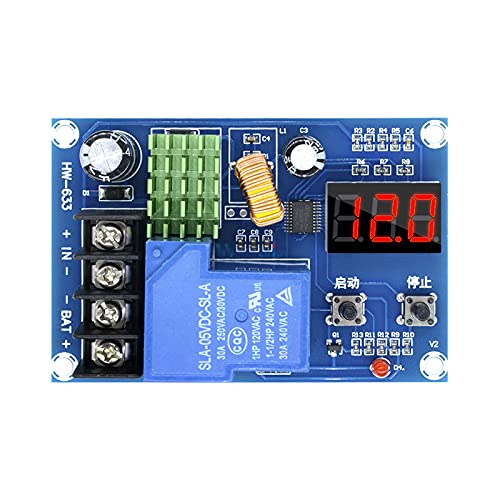
Figure 1: Top-down view of the XH-M604 module, highlighting its main components including input/output terminals, digital display, and control buttons.
4. Setup and Wiring
Carefully follow these steps to connect the XH-M604 module:
- Identify Terminals: Locate the input terminals (+IN, -IN) and battery terminals (+BAT, -BAT) on the module.
- Connect Power Input: Connect your DC power supply (6-60V) to the +IN and -IN terminals. Ensure correct polarity. The module's digital display should light up, showing the current voltage.
- Connect Battery: Connect the battery to be charged to the +BAT and -BAT terminals. Again, observe correct polarity. The module will display the battery's current voltage.
- Verify Connections: Double-check all connections before proceeding to operation.
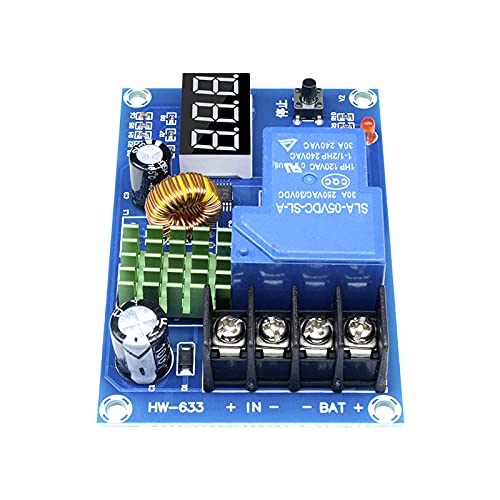
Figure 2: Detail of the wiring terminals on the XH-M604 module. Ensure secure and correct polarity connections for both input power and the battery.
5. Operating Instructions
The module has two main buttons: a "Start" button (often labeled with an upward arrow or '启动') and a "Stop" button (often labeled with a downward arrow or '停止'). These buttons are used for setting the charging parameters.
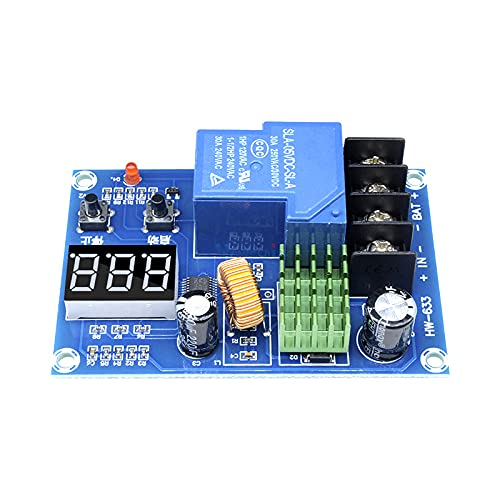
Figure 3: The digital display and control buttons ('Start' and 'Stop') on the XH-M604 module, used for setting voltage thresholds.
5.1. Setting the Start Charging Voltage (Lower Limit)
- In the normal voltage display state, press the "Start" button once. The display will show the currently set start charging voltage.
- To change this value, long-press the "Start" button until the digital display flashes.
- While flashing, use the "Start" button to increase the voltage and the "Stop" button to decrease the voltage.
- Once the desired start voltage is set, wait a few seconds for the display to stop flashing and save the setting automatically.
5.2. Setting the Stop Charging Voltage (Upper Limit)
- In the normal voltage display state, press the "Stop" button once. The display will show the currently set stop charging voltage.
- To change this value, long-press the "Stop" button until the digital display flashes.
- While flashing, use the "Start" button to increase the voltage and the "Stop" button to decrease the voltage.
- Once the desired stop voltage is set, wait a few seconds for the display to stop flashing and save the setting automatically.
5.3. Factory Reset
To restore the module to its factory default settings:
- With the module powered on, simultaneously press and hold both the "Start" and "Stop" buttons.
- The digital display will show "888", indicating that the factory settings have been restored.
6. Maintenance
- Keep the module clean and free from dust. Use a soft, dry cloth for cleaning.
- Ensure adequate ventilation around the module, especially if operating at higher currents, to prevent overheating.
- Regularly check wiring connections for tightness and corrosion.
7. Troubleshooting
| Problem | Possible Cause | Solution |
|---|---|---|
| Module display is off. | No power input or incorrect polarity. | Check power supply connections (+IN, -IN) and ensure correct DC voltage (6-60V) and polarity. |
| Battery not charging. | Start voltage set too high, stop voltage set too low, or incorrect battery connection. | Verify battery connections (+BAT, -BAT). Check and adjust start/stop voltage settings. Ensure start voltage is below current battery voltage and stop voltage is above it. |
| Settings not saving. | Buttons not held long enough, or power interrupted during setting. | Ensure you long-press the button until the display flashes, then wait for it to stop flashing after adjusting. Maintain stable power during setting. |
| Module behaving erratically. | Interference, unstable power, or corrupted settings. | Perform a factory reset (Section 5.3). Ensure a stable and clean power supply. |
8. Specifications
- Model: XH-M604
- Input Voltage: DC 6-60V
- Display Accuracy: 0.1V
- Control Accuracy: 0.1V
- Output Type: Direct Output
- Voltage Tolerance: ±0.1V
- Applicable Battery Voltage: 6-60V (Maximum 80V)
- Dimensions: 81mm x 54mm x 18mm
- Manufacturer: Deeoee
9. Warranty and Support
Warranty and support information for the Deeoee XH-M604 module is not provided in the available product data. Please refer to your retailer or the manufacturer's official website for details regarding warranty coverage and technical support.