
1. Introduction
Thank you for choosing the Midea MCS2021WB Cordless Handheld Vacuum Cleaner. This manual provides essential information for the safe and efficient use, maintenance, and troubleshooting of your new appliance. Please read it thoroughly before first use and keep it for future reference.
2. Safety Instructions
Always follow basic safety precautions when using electrical appliances to reduce the risk of fire, electric shock, or injury.
- This appliance is for household use only. Do not use it outdoors or on wet surfaces.
- Do not allow children to operate the vacuum cleaner. Close supervision is necessary when used near children.
- Do not pick up flammable or combustible materials (lighter fluid, gasoline, kerosene, etc.) or use in areas where they may be present.
- Do not pick up anything that is burning or smoking, such as cigarettes, matches, or hot ashes.
- Do not use without the dust cup and/or filters in place.
- Turn off the appliance before connecting or disconnecting the battery pack, or before performing any maintenance.
- Use only the charger supplied by the manufacturer to recharge the battery.
- Store the appliance indoors in a cool, dry place.
- Do not immerse the motor unit in water or other liquids.
3. Package Contents
Carefully unpack your Midea MCS2021WB vacuum cleaner and check that all items are present and in good condition. If any items are missing or damaged, contact your retailer.
- Main Motor Unit (Handheld Vacuum)
- Extension Wand
- Electric Floor Brush
- Crevice Tool
- 2-in-1 Brush Tool
- Wall Mount Bracket
- Power Adapter/Charger
- User Manual

Image: All components included in the Midea MCS2021WB package, including the main unit, extension wand, floor brush, crevice tool, 2-in-1 brush, wall mount, and charger.
4. Product Diagram
Familiarize yourself with the different parts of your Midea MCS2021WB vacuum cleaner.

Image: The Midea MCS2021WB cordless vacuum cleaner shown in its full stick configuration and as a handheld unit with different attachments. Key parts include the handle, dustbin, power button, extension wand, and floor brush.
- Handle
- Power Button
- Dust Cup Release Button
- Dust Cup
- Filter System
- Extension Wand Release Button
- Extension Wand
- Floor Brush Release Button
- Electric Floor Brush with LED lights
- Crevice Tool
- 2-in-1 Brush Tool
5. Assembly
Your Midea MCS2021WB can be assembled in various configurations for different cleaning needs.
5.1. Assembling the Stick Vacuum
- Insert the extension wand into the main motor unit until it clicks into place.
- Attach the electric floor brush to the other end of the extension wand until it clicks into place.
5.2. Assembling the Handheld Vacuum
- For handheld use, detach the extension wand and floor brush by pressing their respective release buttons.
- Attach the crevice tool or 2-in-1 brush tool directly to the main motor unit until it clicks into place.
6. Charging the Battery
Before first use, fully charge the vacuum cleaner's battery. A full charge takes approximately 4-5 hours.
- Connect the power adapter to the charging port on the main motor unit.
- Plug the power adapter into a wall outlet.
- The charging indicator lights will illuminate to show charging status.
- Once fully charged, disconnect the power adapter.
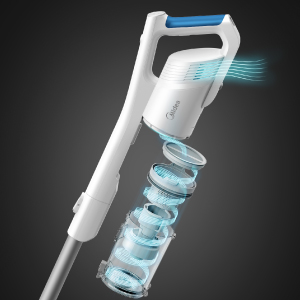
Image: An internal view of the vacuum's battery pack, illustrating the lithium-ion cells that provide up to 45 minutes of runtime.
7. Operating Instructions
7.1. Powering On/Off
Press the power button on the handle to turn the vacuum cleaner on or off.
7.2. Using the Stick Vacuum
For floor cleaning, use the vacuum in its stick configuration with the electric floor brush. The brush features LED lights to illuminate dark areas.
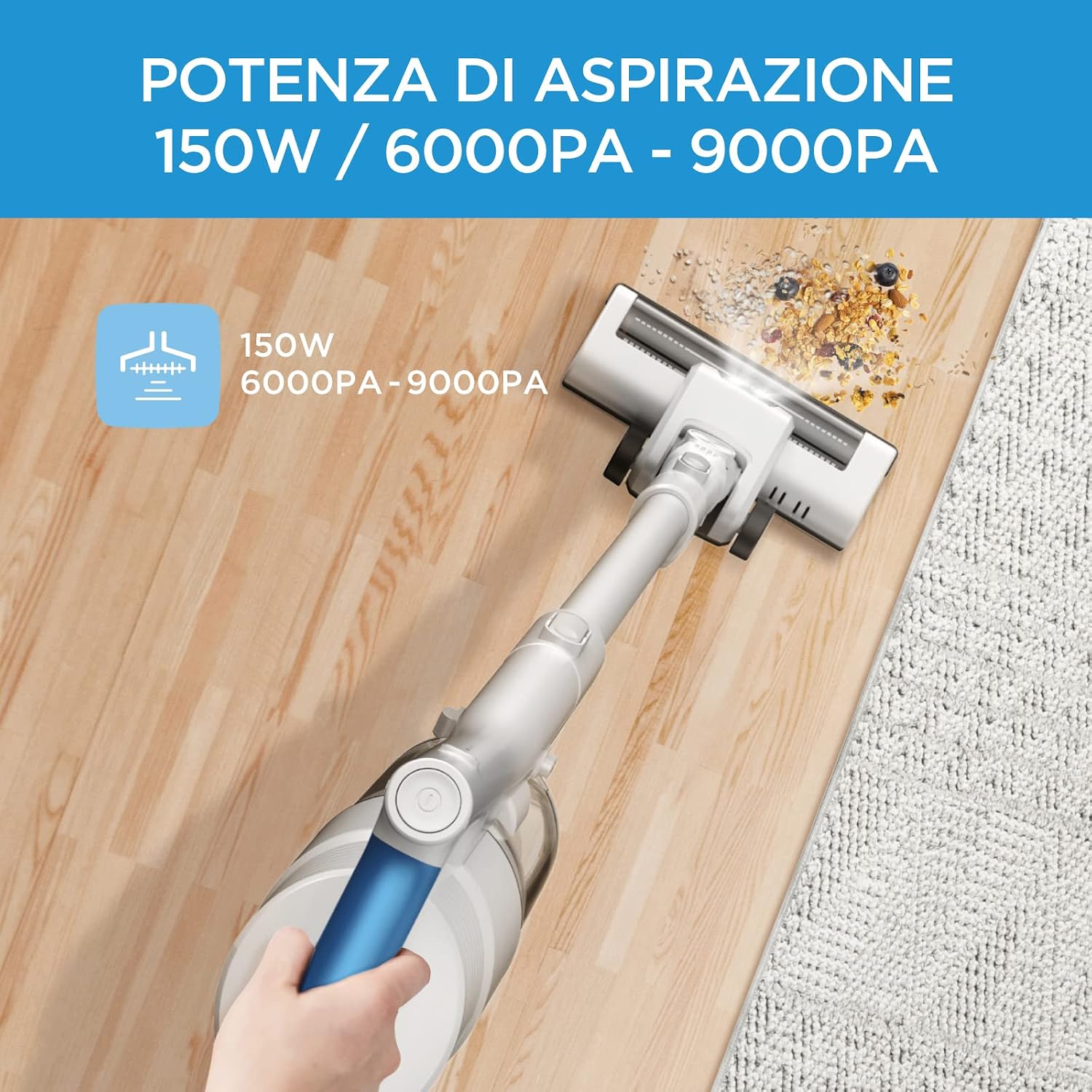
Image: A person operating the Midea MCS2021WB cordless stick vacuum on a hard floor, demonstrating its use for general floor cleaning.
7.3. Using the Handheld Vacuum
Convert the unit to handheld mode by detaching the extension wand and floor brush. Attach the appropriate accessory for specific tasks:
- Crevice Tool: Ideal for narrow gaps, corners, and hard-to-reach areas like between sofa cushions or car seats.
- 2-in-1 Brush Tool: Use the brush for delicate surfaces like keyboards or upholstery, and the nozzle for general dusting.
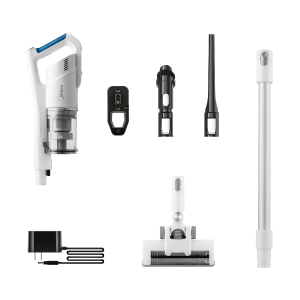
Image: A collage showing the Midea MCS2021WB in handheld mode, cleaning a desktop with the crevice tool, a sofa with the 2-in-1 brush, and a window sill, as well as the stick vacuum cleaning a carpet.
7.4. Flexible Head
The electric floor brush features a flexible joint, allowing it to swivel 180 degrees horizontally and 90 degrees vertically. This design facilitates cleaning under furniture and around obstacles.

Image: A visual representation of the floor brush's flexibility, showing its ability to pivot 180 degrees horizontally and 90 degrees vertically for enhanced maneuverability.
8. Maintenance and Cleaning
Regular maintenance ensures optimal performance and extends the lifespan of your vacuum cleaner.
8.1. Emptying the Dust Cup
Empty the dust cup when the MAX line is reached or after each use.
- Press the dust cup release button to detach the dust cup from the main motor unit.
- Hold the dust cup over a trash bin and open the bottom flap to release debris.
- Close the flap and reattach the dust cup to the main unit.
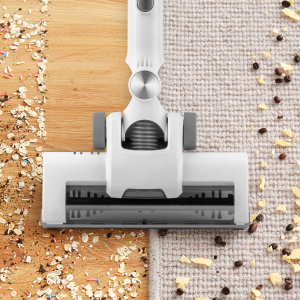
Image: A hand holding the vacuum's dustbin, demonstrating the process of emptying collected debris into a waste bin.
8.2. Cleaning the Filters
The Midea MCS2021WB features a 5-level filtration system. Clean the filters regularly to maintain suction power.
- Twist and pull to remove the filter assembly from the dust cup.
- Separate the foam filter and other filter components.
- Tap off loose dirt. Rinse the filters under cold running water.
- Allow all filter parts to air dry completely for at least 24 hours before reassembling and placing back into the vacuum. Do not use the vacuum with wet filters.

Image: The washable filter components of the vacuum cleaner being cleaned under running water, highlighting their reusability.

Image: An exploded diagram illustrating the five distinct layers of the vacuum's filtration system, designed to capture fine dust and particles.
8.3. Cleaning the Brush Roll
Periodically check the brush roll for tangled hair or debris. Use scissors to cut away any tangled hair and remove it.
9. Troubleshooting
If you encounter issues with your vacuum cleaner, refer to the table below for common problems and solutions.
| Problem | Possible Cause | Solution |
|---|---|---|
| Vacuum does not turn on | Battery is not charged Battery not properly installed | Charge the battery fully Ensure battery is securely clicked into place |
| Low suction power | Dust cup is full Filters are clogged Hose/nozzle is blocked Brush roll is jammed | Empty the dust cup Clean or replace filters Remove any blockages Clean the brush roll |
| Brush roll not spinning | Brush roll is jammed Attachment not properly connected | Remove hair/debris from brush roll Ensure floor brush is securely attached |
| Short runtime | Battery not fully charged Battery life degraded | Ensure battery is fully charged Contact customer support for battery replacement options |
10. Specifications
Technical details for the Midea MCS2021WB Cordless Handheld Vacuum Cleaner.
| Feature | Specification |
|---|---|
| Model Number | MCS2021WB |
| Power | 150 Watts |
| Voltage | 21.6 Volts |
| Battery Type | Lithium-ion |
| Runtime | Up to 45 minutes |
| Noise Level | 82 dB |
| Weight | 2.9 Kilograms |
| Dimensions (L x W x H) | 125 x 23.5 x 18.8 cm |
| Filter Type | Foam (5-level filtration) |
| Special Features | Cordless, Bagless, 2-in-1 Handheld, LED Lighting on brush |
11. Warranty and Support
Midea products are manufactured to high-quality standards. For warranty information, technical support, or spare parts, please refer to the warranty card included with your purchase or visit the official Midea website for your region. Please have your model number (MCS2021WB) and proof of purchase ready when contacting support.


