
Introduction
The Katalic Automatic Pet Feeder LS-PF001 is designed to provide a convenient and reliable solution for feeding your pets. This device allows you to schedule meals and control portion sizes, ensuring your pet receives a consistent and healthy diet. Key features include a 4-liter food capacity, a 10-second customizable voice recorder, a removable stainless steel bowl, and dual power options.
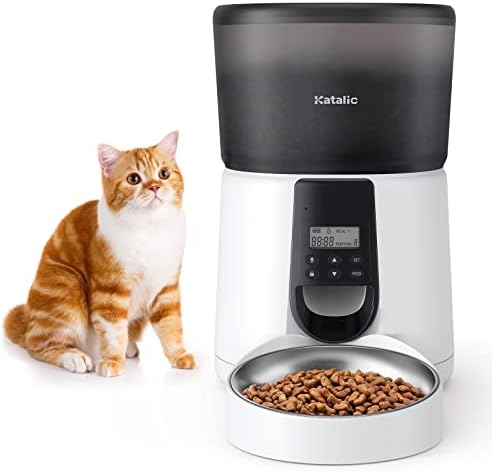
Image: The Katalic Automatic Pet Feeder, a white and black unit with a transparent food tank, shown with a cat.
Package Contents
Please verify that all items are present in the package:
- 1 x Katalic Automatic Pet Feeder (4L)
- 1 x Stainless Steel Bowl
- 1 x 5V Power Adapter
- 1 x Desiccant Bag
- 1 x Food Tray
- 1 x User Manual
Setup
- Unpack Components: Carefully remove all items from the packaging.
- Assemble Bowl: Place the food tray onto the base of the feeder, then insert the stainless steel bowl into the tray.
- Insert Desiccant Bag: Locate the desiccant holder inside the lid or food tank. Insert the desiccant bag to help keep food fresh.
- Power the Feeder:
- AC Adapter: Connect the provided 5V power adapter to the feeder's power port and plug it into a wall outlet.
- Battery Backup: For backup power during outages, insert three D-cell batteries (not included) into the battery compartment at the bottom of the feeder.
- Fill Food Tank: Open the sliding lid and pour dry pet food into the 4-liter food tank. Ensure the lid is securely closed to maintain food freshness.

Image: The feeder with a dog and cat, illustrating the 4L food tank capacity and fresh food concept.
Operating Instructions
- Power On: Long press the power button on the control panel to turn on the feeder.
- Set Current Time: Use the control panel buttons to set the current time. Refer to the display for time adjustment.
- Program Meals: The feeder supports up to 4 meals per day. Use the programming buttons to set the desired feeding times for each meal.
- Adjust Portions: For each programmed meal, you can set the portion size from 1 to 20 portions. Each portion is approximately 7g (±2g). Adjust according to your pet's dietary needs.
- Custom Voice Recording: Press and hold the record button to record a 10-second voice message. This message will play at each feeding time to call your pet. Release the button to save the recording.
- Manual Feeding: Press the "Feed" button to dispense a single portion manually. This is useful for providing extra treats or immediate feeding.

Image: The feeder illustrating a customized healthy diet with meal times and portion settings.
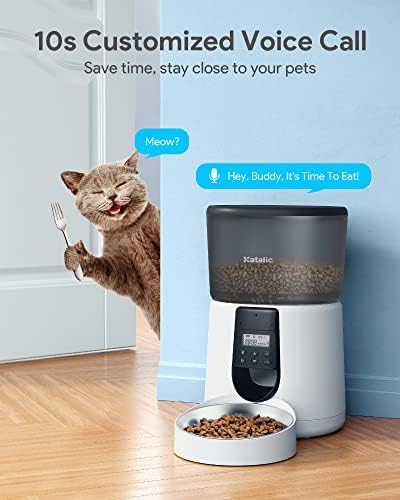
Image: The feeder with a cat, demonstrating the 10-second customizable voice call feature.
Maintenance
Regular cleaning is essential to ensure hygiene and proper functioning of the feeder.
- Disassembly: Unplug the feeder from the power source. Disassemble the food tank, food tray, and stainless steel bowl. Empty any remaining food.
- Cleaning: Remove the desiccant bag before cleaning. Immerse the food tank, food tray, and stainless steel bowl in warm, soapy water. Hand wash these components thoroughly.
- Rinsing and Drying: Rinse all cleaned parts thoroughly with clean water. Allow them to air dry completely before reassembling the feeder.
- Desiccant Bag Replacement: Replace the desiccant bag periodically (e.g., every 1-2 months) to maintain optimal food freshness.

Image: An internal view of the feeder, highlighting its clog-free design and separable storage bucket for easy cleaning.
Troubleshooting
- Feeder Appears Empty: The feeder does not have an automatic empty indicator. It is recommended to check the food level every 2-3 weeks and refill as needed to prevent your pet from missing meals.
- Unexpected Extra Feeding: Some units may occasionally dispense an extra meal. If this occurs, monitor your pet's intake and adjust programmed portions accordingly.
- Bowl Dislodges: Ensure the food tray and stainless steel bowl are securely placed on the feeder's base to prevent accidental dislodgement and spillage.
- Voice Recording Issues: If the voice recording is unclear or the speaker malfunctions, avoid setting the volume to maximum. If issues persist, contact customer support.
- Difficulty Setting Up: Refer to the 'Setup' and 'Operating Instructions' sections carefully. If you encounter persistent difficulties, contact customer support for guidance.
Specifications
| Feature | Specification |
|---|---|
| Model Number | LS-PF001 |
| Capacity | 4 Liters |
| Dimensions (L x W x H) | 21.59 x 19.3 x 34.04 cm (8.5 x 7.6 x 13.4 inches) |
| Weight | 1.76 kg (3.88 lbs) |
| Material | Acrylonitrile Butadiene Styrene (ABS) |
| Power Supply | 5V DC Adapter (included), 3 x D-cell batteries (not included) |
| Target Species | Cat (suitable for small dogs) |
| Color | Black |
Warranty and Support
Katalic is committed to providing quality products and customer satisfaction. If you have any questions, concerns, or require assistance with your Automatic Pet Feeder, please do not hesitate to contact our customer service team. Our dedicated support team aims to respond to all inquiries within 24 hours.
For warranty information or support, please contact Katalic support via their official website or the retailer where the product was purchased. Please have your model number (LS-PF001) and proof of purchase ready.