
TFA Dostmann 60.2560.02
TFA Dostmann Twist Radio-Controlled Alarm Clock (Model 60.2560.02) User Manual
Your guide to setting up and operating your new TFA Dostmann alarm clock.
1. Product Overview
The TFA Dostmann Twist Radio-Controlled Alarm Clock (Model 60.2560.02) is a modern, digital alarm clock designed for ease of use and reliable timekeeping. Its unique twist function allows for intuitive alarm activation and deactivation. The clock features automatic time setting via DCF signal, an adjustable snooze duration, and a clear, low-glare inverted display with automatic night backlighting.

Figure 1: Front view of the TFA Dostmann Twist Radio-Controlled Alarm Clock.
2. Setup
2.1. What's in the Box
- TFA Dostmann Twist Radio-Controlled Alarm Clock
- Instruction Manual
Note: 2 x 1.5V AA batteries are required and must be purchased separately.
2.2. Battery Installation
- Locate the battery compartment on the underside of the alarm clock.
- Open the battery compartment cover.
- Insert two (2) 1.5V AA batteries, ensuring correct polarity (+ and -).
- Close the battery compartment cover securely.
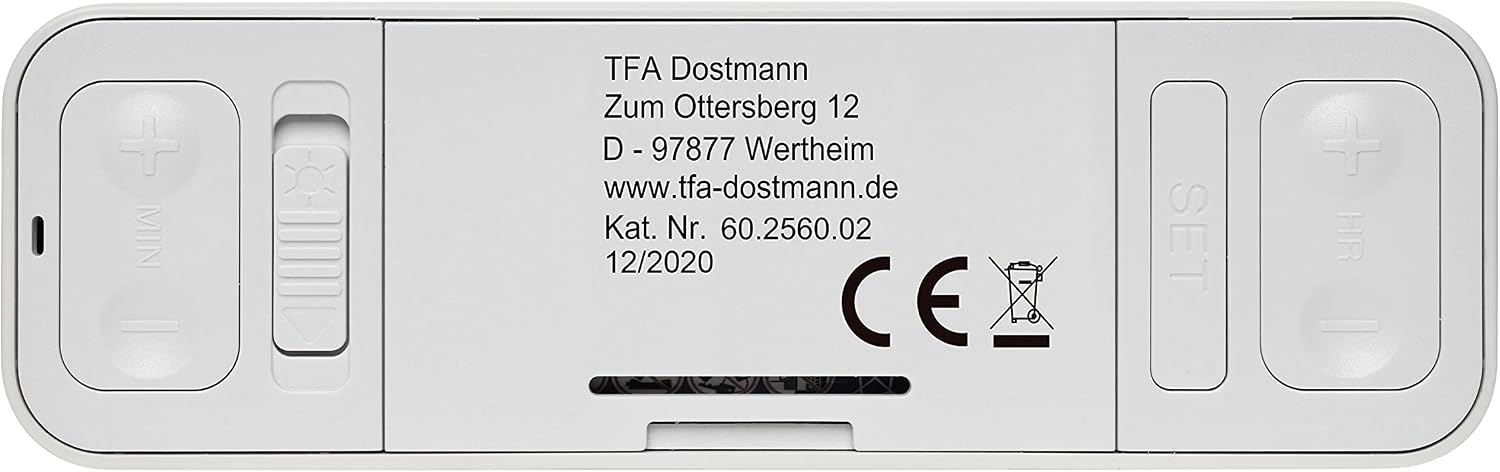
Figure 2: Underside of the alarm clock with battery compartment and controls.
2.3. Initial Time Setting (DCF Signal)
Upon battery insertion, the alarm clock will automatically attempt to receive the DCF radio signal to set the time. This process may take a few minutes. Ensure the clock is placed in an area with good signal reception, away from electronic interference.
- The radio-controlled clock function can be switched off if desired. Refer to the "Operating" section for details.
- The clock automatically adjusts for daylight saving time (summer/winter time).
3. Operating Instructions
3.1. Time Display and Modes
The digital display shows the current time. You can switch between 12-hour and 24-hour modes. Consult the specific buttons on the underside (e.g., "SET" or "HR") to cycle through these options.
- Inverted Display Illumination: The display features light digits on a black background for enhanced readability.
- Automatic Night Backlighting: The display automatically illuminates in low-light conditions, providing clear visibility without being overly bright.

Figure 3: Inverted display with automatic night backlighting.
3.2. Setting the Alarm
To set the alarm time, use the designated "SET" button and the "HR" (Hour) and "MIN" (Minute) buttons located on the underside of the clock. Follow the on-screen prompts or refer to the detailed instructions in the included manual for precise steps.
3.3. Alarm Activation and Deactivation (Twist Function)
The unique "Twist" function allows for easy alarm control:
- To Activate/Deactivate Alarm: Rotate the alarm clock 180 degrees. The display will indicate whether the alarm is active or inactive.
- Snooze Function: When the alarm sounds, gently press the top surface of the clock to activate the snooze function. The snooze duration is adjustable to 5, 10, or 15 minutes.
3.4. Time Zone Adjustment
For travel or different geographical locations, the alarm clock allows for an adjustable time zone of +/- 9 hours. Use the appropriate buttons (often combined with "SET" or "HR/MIN") to make this adjustment.
4. Maintenance
4.1. Cleaning
To clean the alarm clock, use a soft, dry cloth. Do not use abrasive cleaners, solvents, or immerse the device in water. Keep the device dry.
4.2. Battery Replacement
When the display dims or the clock functions become erratic, it is time to replace the batteries. Follow the steps in section 2.2 "Battery Installation" to replace the two 1.5V AA batteries. Dispose of old batteries responsibly according to local regulations.
5. Troubleshooting
| Problem | Possible Cause | Solution |
|---|---|---|
| Clock does not display time or display is dim. | Batteries are low or incorrectly inserted. | Replace batteries with new 1.5V AA batteries, ensuring correct polarity. |
| DCF signal not received / Time is incorrect. | Poor signal reception due to location or interference; DCF function is off. | Move the clock to a different location, preferably near a window and away from other electronics. Ensure the DCF function is enabled (refer to manual). |
| Alarm does not sound. | Alarm is not activated; alarm volume is too low (if adjustable); incorrect alarm time set. | Ensure the clock is rotated to the "Alarm ON" position. Verify alarm time and volume settings. |
| Display difficult to read from certain angles. | Inherent characteristic of inverted LCD displays. | Adjust viewing angle for optimal clarity. This is a known characteristic for some inverted displays. |
If you encounter issues not listed here, please refer to the comprehensive troubleshooting section in the full instruction manual or contact TFA Dostmann customer support.
6. Specifications
| Feature | Detail |
|---|---|
| Model Number | 60.2560.02 |
| Brand | TFA Dostmann |
| Product Dimensions (L x W x H) | 11.7 x 7.1 x 3.7 cm |
| Product Weight | 116 grams |
| Color | White |
| Display Type | Digital (Inverted Display Illumination) |
| Power Source | Battery-operated (2 x 1.5V AA batteries required) |
| Special Features | Radio-controlled (DCF signal), Adjustable Snooze (5, 10, 15 min), Twist Alarm Activation/Deactivation, Automatic Night Backlighting, Multiple Time Zones, 12h/24h Mode |

Figure 4: Product dimensions for the TFA Dostmann Twist Alarm Clock.
7. Warranty and Support
This product comes with a standard manufacturer's warranty. For detailed warranty information and terms, please refer to the documentation included with your purchase or visit the official TFA Dostmann website.
For technical support, spare parts, or further inquiries, please contact TFA Dostmann customer service. You can find contact information on their official website: www.tfa-dostmann.de
Related documents60.2560.02


Ask a question about this manual
Ask about setup, troubleshooting, compatibility, parts, safety, or missing instructions. Manuals+ will review the question and use this page’s manual context to help answer it.