1. Introduction
This manual provides essential information for the safe and efficient operation, installation, and maintenance of your Artic Wind 115V 8,000 BTU Digital Window Air Conditioner & Heater. This versatile 4-in-1 unit offers cooling, heating, dehumidification, and fan modes, designed to provide comfort in small to medium-sized rooms up to 350 square feet. Please read this manual thoroughly before using the appliance and retain it for future reference.
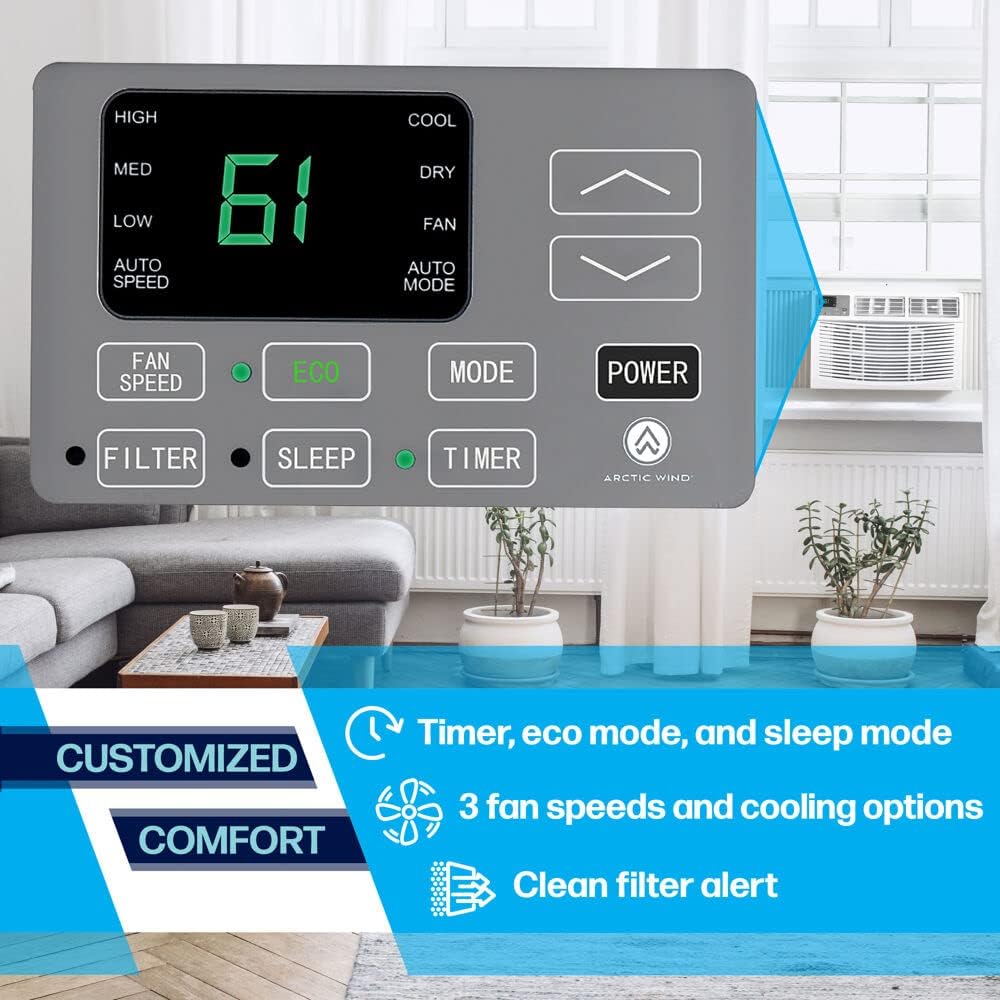
Your unit features digital controls with an easy-to-read LED display, a full-function remote control with a built-in thermostat, and an ECO mode for energy efficiency. It also includes special features such as auto restart, sleep mode, and a built-in timer for convenient operation.
2. Safety Information
WARNING: To reduce the risk of fire, electric shock, or injury to persons, read the following important safety instructions before operating this appliance.
- Always plug the unit into a grounded 3-prong outlet. Do not remove the grounding prong.
- Do not use an adapter or extension cord.
- Do not operate the unit with a damaged cord or plug.
- Do not block air openings.
- Do not insert fingers or foreign objects into the air discharge area.
- Unplug the unit before cleaning or servicing.
- This appliance is not intended for use by persons (including children) with reduced physical, sensory or mental capabilities, or lack of experience and knowledge, unless they have been given supervision or instruction concerning use of the appliance by a person responsible for their safety.
- Proposition 65 Warning: This product can expose you to chemicals including lead, which is known to the State of California to cause cancer and birth defects or other reproductive harm. For more information go to www.P65Warnings.ca.gov.
3. Product Features
- 4-in-1 Functionality: Provides 8,000 BTU cooling, 4,000 BTU heating, dehumidification, and fan-only modes for year-round comfort.
- Digital Controls: User-friendly LED digital display and controls for easy programming.
- Remote Control: Full-function remote with a built-in thermostat for convenient operation from anywhere in the room.
- ECO Mode: Energy-saving mode that cycles the unit on/off to maintain the desired temperature, reducing energy consumption.
- Special Features: Auto restart, sleep mode, and a programmable 24-hour timer.
- Washable Filter: Easy-to-clean mesh filter for simple maintenance and improved air quality.
- Adjustable Air Direction: Full-range air direction control to direct airflow where needed.
4. Setup and Installation
The Artic Wind window air conditioner is designed for easy installation in standard double-hung windows. A mounting kit is included with your unit.
4.1 Unit Dimensions and Window Requirements
Before installation, ensure your window meets the following requirements:
- Unit Dimensions: 24" (Depth) x 20" (Width) x 15.25" (Height)
- Window Width: Minimum 26" to Maximum 36"
- Window Height: Minimum 16"

4.2 Installation Steps (General Overview)
- Prepare the window opening by cleaning the area and ensuring it is structurally sound.
- Attach the top mounting rail to the unit.
- Install the accordion panels (side curtains) to the unit.
- Carefully place the unit into the window opening, ensuring it is securely seated and tilted slightly outwards for proper drainage.
- Extend the accordion panels to fill the window opening and secure them with screws.
- Install the window sash seal and lock to prevent air leakage and provide security.
- Plug the unit into a grounded 115V, 15 AMP electrical outlet.


4.3 Determining Cooling Capacity
Use the following table to determine the appropriate cooling capacity (BTU) for your room size. Adjustments may be necessary based on specific room conditions.

| Area to be Cooled (Sq. Ft.) | Capacity Needed (BTU) |
|---|---|
| UP TO 150 SQ. FT. | 5,000 |
| UP TO 250 SQ. FT. | 6,000 |
| UP TO 300 SQ. FT. | 7,000 |
| UP TO 350 SQ. FT. | 8,000 |
| UP TO 400 SQ. FT. | 9,000 |
| UP TO 450 SQ. FT. | 10,000 |
| UP TO 550 SQ. FT. | 12,000 |
| UP TO 700 SQ. FT. | 14,000 |
| UP TO 1000 SQ. FT. | 18,000 |
| UP TO 1200 SQ. FT. | 21,000 |
| UP TO 1400 SQ. FT. | 23,000 |
| UP TO 1500 SQ. FT. | 24,000 |
Adjustment as necessary:
Make any adjustments for the following circumstance:
- If the room is heavily shaded, reduce capacity by 10 percent.
- If the room is very sunny, increase capacity by 10 percent.
- If more than two people regularly occupy the room, add 600 BTUs for each additional person.
- If the unit is used in a kitchen, increase capacity by 4,000 BTUs.
5. Operating Instructions
Your Artic Wind AC unit can be controlled using the digital control panel on the unit or the included remote control.
5.1 Control Panel Overview
5.2 Remote Control Overview

5.3 Operating Modes
- Cool Mode: Provides cooling. Adjust temperature using the up/down arrows.
- Heat Mode: Provides heating. Adjust temperature using the up/down arrows.
- Dry (Dehumidify) Mode: Reduces humidity in the room. Fan speed is automatically controlled.
- Fan Mode: Circulates air without cooling or heating. Select fan speed (Low, Medium, High).
- ECO Mode: When activated, the unit will run until the desired temperature is reached, then cycle off. It will cycle back on when the room temperature rises above the set point, saving energy.
- Sleep Mode: Gradually increases the set temperature over several hours to save energy and provide comfortable sleeping conditions.
5.4 Timer Function
The 24-hour timer allows you to program the unit to turn on or off automatically at a set time. This is useful for pre-cooling or pre-heating a room before you arrive home.
6. Maintenance
Regular maintenance ensures optimal performance and longevity of your air conditioner.
6.1 Cleaning the Washable Filter
The unit features an easy-to-clean washable mesh filter. A 'Filter' indicator light on the control panel will illuminate when it's time to clean the filter.
- Unplug the unit from the power outlet before cleaning.
- Open the front panel and carefully slide out the air filter.
- Wash the filter with warm, soapy water. Rinse thoroughly.
- Allow the filter to air dry completely before reinserting it. Do not use hot water or dry with direct heat.
- Once the filter is reinserted, press the 'Filter' button on the control panel to reset the indicator light.
6.2 General Cleaning
- Clean the cabinet with a soft, damp cloth. Do not use harsh cleaners or abrasive materials.
- Periodically check the outdoor coils for dirt and debris. If necessary, gently clean with a soft brush.
7. Troubleshooting
If your unit is not operating correctly, consult the following common issues and solutions before contacting customer support.
| Problem | Possible Cause | Solution |
|---|---|---|
| Unit does not turn on | No power; circuit breaker tripped; unit unplugged; fuse blown. | Check power cord connection; reset circuit breaker; check house fuse; press the reset button on the power plug if applicable. |
| Unit not cooling/heating effectively | Dirty air filter; blocked air intake/exhaust; room too large; windows/doors open; temperature setting too high/low. | Clean air filter; ensure clear airflow; close windows/doors; adjust temperature setting; verify unit BTU matches room size. |
| Unusual noise | Loose parts; unit not level; fan hitting an obstruction. | Check for loose screws; ensure unit is level; inspect fan for obstructions (unplug first). |
| Water dripping inside | Unit not tilted properly; drain pan clogged. | Ensure unit is slightly tilted outwards; clear any obstructions from the drain pan. |
| Remote control not working | Dead batteries; obstruction between remote and unit. | Replace batteries; remove any obstructions. |
8. Specifications
| Specification | Value |
|---|---|
| Model Name | 8,000 BTU Window Air Conditioner with Heat |
| Model Number | 2AWH8000A |
| Brand | ARCTIC WIND |
| Cooling Power | 8000 British Thermal Units |
| Heating Power | 4000 British Thermal Units |
| Voltage | 115 Volts |
| Power Source | Electric |
| Floor Area Coverage | Up to 350 Square Feet |
| Product Dimensions (D x W x H) | 24" x 20" x 15.25" |
| Item Weight | 69.5 pounds |
| Seasonal Energy Efficiency Ratio (SEER) | 11.2 |
| Refrigerant | R-410A |
| Included Components | Air Conditioner, Manual, Warranty, Remote, Batteries, Window Kit |
9. Warranty and Support
9.1 Warranty Information
This Artic Wind air conditioner comes with a 1-year limited warranty from the date of purchase. This warranty covers defects in material and workmanship under normal use. Please retain your proof of purchase for warranty claims.
For specific warranty terms and conditions, refer to the warranty document included with your product or contact Artic Wind customer service.
9.2 Customer Support
If you have any questions, require technical assistance, or need to make a warranty claim, please contact Artic Wind customer support. Contact information can typically be found on the product packaging, the included manual, or the manufacturer's official website.
When contacting support, please have your model number (2AWH8000A) and proof of purchase readily available.


