
Bushnell Phantom 3
Bushnell Phantom 3 GPS Rangefinder Instruction Manual
Model: Phantom 3
Introduction
The Bushnell Phantom 3 is an advanced GPS rangefinder designed to enhance your golf game by providing precise distances and course information. This manual will guide you through the setup, operation, and maintenance of your device to ensure optimal performance.
What's Included

Image: Contents of the Bushnell Phantom 3 package, including the GPS device, USB-C charging cable, belt clip, and carabiner.
- Bushnell Phantom 3 Golf GPS Device (Black)
- USB-C Charging Cable
- Belt Clip with Carabiner
- Wearable4U Lens Cleaning Cloth (included in this bundle)
Setup Guide
1. Charging the Device
Before first use, fully charge your Phantom 3 GPS device. Connect the supplied USB-C charging cable to the device and a standard USB power adapter (not included) or a computer USB port. The device features a USB-C data/charging port.
- Charging Time: Approximately 3 hours for a full charge.
- Battery Life: Up to 18 hours, providing power for approximately 4 rounds of golf.
2. Powering On/Off
Press and hold the Power button (usually located on the side or front) to turn the device on or off.
3. Initial GPS Fix
For the first use, or after a long period of inactivity, the device may take slightly longer to acquire a GPS signal. Ensure you are in an open area with a clear view of the sky. Typical time to first fix (TTFS) is less than 45 seconds.
4. Course Updates
The Phantom 3 comes preloaded with over 38,000 golf courses worldwide. For the latest course data, connect your device to the Bushnell Golf app via Bluetooth. The app allows for course updates and additional features.
Operating Instructions
Display and Navigation
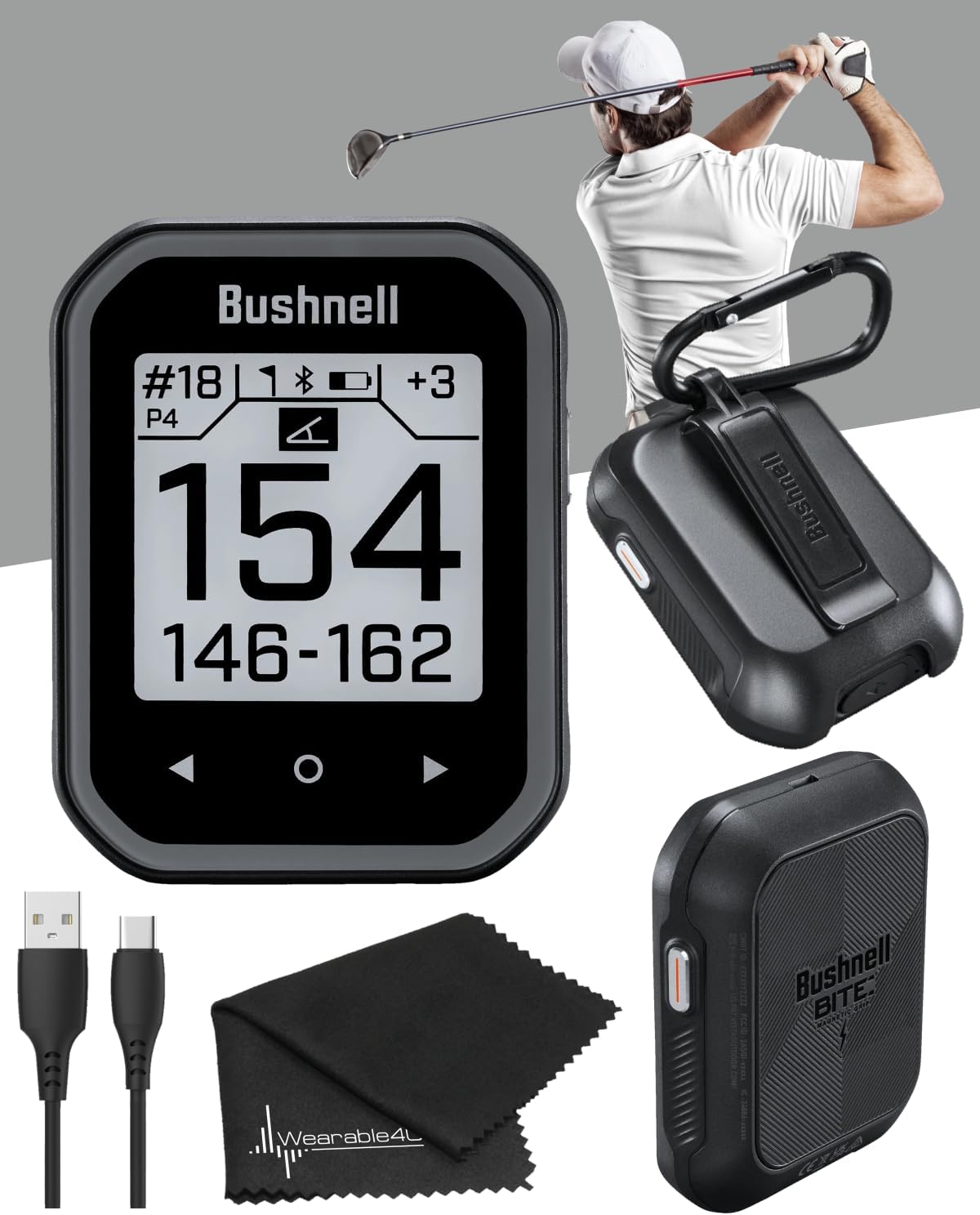
Image: The main display of the Bushnell Phantom 3, showing large numbers for front, center, and back distances to the green, along with hole number and par.
The Phantom 3 features a larger, easy-to-read display and an intuitive user interface. Navigate through menus and options using the physical buttons or the touchscreen functionality.
Key Features
- Front, Center, Back Distances: The primary display shows clear, large numbers for distances to the front, center, and back of the green.

Image: A graphical representation of a golf green from an aerial perspective, highlighting the front, center, and back distances with corresponding yardage numbers.
- GreenView with Moveable Pin Placement: Access GreenView mode to see the shape of the green and adjust the pin location for more precise distances to the flag.
- Hazard/Layup Distances: The device provides distances to up to 6 hazards or layup points per hole, assisting in strategic shot planning.

Image: The Bushnell Phantom 3 display showing a list of hazards with their respective distances and descriptions (e.g., "LBnk" for Left Bunker).
- Auto Hole Advance: The Phantom 3 automatically detects your location and advances to the next hole as you progress through the course, eliminating manual input.
- BITE Magnetic Mount: The integrated BITE magnet allows for secure attachment to golf cart frames, clubs, or other metallic surfaces for easy access during play.

Image: The Bushnell Phantom 3 device magnetically attached to a vertical metal post, demonstrating the BITE magnetic mount feature.
- Slope Compensated Distances: The Phantom 3 incorporates Bushnell Golf's patented Slope Technology to provide compensated distances that account for incline and decline, offering a more accurate "plays like" distance.

Image: A person holding the Bushnell Phantom 3, with an overlay explaining the new patented slope compensated distances feature.
- Scoring: The device includes scoring features. While optional, it can track your score, fairways hit, and putts per green. You can choose to opt out of scoring if you prefer to use it solely as a rangefinder.

Image: The Bushnell Phantom 3 display showing the scoring interface, with options to input putts for the current hole.
Maintenance and Care
- Cleaning: Use the provided lens cleaning cloth or a soft, damp cloth to clean the device's screen and body. Avoid abrasive materials or harsh chemicals.
- Storage: Store the device in a cool, dry place when not in use. Avoid extreme temperatures.
- Water Resistance: The Phantom 3 is IPX6 water resistant, meaning it can withstand powerful water jets. It is not designed for submersion.
- Battery Care: To prolong battery life, avoid fully discharging the battery frequently. Charge the device regularly, especially if storing for extended periods.
Troubleshooting
- Device Not Powering On:
Ensure the device is fully charged. Connect it to a power source using the USB-C cable and allow it to charge for at least 30 minutes before attempting to power on again.
- No GPS Signal/Incorrect Distances:
Ensure you are in an open area with a clear view of the sky. Move away from tall buildings or dense tree cover. Verify that the device has the latest course updates via the Bushnell Golf app.
- Battery Drains Quickly:
Ensure the device is fully charged before use. Reduce screen brightness if possible. If the issue persists, contact customer support.
- Difficulty with Scoring/Menu Navigation:
Refer to the detailed in-device help or the Bushnell Golf app for specific instructions on menu navigation and scoring features. The device is designed with an intuitive UI, but some features may require familiarization.
Specifications

Image: The Bushnell Phantom 3 device shown alongside its key physical and technical specifications, including dimensions, weight, and battery life.
| Feature | Detail |
|---|---|
| Item Weight | 2.75 ounces (78 grams) |
| Product Dimensions | 0.67 x 2.28 x 2.95 inches (17 x 58 x 75 mm) |
| Model Number | 362110 |
| Display Size | 40mm x 40mm (approx. 1.57 x 1.57 inches) |
| Battery Life | Up to 18 Hours |
| Charging Port | USB-C |
| Recharge Time | Less than 3 hours |
| Water Resistance | IPX6 |
| Connectivity | Bluetooth |
| Preloaded Courses | Over 38,000 worldwide |
| Special Features | Larger and easier to read display, BITE Magnetic Mount, GreenView with Moveable Pin Placement, Slope Compensated Distances, Auto Hole Advance |
Warranty Information

Image: A graphic displaying "1-Year Warranty" text within a circular design, indicating the product's warranty period.
Your Bushnell Golf Phantom 3 GPS is warranted to be free of defects in materials and workmanship for one year after the date of purchase. In the event of a defect under this warranty, Bushnell will, at its option, repair or replace the product, provided that you return the product postage prepaid.
This warranty does not cover damages caused by misuse, improper handling, installation, or maintenance provided by someone other than a Bushnell Authorized Service Department.
Customer Support
For further assistance, technical support, or warranty claims, please contact Bushnell Customer Service. You can typically find contact information on the official Bushnell Golf website or within the Bushnell Golf application.
For the most up-to-date information, product registration, and frequently asked questions, visit the official Bushnell Golf website.
Related documentsPhantom 3


Ask a question about this manual
Ask about setup, troubleshooting, compatibility, parts, safety, or missing instructions. Manuals+ will review the question and use this page’s manual context to help answer it.