
Introduction
This manual provides instructions for the setup, operation, and maintenance of your USARMT BN59-01289A Universal Remote Control. This remote is designed as a compatible replacement for various Samsung LED Smart TV models, including those in the MU6290/D, MU6490/D, and MU6070 series, and substitutes for original remotes like TM1240A, BN59-01199F, BN59-01301A, BN59-01315A, and AA59-00666A.

Figure 1: Front view of the BN59-01289A Universal Remote Control.
Setup
Battery Installation
The USARMT BN59-01289A remote control requires two AAA batteries (not included). Follow these steps to install the batteries:
- Locate the battery compartment cover on the back of the remote control.
- Slide the cover downwards or press the latch (if present) to open the compartment.
- Insert two AAA batteries, ensuring the positive (+) and negative (-) terminals align correctly with the markings inside the compartment.
- Replace the battery compartment cover by sliding it back into place until it clicks securely.
Once batteries are installed, the remote is pre-programmed and ready for use with compatible Samsung TVs. No additional setup or programming is required.
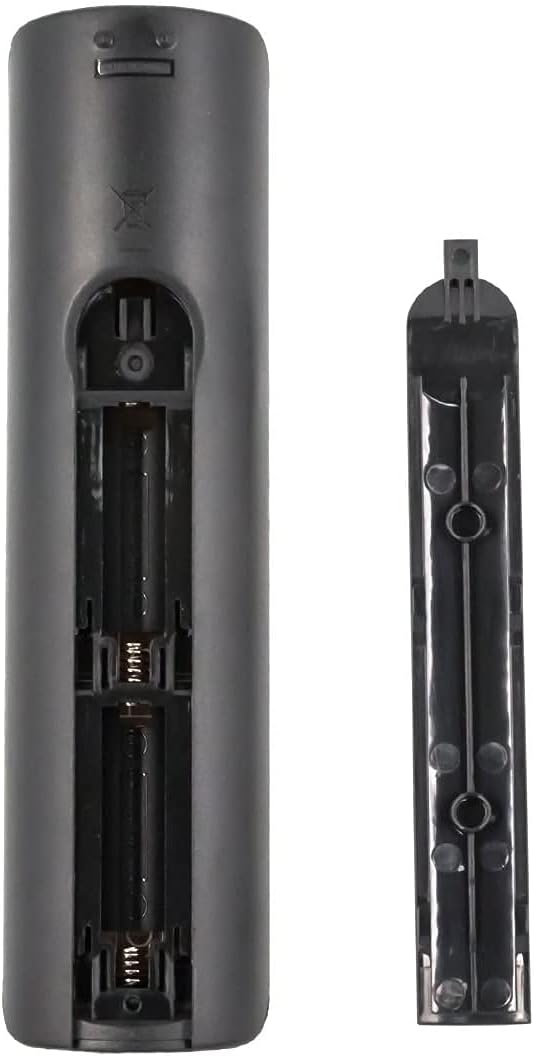
Figure 2: Battery compartment of the BN59-01289A remote control.
Operation
Button Functions
The following describes the functions of the buttons on your USARMT BN59-01289A remote control:

Figure 3: Remote control button layout and functions.
- Power (●): Turns the TV on and off.
- SOURCE: Displays and selects available video sources.
- Number Buttons (0-9): Directly input channel numbers.
- PRE-CH: Returns to the previous channel.
- VOL +/-: Adjusts the volume level.
- CH +/-: Changes channels.
- MUTE: Cuts off the sound temporarily.
- CH LIST: Displays channel lists on the screen.
- E-MANUAL: Displays the electronic manual (if supported by TV).
- SLEEP: Accesses the sleep timer function.
- INFO: Displays information on the TV screen.
- Smart Hub Button (🏠): Press to access the Smart Hub dashboard or hold down to access most recently used apps and notifications.
- Directional Pad (Up, Down, Left, Right) & Enter: Navigate menus and confirm selections.
- RETURN: Returns to the previous menu.
- EXIT: Exits the current menu or application.
- Color Buttons (RED, GREEN, YELLOW, BLUE): Provide shortcut keys for interactive functions, depending on the TV or application.
- P.SIZE: Selects the Picture Size.
- CC/VD: Closed Captioning / Video Description.
- REC: Record function (if supported by TV and external device).
- Playback Controls (Play, Pause, Stop, Fast Forward, Rewind): Control media playback.
Compatible TV Models
This remote control is compatible with a wide range of Samsung LED Smart TVs. Some of the compatible models include, but are not limited to:

Figure 4: Partial list of compatible Samsung TV models.
- UN55MU6071
- UN32N5300AFXZA
- UN40MU6290
- UN40NU7100
- UN43MU6290
- UN43NU7100
- UN49MU6290F
- UN50MU6070
- UN50NU7100F
- UN55FH6200F
- UN55MU6071F
- UN55MU6290
- UN55MU6490F
- UN55NU7100
- UN58MU6071
- UN58MU6100
- UN58NU7100
- UN65MU1290
- UN65MU6070F
- UN65MU6290
- UN65NU7100
- UN75MU6290
- UN75NU7100
This remote also serves as a substitute for original Samsung remote models such as TM1240A, BN59-01199F, BN59-01301A, BN59-01315A, AA59-00666A, BN59-01178W, AA59-00594A, AA59-00784C, and AA59-00582A.
Maintenance
Cleaning
To maintain the remote control's performance and appearance:
- Wipe the remote with a soft, dry cloth.
- Do not use abrasive cleaners, waxes, or solvents.
Battery Care
- Replace batteries when the remote's response becomes sluggish or inconsistent.
- Remove batteries if the remote will not be used for an extended period to prevent leakage.
- Dispose of used batteries responsibly according to local regulations.
Troubleshooting
If you experience issues with your remote control, refer to the following common solutions:
| Problem | Solution |
|---|---|
| Remote is not responding. |
|
| Certain buttons do not work. |
|
| Remote works intermittently. |
|
Specifications
| Feature | Detail |
|---|---|
| Model Number | BN59-01289A |
| Brand | USARMT |
| Product Dimensions | 7 x 2 x 0.5 inches |
| Item Weight | 3 ounces |
| Color | Black |
| Special Feature | Universal (Pre-programmed for compatible Samsung TVs) |
| Max Number of Supported Devices | 1 (Television) |
| Compatible Devices | Television (Various Samsung LED Smart TV models) |
Warranty Information
This product is covered by a 30-Day Hassle-Free Return Policy. Please refer to your purchase documentation or contact customer support for details regarding returns or exchanges.
Customer Support
For any questions or assistance, customer support inquiries are typically responded to within 1 business day. Please refer to the seller's contact information provided at the time of purchase for direct support.